My80211 Videos

DHCP Option 43 Nugget

Loading..

Cisco AP Group Nugget


Phwn a Cisco WLC w/ a Rogue WCS Server

Wireless NIC 4201-4202

The OTAP Packet Vulnerability- What isn't being reported and you need to know!

Loading..

Hack WEP / WPA Keys from your Windows Zero Config


My80211 White Papers (Coming Soon!)

Cisco Wireless Compatibility Matrix (Nov. 2011)

Social Links
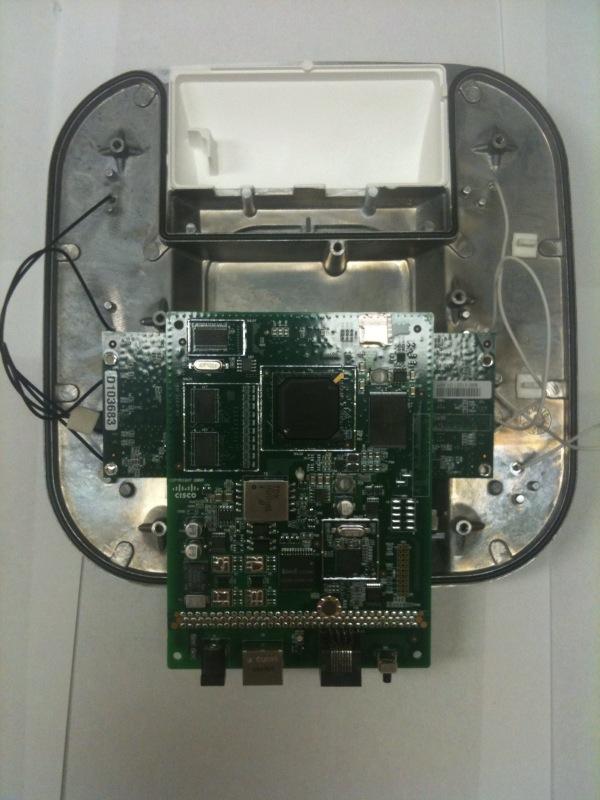
Peek Inside Cisco's Gear

See inside Cisco's latest wireless gear!

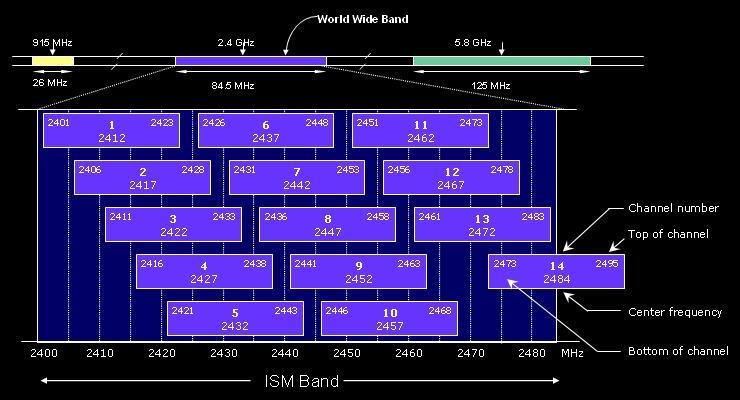
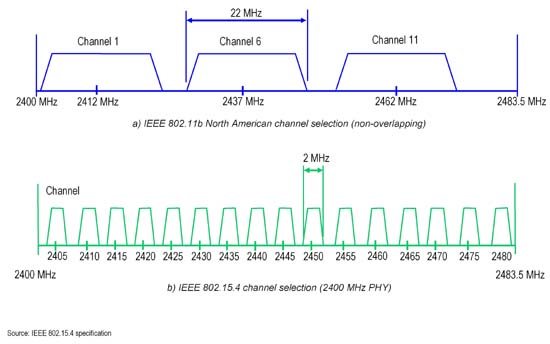
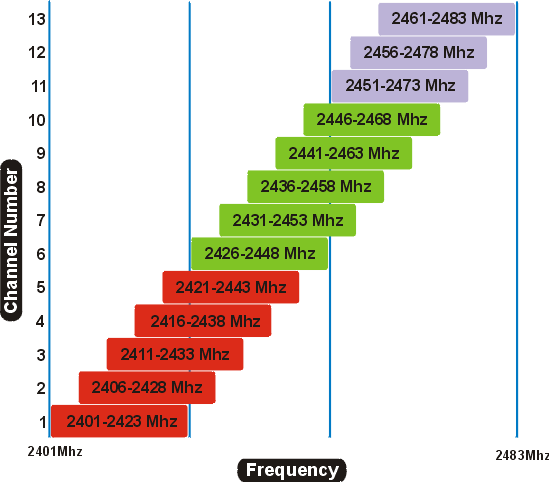
2.4 GHz Channel Overlap

EXAMPLE 1  

EXAMPLE 2

EXAMPLE 3  

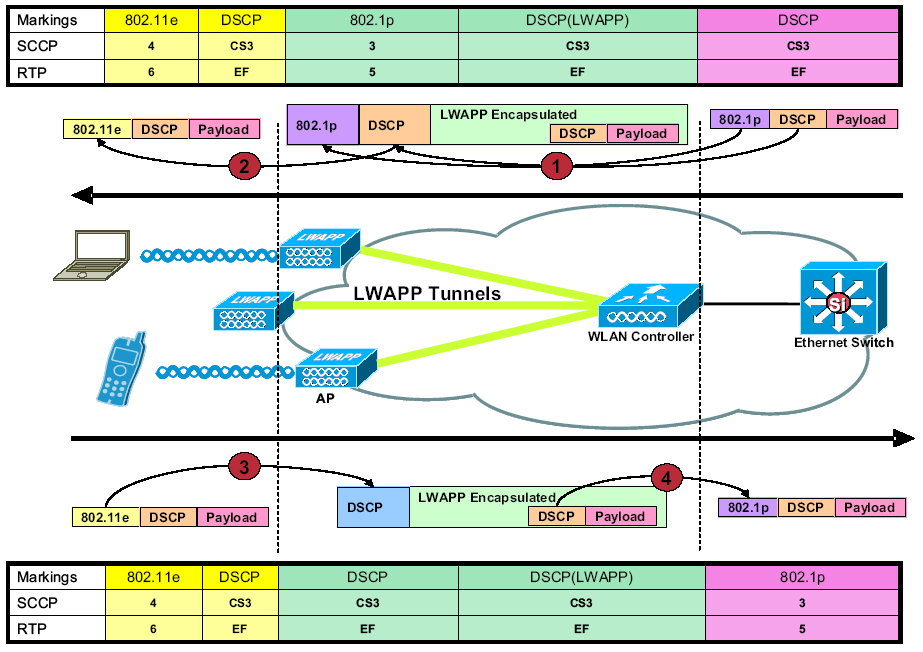
LWAPP QoS Packet Tagging


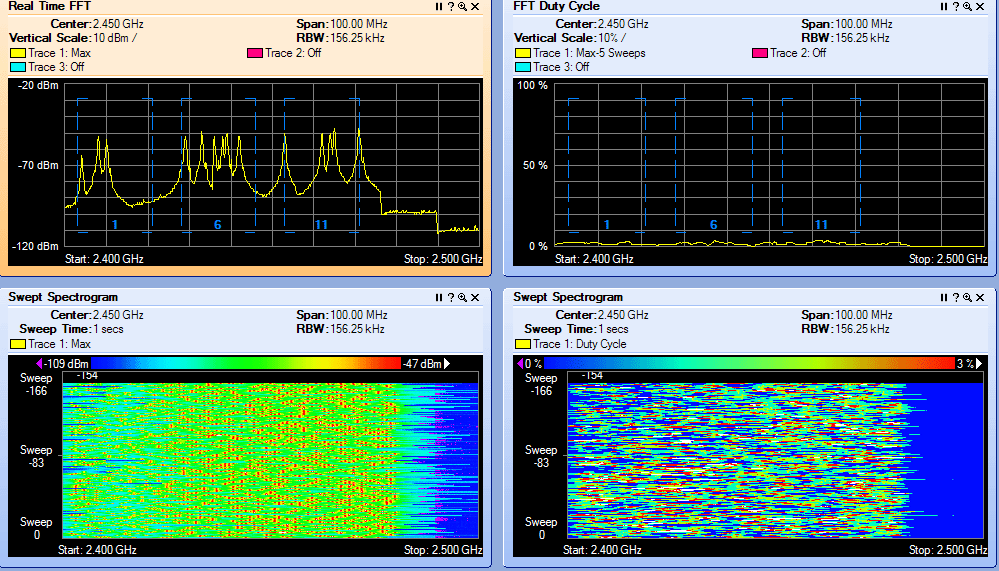
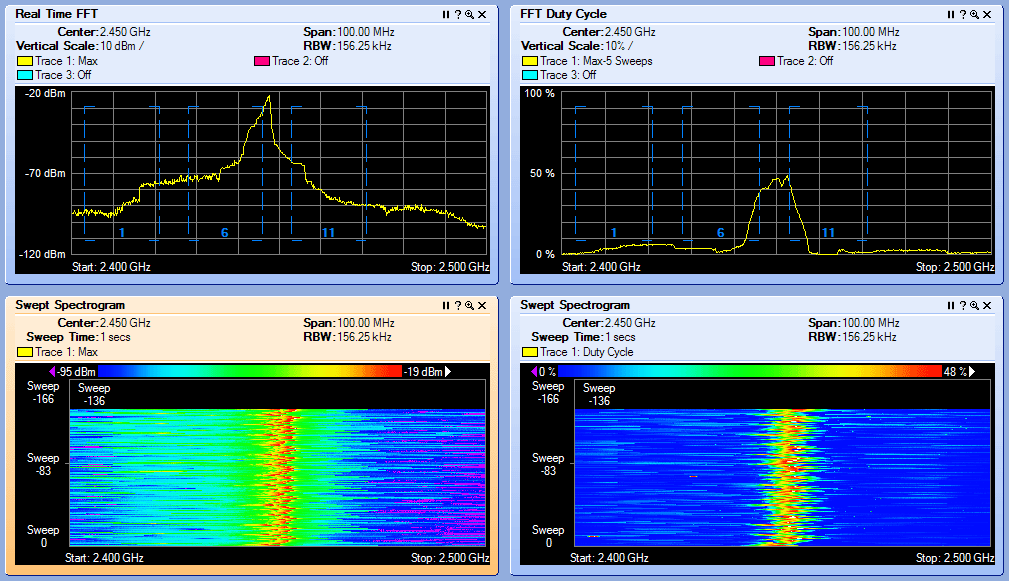
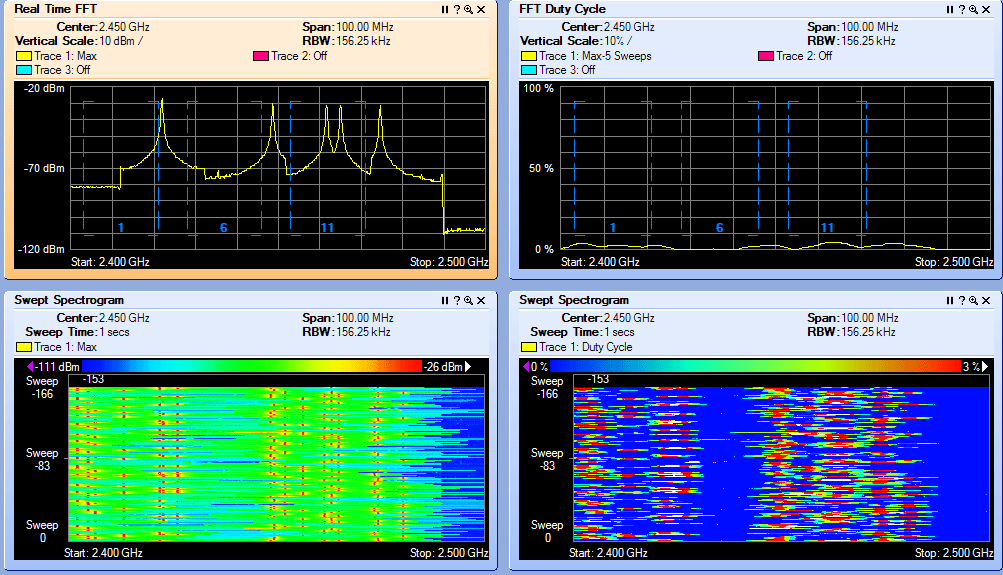
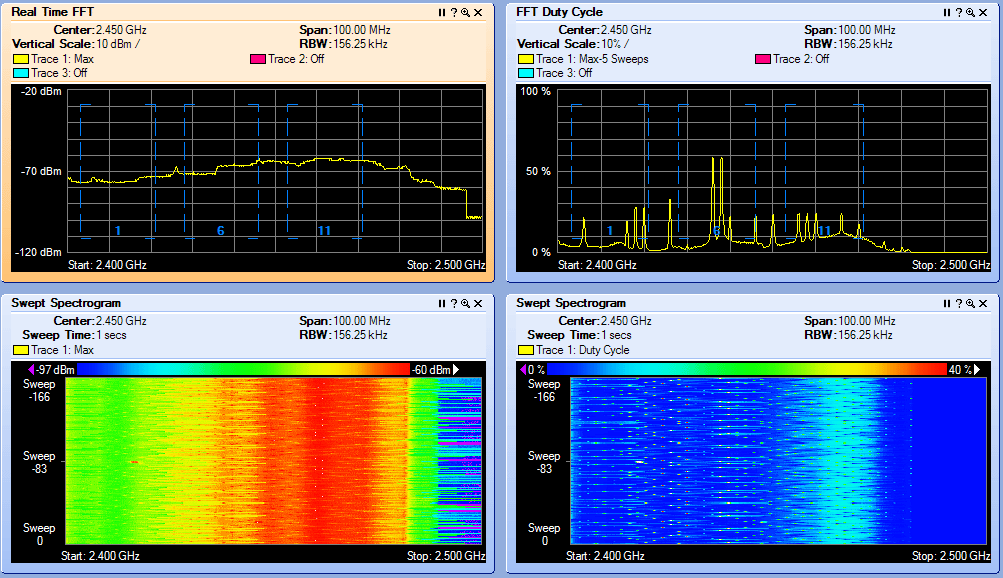
Interference Types

BLUETOOTH
 

Microwave Oven
 

Cordless Phone

JAMMER!
 

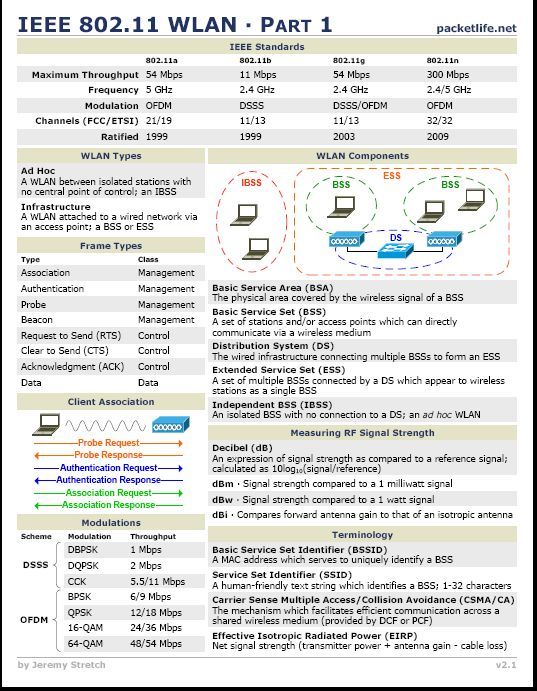
IEEE 802.11a/g/n Reference Sheet


CWSP RELEASE DATE 2/08/2010
  • CWSP Certified Wireless Security Professional Official Study Guide: Exam PW0-204
    CWSP Certified Wireless Security Professional Official Study Guide: Exam PW0-204
    by David D. Coleman, David A. Westcott, Bryan E. Harkins, Shawn M. Jackman

    Shawn Jackman (Jack) CWNE#54 is a personal friend and has been a mentor to me for many years.  I've had the pleasure and opportunity to work with Jack for 4 years. Jack is a great teacher who takes complex 802.11 standards and breaks them down so almost anyone can understand the concept at hand. I'm excited for you brother. Great job and job well done! Put another notch in the belt!


Monday
Jan232012

WLC: AP Managers Are Pingable - 7.x onwards

Since the very beginning the AP manager on a Cisco WLC would never respond to pings. Well that has all changed if you use LAG and a AP manager with 7.x code!

I like how Cisco hides little nuggets in their documentation. It states, in LAG mode, the management and AP manager uses the same base LAG MAC address.


Note With the 7.0 release onwards, the MAC address of the management interface and the AP-manager interface is the same as the base LAG MAC address.

LAB

A show ARP on the distribution switch you can see the MAC is identical for both the manager and AP manager.

NOTE --

This was tested on 4402,4404 and 5508 model controllers.

AP manager(s) aren't needed with a 5508.

This only applies to a WLC in LAG mode w/ AP Manager

Additional Reading Material:

http://www.cisco.com/en/US/docs/wireless/controller/7.0/configuration/guide/c70mint.html#wp1117168

Friday
Jan132012

Cisco Field Notice: Wi-Fi Protected Setup PIN Brute Force Vulnerability

Note the WPS vulnerability is with home and soho devices and not with Cisco enterprise gear. Note the models below:

Cisco Response

On December 27th, 2011 US-CERT released VU#723755 available here: http://www.kb.cert.org/vuls/id/723755

The US-CERT Vulnerability Note describes a vulnerability that exists in the Wi-Fi Alliance Wi-Fi Protected Setup (WPS) protocol, also known as Wi-Fi Simple Config, when devices are operating in PIN External Registrar (PIN-ER) mode.  Devices operating in PIN-ER mode allow a WPS capable client to supply only the correct WPS PIN to configure their client on a properly secured network.  A weakness in the protocol affects all devices that operate in the PIN-ER mode, and may allow an unauthenticated, remote attacker to brute force the WPS configuration PIN in a short amount of time.

The vulnerability is due to a flaw that allows an attacker to determine when the first 4-digits of the eight-digit PIN are known.  This effectively reduces the PIN space from 107 or 10,000,000 possible values to 104 + 103 which is 11,000 possible values. The eighth digit of the PIN is utilized as a checksum of the first 7 digits and does not contribute to the available PIN space. Because the PIN space has been significantly reduced, an attacker could brute force the WPS pin in as little as a few hours.

While the affected devices listed below implement the WPS 1.0 standard which requires that a 60-second lockout be implemented after three unsuccessful attempts to authenticate to the device, this does not substantially mitigate this issue as it only increases the time to exploit the protocol weakness from a few hours to at most several days.  It is our recommendation to disable the WPS feature to prevent exploitation of this vulnerability.

Vulnerable Products:

Product Name
Is the WPS feature enabled by default?
Can the WPS feature be permanently disabled?
Access Points
Cisco WAP4410N
Yes Yes
Unified Communications
Cisco UC320W
Yes
No
Wireless Routers/VPN/Firewall Devices
Cisco RV110W
Yes Yes
Cisco RV120W
No Yes
Cisco SRP521W
Yes Yes
Cisco SRP526W
Yes Yes
Cisco SRP527W
Yes Yes
Cisco SRP541W
Yes Yes
Cisco SRP546W
Yes Yes
Cisco SRP547W
Yes Yes
Cisco WRP400
Yes Yes


Note: The Cisco Valet product line is maintained by the Cisco Linksys Business Unit. Information concerning the Cisco Valet line as well as information on Linksys by Cisco products will be forthcoming.

Products Confirmed Not Vulnerable:

Product Name
Not Affected Reason
Access Points/Wireless Bridges
Cisco AP541N
Does not support WPS
Cisco WAP200
Does not support WPS
Cisco WAP200E
Does not support WPS
Cisco WAP2000
Does not support WPS
Cisco WET200
Does not support WPS
Unified Communications
Cisco UC500 Series
Does not support WPS
Wireless Cameras
Cisco WVC210
Does not support WPS
Cisco WVC2300
Does not support WPS
Wireless Routers/VPN/Firewall Devices
Cisco SA520W
WPS not enabled by default
Does not support PIN-ER configuration Mode
Cisco RV220W
Does not support WPS
Cisco WRV210
Does not support WPS
Cisco WRVS4400N
Does not support WPS

Additional Information

Workarounds:


Disable the Wi-Fi Protected Setup feature on devices that allow the feature to be disabled, as listed in the Vulnerable Products table.  Cisco Systems has verified that the products that support disabling the WPS feature do indeed disable it and are not vulnerable once the feature has been disabled from the management interface.

Fixed Software:

Product Name
Fixed Software
Cisco WAP4410
To Be Released
Cisco RV110W
To Be Released
Cisco RV120W
To Be Released
Cisco UC320W
To Be Released
Cisco SRP521W
To Be Released
Cisco SRP526W
To Be Released
Cisco SRP527W
To Be Released
Cisco SRP541W
To Be Released
Cisco SRP546W
To Be Released
Cisco SRP547W
To Be Released
Cisco WRP400
To Be Released


Note: The Cisco Valet product line is maintained by the Cisco Linksys Business Unit. Information concerning the Cisco Valet line as well as information on Linksys by Cisco products will be forthcoming.

Exploitation and Public Announcements:

Exploit code and functional attack tools that exploit the weakness within the WPS protocol have been released.

This vulnerability was discovered by Stefan Viehböck and Craig Heffner.

Status of this Notice: Final

THIS DOCUMENT IS PROVIDED ON AN "AS IS" BASIS AND DOES NOT IMPLY ANY KIND OF GUARANTEE OR WARRANTY, INCLUDING THE WARRANTIES OF MERCHANTABILITY OR FITNESS FOR A PARTICULAR USE. YOUR USE OF THE INFORMATION ON THE DOCUMENT OR MATERIALS LINKED FROM THE DOCUMENT IS AT YOUR OWN RISK. CISCO RESERVES THE RIGHT TO CHANGE OR UPDATE THIS DOCUMENT AT ANY TIME.

A stand-alone copy or Paraphrase of the text of this document that omits the distribution URL in the following section is an uncontrolled copy, and may lack important information or contain factual errors.


Revision History

 Revision  Date  Notes
1.0 01-11-2012 Initial Public Release
Friday
Dec302011

Cisco WLC 5508 License Gotcha ! (12 AP WLC can only support 487 APs)

Did you know ? If you purchased a Cisco 5508 WLC with a 12 access point license you just limited yourself to 487 access points?

The Cisco 5508 is licensed based which means you can add access point licenses as your wireless grows. The Cisco 5508 allows a maximum of 500 access points. This is a new model for Cisco Wireless Lan Controllers. The now legacy 2000,2100,4400 and WISM1 were licensed by the hardware itself.

You can purchase Cisco 5508 WLC with a 12,25,50,100,250 or 500 access point capacity. Or you can purchase what Cisco calls adder licenses in the quantities of 25,50,100, and 250 access points after the fact.

The license limitation becomes an issue with your initial purchase of a 5508 with a 12 access point license.

Since Cisco only resells 25,50,100 and 250 access point licenses the MAX you will ever get on your WLC is 487 access points.

Note: A 5500 Series WLC with a base license of 12 can only support up to 487 total APs because only 25, 50, 100, and 250 adder licenses are supported.


 Read:

Understanding Cisco 5508 Wireless LAN Controller Licensing

http://www.cisco.com/en/US/products/ps10315/products_tech_note09186a0080b78104.shtml


p.s. Thanks Patton for the link!


Tuesday
Dec202011

How to upload the running AP IOS image to a TFTP Server

Special Guest Post By: Steven Rodriguez
Since Cisco is locking down software downloads, you may have a need to pull code off your existing access points. Here is a quick recap showing how to process the code with the archive command!


Ever lost the code you were running on an AP?  Then need to load that code to another?  What if that codes not available for download from CCO anymore?  Well, there's a pretty easy process to get through to get the image from an AP, and onto your TFTP server.

In this example, I am using a 1131, running 12.4(21a)JY

The first thing you need, is a TFTP server.  There are plenty of free ones out there.  I tested this with TFTPd32 on a PC, and with TFTPServer on a Mac(10.6).

So on the PC, it's pretty easy.  Configure your TFTP Server


Once you've stopped then started the server, you simply need to issue the command

archive upload-sw tftp://192.168.15.11/c1130-k9w7-mx.124-21a.JY.tar

As this command is running, it extracts the current running IOS, including the HTML files, and tar them as it's sending to the TFTP server.  <Term mon if you want to watch the process run.>


On the Mac, I found it to be a little bit different.  With my Mac, even though I did a chmod 777 on my tftp directory, I had to do the following before I attempted to upload the software.


Once the file is 'created' in my target directory it becomes the same as the PC version.

archive upload-sw tftp://192.168.15.6/c1130-k9w7-mx.124-21a.JY.tar


Now, if you have multiple versions of code that have been extracted to your AP, there is a switch that can be used, /version

archive upload-sw /version c1130-k9w7-mx.124-21a.JY tftp://192.168.15.6/c1130-k9w7-mx.124-21a.JY.tar
                                                 ^this would be the version you wanted to upload.

Thursday
Dec152011

Basic Cisco AP Debugging - Autonomous IOS

A great post from Aaron Leonard (Cisco TAC)

These are debugs that you can collect while logged into the IOS CLI.

Basic setup

If you see a prompt that ends in a right angle bracket, like this:

ap>

it means that you are in unprivileged mode, so get privileged (which shows a # prompt):

ap>enable

Password:

ap#

(default username/password on APs is "Cisco".)

Configure NTP, timestamps, line timeout

ap#configure terminal

ap(config)#sntp server 1.2.3.4

ap(config)#service timestamp debug datetime msec

ap(config)#service timestamp log datetime msec

ap(config)#logging rate-limit 500

ap(config)#no logging console

[1]

ap(config)#line con 0

ap(config-line)#no exec-timeout

ap(config-line)#line vty 0 4

ap(config-line)#no exec-timeout

ap(config)#exit

ap#write   (if you wan to to save the configuration changes to NVRAM)

#

[1] if you're going to generate debug messages at an extremely high rate, should be sure to turn off console logging, otherwise the AP will hang.  (If your access is via the console, then of course you would need some other way to see the debugs then - e.g.

write them to a logging buffer, or to an external syslog server

.  Or

increase the console port speed to 115200

.)


Collecting debugs from telnet or ssh session

Telnet/ssh into the AP, then enter the command "terminal monitor".  The debug messages will be written to your terminal window.  To save the messages, configure your terminal emulator accordingly.


Collecting debugs from a console session

Some development special debug output will be written only to the console.  So in such a case, you must connect a serial cable to the AP's console port and access this cable via a terminal emulator program (e.g. Windows Hyperterminal talking to a PC COM port.)  The default console port speed is 9600 bps which is too slow to collect a large volume of debugs - so increase the speed to 115200 bps, its maximum:

ap#configure terminal

ap(config)#logging console
ap(config)#line con 0


ap(config-line)#no exec-timeout
ap(config-file)#speed 115200


at this point, the terminal emulator program on the serial line will no longer be able to communicate with the console port, till you reset its speed to 115200 bps to match.

Radio names

The radios are usually called Dot11Radio0 (2.4GHz) and Dot11Radio1 (5GHz.)


ajax#show ip int brief
Interface                  IP-Address      OK? Method Status                Protocol
BVI1                       10.0.47.21      YES DHCP   up                    up 
Dot11Radio0                unassigned      YES unset  up                    up 
Dot11Radio1                unassigned      YES unset  administratively down down
FastEthernet0              unassigned      YES other  up                    up

You can abbreviate them to do0 and do1:

ajax#show controller do0
[...]
Radio AIR-AP1131G, Base Address 0012.44b3.e000, BBlock version 0.00, Software version 6.20.6
[...]
Configured Frequency: 2442 MHz  Channel 7


Basic show commands


radio information


ajax#show interface dot11radio0
ajax#show controller dot11radio0


client information


ajax#show dot11 associations
ajax#show dot11 associations all


AP information


ajax#show config     <= configuration (from NVRAM)
ajax#show run          <= configuration (in memory)
ajax#show version     <= model, version info
ajax#show tech          <= everything - do "term length 0" first


Other basic commands


ajax#clear dot11 client 0011.2233.4455  <= deauthenticate a client
ajax#clear int dot11radio0              <= reset a radio
ajax#reload                    <= reboot the AP


Basic debug commands


radio debugs

ajax#no debug dot11 dot11radio0 print printf  <= sometimes necessary to get radio debugs to log correctly

ajax#debug dot11 dot11radio0 trace print ?    <= show list of flags
-- example:
-- debug dot11 dot11radio0 trace print mgmt keys  <= mgmt frames & keying


dot1x/RADIUS debugs


ajax#debug dot11 aaa authenticator state-machine
ajax#debug dot11 aaa authenticator txdata
ajax#debug dot11 aaa authenticator rxdata
ajax#debug radius


Example debug output

This example uses all of the above listed debugs.  This shows a client being deauthed, then successfully associating in LEAP with WPA2/AES.  Note that the messages aren't all logged in order, i.e. the 802.11 association response sent by the AP is logged after the EAP ID-Request message is logged.


ajax#clear dot11 client 0040.96b4.7e8f
ajax#
Dec  5 23:14:58.537: %DOT11-6-DISASSOC: Interface Dot11Radio0, Deauthenticating Station 0040.96b4.7e8f Reason: Previous authentication no longer valid
Dec  5 23:14:58.619: 2149F234 t 1     0  - C040 13A B47E8F B3E000 B3E000 8250 deauth l 2
        reason 2
Dec  5 23:14:58.623: 214A02B6-0 0040.96b4.7e8f- delete session key
Dec  5 23:15:02.184: 218059FB r 1      75/ 13- B000 130 B3E000 B47E8F B3E000 0290 auth l 6
        algorithm 128
        sequence 1
        status 0
Dec  5 23:15:02.185: 21805E40 t 1     0  - B000 13A B47E8F B3E000 B3E000 84B0 auth l 6
        algorithm 128
        sequence 2
        status 0
Dec  5 23:15:02.186: 218064A6 r 1      76/ 12- 0000 130 B3E000 B47E8F B3E000 02A0 assreq l 141
        cap 431 infra privacy shorthdr
        listen interval 10
        ssid LEaP
        rates 2 4 B C 12 16 18 24
        extrates 30 48 60 6C
        rsn1 mcst aes ucst aes keymgmt wpa2 cap 2800
        221 - 0 50 F2 2 0 1 0
        aironet AARON-GW-XP load 0 clients 0 hops 0 device 87-0
                refresh 10 CW 0-0 flags 18 distance 0
        IP 10.0.47.206 0
        221 - 0 40 96 1 1 0
        ccxver 5
        221 - 0 40 96 14 7
Dec  5 23:15:02.188: dot11_auth_dot1x_send_id_req_to_client: Sending identity request to 0040.96b4.7e8f
Dec  5 23:15:02.189: EAPOL pak dump tx
Dec  5 23:15:02.189: EAPOL Version: 0x1  type: 0x0  length: 0x0028
Dec  5 23:15:02.189: EAP code: 0x1  id: 0x1  length: 0x0028 type: 0x1
01806BC0:                   01000028 01010028          ...(...(
01806BD0: 01006E65 74776F72 6B69643D 4C456150  ..networkid=LEaP
01806BE0: 2C6E6173 69643D61 6A61782C 706F7274  ,nasid=ajax,port
01806BF0: 69643D30                             id=0
Dec  5 23:15:02.190: dot11_auth_dot1x_send_id_req_to_client: Client 0040.96b4.7e8f timer started for 30 seconds
Dec  5 23:15:02.190: 21806A65-0 0040.96b4.7e8f- session key type 200 len 16, idx: 1, E2164DEDE9F1AA1D
Dec  5 23:15:02.191: 21807239 t 1     0  - 1000 13A B47E8F B3E000 B3E000 84C0 assrsp l 113
        cap 431 infra privacy shorthdr
        status 0
        aid C001
        rates 82 84 8B C 12 96 18 24
        extrates 30 48 60 6C
        aironet ajax load 0 clients 0 hops 0 device 89-2700
                refresh 10 CW 15-1023 flags 1 distance 0
        IP 10.0.47.21 1
        ccxver 5
        221 - 0 40 96 B 9
        221 - 0 40 96 14 1
        221 - 0 50 F2 2 1 1 8C 0 3 A4 0 0 27 A4 0 0 42 43 BC 0 62 32 66 0
Dec  5 23:15:02.192: 218076D6 t 1     0  - 8802 13A B47E8F B3E000 B3E000 C730 q7 l54
  EAP id 1 req ident 0 "networkid=LEaP,nasid=ajax,portid=0"
Dec  5 23:15:02.205: 2180ACD3 r 1      75/ 13- 0801 130 B3E000 B47E8F B3E000 02B0 l21
   0100 0009 0201 0009 016C 6561 7000 0000 0000 0000 00
Dec  5 23:15:02.205: EAPOL pak dump rx
Dec  5 23:15:02.205: EAPOL Version: 0x1  type: 0x0  length: 0x0009
Dec  5 23:15:02.205: EAP code: 0x2  id: 0x1  length: 0x0009 type: 0x1
01803280: 01000009 02010009 016C6561 70        .........leap
Dec  5 23:15:02.206: dot11_auth_dot1x_run_rfsm: Executing Action(CLIENT_WAIT,CLIENT_REPLY) for 0040.96b4.7e8f
Dec  5 23:15:02.206: dot11_auth_dot1x_send_response_to_server: Sending client 0040.96b4.7e8f data to server
Dec  5 23:15:02.206: dot11_auth_dot1x_send_response_to_server: Started timer server_timeout 60 seconds
Dec  5 23:15:02.207: RADIUS/ENCODE(00000B86):Orig. component type = DOT11
Dec  5 23:15:02.207: RADIUS:  AAA Unsupported Attr: ssid              [265] 4
Dec  5 23:15:02.207: RADIUS:   4C 45                                            [LE]
Dec  5 23:15:02.207: RADIUS:  AAA Unsupported Attr: interface         [157] 4
Dec  5 23:15:02.208: RADIUS:   33 31                                            [31]
Dec  5 23:15:02.208: RADIUS(00000B86): Config NAS IP: 0.0.0.0
Dec  5 23:15:02.208: RADIUS/ENCODE(00000B86): acct_session_id: 2948
Dec  5 23:15:02.208: RADIUS(00000B86): sending
Dec  5 23:15:02.208: RADIUS/ENCODE: Best Local IP-Address 10.0.47.21 for Radius-Server 10.0.47.20
Dec  5 23:15:02.208: RADIUS(00000B86): Send Access-Request to 10.0.47.20:1812 id 1645/10, len 123
Dec  5 23:15:02.209: RADIUS:  authenticator 4B A2 CB 82 2F BD 4A DA - E8 78 72 BA 6B A3 04 16
Dec  5 23:15:02.209: RADIUS:  User-Name           [1]   6   "leap"
Dec  5 23:15:02.209: RADIUS:  Framed-MTU          [12]  6   1400
Dec  5 23:15:02.209: RADIUS:  Called-Station-Id   [30]  16  "0012.44b3.e000"
Dec  5 23:15:02.209: RADIUS:  Calling-Station-Id  [31]  16  "0040.96b4.7e8f"
Dec  5 23:15:02.209: RADIUS:  Service-Type        [6]   6   Login                     [1]
Dec  5 23:15:02.209: RADIUS:  Message-Authenticato[80]  18
Dec  5 23:15:02.209: RADIUS:   C2 F3 BA 46 5D CC A7 56 6F 75 CD D5 CF 71 A1 F2  [???F]??Vou???q??]
Dec  5 23:15:02.210: RADIUS:  EAP-Message         [79]  11
Dec  5 23:15:02.210: RADIUS:   02 01 00 09 01 6C 65 61 70                       [?????leap]
Dec  5 23:15:02.210: RADIUS:  NAS-Port-Type       [61]  6   802.11 wireless           [19]
Dec  5 23:15:02.210: RADIUS:  NAS-Port            [5]   6   3196
Dec  5 23:15:02.210: RADIUS:  NAS-Port-Id         [87]  6   "3196"
Dec  5 23:15:02.210: RADIUS:  NAS-IP-Address      [4]   6   10.0.47.21
Dec  5 23:15:02.215: RADIUS: Received from id 1645/10 10.0.47.20:1812, Access-Challenge, len 116
Dec  5 23:15:02.216: RADIUS:  authenticator 89 E3 9A 73 09 D3 BC C7 - F5 3B 33 C4 1F 0D 71 25
Dec  5 23:15:02.216: RADIUS:  EAP-Message         [79]  22
Dec  5 23:15:02.216: RADIUS:   01 02 00 14 11 01 00 08 C2 F9 E3 AE 90 E0 5E 4D  [??????????????^M]
Dec  5 23:15:02.216: RADIUS:   6C 65 61 70                                      [leap]
Dec  5 23:15:02.216: RADIUS:  Session-Timeout     [27]  6   10
Dec  5 23:15:02.216: RADIUS:  State               [24]  50
Dec  5 23:15:02.217: RADIUS:   C2 F9 E3 AE 90 E0 5E 4D 00 00 00 00 00 00 00 00  [??????^M????????]
Dec  5 23:15:02.217: RADIUS:   00 00 00 00 00 00 00 00 00 00 00 00 00 00 00 00  [????????????????]
Dec  5 23:15:02.217: RADIUS:   24 B7 93 97 FE D4 04 23 78 5C 05 87 75 00 17 6C  [$??????#x\??u??l]
Dec  5 23:15:02.217: RADIUS:  Message-Authenticato[80]  18
Dec  5 23:15:02.217: RADIUS:   B6 9B A4 4B A5 A0 81 5B CC 75 58 42 A9 3F C1 C3  [???K???[?uXB????]
Dec  5 23:15:02.218: RADIUS(00000B86): Received from id 1645/10
Dec  5 23:15:02.218: RADIUS/DECODE: EAP-Message fragments, 20, total 20 bytes
Dec  5 23:15:02.219: dot11_auth_dot1x_run_rfsm: Executing Action(SERVER_WAIT,SERVER_REPLY) for 0040.96b4.7e8f
Dec  5 23:15:02.219: dot11_auth_dot1x_send_response_to_client: Forwarding server message to client 0040.96b4.7e8f
Dec  5 23:15:02.219: EAPOL pak dump tx
Dec  5 23:15:02.219: EAPOL Version: 0x1  type: 0x0  length: 0x0014
Dec  5 23:15:02.219: EAP code: 0x1  id: 0x2  length: 0x0014 type: 0x11
01800CB0:                   01000014 01020014          ........
01800CC0: 11010008 C2F9E3AE 90E05E4D 6C656170  ....Byc..`^Mleap
01800CD0:
Dec  5 23:15:02.220: dot11_auth_dot1x_send_response_to_client: Started timer client_timeout 10 seconds
Dec  5 23:15:02.221: 2180EC54 t 1     0  - 8802 13A B47E8F B3E000 B3E000 C740 q7 l54
  EAP id 2 req leap 0100 08C2 F9E3 AE90 E05E 4D6C 6561 70
Dec  5 23:15:02.224: EAPOL pak dump rx
Dec  5 23:15:02.224: EAPOL Version: 0x1  type: 0x0  length: 0x0024
Dec  5 23:15:02.224: EAP code: 0x2  id: 0x2  length: 0x0024 type: 0x11
01807E10: 01000024 02020024 11010018 75682898  ...$...$....uh(.
01807E20: 897FB670 FA732F1A 09B92150 B21EF0F2  ..6pzs/..9!P2.pr
01807E30: 044CDEE4 6C656170                    .L^dleap
Dec  5 23:15:02.225: dot11_auth_dot1x_run_rfsm: Executing Action(CLIENT_WAIT,CLIENT_REPLY) for 0040.96b4.7e8f
Dec  5 23:15:02.225: dot11_auth_dot1x_send_response_to_server: Sending client 0040.96b4.7e8f data to server
Dec  5 23:15:02.225: dot11_auth_dot1x_send_response_to_server: Started timer server_timeout 60 seconds
Dec  5 23:15:02.226: RADIUS/ENCODE(00000B86):Orig. component type = DOT11
Dec  5 23:15:02.226: RADIUS:  AAA Unsupported Attr: ssid              [265] 4
Dec  5 23:15:02.226: RADIUS:   4C 45                                            [LE]
Dec  5 23:15:02.226: RADIUS:  AAA Unsupported Attr: interface         [157] 4
Dec  5 23:15:02.226: RADIUS:   33 31                                            [31]
Dec  5 23:15:02.226: RADIUS(00000B86): Config NAS IP: 0.0.0.0
Dec  5 23:15:02.227: RADIUS/ENCODE(00000B86): acct_session_id: 2948
Dec  5 23:15:02.227: RADIUS(00000B86): sending
Dec  5 23:15:02.227: RADIUS/ENCODE: Best Local IP-Address 10.0.47.21 for Radius-Server 10.0.47.20
Dec  5 23:15:02.227: RADIUS(00000B86): Send Access-Request to 10.0.47.20:1812 id 1645/11, len 200
Dec  5 23:15:02.227: RADIUS:  authenticator A7 50 BD F4 AA 2D 8A F3 - 92 EF 86 B2 2F 31 89 B4
Dec  5 23:15:02.228: RADIUS:  User-Name           [1]   6   "leap"
Dec  5 23:15:02.228: RADIUS:  Framed-MTU          [12]  6   1400
Dec  5 23:15:02.228: RADIUS:  Called-Station-Id   [30]  16  "0012.44b3.e000"
Dec  5 23:15:02.228: RADIUS:  Calling-Station-Id  [31]  16  "0040.96b4.7e8f"
Dec  5 23:15:02.228: RADIUS:  Service-Type        [6]   6   Login                     [1]
Dec  5 23:15:02.228: RADIUS:  Message-Authenticato[80]  18
Dec  5 23:15:02.228: RADIUS:   BA FE 70 17 A6 67 2B B3 A5 78 35 EB 6D AE 5B 36  [??p??g+??x5?m?[6]
Dec  5 23:15:02.228: RADIUS:  EAP-Message         [79]  38
Dec  5 23:15:02.229: RADIUS:   02 02 00 24 11 01 00 18 75 68 28 98 89 7F B6 70  [???$????uh(????p]
Dec  5 23:15:02.229: RADIUS:   FA 73 2F 1A 09 B9 21 50 B2 1E F0 F2 04 4C DE E4  [?s/???!P?????L??]
Dec  5 23:15:02.229: RADIUS:   6C 65 61 70                                      [leap]
Dec  5 23:15:02.229: RADIUS:  NAS-Port-Type       [61]  6   802.11 wireless           [19]
Dec  5 23:15:02.229: RADIUS:  NAS-Port            [5]   6   3196
Dec  5 23:15:02.230: RADIUS:  NAS-Port-Id         [87]  6   "3196"
Dec  5 23:15:02.230: RADIUS:  State               [24]  50
Dec  5 23:15:02.230: RADIUS:   C2 F9 E3 AE 90 E0 5E 4D 00 00 00 00 00 00 00 00  [??????^M????????]
Dec  5 23:15:02.230: RADIUS:   00 00 00 00 00 00 00 00 00 00 00 00 00 00 00 00  [????????????????]
Dec  5 23:15:02.230: RADIUS:   24 B7 93 97 FE D4 04 23 78 5C 05 87 75 00 17 6C  [$??????#x\??u??l]
Dec  5 23:15:02.230: RADIUS:  NAS-IP-Address      [4]   6   10.0.47.21
Dec  5 23:15:02.231: 2180F622 r 1      76/ 13- 0801 130 B3E000 B47E8F B3E000 02C0 l48
   0100 0024 0202 0024 1101 0018 7568 2898 897F B670 FA73 2F1A 09B9 2150
  B21E F0F2 044C DEE4 6C65 6170 0000 0000 0000 0000
Dec  5 23:15:02.245: RADIUS: Received from id 1645/11 10.0.47.20:1812, Access-Challenge, len 94
Dec  5 23:15:02.245: RADIUS:  authenticator FE 64 BD 35 49 E1 0C C4 - 71 F5 9E B1 DE CB 45 9D
Dec  5 23:15:02.246: RADIUS:  EAP-Message         [79]  6
Dec  5 23:15:02.246: RADIUS:   03 02 00 04                                      [????]
Dec  5 23:15:02.246: RADIUS:  State               [24]  50
Dec  5 23:15:02.246: RADIUS:   C2 F9 E3 AE 90 E0 5E 4D 75 68 28 98 89 7F B6 70  [??????^Muh(????p]
Dec  5 23:15:02.246: RADIUS:   FA 73 2F 1A 09 B9 21 50 B2 1E F0 F2 04 4C DE E4  [?s/???!P?????L??]
Dec  5 23:15:02.247: RADIUS:   D4 2C 1C 1C 49 4D 60 80 BC BC AF FC 91 78 37 92  [?,??IM`??????x7?]
Dec  5 23:15:02.247: RADIUS:  Message-Authenticato[80]  18
Dec  5 23:15:02.247: RADIUS:   6E 86 16 34 26 7B 27 89 53 32 0A 49 DE 4E 65 FC  [n??4&{'?S2?I?Ne?]
Dec  5 23:15:02.247: RADIUS(00000B86): Received from id 1645/11
Dec  5 23:15:02.248: RADIUS/DECODE: EAP-Message fragments, 4, total 4 bytes
Dec  5 23:15:02.248: dot11_auth_dot1x_run_rfsm: Executing Action(SERVER_WAIT,SERVER_REPLY) for 0040.96b4.7e8f
Dec  5 23:15:02.248: dot11_auth_dot1x_send_response_to_client: Forwarding server message to client 0040.96b4.7e8f
Dec  5 23:15:02.248: EAPOL pak dump tx
Dec  5 23:15:02.248: EAPOL Version: 0x1  type: 0x0  length: 0x0004
Dec  5 23:15:02.248: EAP code: 0x3  id: 0x2  length: 0x0004
01808F20: 01000004 03020004                    ........
Dec  5 23:15:02.249: dot11_auth_dot1x_send_response_to_client: Started timer client_timeout 30 seconds
Dec  5 23:15:02.250: 21815D4C t 1     0  - 8802 13A B47E8F B3E000 B3E000 C750 q7 l54
  EAP id 2 success
Dec  5 23:15:02.255: EAPOL pak dump rx
Dec  5 23:15:02.255: EAPOL Version: 0x1  type: 0x0  length: 0x0014
Dec  5 23:15:02.255: EAP code: 0x1  id: 0x2  length: 0x0014 type: 0x11
01804390: 01000014 01020014 11010008 496A7925  ............Ijy%
018043A0: 08614014 6C656170                    .a@.leap
Dec  5 23:15:02.256: dot11_auth_dot1x_run_rfsm: Executing Action(CLIENT_WAIT,CLIENT_REPLY) for 0040.96b4.7e8f
Dec  5 23:15:02.256: dot11_auth_dot1x_send_response_to_server: Sending client 0040.96b4.7e8f data to server
Dec  5 23:15:02.256: dot11_auth_dot1x_send_response_to_server: Started timer server_timeout 60 seconds
Dec  5 23:15:02.257: RADIUS/ENCODE(00000B86):Orig. component type = DOT11
Dec  5 23:15:02.257: RADIUS:  AAA Unsupported Attr: ssid              [265] 4
Dec  5 23:15:02.257: RADIUS:   4C 45                                            [LE]
Dec  5 23:15:02.257: RADIUS:  AAA Unsupported Attr: interface         [157] 4
Dec  5 23:15:02.257: RADIUS:   33 31                                            [31]
Dec  5 23:15:02.258: RADIUS(00000B86): Config NAS IP: 0.0.0.0
Dec  5 23:15:02.258: RADIUS/ENCODE(00000B86): acct_session_id: 2948
Dec  5 23:15:02.258: RADIUS(00000B86): sending
Dec  5 23:15:02.258: RADIUS/ENCODE: Best Local IP-Address 10.0.47.21 for Radius-Server 10.0.47.20
Dec  5 23:15:02.258: RADIUS(00000B86): Send Access-Request to 10.0.47.20:1812 id 1645/12, len 184
Dec  5 23:15:02.258: RADIUS:  authenticator 31 78 B8 F6 26 E4 36 F1 - 88 DB 25 40 53 56 A4 B5
Dec  5 23:15:02.259: RADIUS:  User-Name           [1]   6   "leap"
Dec  5 23:15:02.259: RADIUS:  Framed-MTU          [12]  6   1400
Dec  5 23:15:02.259: RADIUS:  Called-Station-Id   [30]  16  "0012.44b3.e000"
Dec  5 23:15:02.259: RADIUS:  Calling-Station-Id  [31]  16  "0040.96b4.7e8f"
Dec  5 23:15:02.259: RADIUS:  Service-Type        [6]   6   Login                     [1]
Dec  5 23:15:02.259: RADIUS:  Message-Authenticato[80]  18
Dec  5 23:15:02.259: RADIUS:   31 01 9A B3 64 AA 5B DB 6C 76 31 AA A2 CD 3B F6  [1???d?[?lv1???;?]
Dec  5 23:15:02.259: RADIUS:  EAP-Message         [79]  22
Dec  5 23:15:02.260: RADIUS:   01 02 00 14 11 01 00 08 49 6A 79 25 08 61 40 14  [????????Ijy??a@?]
Dec  5 23:15:02.260: RADIUS:   6C 65 61 70                                      [leap]
Dec  5 23:15:02.260: RADIUS:  NAS-Port-Type       [61]  6   802.11 wireless           [19]
Dec  5 23:15:02.260: RADIUS:  NAS-Port            [5]   6   3196
Dec  5 23:15:02.260: RADIUS:  NAS-Port-Id         [87]  6   "3196"
Dec  5 23:15:02.260: RADIUS:  State               [24]  50
Dec  5 23:15:02.261: RADIUS:   C2 F9 E3 AE 90 E0 5E 4D 75 68 28 98 89 7F B6 70  [??????^Muh(????p]
Dec  5 23:15:02.261: RADIUS:   FA 73 2F 1A 09 B9 21 50 B2 1E F0 F2 04 4C DE E4  [?s/???!P?????L??]
Dec  5 23:15:02.261: RADIUS:   D4 2C 1C 1C 49 4D 60 80 BC BC AF FC 91 78 37 92  [?,??IM`??????x7?]
Dec  5 23:15:02.261: RADIUS:  NAS-IP-Address      [4]   6   10.0.47.21
Dec  5 23:15:02.262: 21816FB9 r 1      /75 12- 0801 130 B3E000 B47E8F B3E000 02D0 l32
   0100 0014 0102 0014 1101 0008 496A 7925 0861 4014 6C65 6170 0000 0000
  0000 0000
Dec  5 23:15:02.278: RADIUS: Received from id 1645/12 10.0.47.20:1812, Access-Accept, len 216
Dec  5 23:15:02.278: RADIUS:  authenticator 52 FD 9C 2F 96 3A B9 B1 - F5 C1 59 17 A7 A5 DD FD
Dec  5 23:15:02.278: RADIUS:  EAP-Message         [79]  38
Dec  5 23:15:02.278: RADIUS:   02 02 00 24 11 01 00 18 AC BD 25 1F 89 7B CB 6F  [???$?????????{?o]
Dec  5 23:15:02.279: RADIUS:   42 08 3B 37 62 8D 0D C7 78 9F 11 E3 5C D9 5B F1  [B?;7b???x???\?[?]
Dec  5 23:15:02.279: RADIUS:   6C 65 61 70                                      [leap]
Dec  5 23:15:02.279: RADIUS:  Vendor, Cisco       [26]  59
Dec  5 23:15:02.279: RADIUS:   Cisco AVpair       [1]   53  "leap:session-key=?
p<k2}l;q`o)2AHP2K%GXD>G:"
Dec  5 23:15:02.279: RADIUS:  Vendor, Cisco       [26]  31
Dec  5 23:15:02.279: RADIUS:   Cisco AVpair       [1]   25  "auth-algo-type=eap-leap"
Dec  5 23:15:02.279: RADIUS:  State               [24]  50
Dec  5 23:15:02.280: RADIUS:   C2 F9 E3 AE 90 E0 5E 4D 75 68 28 98 89 7F B6 70  [??????^Muh(????p]
Dec  5 23:15:02.280: RADIUS:   FA 73 2F 1A 09 B9 21 50 B2 1E F0 F2 04 4C DE E4  [?s/???!P?????L??]
Dec  5 23:15:02.280: RADIUS:   D4 2C 1C 1C 49 4D 60 80 BC BC AF FC 91 78 37 92  [?,??IM`??????x7?]
Dec  5 23:15:02.280: RADIUS:  Message-Authenticato[80]  18
Dec  5 23:15:02.280: RADIUS:   A4 B6 3E 73 9D C0 5E 01 EB 1F 6A 57 D7 44 4C DF  [??>s??^???jW?DL?]
Dec  5 23:15:02.281: RADIUS(00000B86): Received from id 1645/12
Dec  5 23:15:02.281: RADIUS/DECODE: EAP-Message fragments, 36, total 36 bytes
Dec  5 23:15:02.281: found leap session key
Dec  5 23:15:02.282: dot11_auth_dot1x_run_rfsm: Executing Action(SERVER_WAIT,SERVER_PASS) for 0040.96b4.7e8f
Dec  5 23:15:02.282: dot11_auth_dot1x_send_response_to_client: Forwarding server message to client 0040.96b4.7e8f
Dec  5 23:15:02.282: EAPOL pak dump tx
Dec  5 23:15:02.282: EAPOL Version: 0x1  type: 0x0  length: 0x0024
Dec  5 23:15:02.282: EAP code: 0x2  id: 0x2  length: 0x0024 type: 0x11
01804AE0: 01000024 02020024 11010018 ACBD251F  ...$...$....,=%.
01804AF0: 897BCB6F 42083B37 628D0DC7 789F11E3  .{KoB.;7b..Gx..c
01804B00: 5CD95BF1 6C656170                    \Y[qleap
Dec  5 23:15:02.283: dot11_auth_dot1x_send_response_to_client: Started timer client_timeout 30 seconds
Dec  5 23:15:02.284: 2181E306 t 1     0  - 8802 13A B47E8F B3E000 B3E000 C760 q7 l54
  EAP id 2 resp leap 0100 18AC BD25 1F89 7BCB 6F42 083B 3762 8D0D C778 9F11
  E35C D95B F16C 6561 70
Dec  5 23:15:02.286: 2181EA22 t 1     0  - 8802 13A B47E8F B3E000 B3E000 C770 q7 l129
  EAPOL2 EAPOL key desc 02  008A 0010 0000 0000 0000 0001 5AD9 47C1 D022
  5AE4 6C06 F77E AFD2 B48A D7CD 4D05 1510 DF8C F732 7D69 E62D A592 0000 0000
Dec  5 23:15:02.298: 21821818 r 1      /76 14- 0801 130 B3E000 B47E8F B3E000 02E0 l161
   0103 0095 0201 0A00 0000 0000 0000 0000 01B1 3B6A A511 28C1 8CD6 A90B
  8797 8C2F F115 1D9A 95C1 9BE1 C07E E9A8 9AA7 86C2 B500 0000 0000 0000 0000
Dec  5 23:15:02.302: 218227E8 t 1     0  - 8802 13A B47E8F B3E000 B3E000 C780 q7 l179
  EAPOL2 EAPOL key desc 02  13CA 0010 0000 0000 0000 0002 5AD9 47C1 D022
  5AE4 6C06 F77E AFD2 B48A D7CD 4D05 1510 DF8C F732 7D69 E62D A592 0000 0000
Dec  5 23:15:02.312: 21824F9A r 1      /76 15- 0801 130 B3E000 B47E8F B3E000 02F0 l107
   0103 005F 0203 0A00 0000 0000 0000 0000 0200 0000 0000 0000 0000 0000
  0000 0000 0000 0000 0000 0000 0000 0000 0000 0000 0000 0000 0000 0000 0000
Dec  5 23:15:02.313: %DOT11-6-ASSOC: Interface Dot11Radio0, Station AARON-GW-XP 0040.96b4.7e8f Associated KEY_MGMT[WPAv2]
Dec  5 23:15:02.314: 218252AE-0 0040.96b4.7e8f- session key type 200 len 16, idx: 0, B0DC14798C4898C6


More info


Quick Start Guide Cisco Aironet 1240AG Series Access Point


Configuration Guide


AP Command Reference

Monday
Dec122011

792x phone may not reconnect when invalid 5 GHz beacon received : CSCtk58591

A more recent bug found on 1.4(1) 792x handset code. Something to take note if you're on this code and using voice on 802.11a

CSCtk58591 Bug Details
792x phone may not reconnect when invalid 5 GHz beacon received
Symptom:
792x phone may not reconnect when invalid 5 GHz beacon received.

Conditions:
792x phone going out of range then comes back in range when set to scan 5 GHz.

Workaround:
Power cycle the phone.
Use 802.11b/g only mode.

Status Status
Open

Severity Severity
3 - moderate

Last Modified Last Modified
In Last 3 Days

Product Product
Cisco Unified IP Phone 7900 Series

Technology Technology
Wireless, Mobile

1st Found-In 1st Found-in
1.4(1)
Interpreting This Bug
Bug Toolkit provides access to the latest raw bug data so you have the earliest possible knowledge of bugs that may affect your network, avoiding un-necessary downtime or inconvenience. Because you are viewing a live database, sometimes the information provided is not yet complete or adequately documented. To help you interpret this bug data, we suggest the following:
  • This bug has a Moderate severity 3 designation. Things fail under unusual circumstances, or minor features do not work at all, or things fail but there is a low-impact workaround.
  • This is the highest level for documentation bugs. (Bug Toolkit may not provide access to all documentation bugs.)
  • Severity levels are designated by the engineering teams working on the bug. Severity is not an indication of customer priority which is another value used by engineering teams to determine overall customer impact.
  • Bug documentation often assumes intermediate to advanced troubleshooting and diagnosis knowledge. Novice users are encouraged to seek fully documented support documents and/or utilize other support options available.
  •  


    Monday
    Dec122011

    Recover WEP, Admin, Guest account Password from WLC

    Salil Prabhu from Cisco TAC did a great post on how to recover WEP, ADMIN and Guest account passwords. Note this will not yield the PSK key. As you can not pull the PSK from a WLC.

    Procedure to Recover WEP,Admin,Guest account Password from WLC

    Step 1 :

    1. (Cisco Controller) >show switchconfig

    802.3x Flow Control Mode......................... Disable
    FIPS prerequisite features....................... Disabled
    secret obfuscation............................... Enabled

    (Cisco Controller) >config switchconfig secret-obfuscation disabled

    Secret (de-)obfuscation may take a few minutes.

    Please wait...  Done!


    (Cisco Controller) >config passwd-cleartext enable

    The way you see your passwds will be changed

    You are being warned.

    Enter admin password: ***********

    Enabling cleartext viewing of passwords


    Step 2:


    2. Download config from the WLC. Commands --> Upload configuration from
    WLC to tftp server.


    Step 3:
    3. Open the file in notepad :


    WEP :

    config wlan security static-wep-key encryption 4 40 hex encrypt 0 0 0 128 313233343500000000000000000000000000000000000000000000000000000000000000000000000000000000000000000000000000000000000000000000000000000000000000000000000000000000000000000000000000000000000000000000000000000000000000000000000000000000000000000000000000000000000000000000000000000000000000  1

    40 = 40 bit key


    ADMIN :

    config mgmtuser add encrypt admin1 0 0 0 8 436973636f31323300000000000000000000000000000000000000000000000000000000000000000000000000000000000000000000000000000000000000000000 read-write


    Guest-Account :

    config netuser add encrypt username guest-1 password 0 0 0 7 67756573742d310000000000000000000000000000000000000000000000000000000000000000000000000000000000000000000000000000000000000000000000  wlan 0 usertype guest lifetime 86400


    Step 4:

    4. Use this tool to convert to Ascii : ( Use red colour digits ..)

    http://www.dolcevie.com/js/converter.html

    WEP : Key size = 40bit.
    HEX :3132333435 
    Ascii : 12345 ( using the tool )

    ADMIN : Username : admin1
    HEX : 436973636f313233
    Ascii : Cisco123

    Guest-Account: Username: guest-1
    HEX: 67756573742d31 
    Ascii : guest-1 
    Saturday
    Nov192011

    Understanding Cisco Access Point IOS Images

    From Aaron Leonard - Cisco

    All Cisco Aironet wireless access points and bridges currently being shipped run IOS.  The only exception is the OEAP602.  (Some older Cisco access points did not run IOS, such as the Aironet 340 which ran only VxWorks, and the 1000 series lightweight APs.)

    Access Point IOS is distributed as a tar file.  These tar files can be downloaded from cisco.com SDS; lightweight IOS images (k9w8) are also bundled in the WLC software images (.aes.)

    The IOS image names include the following components:

    platform-featureset-tar.version.tar

    • platform- the access point hardware model or family supported by the image       
      • examples: c1250; ap3g1 - 3500/1260; ap801- AP embedded in 881W; c1520 - 1520/1550
    • featureset- the set of software features supported by the image - one of:      
      • k9w7 - autonomous IOS
      • k9w8 - full lightweight IOS (this is what is bundled in the WLC .aes image, and is factory installed on "mesh" APs)
      • rcvk9w8 - lightweight recovery image - this is factory installed on lightweight APs, unless a "mesh" image is specified; it lacks radio firmware
    • version- the IOS version       


    Example: c1240-k9w7-tar.124-25d.JA1.tar

    • Platform: c1240: 1240 series AP
    • Featureset: k9w7: autonomous IOS
    • Version: 124-25d.JA1: 12.4(25d)JA1


    As AP IOS is always distributed as a tar file, the AP cannot directly execute such a file (thus, if you were to copy c1240-k9w7-tar.124-25d.JA1.tar directly onto AP flash, and then try to boot it, this could not work.)  The tar file contains, in addition to the IOS image proper, the radio firmware files, the HTML GUI files (if present), and various other files.  The AP IOS tar file must be unbundled into AP flash using the archive exec command (this is done in an automated fashion when a lightweight AP is upgraded after joining a WLC.)  After unbundling, the IOS image itself be in a file called flash:/platform-featureset-mx.version/platform-featureset-mx.version - for example, flash:/c1240-k9w7-mx.124-25d.JA1/c1240-k9w7-mx.124-25d.JA1.  The AP is configured to boot this image if the bootloader BOOT environmental variable is set accordingly.

    Friday
    Nov182011

    Autonomous IOS Support for 3500 and 3600 Series Access Points

    From Tac:

    Cisco TAC does not support running autonomous IOS (aIOS) on the 3500 or 3600 Series Access Points.  These access points are  supported only when running in lightweight mode (Cisco Unified Wireless Network.)

    The 12.4(25d)JA1 aIOS image for the 1260 series access point (ap3g1-k9w7) will load on a 3500 series AP, and may be used on an "as-is" basis.  Cisco will provide no support for this use case, and will not warrant that future 1260 aIOS images will continue to load on 3500 series APs.

    The 1260 series AP aIOS images will not load on a 3600 series AP, which requires an ap3g2 image.  There are no aIOS images available for the 3600 series.

    Wednesday
    Nov162011

    What is Time-Domain Reflectometer (TDR) - Have your switch test your cable!

    This is a handy trick to test your cable from a Cisco switch. My buddy Leo wrote this up.


    What is Time-Domain Reflectometer (TDR)?

    “A time-domain reflectometer (TDR) is an electronic instrument used to characterize and locate faults in metallic cables (for example, twisted wire pairs, coaxial cables)1.”


    For the sake of this document, “TDR testing” and “TDR” are used interchangeably in this document to sow confusion to the un-initiated. They both mean the same.

    How can TDR help me?

    TDR, in its simplest form, can help you determine IF you have a cable problem, WHICH pair(s) is/are faulty and HOW FAR away the fault is.


    Typically, when you have a Layer 1 issue there are a lot of factors to consider:

    1. Local-end Side (LeS) patch cable;
    2. Local-end Side (LeS) patch panel (including punch block);
    3. Horizontal cable;
    4. Remote-end (Red) patch panel (including punch block);
    5. Remote-end (Red) patch cable; and
    6. Remote-end (Red) device NIC

     So you see, dear readers, TDR minimize the guess-work.


    Picture this …

    Before we begin, let me give you the “lay of the land”. Presume the following scenario:


    Drawing1.jpg


    What model of Cisco switch does TDR work on?

    Firstly, not all switch model support TDR. TDR feature first came out with the Catalyst 2960. So here is the list of which ones will work and will not:


    Model

    TDR Support

    2960

    Yes1, 2

    2960G

    Yes

    2960S

    Yes

    2918

    Unknown

    2350

    Unknown

    2360

    Unknown

    2975

    Unknown

    3560

    No

    3560G

    Yes

    3560E/3560X

    Yes

    3750

    No

    3750G

    Yes

    3750E/3750X

    Yes

    Nexus 2K

    Unknown

    Nexus 5K

    Unknown

    Nexus 7K

    Yes3


    Note:  

    1.        The 2960 will support TDR in both the FastEthernet and dual-personality GigiabitEthernet port, however, when used on a FastEthernet port, TDR will only test the first two pairs, namely Pairs A & B.  For obvious reasons, Pairs C and D will not be tested when used on non-GigabitEthernet ports.

    2.       Except the WS-C2960-48PDL, when using the copper GigabitEthernet port of the Catalyst 2960, one must manually set the interface to copper using the command “media rj” before the test can be conducted.

    3.       Confirmed by Cisco TAC, Ankur Garg.


    The list does not include modules/blades for the Catalyst 4000/4500, 5000/5500, 6000/6500 although it is mentioned here that TDR was introduced with IOS Release 12.2 ZY for the Catalyst 6000/6500. It’s not included in the list above because I don’t have the resources to test and verify.


    Legacy Cisco Catalyst models 1900, 2900XL/3500XL, 2940/2950/2955, 2948G and 2970 are not supported. Routers are also not supported. I do not have any resources to test router Ethernet Switch Modules (NME, HWIC, EHWIC). Wireless Access Points do not support TDR.


    Why doesn’t the FastEthernet-flavoured 3560 and 3750 support TDR and but the cheaper FastEthernet 2960 support TDR?


    Base on the time-line, the “plain” (or non-GigabitEthernet copper port) 3560 and 3750 came out BEFORE the 2960. The “chip” for the TDR was included in the design of the 2960. When Cisco released the 3560G and 3750G later, someone made the ultimate decision to include the TDR feature as a standard. Therefore, the plain 3560 and 3750 are the only two series that WON’T HAVE the TDR feature. (Take note reader: Emphasis on the words “WON’T HAVE”)


    Any Gotchas I need to be aware of?

    • Switches need to run IOS version 12.2 or later. TDR is supported in IOS version 15.0. IOS version 12.0 and 12.1 do NOT support TDR.


    • If you are running IOS version 12.2(46)SE or earlier, TDR test is DISRUPTIVE. During the test, the interface will go down and up. For obvious reasons, anything connected will lose network connectivity.


    • If the remote-end device is a power-over-ethernet (PoE) device, the test will cause the device to lose power. If you have, for example, a Voice over IP (VoIP) phone and a PC client is connected to the phone, both the phone and client will lose network connectivity because the phone does not have a bypass functionality. This will affect ALL IOS versions.


    • Particularly when you are running old IOS versions, the test can take between five (5) to seven (7) seconds.


    • TDR works on 10/100/1000BaseTx. Fibre optic ports (any flavours) is not covered/discussed here. TenGigabitEthernet copper port DOES NOT (YET) support TDR.


    • Cisco GLC-T/GLC-TX SFP module does NOT support TDR.


    The next two Gotcha items are for those who plan to use the TDR feature on Cisco Catalyst 2960 and 2960G (2960S not included):


    • 1. The 2960 will support TDR in both the FastEthernet and dual-personality GigiabitEthernet port, however, when used on a FastEthernet port, TDR will only test the first two pairs, namely Pairs A & B. For obvious reasons, Pairs C and D will not be tested when used on non-GigabitEthernet ports. Pairs C and D will report a result of “Not Supported”.


    • 2. Except the WS-C2960-48PDL, when using the copper GigabitEthernet (Gig 0/1 and Gig 0/2) ports of the Catalyst 2960, one must manually set the interface to copper using the command “media rj” before the test can be conducted.


    How to use TDR?

    The commands are very simple: One to start the test and the second command to display the result. Here is simple procedure:


    1. Command to start the TDR: “test cable tdr interface <interface of your choice>”;
    2. Wait for about 5 to 7 seconds for the test to run; and
    3. Command to show the result of the TDR test: “show cable tdr interface <interface of your choice>”


    See? Easy! Now let’s see what the I results would look like.


    Interface

    Speed

    Local pair

    Pair length

    Remote pair

    Pair status

    Gi0/1

    1000M

    Pair A

    3 +/- 1 meters

    Pair A

    Normal


    Pair B

    3 +/- 1 meters

    Pair B

    Normal


    Pair C

    3 +/- 1 meters

    Pair C

    Normal


    Pair D

    3 +/- 1 meters

    Pair D

    Normal


    So what does this result above tell us?


    1. Port tested is on GigabitEthernet 0/1;
    2. Port has negotiated to 1 Gbps;
    3. Cable use is a straight-through cable (look and compare the values of “Local pair” and “remote pair”);
    4. Cable length is approximately 3 metres long and an error (length-wise) of 1 metre; and
    5. All four pairs are working fine (Pair status)


    Under “Pair status” you can get the following results:


    Result

    Explaination

    Normal

    Ideal result you want.

    • If testing FastEthernet, you want Pair A and B as “Normal”.
    • If testing GigabitEthernet, you want ALL as “Normal”.

    Open

    Open circuit. This means that one (or more) pair has “no pin contact”.

    Short

    Short circuit.

    Impedance Mismatched

    Bad cable. For more explanation, go here.


    An ideal result is “Normal”. In practice, whether the remote-end device is FastEthernet or GigabitEthernet, I will never accept a TDR result other than “Normal” in all four pairs.


    Cable Pairs explained?


    This is how I see what each Pairs control:


    Pairs

    Function

    A

    This pair controls whether or not the port should go up or not.

    B

    Protocol-level and controls FastEthernet.

    C

    Power over Ethernet (PoE)

    D

    GigabitEthernet


    More examples


    Interface

    Speed

    Local pair

    Pair length

    Remote pair

    Pair status

    Gi0/11

    100M

    Pair A

    13 +/- 1 meters

    Pair B

    Normal


    Pair B

    12 +/- 1 meters

    Pair A

    Normal


    Pair C

    0 +/- 1 meters

    Pair D

    Open


    Pair D

    0 +/- 1 meters

    Pair C

    Open


    Normally, this result would freak me out. Look at the items in RED. Pairs C and D are reporting a cable value of “0”. Next I move to the “Pair status” and it’s reported as an Open circuit. No pin contact. Whao! But look at the speed. It’s 100 Mbps. So it’s normal … I guess.


    But wait. What if the remote-end side (Red) client is a GigabitEthernet. So where is the faulty cabling? Which one of the patch cables? Or is it a horizontal cabling? Does the client support GigabitEthernet or not?


    Here’s another clue: Look at the length of the cable for Pair A and B. It’s reporting around 12 to 13 metres. Experience has taught me that my Local-end Side (LeS) cable doesn’t exceed two metres. So that rules out my cable, however the horizontal cabling is more than 10 metres. So what’s between the horizontal cabling and the remote-end client? You have three suspects: 1) The remote-end punch block; 2) the remote-end patch cable; and 3) remote-end client.


    Culprit was the remote-end punch block and the horizontal cabling: Cable contractors only terminated two pairs.


    Never ask a boy to do a man’s job!


    Interface

    Speed

    Local pair

    Pair length

    Remote pair

    Pair status

    Gi1/0/48

    auto

    Pair A

    149 +/- 1 meters

    Pair B

    Normal


    Pair B

    151 +/- 1 meters

    Pair A

    Normal


    Pair C

    35 +/- 1 meters

    Pair D

    Short/Impedance Mism


    Pair D

    21 +/- 1 meters

    Pair C

    Short/Impedance Mism


    Its results like the ones above that makes me want to cry.


    Ok, I look under “Pair status” and I see “Short/Impedance Mism” for Pair C and D. No question about it. It’s bad cabling. This is not what makes me want to cry. Look at under “Pair length” of Pair A and B. NOW cry.


    Should I be worried?


    Interface

    Speed

    Local pair

    Pair length

    Remote pair

    Pair status

    Fa0/39

    100M

    Pair A

    6 +/- 1 meters

    N/A

    Open


    Pair B

    49 +/- 1 meters

    N/A

    Open


    Pair C

    N/A

    N/A

    Not Supported


    Pair D

    N/A

    N/A

    Not Supported


    Looking at the result, I can confidently say that the appliance was a 48-port Cisco Catalyst 2960. How? Look under “Interface”. Look at “Pair status” for Pair C and D. Only the plain 2960 FastEthernet ports can support TDR.


    But look at “Pair status” for Pairs A and B. What does that mean?

    Drawing2.jpg


    It means that the remote-end (Red) patch cable is missing.

    Monday
    Nov142011

    Cisco Wireless Software Compatibility Matrix - Nov. 2011

    Wireless Solutions Software Compatibility Matrix


    Last Revised: November 2011

    OL-23697-01

    This document lists the software compatibility matrix information for the Cisco wireless devices used in a Cisco centralized and distributed wireless LAN solution.

    Contents

    This document contains the following sections:

    Conventions

    Software Release Compatibility Matrix

    Mesh and Mainstream Controller Software Releases

    Cisco Prime Network Control System Compatibility Matrix

    Wireless Control System Compatibility Matrix

    Inter-Release Controller Mobility (IRCM)

    Cisco Support Community

    Obtaining Documentation and Submitting a Service Request

    Conventions

    See Cisco Technical Tips Conventions for information about document conventions.

    Software Release Compatibility Matrix

    Table 1 lists the Wireless Software compatibility matrix.

    Table 1 Wireless Software Compatiblity Matrix 

    IOS Release
    WLC
    WCS
    Navigator
    Location
    MSE

    12.4(23c)JY

    7.1.91.0

    7.0.220.0

    1.6.220.0

    -

    7.0.220.0

    12.4(23c)JA3

    7.0.220.0

    7.0.220.0

    1.6.220.0

    -

    7.0.220.0

    12.4(23c)JA2

    7.0.116.0

    7.0.172.0

    1.6.172.0

    -

    7.0.201.204

    12.4(23c)JZ

    7.0.98.218

    7.0.164.3

    1.6.164.3

    -

    7.0.105.0

    12.4(23c)JA

    7.0.98.0

    7.0.164.0

    1.6.164.0

    -

    7.0.105.0

    12.4(21a)JHC

    6.0.202.0

    6.0.202.0

    1.5.202.0

    6.0.202.0

    6.0.202.0

    12.4(21a)JHB1

    6.0.199.4

    6.0.196.0

    1.5.196.0

    6.0.102.0

    6.0.105.0

    12.4(21a)JHB

    6.0.199.0

    6.0.196.0

    1.5.196.0

    6.0.102.0

    6.0.105.0

    12.4(21a)JHA

    6.0.196.0

    6.0.181.0

    1.5.181.0

    6.0.101.0

    6.0.103.0

    12.4(21a)JA2

    6.0.188.0

    6.0.170.0

    1.5.170.0

    6.0.97.0

    6.0.97.0

    12.4(21a)JA

    6.0.182.0

    6.0.132.0

    1.5.132.0

    6.0.75.0

    6.0.75.0

    12.4(18a)JA2

    5.2.193.0

    5.2.148.0

    1.4.148.0

    5.2.100.0

    5.2.100.0

    12.4(18a)JA1

    5.2.178.0

    5.2.130.0

    1.4.130.0

    5.2.91.0

    5.2.91.0

    12.4(18a)JA

    5.2.157.0

    5.2.110.0

    1.4.110.0

    5.2.91.0

    5.2.91.0

    12.4(16b)JA1

    5.1.163.0

    5.1.65.4

    1.3.65.4

    5.1.35.0

    5.1.35.0

    12.4(16b)JA

    5.1.151.0

    5.1.64.0

    1.3.64.0

    5.1.30.0

    5.1.30.0

    12.4(13d)JA1

    5.0.148.2

    5.0.72.0

    1.2.72.0

    4.0.38.0

    -

    12.4(13d)JA

    5.0.148.0

    5.0.55.0

    1.2.56.0

    4.0.32.0

    -

    12.4(10b)JA

    4.2.61.0

    4.2.62.0

    1.1.62.0

    3.1.35.0

    -

    12.4(10b)JA1

    4.2.99.0

    4.2.61.11

    1.1.61.11

    -

    -

    12.4(10b)JA2

    4.2.112.0

    4.2.81.0

    1.1.81.0

    3.1.36.0

    -

    12.4(10b)JA4

    4.2.130.0 (MD)

    -

    -

    -

    -

    12.4(10b)JDA

    4.2.173.0 (MD)

    -

    -

    -

    -

    12.4(10b)JDE

    4.2.209.0

    4.2.209.0

    -

    -

    -

    12.4(10b)JDD

    4.2.207.0 (MD)

    -

    -

    -

    -

    12.4(10b)JDC

    4.2.205.0 (MD)

    4.2.128.0

    1.1.128.0

    3.1.43.0

    -

    12.4(10b)JDA1

    4.2.176.51

    4.2.176.51M

    -

    -

    -

    12.4(10b)JDD

    4.2.207.54M

    4.2.207.54M

    -

    -

    -

    12.4(3g)JMC

    4.1.192.17M

    -

    -

    -

    -

    12.4(3g)JMB

    4.1.191.24M

    -

    -

    -

    -

    12.4(3g)JA

    4.1.171.0

    4.1.83.0

    4.1.83.0

    3.0.37.0

    -

    12.4(3g)JA1

    4.1.181.0

    4.1.91.0

    4.1.91.0

    3.0.42.0

    -

    12.4(3g)JA2

    4.1.185.0

    -

    -

    -

    -

    12.4(3g)JMA

    4.0.217.204

    -

    -

    -

    -

    12.3(11)JA

    4.0.179.8

    4.0.81.0

    -

    -

    -

    -

    4.0.179.11

    -

    -

    -

    -

    12.3(11)JA1

    4.0.206.0

    4.0.96.0

    -

    -

    -

    12.3(11)JA3

    4.0.217.0

    4.0.97.0

    -

    -

    -

    12.3(11)JX

    4.0.155.0

    4.0.66.0

    -

    -

    -

    12.3(7)JX2

    3.2.78.0

    -

    -

    -

    -

    12.3(7)JX3

    3.2.116.21

    -

    -

    -

    -

    12.3(7)JX5

    3.2.150.6

    -

    -

    -

    -

    12.3(7)JX6

    3.2.171.6

    -

    -

    -

    -

    12.3(7)JX7

    3.2.193.5

    -

    -

    -

    -

    12.3(7)JX8

    3.2.195.10

    -

    -

    -

    -

    12.3(7)JX10

    3.2.202.0

    -

    -

    -

    -

    12.3(7)JX11

    3.2.210.0

    -

    -

    -

    -


    Mesh and Mainstream Controller Software Releases

    Table 2 lists the mesh and controller software releases and the compatible access points.

    Table 2 Mesh and Controller Software Releases and the Supported APs 

    Mesh and Controller Releases
    Supported Access Points

    7.0.220.0

    1522, 1524PS, 1524SB, 1552E, 1552H, 1552I, 1552C, 1552S, 1130, 1240, 1250, 1260, 3500e, 3500i, 1140

    7.0.116.0

    1522, 1524PS, 1524SB, 1552E, 1552H, 1552I, 1552C, 1130, 1240, 1250, 1260, 3500e, 3500i, 1140

    7.0.98.218

    1522, 1524PS, 1524SB, 1130, 1240

    7.0.98.0

    1522, 1524PS, 1524SB, 1130, 1240

    6.0.202.0

    1522, 1524PS, 1524SB, 1130, 1240

    5.2.193.0

    1522, 1524PS, 1130, 1240

    4.1.192.35M (Mesh Release 3)

    1505, 1510, 1522, 1524PS, 1130, 1240

    4.1.191.24M (Mesh Release 2)

    1505, 1510, 1522 (US, Canada, and RoW), 1130, 1240

    4.1.190.5 (Mesh Release 1)

    1505, 1510, 1522 (US and Canada)


    Note See the relevant release notes before you perform any software upgrade. The release notes are available at http://www.cisco.com/en/US/products/ps10315/prod_release_notes_list.html.


    Software Release Support for Access Points

    Table 3 lists the controller software releases that support specific Cisco access points. The First Support column lists the earliest controller software release that supports the access point. For access points that are not supported in ongoing releases, the Last Support column lists the last release that supports the access point.


    Table 3 Software Support for Access Points 

    Access Points
    First Support
    Last Support

    1000 Series

    AIR-AP1010

    3.0.100.0

    4.2.207.0


    AIR-AP1020

    3.0.100.0

    4.2.207.0

    AIR-AP1030

    3.0.100.0

    4.2.207.0

    Airespace AS1200

    -

    4.0.219.0

    AIR-LAP1041N

    7.0.98.x

    -

    AIR-LAP1042N

    7.0.98.x

    -

    1100 Series

    AIR-LAP1121

    4.0.155.0

    -

    AIR-LAP1131

    3.1.59.24

    -

    AIR-LAP1141N

    5.2.157.0

    -

    AIR-LAP1142N

    5.2.157.0

    -

    1200 Series

    AIR-AP1220A

    3.1.59.24

    -

    AIR-AP1220B

    3.1.59.24

    -

    1230 Series

    AIR-AP1230A

    3.1.59.24

    -

    AIR-AP1230B

    3.1.59.24

    -

    AIR-LAP1231G

    3.1.59.24

    -

    AIR-LAP1232AG

    3.1.59.24

    -

    1240 Series

    AIR-LAP1242G

    3.1.59.24

    -

    AIR-LAP1242AG

    3.1.59.24

    -

    1250 Series

    AIR-LAP1250

    4.2.61.0

    -

    AIR-LAP1252G

    4.2.61.0

    -

    AIR-LAP1252AG

    4.2.61.0

    -

    1260 Series

    AIR-LAP1261N

    7.0.116.0

    -


    AIR-LAP1262N

    7.0.98.x

    -

    1300 Series

    AIR-BR1310G

    4.0.155.0

    -

    1400 Series

    Standalone Only

    N/A

    -

    3500 Series

    AIR-CAP3501E

    7.0.98.x

    -


    AIR-CAP3501I

    7.0.98.x

    -


    AIR-CAP3502E

    7.0.98.x

    -


    AIR-CAP3502I

    7.0.98.x

    -


    AIR-CAP3502P

    7.0.116.0

    -

    1500 Mesh Series

    AIR-LAP-1505

    3.1.59.24

    4.2.207.54M

    AIR-LAP-1510

    3.1.59.24

    4.2.207.54M

    1520 Mesh Series

    AIR-LAP1522AG

    -A and N: 4.1.190.1 or 5.2 or later1

    -

    All other reg. domains: 4.1.191.24M or 5.2 or later1

    -

    AIR-LAP1522HZ

    -A and N: 4.1.190.1 or 5.2 or later1

    -

    All other reg. domains: 4.1.191.24M or 5.2 or later1

    -

    AIR-LAP1522PC

    -A and N: 4.1.190.1 or 5.2 or later1

    -

    All other reg. domains: 4.1.191.24M or 5.2 or later1

    -

    AIR-LAP1523CM

    7.0.116.0 or later.

    -

    AIR-LAP1524SB

    -A, C and N: 6.0 or later

    -

    All other reg. domains: 7.0.116.0 or later.

    -

    AIR-LAP1524PS

    -A: 4.1.192.22M or 5.2 or later1

    -

    1550 Series

    AIR-CAP1552I-x-K9

    7.0.116.0

    -


    AIR-CAP1552E-x-K9

    7.0.116.0

    -


    AIR-CAP1552C-x-K9

    7.0.116.0

    -


    AIR-CAP1552H-x-K9

    7.0.116.0

    -


    AIR-CAP1552SA-x-K9

    7.0.220.0

    -


    AIR-CAP1552SD-x-K9

    7.0.220.0

    -

    1 These access points are supported in the separate 4.1.19x.x mesh software release or with release 5.2 or later releases. These access points are not supported in the 4.2, 5.0, or 5.1 Releases.


    Cisco Prime Network Control System Compatibility Matrix

    Table 4 lists the compatibility matrix of Cisco Prime NCS, controller, access point images, Identity Services Engines (ISE), and mobility services engines (MSE).

    Table 4 Supported Version Matrix

    NCS Version
    Supported Controller Version
    Supported MSE Version
    Supported ISE Version
    Supported switch IOS Version
    Operating System Requirements

    NCS 1.0.1.4

    7.0.220.0
    7.0.116.0
    7.0.98.218
    7.0.98.0
    6.0.202.0
    6.0.199.4
    6.0.196.0
    6.0.188.0
    6.0.182.0
    6.0.108.0
    4.2.209.0
    4.2.207.0
    4.2.205.0
    4.2.176.0
    4.2.173.0
    4.2.130.0
    4.2.112.0
    4.2.99.0
    4.2.61.0

    7.0.220.0
    7.0.201.204
    6.0.202.0
    6.0.103.0
    6.0.105.0 (LBS)

    ISE 1.0

    IOS12.2(50)SE
    IOS12.2(50)SG
    IOS12.2(33)SXI

    VMWare ESX or VMWare ESXi version 4.0

    VMWare ESX or VMWare ESXi version 4.1

    NCS 1.0.0.96

    7.0.116.0
    7.0.98.218
    7.0.98.0
    6.0.202.0
    6.0.199.4
    6.0.196.0
    6.0.188.0
    6.0.182.0
    6.0.108.0
    4.2.209.0
    4.2.207.0
    4.2.205.0
    4.2.176.0
    4.2.173.0
    4.2.130.0
    4.2.112.0
    4.2.99.0
    4.2.61.0

    7.0.201.204
    6.0.202.0
    6.0.103.0
    6.0.105.0 (LBS)

    ISE 1.0

    IOS12.2(50)SE, IOS12.2(50)SG, IOS12.2(33)SXI

    VMWare ESX or VMWare ESXi version 4.0

    VMWare ESX or VMWare ESXi version 4.1


    Wireless Control System Compatibility Matrix

    Table 5 lists the Wireless Control System (WCS) compatibility matrix.

    Table 5 WCS Versions 

    WCS Version
    Supported Controller Versions
    Supported Location Server Versions
    Supported MSE Versions
    Release Date
    Upgrade Supported From
    Operating System Requirement

    7.0.220.0

    7.1.91.0
    7.0.220.0
    7.0.116.0
    7.0.98.218
    7.0.98.0
    6.0.202.0
    6.0.196.0
    6.0.188.0
    6.0.182.0
    6.0.108.0
    5.2.193.0
    5.2.178.0
    5.2.157.0
    4.2.209.0
    4.2.207.0
    4.2.205.0
    4.2.176.0
    4.2.173.0
    4.2.130.0
    4.2.112.0
    4.2.99.0
    4.2.61.0

    -

    7.0.220.0

    October 2011

    7.0.172.0
    7.0.164.3
    7.0.164.0
    6.0.202.0
    6.0.196.0
    6.0.181.0
    6.0.170.0
    6.0.132.0
    5.2.148.0
    5.2.130.0
    5.2.125.0
    5.2.110.0

    Windows 2003 SP2 32-bit

    RHEL 5.x

    Windows/ RHEL on ESX 3.0.1 and above

    No support for 64 bit

    7.0.172.0

    7.0.116.0
    7.0.98.218
    7.0.98.0
    6.0.202.0
    6.0.196.0
    6.0.188.0
    6.0.182.0
    6.0.108.0
    5.2.193.0
    5.2.178.0
    5.2.157.0
    4.2.209.0
    4.2.207.0
    4.2.205.0
    4.2.176.0
    4.2.173.0
    4.2.130.0
    4.2.112.0
    4.2.99.0
    4.2.61.0

    -

    7.0.201.204

    April 2011

    7.0.164.3
    7.0.164.0
    6.0.202.0
    6.0.196.0
    6.0.181.0
    6.0.170.0
    6.0.132.0
    5.2.148.0
    5.2.130.0
    5.2.125.0
    5.2.110.0

    Windows 2003 SP2 32-bit

    RHEL 5.x

    Windows/ RHEL on ESX 3.0.1 and above

    No support for 64 bit

    7.0.164.3

    7.0.98.218
    7.0.98.0
    6.0.196.0
    6.0.188.0
    6.0.182.0
    6.0.108.0
    5.2.193.0
    5.2.178.0
    5.2.157.0
    4.2.209.0
    4.2.207.0
    4.2.205.0
    4.2.176.0
    4.2.173.0
    4.2.130.0
    4.2.112.0
    4.2.99.0
    4.2.61.0

    -

    7.0.105.0

    June 2010

    6.0.181.0
    6.0.170.0
    6.0.132.0
    5.2.148.0
    5.2.130.0
    5.2.125.0
    5.2.110.0

    Windows 2003 SP2 32-bit

    RHEL 5.x

    Windows/ RHEL on ESX 3.0.1 and above

    No support for 64 bit

    7.0.164.0

    7.0.98.218
    7.0.98.0
    6.0.196.0
    6.0.188.0
    6.0.182.0
    6.0.108.0
    5.2.193.0
    5.2.178.0
    5.2.157.0
    4.2.209.0
    4.2.207.0
    4.2.205.0
    4.2.176.0
    4.2.173.0
    4.2.130.0
    4.2.112.0
    4.2.99.0
    4.2.61.0

    -

    7.0.105.0

    June 2010

    6.0.181.0
    6.0.170.0
    6.0.132.0
    5.2.148.0
    5.2.130.0
    5.2.125.0
    5.2.110.0

    Windows 2003 SP2 32-bit

    RHEL 5.x

    Windows/ RHEL on ESX 3.0.1 and above

    No support for 64 bit

    6.0.196.0

    6.0.199.4
    6.0.199.0 (pulled from CCO)
    6.0.196.0
    6.0.188.0
    6.0.182.0
    6.0.108.0
    5.2.193.0
    5.2.178.0
    5.2.157.0
    5.1.163.0
    5.1.151.0
    4.2.209.0
    4.2.207.0
    4.2.205.0
    4.2.176.0
    4.2.173.0
    4.2.130.0
    4.2.112.0
    4.2.99.0
    4.2.61.0

    6.0.102.0

    6.0.105.0

    July 2010

    6.0.181.0
    6.0.170.0
    6.0.132.0
    5.2.148.0
    5.2.130.0
    5.2.125.0
    5.2.110.0
    5.1.65.4
    5.1.64.0
    4.2.128.0
    4.2.110.0
    4.2.97.0
    4.2.81.0
    4.2.62.11
    4.2.62.0

    Windows 2003 SP2 32-bit

    RHEL 5.x

    Windows/ RHEL on ESX 3.0.1 and above

    No support for 64 bit

    6.0.181.0

    6.0.199.4
    6.0.199.0
    6.0.196.159
    6.0.196.0
    6.0.188.0
    6.0.182.0
    6.0.108.0
    5.2.193.0
    5.2.178.0
    5.2.157.0
    5.1.163.0
    5.1.151.0
    4.2.207.0
    4.2.205.0
    4.2.176.0
    4.2.173.0
    4.2.130.0
    4.2.112.0
    4.2.99.0
    4.2.61.0

    6.0.101.0

    6.0.103.0

    February 2010

    6.0.170.0
    6.0.132.0
    5.2.148.0
    5.2.130.0
    5.2.125.0
    5.2.110.0
    5.1.65.4
    5.1.64.0
    4.2.128.0
    4.2.110.0
    4.2.97.0
    4.2.81.0
    4.2.62.11
    4.2.62.0

    Windows 2003 SP2 32-bit

    RHEL 5.x

    Windows/ RHEL on ESX 3.0.1 and above

    No support for 64 bit

    6.0.170.0

    6.0.188.0
    6.0.182.0
    6.0.108.0
    5.2.193.0
    5.2.178.0
    5.2.157.0
    5.1.163.0
    5.1.151.0
    4.2.207.0
    4.2.205.0
    4.2.176.0
    4.2.173.0
    4.2.130.0
    4.2.112.0
    4.2.99.0
    4.2.61.0

    6.0.97.0

    6.0.97.0

    November 2009

    6.0.132.0
    5.2.148.0
    5.2.130.0
    5.2.125.0
    5.2.110.0
    5.1.65.4
    5.1.64.0
    4.2.128.0
    4.2.110.0
    4.2.97.0
    4.2.81.0
    4.2.62.11
    4.2.62.0

    Windows 2003 SP2 32-bit

    RHEL 5.x

    Windows/ RHEL on ESX 3.0.1 and above

    No support for 64 bit

    6.0.132.0

    6.0.182.0
    6.0.108.0
    5.2.178.0
    5.2.157.0
    5.1.163.0
    5.1.151.0
    4.2.205.0
    4.2.176.0
    4.2.173.0
    4.2.130.0
    4.2.112.0
    4.2.99.0
    4.2.61.0

    6.0.85.0

    6.0.85.0

    June 2009

    5.2.130.0
    5.2.125.0
    5.2.110.0
    5.1.65.4
    5.1.64.0
    4.2.128.0
    4.2.110.0
    4.2.97.0
    4.2.81.0
    4.2.62.11
    4.2.62.0

    Windows 2003 SP2 32-bit

    RHEL 5.x

    Windows/ RHEL on ESX 3.0.1 and above

    No support for 64 bit

    5.2.148.0

    5.2.193.0
    5.2.178.0
    5.2.157.0
    5.1.151.0
    5.0.148.2
    5.0.148.0
    4.2.207.0
    4.2.205.0
    4.2.176.0
    4.2.173.0
    4.2.130.0
    4.2.112.0
    4.2.99.0
    4.2.61.0

    5.2.100.0

    5.2.100.0

    June 2009

    5.2.130.0
    5.2.125.0
    5.2.110.0
    5.1.65.4
    5.1.64.0
    5.0.72.0
    5.0.56.2
    5.0.56.0
    4.2.128.0
    4.2.110.0
    4.2.97.0
    4.2.81.0
    4.2.62.11
    4.2.62.0

    Windows 2003 SP2 32-bit

    RHEL 5.x

    Windows/ RHEL on ESX 3.0.1 and above

    No support for 64 bit

    5.2.130.0

    5.2.178.0
    5.2.157.0
    5.1.151.0
    5.0.148.2
    5.0.148.0
    4.2.176.0
    4.2.173.0
    4.2.130.0
    4.2.112.0
    4.2.99.0
    4.2.61.0

    5.2.91.0

    5.2.91.0

    February 2009

    5.2.125.0
    5.2.110.0
    5.1.65.4
    5.1.64.0
    5.0.72.0
    5.0.56.2
    5.0.56.0
    4.2.110.0
    4.2.97.0
    4.2.81.0
    4.2.62.11
    4.2.62.0

    Windows 2003 SP2 32-bit

    RHEL 5.x

    Windows/ RHEL on ESX 3.0.1 and above

    No support for 64 bit

    5.2.125.0 (pulled from CCO)

    5.2.178.0
    5.2.157.0
    5.1.151.0
    5.0.148.2
    5.0.148.0
    4.2.176.0
    4.2.173.0
    4.2.130.0
    4.2.112.0
    4.2.99.0
    4.2.61.0

    5.2.91.0

    5.2.91.0

    February 2009

    5.2.110.0
    5.1.65.4
    5.1.64.0
    5.0.72.0
    5.0.56.2
    5.0.56.0
    4.2.110.0
    4.2.97.0
    4.2.81.0
    4.2.62.11
    4.2.62.0

    Windows 2003 SP2 32-bit

    RHEL 5.x

    Windows/ RHEL on ESX 3.0.1 and above

    No support for 64 bit

    5.2.110.0

    5.2.157.0
    5.1.151.0
    5.0.148.2
    5.0.148.0
    4.2.176.0
    4.2.173.0
    4.2.130.0
    4.2.112.0
    4.2.99.0
    4.2.61.0

    5.2.91.0

    5.2.91.0

    November 2008

    5.1.64.0
    5.0.72.0
    5.0.56.2
    5.0.56.0
    4.2.110.0
    4.2.97.0
    4.2.81.0
    4.2.62.11
    4.2.62.0

    Windows 2003 SP2 32-bit

    RHEL 5.1

    RHEL 5.0

    Windows/ RHEL on ESX 3.0.1 and above

    No support for 64 bit

    5.1.65.4

    5.1.163.0
    5.1.151.0
    5.0.148.2
    5.0.148.0
    4.2.176.0
    4.2.173.0
    4.2.130.0
    4.2.112.0
    4.2.99.0
    4.2.61.0

    5.1.35.0

    5.1.35.0

    January 2009

    5.1.64.0
    5.0.72.0
    5.0.56.2
    5.0.56.0
    4.2.110.0
    4.2.97.0
    4.2.81.0
    4.2.62.11
    4.2.62.0

    Windows 2003 SP2 32-bit

    RHEL 5.x

    RHEL 5.x

    Windows/ RHEL on ESX 3.0.1 and above

    No support for 64 bit

    5.1.64.0

    5.1.151.0
    5.0.148.2
    5.0.148.0
    4.2.176.0
    4.2.173.0
    4.2.130.0
    4.2.112.0
    4.2.99.0
    4.2.61.0

    5.1.30.0

    5.1.30.0

    July 2008

    5.0.56.2
    5.0.56.0
    4.2.97.0
    4.2.81.0
    4.2.62.11
    4.2.62.0

    Windows 2003 SP2 32-bit

    RHEL 5.1

    RHEL 5.0

    Windows/ RHEL on ESX 3.0.1 and above

    No support for 64 bit

    5.0.72.0

    5.0.148.2
    5.0.148.0
    4.2.130.0
    4.2.112.0
    4.2.99.0
    4.2.61.0
    4.1.185.0
    4.1.171.0

    4.0.38.0

    -

    August 2008

    5.0.56.2
    5.0.56.0
    4.2.62.11
    4.2.62.0
    4.1.91.0
    4.1.83.0

    Windows 2003 SP2 32-bit

    RHEL 5.1

    RHEL 5.0

    Windows/ RHEL on ESX 3.0.1 and above

    No support for 64 bit

    5.0.56.2

    5.0.148.0
    4.2.61.0
    4.1.x.x

    4.0.33.0

    -

    April 2008

    5.0.56.0
    4.2.62.11
    4.2.62.0
    4.1.91.0
    4.1.83.0

    Windows 2003 SP2 32-bit

    RHEL 5.0

    Windows/ RHEL on ESX 3.0.1 and above

    No support for 64 bit

    5.0.56.0

    5.0.148.0
    4.2.61.0
    4.1.x.x

    4.0.32.0

    -

    February 2008

    4.2.62.11
    4.2.62.0
    4.1.91.0
    4.1.83.0

    Windows 2003 SP2 32-bit

    RHEL 5.0

    Windows/ RHEL on ESX 3.0.1 and above

    No support for 64 bit

    4.2.128.0

    4.2.209.0
    4.2.207.0
    4.2.205.0
    4.2.176.0
    4.2.130.0
    4.2.112.0
    4.2.99.0
    4.2.61.0
    4.1.185.0
    4.1.171.0
    4.0.216.0
    4.0.206.0
    4.0.179.11
    4.0.179.8
    4.0.155.0

    3.1.43.0

    -

    May 2009

    4.2.110.0
    4.2.97.0
    4.2.81.0
    4.2.62.11
    4.2.62.0
    4.1.91.0
    4.1.83.0
    4.0.100.0
    4.0.97.0
    4.0.96.0
    4.0.87.0
    4.0.81.0
    4.0.66.0

    Windows 2003 SP2 32-bit

    RHEL 4.0

    RHEL 5.0 (5.1 and later no supported)

    Windows/ RHEL on ESX 3.0.1 and above

    No support for 64 bit

    4.2.110.0

    4.2.176.0
    4.2.130.0
    4.2.112.0
    4.2.99.0
    4.2.61.0
    4.1.185.0
    4.1.171.0
    4.0.216.0
    4.0.206.0
    4.0.179.11
    4.0.179.8
    4.0.155.0

    3.1.42.0

    -

    September 2008

    4.2.97.0
    4.2.81.0
    4.2.62.11
    4.2.62.0
    4.1.91.0
    4.1.83.0
    4.0.100.0
    4.0.97.0
    4.0.96.0
    4.0.87.0
    4.0.81.0
    4.0.66.0

    Windows 2003 SP2 32-bit

    RHEL 4.0

    RHEL 5.0

    Windows/ RHEL on ESX 3.0.1 and above

    No support for 64 bit

    4.2.97.0

    4.2.176.0
    4.2.130.0
    4.2.112.0
    4.2.99.0
    4.2.61.0
    4.1.185.0
    4.1.171.0
    4.0.216.0
    4.0.206.0
    4.0.179.11
    4.0.179.8
    4.0.155.0

    3.1.38.0

    -

    June 2008

    4.2.81.0
    4.2.62.11
    4.2.62.0
    4.1.91.0
    4.1.83.0
    4.0.100.0
    4.0.97.0
    4.0.96.0
    4.0.87.0
    4.0.81.0
    4.0.66.0

    Windows 2003 SP2 32-bit

    RHEL 4.0

    RHEL 5.0

    Windows/RHEL on ESX 3.0.1 and above

    No support for 64 bit

    4.2.81.0

    4.2.99.0
    4.2.61.0
    4.1.185.0
    4.1.171.0
    4.0.216.0
    4.0.206.0
    4.0.179.11
    4.0.179.8
    4.0.155.0

    3.1.36.0

    -

    March 2008

    4.2.62.11
    4.2.62.0
    4.1.91.0
    4.1.83.0
    4.0.100.0
    4.0.97.0
    4.0.96.0
    4.0.87.0
    4.0.81.0
    4.0.66.0

    Windows 2003 SP2 32-bit

    RHEL 4.0

    RHEL 5.0

    Windows/ RHEL on ESX 3.0.1 and above

    No support for 64 bit

    4.2.62.11

    4.2.61.0
    4.1.185.0
    4.1.171.0
    4.0.216.0
    4.0.206.0
    4.0.179.11
    4.0.179.8
    4.0.155.0

    3.1.35.0

    -

    January 2008

    4.2.62.0
    4.1.91.0
    4.1.83.0
    4.0.100.0
    4.0.97.0
    4.0.96.0
    4.0.87.0
    4.0.81.0
    4.0.66.0

    Windows 2003 SP2 32-bit

    RHEL 4.0 Update 5

    Windows/ RHEL on ESX 3.0.1 and above

    No support for 64 bit

    4.2.62.0

    4.2.61.0
    4.1.185.0
    4.1.171.0
    4.0.216.0
    4.0.206.0
    4.0.179.11
    4.0.179.8
    4.0.155.0

    3.1.35.0

    -

    November 2007

    4.1.91.0
    4.1.83.0
    4.0.100.0
    4.0.97.0
    4.0.96.0
    4.0.87.0
    4.0.81.0
    4.0.66.0

    Windows 2003 SP2 32-bit

    RHEL 4.0 Update 5

    Windows/ RHEL on ESX 3.0.1 and above

    No support for 64 bit


    WCS and Navigator Compatibility

    Cisco WCS and Cisco WCS Navigator must be from the same release in order to be compatible (see Table 6). Although the release numbers will not be the same, you must verify whether they were part of the same release.

    For example, Cisco WCS Navigator 1.0 is compatible with Cisco WCS 4.1, and Cisco WCS Navigator 1.1.x is compatible with any Cisco WCS 4.2.x.


    Note When Cisco WCS Navigator is upgraded to a new version, the corresponding Cisco WCS must also be upgraded to the corresponding new version. For example, if Cisco WCS Navigator is upgraded to version 1.6, Cisco WCS must also be upgraded to the corresponding version 7.0.


    Table 6 Compatiblity Matrix 

    Navigator Release Number
    WCS Release Number
    Upgrade Supported From

    1.6.220.0

    7.0.220.0

    1.6.172.0
    1.6.164.3
    1.6.164.0
    1.5.202.0
    1.5.196.0
    1.5.181.0
    1.5.170.0
    1.5.132.0
    1.4.148.0
    1.4.130.0
    1.4.125.0
    1.4.110.0

    1.6.172.0

    7.0.172.0

    1.6.164.3
    1.6.164.0
    1.5.202.0
    1.5.196.0
    1.5.181.0
    1.5.170.0
    1.5.132.0
    1.4.148.0
    1.4.130.0
    1.4.125.0
    1.4.110.0

    1.6.164.3

    7.0.164.3

    1.6.164.0
    1.5.202.0
    1.5.196.0
    1.5.181.0
    1.5.170.0
    1.5.132.0
    1.4.148.0
    1.4..130.0
    1.4.125.0
    1.4.110.0

    1.6.164.0

    7.0.164.0
    7.0.164.3

    6.0.181.0
    6.0.170.0
    6.0.132.0
    5.2.148.0
    5.2.130.0
    5.2.125.0
    5.2.110.0

    1.5.202.0

    6.0.132.0
    6.0.181.0
    6.0.202.0

    1.5.196.0
    1.5.181.0
    1.5.170.0
    1.5.132.0
    1.4.148.0
    1.4.130.0
    1.4.125.0
    1.4.110.0
    1.3.65.4
    1.3.64.0
    1.1.128.0
    1.1.110.0
    1.1.97.0
    1.1.81.0
    1.1.62.11
    1.1.62.0

    1.5.196.0

    6.0.196.0

    1.5.181.0
    1.5.170.0
    1.5.132.0
    1.4.148.0
    1.4.130.0
    1.4.125.0
    1.4.110.0
    1.3.65.4
    1.3.64.0
    1.1.128.0
    1.1.110.0
    1.1.97.0
    1.1.81.0
    1.1.62.11
    1.1.62.0

    1.5.181.0

    6.0.181.0

    1.5.170.0
    1.5.132.0
    1.4.148.0
    1.4.130.0
    1.4.125.0
    1.4.110.0
    1.3.65.4
    1.3.64.0
    1.1.128.0
    1.1.110.0
    1.1.97.0
    1.1.81.0
    1.1.62.11
    1.1.62.0

    1.5.170.0

    6.0.132.0

    1.5.132.0
    1.4.148.0
    1.4.130.0
    1.4.125.0
    1.4.110.0
    1.3.65.4
    1.3.64.0
    1.1.128.0
    1.1.110.0
    1.1.97.0
    1.1.81.0
    1.1.62.11
    1.1.62.0

    1.5.132.0

    6.0.132.0

    1.4.130.0
    1.4.125.0
    1.4.110.0
    1.3.65.4
    1.3.64.0
    1.1.128.0
    1.1.110.0
    1.1.97.0
    1.1.81.0
    1.1.62.11
    1.1.62.0

    1.4.148.0

    5.2.148.0

    1.4.130.0
    1.4.125.0
    1.4.110.0
    1.3.65.4
    1.3.64.0
    1.2.72.0
    1.2.56.2
    1.2.56.0
    1.1.128.0
    1.1.110.0
    1.1.97.0
    1.1.81.0
    1.1.62.11
    1.1.62.0

    1.4.130.0

    5.2.130.0
    5.2.110.0

    1.4.125.0
    1.4.110.0
    1.3.65.4
    1.3.64.0
    1.2.72.0
    1.2.56.2
    1.2.56.0
    1.1.128.0
    1.1.110.0
    1.1.97.0
    1.1.81.0
    1.1.62.11
    1.1.62.0

    1.4.110.0

    5.2.110.0

    1.3.64.0
    1.2.72.0
    1.2.56.2
    1.2.56.0
    1.1.128.0
    1.1.110.0
    1.1.97.0
    1.1.81.0
    1.1.62.11
    1.1.62.0

    1.3.64.0

    5.1.64.0

    1.2.56.2
    1.2.56.0
    1.1.128.0
    1.1.110.0
    1.1.97.0
    1.1.81.0
    1.1.62.11
    1.1.62.0

    1.1.128.0

    4.2.97.0
    4.2.81.0
    4.2.62.11
    4.2.62.0
    4.2.110.0
    4.2.128.0

    1.1.110.0
    1.1.97.0
    1.1.81.0
    1.1.62.11
    1.1.62.0
    1.0.91.0
    1.0.83.0

    1.1.110.0

    4.2.97.0
    4.2.81.0
    4.2.62.11
    4.2.62.0
    4.2.110.0

    1.1.97.0
    1.1.81.0
    1.1.62.11
    1.1.62.0
    1.0.91.0
    1.0.83.0

    1.1.97.0

    4.2.97.0
    4.2.81.0
    4.2.62.11
    4.2.62.0

    1.1.81.0
    1.1.62.11
    1.1.62.0
    1.0.91.0
    1.0.83.0

    1.1.62.11

    4.2.62.11
    4.2.62.0

    1.1.62.0
    1.0.91.0
    1.0.83.0

    1.1.62.0

    4.2.62.0

    1.0.91.0
    1.0.83.0

    1.0.91.0

    4.1.91.0
    4.1.83.0

    1.0.83.0

    1.0.83.0

    4.1.83.0

    -


    Inter-Release Controller Mobility (IRCM)

    Table 7 lists the inter-release Controller Mobility (IRCM) compatibility matrix.


    Table 7 Inter-Release Controller Mobility Compatiblity Matrix 

    CUWN Service
    4.2.x.x
    5.0.x.x
    5.1.x.x
    6.0.x.x
    7.0.x.x

    Layer 2 and Layer 3 Roaming

    X

    -

    -

    X

    X

    Guest Access/Termination

    X

    X

    X

    X

    X

    Rogue Detection

    X

    -

    -

    X

    X

    Fast Roaming (CCKM) in a mobility group

    X

    -

    -

    X

    X

    Location Services

    X

    -

    -

    X

    X

    Radio Resource Management (RRM)

    X

    -

    -

    X

    X

    Management Frame Protection (MFP)

    X

    -

    -

    X

    X

    AP Failover

    X

    -

    -

    X

    X

    Monday
    Nov142011

    Insulin pump hack delivers fatal dosage over the air

    Medtronic ignore original attempts to fix this problem back in August. As a wireless engineer focusing in the Healthcare vertical its always important to test all your medical devices prior to deployment. A simple port scan could yield valuable information and potential means to access these devices. Often times, vendors will leave default logon credentials allowing access.

    The attack on wireless insulin pumps made by medical devices giant Medtronic was demonstrated Tuesday at the Hacker Halted conference in Miami. It was delivered by McAfee's Barnaby Jack, the same researcher who last year showed how to take control of two widely used models of automatic teller machines so he could to cause them to spit out a steady stream of dollar bills.

    Read more:

    http://www.theregister.co.uk/2011/10/27/fatal_insulin_pump_attack/

    Monday
    Nov142011

    Blake Krone - His Journey Passing The CCIE Wireless !

    I wanted to show some love to my buddy Blake Krone. Blake completed his CCIE wireless journey a few weeks ago. He is a true inspiration to us all …

    Blake worked hard and diligently in search of the elusive CCIEW number. After his 4th attempt we chatted briefly and he shared his thoughts about giving up. He was so close the last few attempts he decided to give it one more try before v2. And we’re all glad that he did! I understand he is perhaps #48 to have passed ... Truly a great achievement !

    I want to wish Blake and his family a very relaxing and enjoyable holiday season.

    Blake Krone - CCIE#31229

    You can read about Blake’s journey at his blog: http://blakekrone.com/2011/10/26/im-now-known-as-a-number

    Sunday
    Nov132011

    Voice Over Wireless LAN (VoWLAN) Troubleshooting Checklist

    Cisco VoWLAN checklist is a great way to plan your config and to reference when you are having voice issues.


    Recommendation
    Best Practice
    May Consider
    Done

    Verify an AP can be seen from the phone at -67 dBm or better in all areas to be covered. You also need to verify that the AP sees the phone at -67 dBm or better in all areas as well.

    X


    Ensure that the SNR is always 25 dB or higher in all areas to provide coverage.

    X


    Verify that channel utilization is under 50%.

    X


    Configure voice WLAN to use the 802.11a band.


    X


    If using EAP authentication, ensure that fast roaming is supported such as CCKM.

    X


    WMM should be allowed or required for the voice WLAN.

    X


    Voice WLAN should be marked with Platinum QoS.

    X


    Platinum QoS profile should have the 802.1p bits set to 6.

    X


    Verify the switch ports used to connect to the controller are set to trust CoS and ports to APs and uplinks are set to trust DSCP.

    X


    Verify that Call Admission Control is enabled globally for the radios.

    X


    Verify that Load-based CAC is enabled under Call Admission Control.

    X


    Ensure that Load Based CAC (7920 AP CAC) under the WLAN is enabled for the voice WLAN if the network has a mix of 7920 and 792xG Series wireless IP phones.

    X


    Ensure that Client Based CAC (7920 Client CAC) under the WLAN is disabled for the voice WLAN.

    X


    Verify that the EDCA profile on the controller is set to Voice Optimized.

    X


    Verify that Low Latency MAC is disabled.

    X


    Verify that the 12 Mbps data rate is enabled (default PHY rate of the phone).

    X


    If using 802.11b/g disable the 1, 2, 5.5, 6, and 9 Mbps data rates if possible.

    X


    If using 802.11a disable the 6 and 9 Mbps data rates if possible.

    X


    Verify coverage is designed for 24 Mbps to maximize throughput. Optionally disable 36-54 Mbps.


    X


    Optionally disable 36-54Mbps


    Verify that Aggressive Load Balancing is disabled.


    X


    Disabled ARP unicast if running a pre-4.2 image on the controller.

    X


    Verify that DTPC is enabled so that the client and AP match tx power levels.

    X


    Verify the Beacon interval is set to 100 ms.

    X


    A DTIM of 2 is recommended.

    X


    Ensure DHCP required is not enabled for the voice WLAN.


    X


    Ensure that Aironet IE is enabled for the voice WLAN.

    X


    Verify that Client MFP is set to Optional or Disabled.

    X


    Session timeout for the WLAN should not be too short (300 seconds or more).

    X


    Verify that peer-to-peer blocking is disabled.

    X


    If using TKIP encryption, disable the hold down timer on the voice WLAN to prevent MIC errors from disrupting voice.

    X


    Verify that the radio of the AP has multiple antennas and that diversity is enabled.

    X


    Ensure controllers are configured for Symmetric Mobility if phones will be roaming between controllers.


    X


    Validate the virtual interface address is the same across all controllers in the same mobility group.

    X


    Validate that the mobility status shows as UP between all controllers in the same mobility group.

    X


    Enable Traffic Stream Metrics collection on the controller.

    X


    DCA Channel Sensitivity set to High to reduce chance of channel changes during business hours.

    X


    http://www.cisco.com/en/US/docs/wireless/technology/vowlan/troubleshooting/VoWLAN_Troubleshooting_Checklist.html


    Thursday
    Nov102011

    Cisco 7.1.91.0 is special release for AP3600

    Cisco releases a 'special' for the AP3600

     I understand this code is only for new gen WLCs. You will only find this code under these controllers.

    Tuesday
    Nov082011

    Cisco ACS 5.x - Radius Proxy Server to strip prefix or suffix 'user@domain'

    The purpose of this document is to strip the domain from users that authenticate with the format: username@domain in ACS 5.x.

    Wireless supplicants sometimes present the user creditials in different formats. One such device is the Motorola handhelds. They present the user ID as 'user@domain' to the radius server who then sends this to the AD server. In some cases if you didnt use a FQDN as your domain name (in the handheld) and you were on ACS 4.x it would still authenticate. ACS 4.x would strip this suffix and present the raw ID to AD.

    But ACS 5.x doesnt do this easily. You actually have to create a PROXY ACS inside your ACS server. There is no easy check box to strip the prefix or the suffix in ACS 5.x.

    If you use LDAP, different sorry. You have the option to strip both with a simple check box under external / ldap section of ACS 5.x.. Below is a document I received from Cisco TAC showing how to strip the prefix and or suffix in ACS 5.x within a ACS proxy.


    RADIUS PROXY SERVER

    Configure the ACS server as a network device and choose as the authentication option Radius.


    Define the ACS server as an External Radius server under Network Resources. The external radius server on this case is the ACS itself.


    Create a new access service and point the new policy to use the Radius Proxy service type.


    Once the access service is enable configure the advance options of the new service selection rule to strip the domain after the @.


    Go to service selection rule and create a new rule pointing to the Proxy Radius Server created previously and include a compound condition as follows:


    With the previous configuration when we use the username@domain the user is able to authenticate because check the first rule pointing to the proxy radius server which is set up to strip the domian.

    When the ACS first receives the request and strips the domain part from the username, the server will Proxy the request to itself in which case the ACS will act as a AAA client striping the domain and showing the passed authentication as follows:


    On the previous screenshot you can see that once the ACS strips the domain is going to hit the second access service rule which just accept the radius request that does not contain any UPN format.

    Saturday
    Nov052011

    End-of-Sale and End-of-Life Announcement for the Cisco 2100 Series Wireless LAN Controllers

    End-of-Sale and End-of-Life Announcement for the Cisco 2100 Series Wireless LAN Controllers
    Url: http://www.cisco.com/en/US/prod/collateral/wireless/ps6302/ps8322/ps7206/ps7221/end_of_life_notice_c51-691053.html
    Description: Cisco announces the end-of-sale and end-of-life dates for the Cisco 2100 Series Wireless LAN Controllers. The last day to order the affected product(s) is May 2, 2012. Customers with active service contracts will continue to receive support from the Cisco Technical Assistance Center (TAC) as shown in Table 1 of the EoL bulletin. Table 1 describes the end-of-life milestones, definitions, and dates for the affected product(s). Table 2 lists the product part numbers affected by this announcement. For customers with active and paid service and support contracts, support will be available until the termination date of the contract, even if this date exceeds the Last Date of Support shown in Table 1.
    Date: 2011-11-04 16:30:00.0

    Tuesday
    Oct252011

    Release Notes for code 7.0.220.0 is up before the code release? 

    Noticed a tweet on twitter about release notes for 7.0.220.0 being available for download. As of this blog entry, 7.0.220.0 code is not available for download.

    Link to release notes: http://www.cisco.com/en/US/docs/wireless/controller/release/notes/crn7_0_220_0.html#wp784169

    Monday
    Oct242011

    OmniPeek Remote Assistant (Cisco TAC)

    Arron Leonard from Cisco TAC released a great post about ORA on CSC.

    OmniPeek Remote Assistant

    VERSION 4  Click to view document history

    Omnipeek Remote Assistant (ORA)

    Cisco TAC can provide the Omnipeek Remote Assistant application to assist in performing wireless packet captures. The tool will capture wireless packets and encrypt them for processing by the TAC. A full version of Omnipeek Enterprise is required to decrypt and analyze the capture files.


    Installation

    You should receive a ZIP file from TAC – such as “ora131Cisco.zip” (the filename may change with different release versions). Open this file and Navigate to the “OmniPeek Remote Assistant” folder – run the installer “ora131.exe” and follow the installation instructions.


    Supported Wireless Adapters and Drivers

    Capturing Wireless Packets with ORA requires the use of supported Wireless Network Adapters along with the appropriate driver version. To view a complete list of supported adapters and drivers, please see:


    http://www.wildpackets.com/support/downloads/drivers


    In most cases, the Ralink USB adapters will be the easiest to install - and, because you can install multiple USB adapters on a single laptop - they are the best way to get a multichannel capture.  The following Ralink adapters have been tested by Cisco TAC:


    Linksys WUSB600N (V1 and V2), Linksys AE1000,ALFA AWUS051NH


    Driver Installation for Linksys USB600N with Windows XP

    1. TAC can provide the OmniPeek driver for the Ralink USB adapters.  You should receive a ZIP file “RALINKUSB-1_4_0_18.ZIP”. There will be 2 folders in the archive -- “Win2kXP” for 32-bit Windows and “WinXPx64” for 64-bit Windows. Extract the contents of the appropriate folder for your Operating System to a specified location.

    image001.png


    2. Insert the Linksys USB600N adapter.

    a. If this is the first time using the adapter on the workstation, Windows  will start the New Hardware Wizard. Do not search for a driver  automatically and click Next. Skip to step 3.

    b. If you have previously installed the Linksys USB600N on your  workstation, you will need to change the driver to the Omnipeek version.  Go to Start > Control Panel > Network Connections and Right Click  on the Linksys adapter and click Properties. In this example, the  interface is “Wireless Network Connection 3”.

    image003.png

    Under the General Tab, Click the “Configure…” button, and then click on the Driver Tab > Update Driver. This will prompt the Hardware Update Wizard.


    3. Select “Install from a list or specific location (Advanced)” and click Next. Select “Search for the best driver in these locations.”, include the location of your extracted driver files and click Next:

    image004.png

    4. Windows will now search and install the Omnipeek driver. If you receive the following warning message, click “Continue Anyway”.

    image006.png

    5.  The driver installation should complete and the adapter is now ready for capturing packets with ORA.


    Running Omnipeek Remote Assistant


    If the correct driver isn’t loaded, ORA may appear to work, but not provide the option to select the desired channel to monitor. The Channel cell will read ‘Ethernet’ or ‘Wireless’ and not offer the option to select a channel:


    image007.png


    Capture Settings

    Select the desired adapter(s) to perform the capture and indicate the desired channel. If you have multiple supported adapters installed you can capture on multiple channels simultaneously (but you cannot mix wired and wireless interfaces at the same time). You can select either an 802.11b/g channel or 802.11a channel in the dropdown. You can select 40 MHz 802.11n channels using the (n40l) or (n40h) options. The n40l will be the selected channel and adjacent lower channel, while n40h will be the selected channel and adjacent higher channel.

    image008.png


    File Properties

    Select the folder you would like to store the capture files in. You can then also specify the file rollover size. Each new filename will include a timestamp so data will not be overwritten.


    Capture Control

    If you have selected correct adapter/channel settings, you will now be able to click the Start/Stop buttons at the bottom. You will not be able to see the packets, but you will see the counters incrementing. Click Stop when finished.


    Uploading the files to TAC

    If the capture file(s) are too large for email, you can upload them to your TAC Service Request:


    https://tools.cisco.com/ServiceRequestTool/query/


    Enter your SR Number, and then click on File Upload.

    Monday
    Oct242011

    Cisco WLC Code Version LDPE (Licensed Data Payload Encryption)

    Did you go HUH?, like I did when I seen the LDPE code rev for the Cisco WLC? I opened a TAC case to find out what this was and this is what I was told.

    Client data encryption is normally not done. LDPE  feature is Licensed Data Payload Encryption (LDPE). Data Payload Encryption allows for the data that travels between the Access Point and the WLC to be Datagram Transport Layer Security   (DTLS) encrypted.

    Note: Non Russian customers using Cisco 5508 Series Controller do not need data DTLS license. If your controller does not have a data DTLS license and if the access point associated with the controller has DTLS enabled, the data path will be unencrypted

       AIR-CT5500-K9-7-0-116-0.aes (Regular image)

    ·         AIR-CT5500-LDPE-K9-7-0-116-0.aes (LDPE image)

    It would appear that Russia has some requirements to encrypt their AP to WLC traffic internally.


    NOTE: I came across a post by blogger/friend Sam C. @ sc-wifi.com that covers this subject in more detail. Thanks SAM! I should have called and opened a ticket with you instead! LOL

    http://sc-wifi.com/2011/04/30/cisco-wlc-ldpe-images/