
Wired Stuff
WiFi Tablet Corner
My80211 Videos

DHCP Option 43 Nugget

Loading..

Cisco AP Group Nugget


Phwn a Cisco WLC w/ a Rogue WCS Server

Wireless NIC 4201-4202

The OTAP Packet Vulnerability- What isn't being reported and you need to know!

Loading..

Hack WEP / WPA Keys from your Windows Zero Config


My80211 White Papers (Coming Soon!)

Cisco Wireless Compatibility Matrix (Nov. 2011)

Social Links
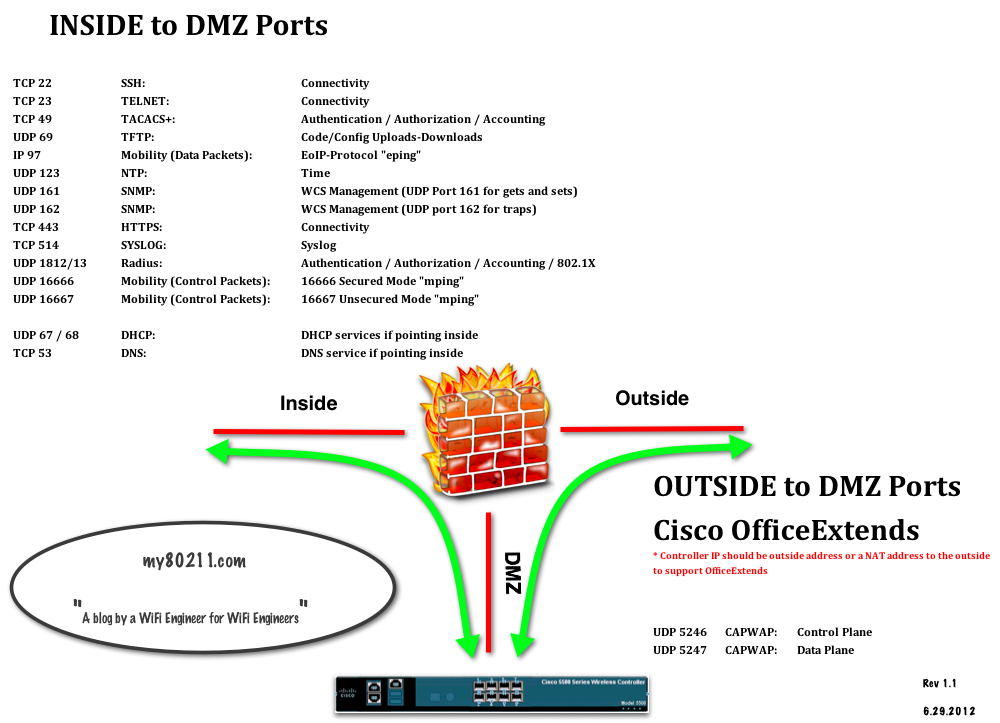
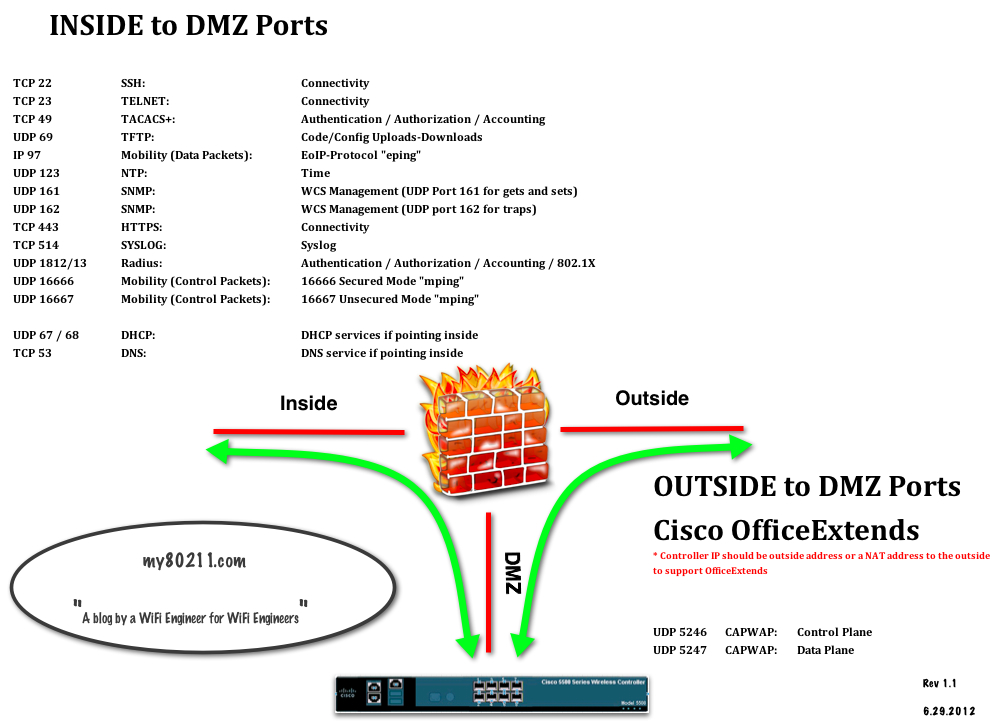
Anchor / Office Extends Ports


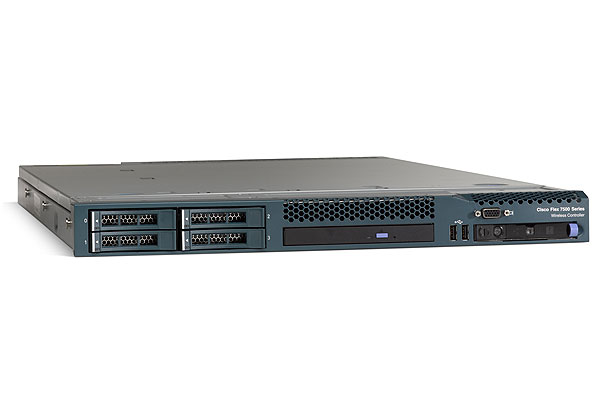
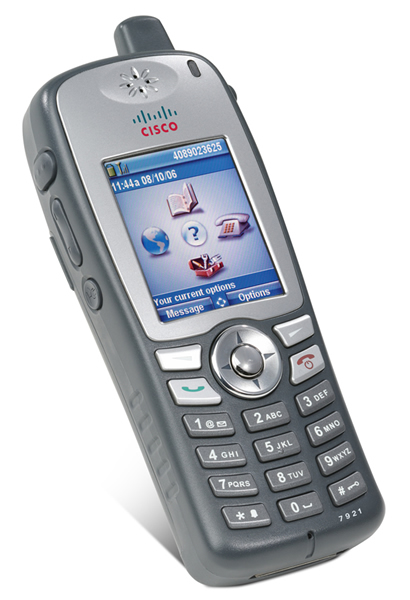
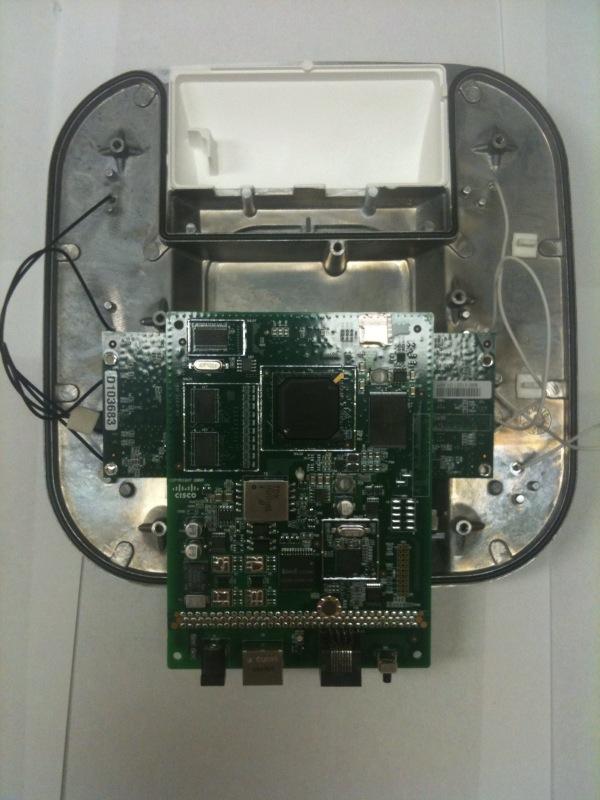
Peek Inside Cisco's Gear

See inside Cisco's latest wireless gear!

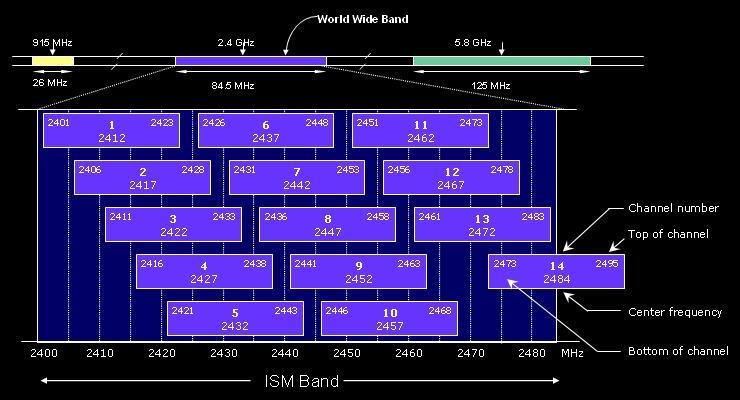
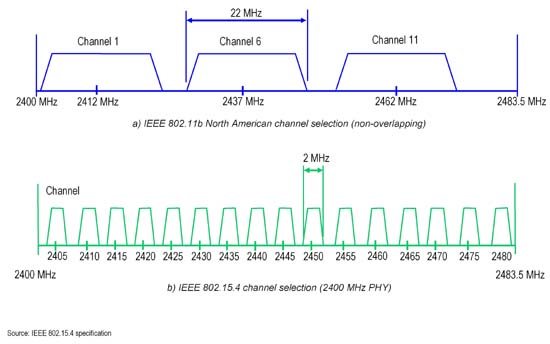
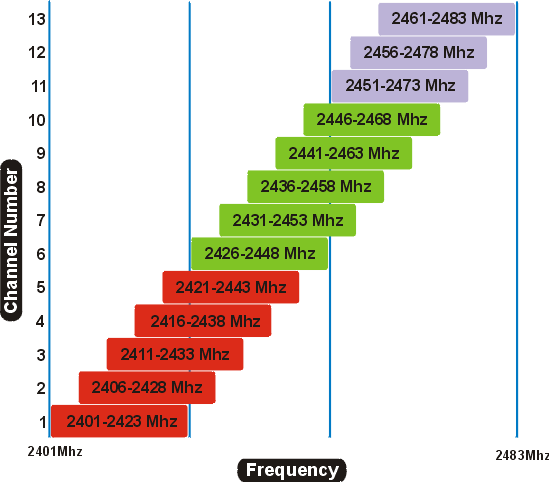
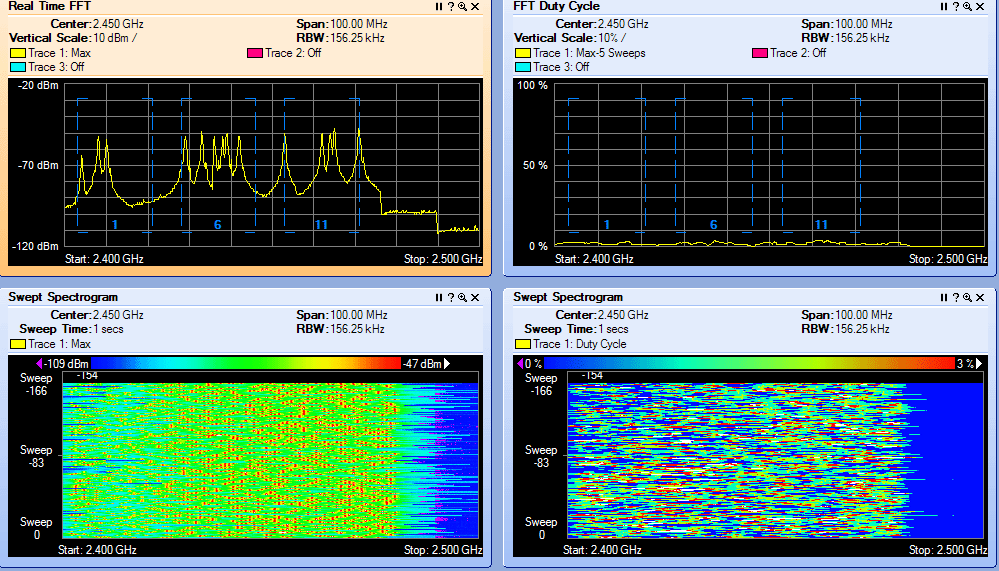
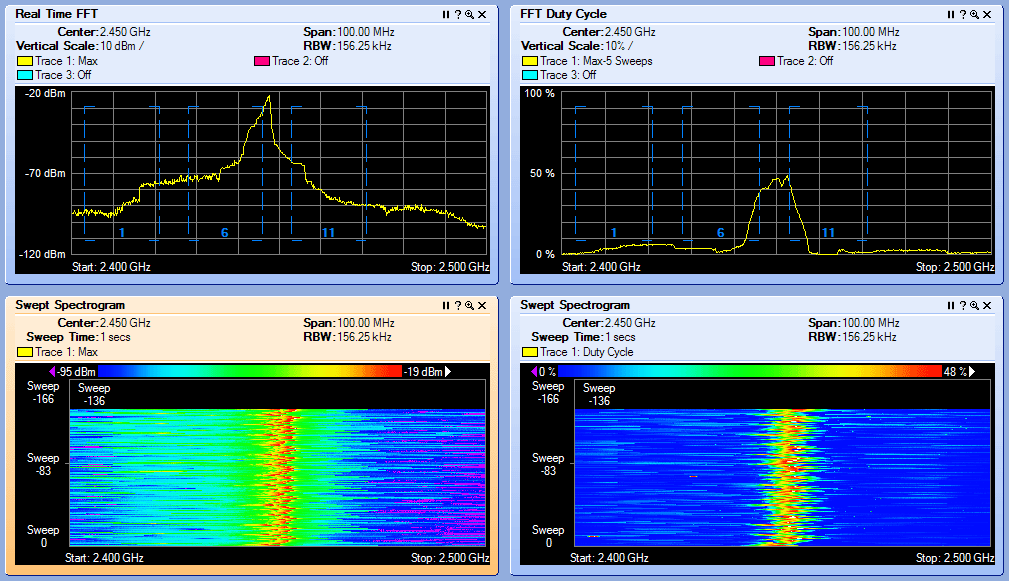
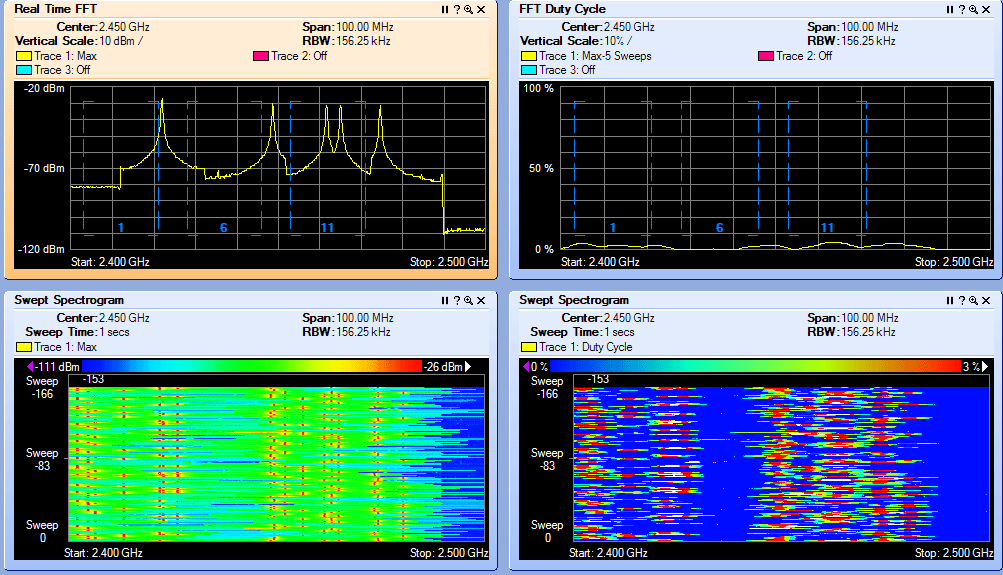
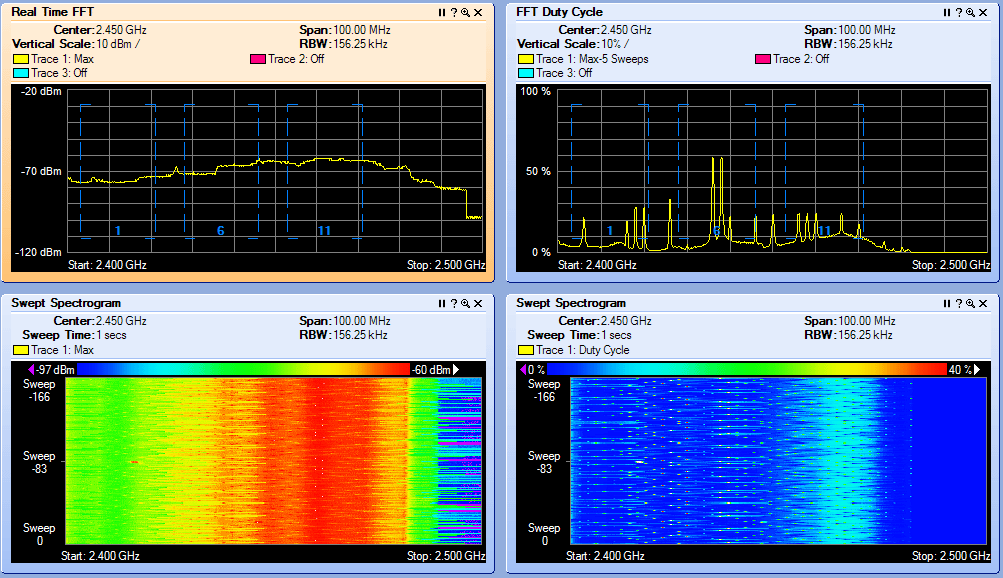
2.4 GHz Channel Overlap

EXAMPLE 1  

EXAMPLE 2

EXAMPLE 3  

Interference Types

BLUETOOTH
 

Microwave Oven
 

Cordless Phone

JAMMER!
 

CWSP RELEASE DATE 2/08/2010
  • CWSP Certified Wireless Security Professional Official Study Guide: Exam PW0-204
    CWSP Certified Wireless Security Professional Official Study Guide: Exam PW0-204
    by David D. Coleman, David A. Westcott, Bryan E. Harkins, Shawn M. Jackman

    Shawn Jackman (Jack) CWNE#54 is a personal friend and has been a mentor to me for many years.  I've had the pleasure and opportunity to work with Jack for 4 years. Jack is a great teacher who takes complex 802.11 standards and breaks them down so almost anyone can understand the concept at hand. I'm excited for you brother. Great job and job well done! Put another notch in the belt!

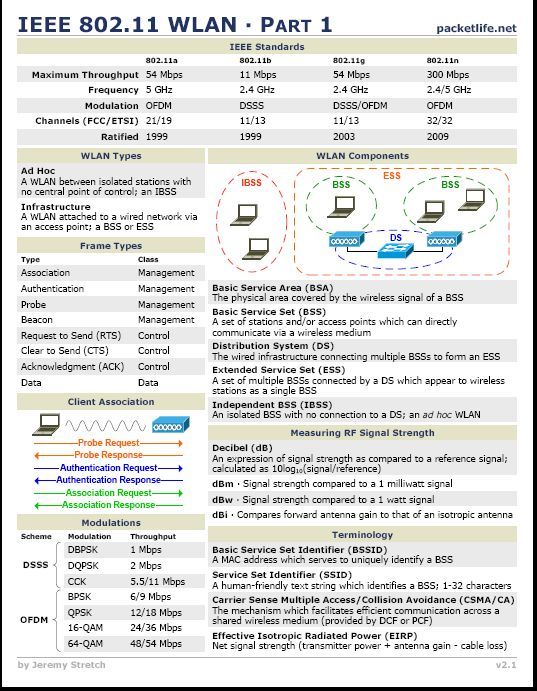
IEEE 802.11a/g/n Reference Sheet


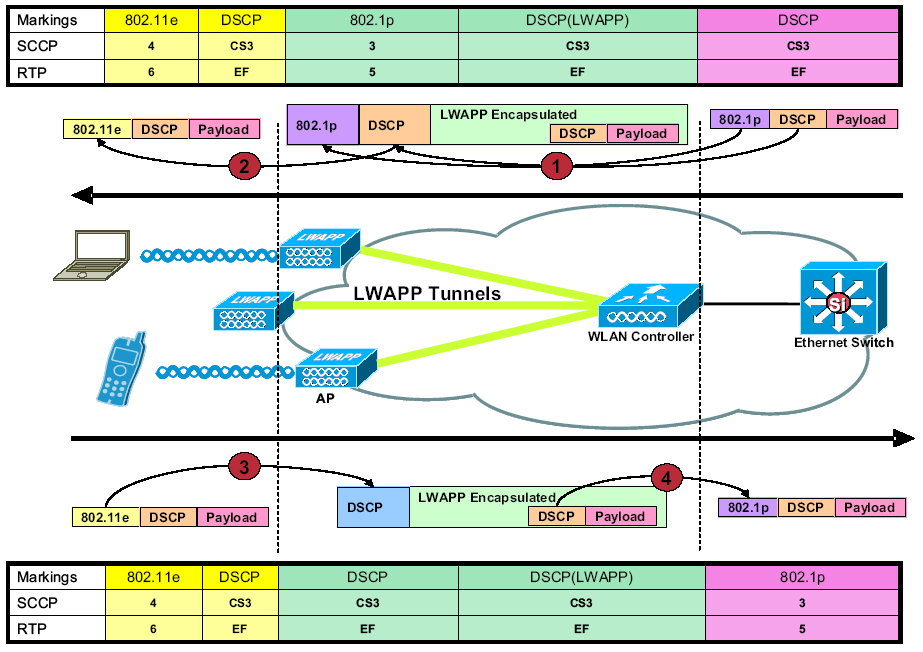
LWAPP QoS Packet Tagging


Friday
Sep022011

Wireless Sniffing in Windows 7 with Netmon 3.4

I leeched this from the CSC forum. This was posted by Aaron Leonard. Aaron goes through the steps of turning your WIN7 into a sniffer. 

With Microsoft Network Monitor (Netmon) 3.4, you can now perform some decent 802.11a/b/g (and maybe 11n) wireless sniffing in Windows 7, using your standard wireless adapter.  The file saved from Netmon can be read by latest bleeding edge (1.5.0) Wireshark, though not in OmniPeek.  Note that, even though Netmon 3.4 is supported with XP SP3, it supports wireless sniffing only if running Win7 (and presumably Vista.)

I've tested with the following adapters/drivers:

  • An Intel 6300 running drivers 13.2.1.5 and 13.5.0.6.  This adapter works well with 11a/g but does not support 11n. 
  • A Linksys WUSB600Nv1 with Ralink driver 3.0.10.0.  This driver says that it supports 11n (which function I didn't test).  It seemed to report all packets as having an RSSI of -50, and as being of data rate "3.5 Mbps".
  • An Atheros AR9285 with driver 8.0.0.258.  Driver reports 11n support (not tested.)  RSSI values and data rates look sound.
  • A Cisco CB21AG with Atheros driver 1.0.0.120 - this also reported weird data rates (1Mbps showed up as "116 Mbps" and 11 Mbps as "124     Mbps".)


Install Netmon 3.4

Download Netmon 3.4 from Microsoft.  If running Win7 64bit, get and install NM34_x64.exe.  You'll have to log off and back on again after installing.

Sniff wireless packets from a channel

Note: if using PROSet for Win7, set it to "Use Windows to Manage WiFi".  Otherwise, PROSet is apt to take control of the adapter out from under Netmon.


Launch Netmon.  Check the wireless adapter of interest, and uncheck the others.


Netmon1.jpg


Click the New Capture button, then the Capture Settings button.  This pops up the Capture Settings window.  Highlight the adapter of interest and click Properties which pops up the Network Interface Configuration window.


Netmon2.jpg


In the Network Interface Configuration window, click [Scanning Options].  This pops up the WiFi Scanning Options window.  Check Switch to Monitor Mode.  Select the Select a layer and channel button.  Select the band and channel of interest.  Click [Apply].  Important: do not click [Close and Return to Local Mode], but keep the WiFi Scanning Options window up all the time you're capturing the sniff.


Netmon3.jpg


Now (keeping the WiFi Scanning Options window open), go back to the Network Interface Configuration window and click [OK] to get rid of it.  [Close] the Capture Settings window.  Back in the main Network Monitor window, click Start.

This should now cause NetMon to capture all wireless frames.  Sometimes  though it will just sit there and not capture any frames.  When this  happens, try restarting NetMon, disabling/reenabling the adapter, etc.


When done, click [Stop] and use File -> Save as to save the .CAP file.


Analyze with Wireshark

Wireshark up through 1.4.x cannot grok a Netmon 2 format file.  However, latest development Wireshark (1.5.0 and above) can.  I'm using Wireshark 1.5.1.


wshark.gif


Problems

  • NetMon recently just stopped being able to see my wireless adapter - it simply was not present in the Netmon start page, even though it was up and working fine.  Rebooting did not help.  Uninstalling Netmon Parsers, then Netmon, then reinstalling NetMon 3.4, then logging off, then logging back on, did work.
Sunday
Aug142011

Ask the Experts:iPads on Your Network


Read the bioWith Saurabh Bhasin


Welcome to the Cisco Support Community Ask the Expert conversation. This is an opportunity to learn about iPads on Your Network and how you can securely on-board employee-owned devices while protecting your network with Cisco expert Saurabh Bhasin. Saurabh has been involved with various wireless technologies over the years, since the first days of 802.11 becoming a standard and, more recently, with the evolution of the wireless industry to 802.11n. Saurabh has been with the Cisco Wireless Networking Business Unit for about five years, and in this role, he has worked closely with Cisco technology partners (enabling advanced services over wireless networks), leading key architectural features and training various members of the Cisco and partner community in person or through the numerous papers he has authored. Most recently, Saurabh has been leading the product strategy for Cisco's network management efforts. In his past, Saurabh has also authored numerous articles for reputable industry publications, and contributed to open source projects.

Remember to use the rating system to let Saurabh know if you have received an adequate response.

Saurabh might not be able to answer each question due to the volume expected during this event. Remember that you can continue the conversation on the Wireless,Other Mobility Subjects discussion forum shortly after the event. This event lasts through August 26 , 2011. Visit this forum often to view responses to your questions and the questions of other community members.


https://supportforums.cisco.com/message/3419163#3419163

Monday
Aug012011

Cisco 3500 ECO Pack Special – Free 100 WCS PLUS+ License with each ECO pack purchase

Cisco is running a special for a while now which is not well advertised.

If you purchase Cisco Access Points model 3500 in ECO packs you will receive a WCS PLUS+ 100 access point license for FREE!

I understand when ordering the ECO pack, there is a special order number so you will need to ask your reseller.

KEEP IN MIND!

The PAK license for your 100 access point PLUS+ is actually in EACH ECO pack. So if you have someone install your access points, make sure you pull the PAK from each box.

If you are like me and did not know the PAK was in each box. Talk to your Cisco Sales Rep. He can have all your PAKs converted to a single PAK, if you ask him/her nicely … LOL


LINKS: http://www.cisco.com/en/US/prod/collateral/wireless/ps5678/ps10981/qa_c67-604158.html

Q. Are 10-packs available?

A. Yes, the Cisco Aironet 3500 is delivered in 10-access point eco-packs that reduce packaging waste by more than 50% and can reduce shipping and installation costs. Additionally, the eco-pack includes a WCS PLUS Upgrade license for 100 access points at no cost.


Enjoy !

Wednesday
Jul272011

CCIE Wireless V2 Written - Beta pushed back to mid september

The CCIE Wireless Beta exam was pushed from July to mid Seprember !

An  optional beta version of the new CCIE Wireless v2.0 written exam will  be available in mid-September 2011 at a discounted price of $50 USD.

LINK:https://learningnetwork.cisco.com/docs/DOC-3332

Saturday
Jul232011

TAC Tip: TAC Engineers Reveal Their Favorite Apps

Leeched from: https://supportforums.cisco.com/docs/DOC-15474?referring_site=facebook&channel=CiscoSupportCommunity

Smartphones have become almost ubiquitous lately. The TS Newsletter team asked the Cisco TAC what Smartphone apps they recommend to make life easier for hard working network engineers. Some apps are from Cisco, some are incredibly useful when working with Cisco gear, and others are just plain fun.

1.  Cisco Webex -  Available on iPhone, iPad, and Android, this client lets you attend meetings while on the go. Currently, the app does not work with Webex Training Center sessions due to the extra features, it is for meetings only. It’s especially nice on a large screen like the iPad.

2.  Cisco Anyconnect VPN client - Available for iPhone, and works on the iPad. It does not work on Android plans yet but stay tuned, as Cisco has announced an Android tablet for enterprises.

3.  Cisco Technical Support - This app helps Cisco customers, partners, and employees stay plugged into the Cisco Support Community (http://supportforums.cisco.com) when on the go. Stuck in a boring meeting? Waiting for a train? Use this handy app to surf the discussions within the communities, answer technical questions, and increase your online community reputation score by helping Cisco customers and partners, and adding to the community knowledge base.

In addition to forum discussions, you can also access RSS feeds, videos, and the community's leaderboards. Collaborate with other community members anytime, anywhere, by downloading this app at http://itunes.apple.com/us/app/cisco-technical-support/id398104252?mt=8. Available for iPhone today, for iPad very soon, and for Android next.

4. An SSH client - For you CLI diehards, an indispensable tool for remote administration on the go. Paid app iSSH is a top seller and well worth the money. It includes a fully featured VNC client and X11 display server, and both of these can work over SSH. There are also free SSH apps available

5. datacase - Use your phone as a ftp/tftp/http server - handy for transferring files. Connect the iPhone to a wireless network you can access from your Mac and launch DataCase. You should see your iPhone appear in the list of shared computers in the finder toolbar. Once connected, click on the volume you wish to browse, accept the connection, and use as a normal hard drive.

http://www.veiosoft.com/

6. missingcalc - The Calculator of Mac OS X has 3 modes: Basic, Scientific and Programmer. But the Calculator of iPhone/iPod touch does not have Programmer mode. The Missing Calculator app provides the Programmer's calculator. It operates on and displays 64 bits of data. Do you want to know what it exactly does? Launch the Calculator of Mac OS X in programmer's calculator mode and check it out.

http://aingoppa.egloos.com/1788948

7. Cisco App - A portal to mobile-optimized Cisco.com content, including news, new product introductions, support, videos, security alerts, partner locator, podcasts, events, and a tool to set up text messaging (SMS) alerts.

8. Cisco SIO to go- Security blog messages and customizable real time security alerts around threat outbreaks and mitigation strategies,

9. Cisco GIS Global Internet Speed test - Test Mobile Network or Wifi speed and report your results. See what kinds of speeds people geographically nearby are reporting.

10. Cisco Mobile 8.1 - Turn your iPhone into a Skinny Client talking to your Cisco Mobile-enabled Cisco Unified Communications Manager.

11. Wolfram Alpha - Instead of presenting a list of URLs (next hops) related to a subject, Wolfram Alpha presents an organized list of knowledge (answers). Do a Google search of Cisco.com and get links to our home page, certification page, tech support page, and about 515 million other links (in 0.13 seconds). Search Cisco.com on Wolfram and you will get our web hosting info, web stats, web page info, and HTML hierarchy (graphic or tabular) in an easy to read format with the ability to drill down into any topic. Originally targeted at the hard sciences and finance, it has recently started to organize knowledge in sports, music, culture and media, and weather. It’s full of crucial information (like what your name looks like as a Code 128 barcode).

12. A PDF reader that allows you to read even tiny-lettered PDFs, so you can sit back and relax while reading those project details. iRead PDF is pretty good and iBooks integrates well with iTunes but it doesn't behave very well when you want to read PDFs in partial page view or in side-by-side. ForScore is awesome in its PDF reading and annotation features but it's really meant for sheet music.

13. Dropbox - lets you wirelessly sync files onto your iDevice (like PDF files that you open in your reader). Keep in mind that the data is transmitted to a third party and they can read it if they want to, so don't put confidential files on it.

14. Get Console - Terminal emulator with accompanying console cable. Expensive, but looks cool.

http://www.mobilecrunch.com/2011/03/01/iphone-ethernet-cable-cisco-router-console/?utm_source=twitterfeed&utm_medium=twitter

15. IP6Config - Displays your assigned IPv6 address on the WiFi LAN interface (and cellular data interface if your carrier provides IPv6) and identifies local Router Advertisements. Requires iOS 4.x and later for IPv6 support.16.

Just for fun:

  • Cisco Binary Learning Game - Brush up on your binary skills so you can subnet circles around your nerdy friends.
  • iBeer and iCookies. (Props to customers with us long enough to remember the Wednesday night Beer and Cookies during Cisco training classes.)
  • Angry Birds can help you make it through those long maintenance windows.
Thursday
Jul212011

I will be presenting at CHUG (Houston, TX) on 7/29/2011

It’s an honor to be asked to speak at the Cisco Healthcare User Group event being hosted by Cisco and The Methodist Hospital System.

The event sign in starts at 1:30pm. If you’re in the Houston area and have an interest in WiFi and Healthcare, stop by. I plan to present the common hurdles of WiFi in healthcare, design practices, security, Cisco Clean Air and how to use TAC to your benefit!


Sunday
Jul172011

CWNP: Download your CWNP CDs

If you’re like me and have most of the CWNP material in PDF or Kindle format you don’t get the CDs.


CWNP offers the CDs for download. You can find them here:

http://www.cwnp.com/index/training/freeresources/sybex_download


Tuesday
Jul122011

Cisco Live 2011: CCIE Wireless Session (LAB v2) TECCCIE-8006

I sat the 8 hour CCIE Wireless session at Cisco Live on Sunday. Talk about brain swell. I was in good company with the likes of Blake Krone, Jason Boyers and others.

During the session I used twitter for my note taking, so if you’re following me then you may have noticed an abundance of tweets on Sunday with the #CCIEW and #CL11 hash tags. The session was very focused on most lab topics and lab v2 changes, expected on Nov 18th  of this year.

CCIE WIRELESS BULLET POINTS

What made this event unique is the fact that the presenters have either wrote or participated in lab development content. You weren’t getting second hand information from someone else. There were MANY notable items and I will only share a few here. Again, I would recommend stopping by Blake’s and Jason’s blogs.

  • CCIE Wireless v2 will be out Nov 18, 2011
  • OEQ are getting ditched when v2 comes out
  • IPv6 will be on v2
  • MULTICAST, MUTICAST, MULTICAST
  • CCIE Wireless v2 will be on M1 code release 7.0.116.0
  • ACS 5.2, MSE and ANYCONNECT 3.0 are new additions
  • Know RRM and ALL your default timers
  • CCNP R/S is highly recommended
  • OfficeExtends is a new addition, although the AP600 is not in the lab mix
  • CCIE Wireless Quick Reference guide is near completion and should be out around November
  • CCIE Wireless v2 will no longer come with a paper workbook, rather a digtial one on the pc

Comments I found interesting

“ 95% of the LAB is based around best practices ”

“ 45 CCIE Wireless world wide. 60% of which are Cisco employees ”

“ 25 of the 45 CCIEs are in the US”

“ The first female CCIE W passed this week, again Cisco employee ”

“ CCNA level R/S will not be enough to pass the wired side tasks of the CCIE W ”

“ The lab can be completed in 5 -6 hours “

“ Average 3 attempts to pass the exam “

DEMO LAB / SOLUTION GUIDE

Each person received a demo lab book which is an “example” of a mock up lab. When asked if we could share this document, although its just an “example” lab we were given the “look”. 

The presenters also shared how the lab is graded. This was a good eye opener for most of us in the class. As the CCIE W is manually graded it was interesting to see how it was done. In short, the example lab was 22 pages with about 40 pts. The solution guide that the proctor uses in this example was 68 pages. The guide was color coded. Yellow represented what the config on the lab should represent exactly. While blue was variable.

In closing. It was worth the extra $1,000 bucks to sit this class. The presenters all did a great job.

Presenters

Stephen Orr Distinguished Systems Engineer
Javier Contreras Albesa System Engineering - WNBU Escalation
Erik Vangrunderbeek Product Manager
Matt Swartz Technical Leader
Secondary Speaker:   Davie Chia Product Manager

NOTES:

You can find my tweets @wirelesssguru and I have included links to Blake’s and Jason’s blog post.

Blake Krone:

http://blakekrone.com/2011/07/10/cisco-live-2011-day-1-ccie-w-techtorial

Jason Boyers:

http://blog.ipexpert.com/2011/07/11/cisco-live-news-and-updates-ccie-wireless/


Tuesday
Jul052011

Autonomous: Multiple SSID With Multiple VLANs configuration example on Cisco Aironet APs

Cisco's Wireless TAC teams is one of the best around. Their group is small when compared to other groups like r/s and security. Ive had the pleasure to work with most if not all of them over the years by simply opening a TAC case and shooting the breeze. In most cases when I open a ticket the guys know me by name. Hey if you pay for TAC use it !


This video is by Surendra. Surendra is not only a bad ass Cisco TAC enigneer but he also leads the pack on Cisco Wireless Support forum. He is by far one of the most active Cisco Wireless TAC engineer contributors who gives back to the community.

In this video Surendra shows how to configure multiple SSIDs with multiple VLANs.


Wednesday
May252011

Site Survey: Intravenous WiFi (Survey Pole)

Recently, I repurposed an old IV pole as a site survey rig.

Some see a collection of old carts and IV poles waiting to be exposed of as trash. As for me, I see parts for a survey rig ! This isn’t anything special and I didn’t say it was pretty. I am repurposing a few of these for local survey rigs. I plan to keep 1 at each hospital.

I mention the word “local” rig because this isn’t something that you can pack up and fly with. But if you work in healthcare it could be ideal to have one of these at each site. Or if you travel locally these travel comfortably in an suv.

IV poles come in all different shapes and sizes. I was lucky to find one that extends 12 feet in height and is very stable when fully extended with an access point attached. The casters are low profile and the battery (Terrawave) is placed at the base held into place with a band of velcro. I have a cat5 cable running the length of the pole held into place with velcro. The access point is secured into place with a band clamp and a piece of velcro on top to stabilize the ap.

This is still a work in progress.

On the end of the day it meets my need. It is very mobile and it was FREE!


ivpole.batter


Tuesday
May172011

Wavelink Avalanche Cisco 79xx Wireless Phone Deployment

Over the next few weeks I’ll share my deployment strategy, challenges, design overview, testing and hands on experience while deploying one of the largest Wavelink Avalanche Cisco 79xx Wireless Phone deployments on planet earth!

I was challenged to reduce our organizations Cisco 79xx Wireless Phone deployment overhead while improving our post deployment manageability.

After clearly understanding the needs and requirements I evaluated a number of solutions and internal procedural changes to streamline a planned massive Cisco 7925 Wireless Phone deployment. It was clear an enterprise solution was needed.

Communication in Healthcare is arguably the most critical. It could mean life or death. Managing thousands of wireless phones in a healthcare system becomes a very sensitive matter while also posing a massive responsibility and an attention to detail at an extremely high level.

The consideration to demo Wavelink initially was a no brainer. The Wavelink ‘agent’ is already installed from the factory on each Cisco 79xx wireless handset. Wavelink is not new to me. Previously I was employed by a mobility company that deployed WiFi for 2 of the largest rental car companies in the US. We used Wavelink to manage thousands of Motorola hand helds across the nation.

I was surprised and concerned to learn that there wasn’t a lot of web content specific to Wavelink Avalanche and Cisco deployments. If you are considering Wavelink Avalanche I hope these post help you with your Wavelink journey.


Monday
May162011

WLC: Configuring Dynamic Anchoring for Clients with Static IP Addresses

If you have a WLAN that requires a large mobility area for roaming and your client needs to be static. This feature is something you should consider! This will allow you to break up these large subnets into much smaller sizeable subnets while still allowing static address on your mobile devices. 

In Cisco 7.0.116.0 release a new feature "Configuring Dynamic Anchoring for Clients with Static IP Addresses" appears to have resolved my issue.

P.S. Below is a cut and paste from 7.0.116.0 config manual. Here is the link:

http://www.cisco.com/en/US/docs/wireless/controller/7.0MR1/configuration/guide/cg_mobility.html#wp1208318

Configuring Dynamic Anchoring for Clients with Static IP Addresses

At times you may want to configure static IP addresses for wireless clients. When these wireless clients move about in a network, they could try associating with other controllers. If the clients try to associate with a controller that does not support the same subnet as the static IP, the clients fail to connect to the network. You can now enable dynamic tunneling of clients with static IP addresses.

Dynamic anchoring of static IP clients with static IP addresses can be associated with other controllers where the client's subnet is supported by tunneling the traffic to another controller in the same mobility group. This feature enables you to configure your WLAN so that the network is serviced even though the clients use static IP addresses.

How Dynamic Anchoring of Static IP Clients Works 

 The following sequence of steps occur when a client with a static IP address tries to associate with a controller:


1.
When a client associates with a controller, for example, WLC-1, it performs a mobility announcement. If a controller in the mobility group responds (for example WLC-2), the client traffic is tunneled to the controller WLC-2. As a result, the controller WLC 1 becomes the foreign controller and WLC-2 becomes the anchor controller.

2.
If none of the controllers respond, the client is treated as a local client and authentication is performed. The IP address for the client is updated either through an orphan packet handling or an ARP request processing. If the client's IP subnet is not supported in the controller (WLC-1), WLC-1 sends another static IP mobile announce and if a controller (for example WLC-3) which supports the clients subnet responds to that announce, the client traffic is tunneled to that controller WLC-3. As a result, the controller WLC 1 becomes the export foreign controller and WLC-2 becomes the export anchor controller.

3.
Once the acknowledgement is received, the client traffic is tunneled between the anchor and the controller (WLC-1).


Note If you configure WLAN with an interface group and any of the interfaces in the interface group supports the static IP client subnet, the client is assigned to that interface. This situation occurs in local or remote (static IP Anchor) controller.


Note A security level 2 authentication is performed only in the local (static IP foreign) controller, which is also known as the exported foreign controller.


Note Do not configure overridden interfaces when you perform AAA for static IP tunneling, this is because traffic can get blocked for the client if the overridden interface does not support the client's subnet. This can be possible in extreme cases where the overriding interface group supports the client's subnet.


Note The local controller must be configured with the correct AAA server where this client entry is present.


The following restrictions apply when configuring static IP tunneling with other features on the same WLAN:

Auto anchoring mobility (guest tunneling) cannot be configured for the same WLAN.

Hybrid-REAP local authentication cannot be configured for the same WLAN.

The DHCP required option cannot be configured for the same WLAN.


Note You cannot configure dynamic anchoring of static IP clients with hybrid REAP local switching.


Using the GUI to Configure Dynamic Anchoring of Static IP Clients

To configure dynamic anchoring of static IP clients using the controller GUI, follow these steps:


Step 1 Choose WLANs to open the WLANs page.

Step 2 Click the ID number of the WLAN on which you want to enable dynamic anchoring of IP clients. The WLANs > Edit page is displayed.

Step 3 Choose the Advanced tab to open the WLANs > Edit (Advanced) page.

Step 4 Enable dynamic anchoring of static IP clients by selecting the Static IP Tunneling check box.

Step 5 Click Apply to commit your changes.

Using the CLI to Configure Dynamic Anchoring of Static IP Clients

To configure dynamic anchoring of Static IP clients using the controller CLI, use the following commands:

config wlan static-ip tunneling {enable | disable} wlan_id— Enables or disables the dynamic anchoring of static IP clients on a given WLAN.

To monitor and troubleshoot your controller for clients with static IP, use the following commands:

show wlan wlan_id—Enables you to see the status of the static IP clients feature.

..............

Static IP client tunneling.............. Enabled

..............

debug client client-mac

debug dot11 mobile enable

debug mobility handoff enable

Configuring Foreign Mappings

Auto-Anchor mobility, also known as Foreign Mapping, allows you to configure users that are on different foreign controllers to obtain IP addresses from a subnet or group of subnets.

Using the GUI to Configure Foreign MAC Mapping

To configure a foreign mapping using the controller GUI, follow these steps:


Step 1 Choose the WLANs tab.

The WLANs page appears listing the available WLANs.

Step 2 Click the Blue drop down arrow for the desired WLAN and choose Foreign-Maps.

The foreign mappings page appears. This page also lists the MAC addresses of the foreign controllers that are in the mobility group and interfaces/interface groups.

Step 3 Choose the desired foreign controller MAC and the interface or interface group to which it must be mapped and click on Add Mapping.


Using the CLI to Configure Foreign Controller MAC Mapping

To configure foreign controller MAC mapping, use this command:

config wlan mobility foreign-map add wlan-id foreign_ctlr_mac interface/interface_grp name

To configure a foreign mappings, use this command:

config wlan mobility foreign-map add wlan_id interface


Monday
May022011

WLC: How Cisco Virtualizes The Base Radio MAC ADDRESS On The WLC – Did you know?

This is a quick blog post on how Cisco uses the VIRTUAL MAC ADDRESS for BSSID(s).

As you add SSIDs (Service Set Identification(s)) to an access point each BSSID (Basic Service Set Identifier) receives a virtual mac address. This allows for wireless network segmentation as well as for wireless clients to communicate via LAYER 2 with each access point BSSID.

A Cisco access point takes the base radio mac address and then virtualizes the mac address as additional SSIDs are added. What is interesting is how the virtual MAC addresses are selected. Pay very close attention to the 2.4GHz and 5 GHz radios and BSSIDs.

BASE RADIO MAC ADDRESS

You can find the base radio mac address under WIRELESS->Select Access Point

 Virtualized BSSID(s)

I configured a controller with 16 SSIDs. Each SSID named as 01,02,03,04,05,06, 07,08,09,10,11,12,13,14,15 and 16. I then enabled both the 2.4 GHz and 5 GHz radios. Cisco WLC access points have a limit of 16 SSIDs on each radio.

I then fired up AirMagnet WiFi Analyzer Pro to conduct a capture.

Note: The access point base radio mac address ends in A9:10.

2.4 GHz – Notice the first SSID ‘01’ is assigned the BASE RADIO MAC ADDRESS A9:10. The second SSID is appended with a .11 and so on. 

5GHz – Notice the sixteenth SSID ‘16’ is assigned the BASE RADIO MAC ADDRESS A9:10. The fifteenth SSID is appended with a .11 and so on.

NOTE: The VIRTUAL MAC ADDRESSES get reused by the access point on both the 2.4GHz and the 5GHz radios.


Virtualized BSSID Assignment

Keep in mind, the assignment or order in which the virtual mac addresses are assigned in the above example has nothing to do with the WLAN IDs that are configured in the WLC. Rather, the virtual mac addresses are assigned in order by how the SSID is assigned to the access point. Lets take a look at an AP Group for example.

AP GROUP EXAMPLE

In the below example I created an AP GROUP where I assigned SSIDs 01,05 and 10. Note the WLAN ID assignment from the WLC in the AP GROUP (see below). Then note the AirMagnet capture where SSIDs 01,05 and 10 are mentioned. As you can see, the BSSIDs did not take the WLC WLAN ID when compared to our last example. Rather the virtual mac address starts at the BASE RADIO mac for the first BSSID and the counts down for the 2.4GHz and starts on the opposite end for the 5 GHz.


CONCLUSION

As you apply SSIDs to an access point the base radio mac address is applied to the first BSSID on the 2.4GHz radio. If you enable the 5 GHz radio you will see that the same SSID is given the 'back end' of the HEX range from the base radio mac address and counts down in HEX positions as additional SSIDs are added. 

ENJOY!


Saturday
Apr302011

WCS: WCS HA FAIL OVER – HOW TO MANUALLY FAIL OVER!? – DID YOU KNOW?

I’ll save you a call to TAC … How to fail over your WCS server in HA mode manually..

I initially thought, shutting down the primary WCS gracefully it would failover to the secondary WCS. It didn’t.

WHAT I LEARNED …

If you shut WCS down gracefully “StopWCS” she doesn’t failover. In fact, either you have to pull the cable or hard shut down the server for the WCS to failover.

TESTING WCS HA FAIL OVER

If you want to test WCS fail over from your primary to secondary WCS server enter the following command in the primary WCS server CLI:

/WCSROOT/bin/nmsadmin.bat -switchover stop

ENJOY!


Saturday
Apr302011

WCS: WCS Server Diagnostics Page

I always enjoy speaking to knowledgeable Cisco TAC engineers. I recently was experiencing some VERY SLOW WCS server response. The TAC engineer enlightened me to a “Server Diagnostics Page”

 “I find it most successful to have multiple windows open to WCS at the same time, one of the GUI and one of the diagnostic page.  Navigate a page in the GUI, then change windows to the diag page and click Refresh.  Use the browser's File > Save As utility to capture a copy of the diag page while WCS is in pain, and send it in for review.  We'll take a look at what the Java threads are doing, and what tables they're interacting with, and know better what actions to take to address the latency.” --TAC

 https://<WCS>/webacs/pages/admin/serverDiagnosticInfo.jsp


Wednesday
Apr272011

Cisco Security Advisory: Cisco Wireless LAN Controllers Denial of Service Vulnerability

DONT PING YOUR CISCO WLCs! LOL

Document ID: 112916

Advisory ID: cisco-sa-20110427-wlc

http://www.cisco.com/warp/public/707/cisco-sa-20110427-wlc.shtml

Revision 1.0

For Public Release 2011 April 27 1600 UTC (GMT)


Contents

Summary
Affected Products
Details
Vulnerability Scoring Details
Impact
Software Versions and Fixes
Workarounds
Obtaining Fixed Software
Exploitation and Public Announcements
Status of this Notice: FINAL
Distribution
Revision History
Cisco Security Procedures


Summary

The Cisco Wireless LAN Controller (WLC) product family is affected by a denial of service (DoS) vulnerability where an unauthenticated attacker could cause a device reload by sending a series of ICMP packets.

Cisco has released free software updates that address this vulnerability.

There are no available workarounds to mitigate this vulnerability.

This advisory is posted at http://www.cisco.com/warp/public/707/cisco-sa-20110427-wlc.shtml.

[Expand all sections]     [Collapse all sections]

Affected Products

Vulnerable Products

This vulnerability affects Cisco WLC software versions 6.0 and later. The following products are affected by the vulnerability described in this Security Advisory:

  • Cisco 2100 Series Wireless LAN Controllers
  • Cisco WLC526 Mobility Express Controller (AIR-WLC526-K9)
  • Cisco NME-AIR-WLC Modules for Integrated Services Routers (ISRs)
  • Cisco NM-AIR-WLC Modules for Integrated Services Routers (ISRs)

Note: The Cisco NM-AIR-WLC have reached End-of-Life and End-of-Software Maintenance. Please refer to the following document for more information:


http://www.cisco.com/en/US/prod/collateral/modules/ps2797/prod_end-of-life_notice0900aecd806aeb34.html


Thursday
Apr212011

Cisco Wavelink (Avalanche) Bug:CSCtb45669 Code 1.3(3)

We are deploying thosands of Cisco 7925 handsets with Wavelink. After extensive testing I discovered that I could not get the phone to reboot after a profile push. I reached out to Wesley Terry (Cisco's Escalation Team) and BAM! He delivers for me ... Thanks Wesley !

792x is not reprovisioning after receiving Wavelink package

Symptom: 792x is not reprovisioning after receiving Wavelink package.
If updating profile 1 or switching from profile 2, there is no provisioning trigger occurring, but the network profile config is updated.


The phone stays connected with the previous network profile information even if not existing in the network profiles.

Condition: Pushing a package to the 792x via Wavelink.

Workaround: Power cycle the phone


This is resolved in code 1.3(4)


Monday
Apr112011

Cisco WLC WLAN Summary Display Bug: CSCth52309 - 7.0.98.0

I was working with a colleague when I noticed the WLAN Summary Display on the WLC showed NO clients, when we knew there was indeed clients. In fact when you hit the client page there was over 100 clients on the controller.

After looking at another controller the WLAN Summary Display showed 30,000+ clients, again we knew this wasn't accurate. After speaking with a Cisco SE we discovered there is a bug in 7.0.98.0, "WLAN summary display defect causing wrong count to be displayed, defect number CSCth52309" 

This bug is fixed in 7.0.114.51 or greater.

As of this post this BUG was not in the bug tool kit. However it comes from a very reliable Cisco SE.


Sunday
Apr102011

WCS: Limited Audit Trail in WCS

As our engineering group grows, so does the need for proper auditing measures. A user with Admin credentials to WCS has the power at his/her fingertips to make changes to your WLAN enterprise.

Currently, there is very limited accounting visibility in WCS itself. In fact, if you want detailed accounting you need to look at ACS AAA logs.

Bug / Feature Request - CSCta98733 Need TACACS accounting support on WCS

CSCta98733 Need TACACS accounting support on WCS.

The above case number can be used for bug tracking. It hasn’t been mentioned WHEN this feature will go in and I understand it was “postponed.”

LOCAL WCS AUDIT

WCS currently does offer very limited local visibility into WHO and WHEN they logged in.

Go->Administration->AAA->(User/groups/active sessions) and click on Audit Trail.

Again, very limited and pretty disappointing.


Friday
Mar252011

CWNP - Gestalt IT Wireless TechField Day

I would like to thank CWNP for their contribution to the Gestalt IT Wireless Tech Field Day

CWNP Provided each Wireless Tech Field Day delegate with a FREE hardcopy of their choice of either the CWAP or CWDP study guide!

I wanted to take a moment and thank both Marcus and Kevin for their continued contribution to the wireless community. It was a pleasure to meet Marcus in person. What a talented young guy with a passion and fire for WiFi.

I also wanted to show some love to Kevin Sandlin. A lot of folks may not realize the driving force and focus behind CWNP. Kevin is the guy behind the curtain keeping the CWNP momentum alive and well.  Kevin, thank you!

I also want to show love to their entire CWNP crew and authors of the recent CWDP and CWAP study guides!!

www.cwnp.com


Page 1 ... 3 4 5 6 7 ... 14 Next 20 Entries »