Wired Stuff
WiFi Tablet Corner
My80211 Videos

DHCP Option 43 Nugget

Loading..

Cisco AP Group Nugget


Phwn a Cisco WLC w/ a Rogue WCS Server

Wireless NIC 4201-4202

The OTAP Packet Vulnerability- What isn't being reported and you need to know!

Loading..

Hack WEP / WPA Keys from your Windows Zero Config


My80211 White Papers (Coming Soon!)

Cisco Wireless Compatibility Matrix (Nov. 2011)

Social Links
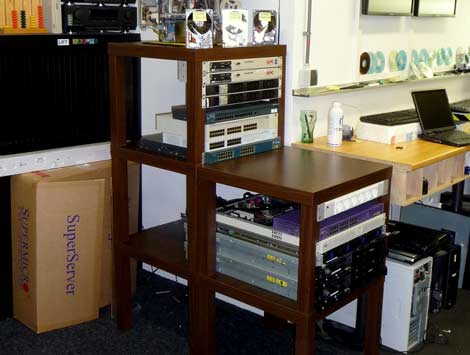
Anchor / Office Extends Ports


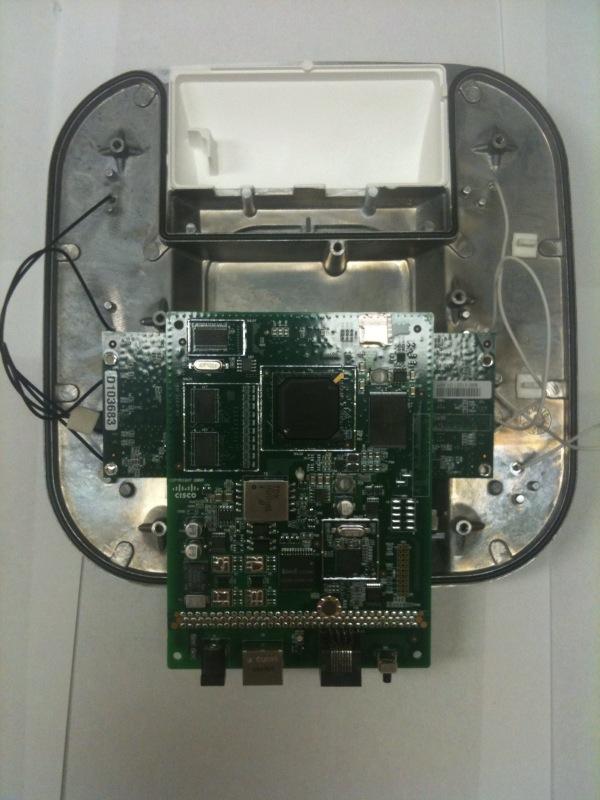
Peek Inside Cisco's Gear

See inside Cisco's latest wireless gear!

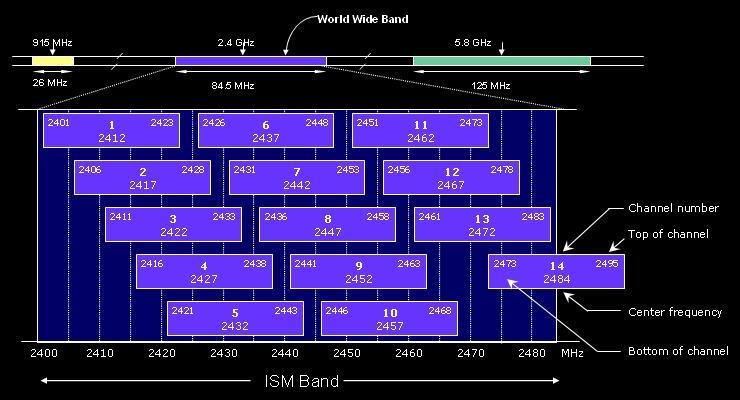
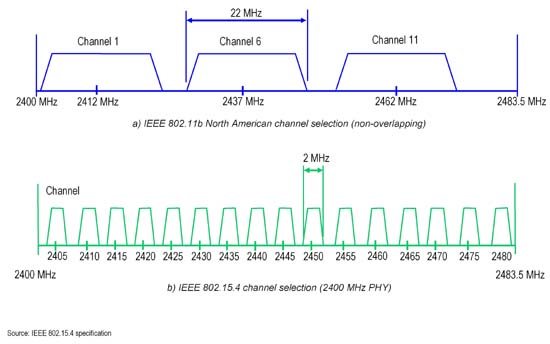
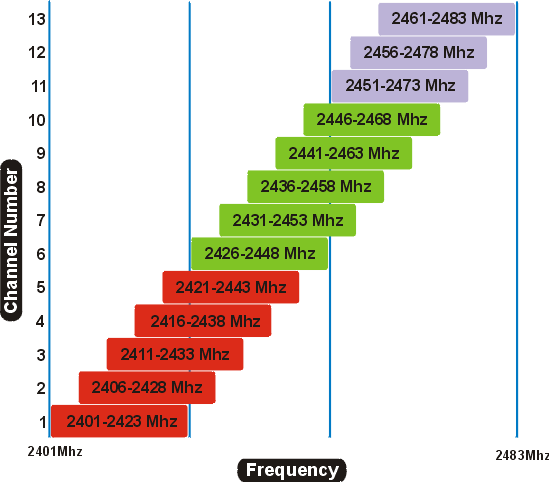
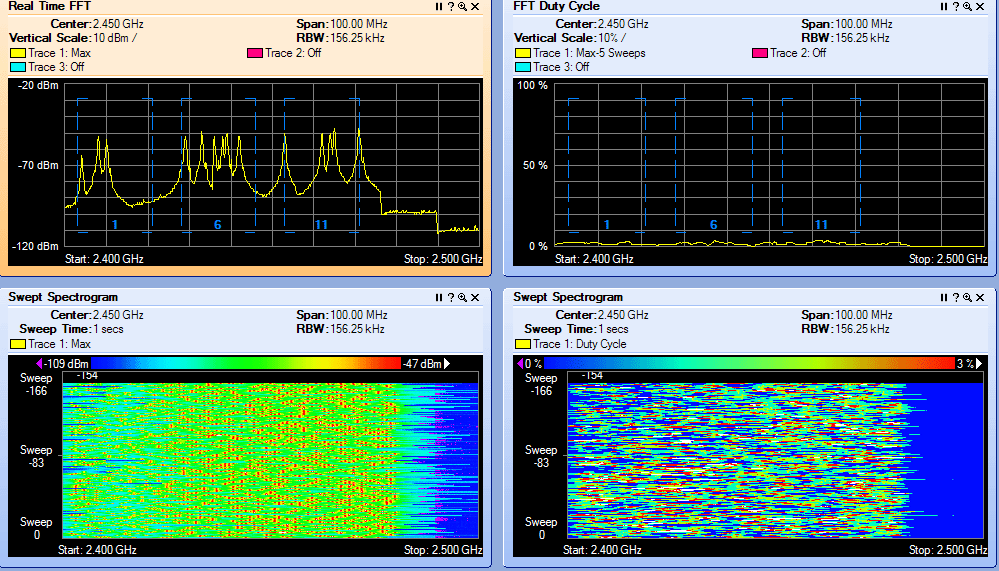
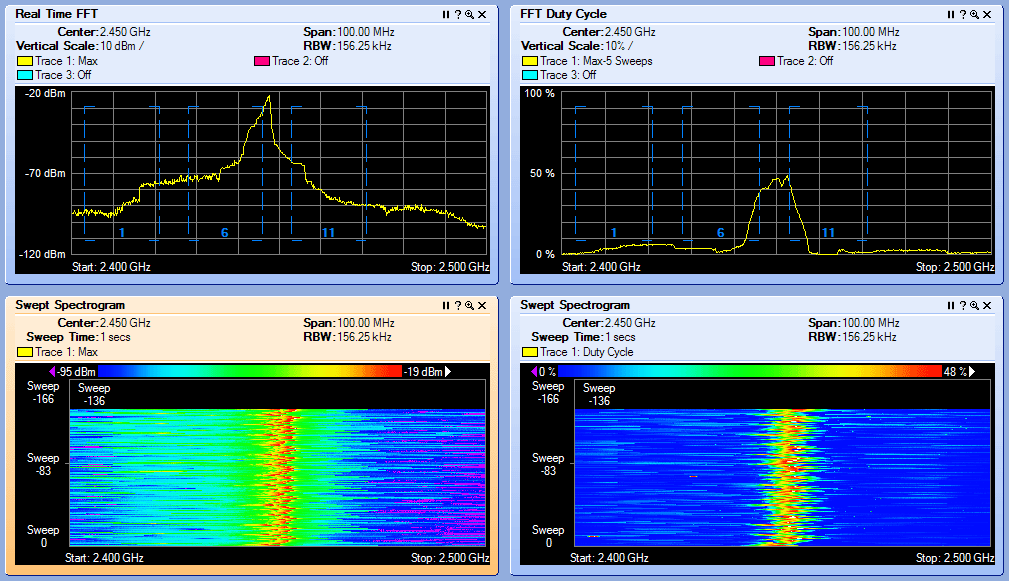
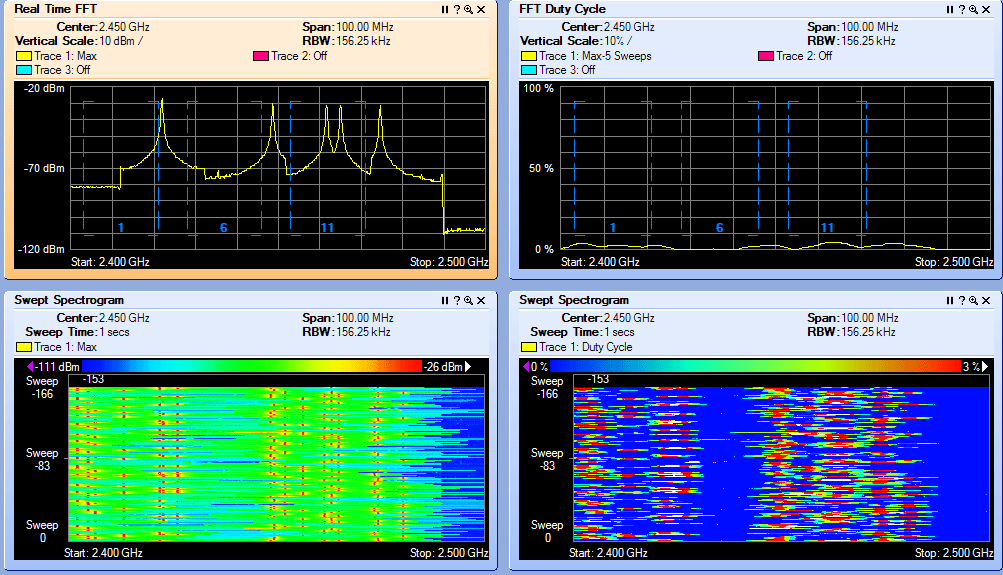
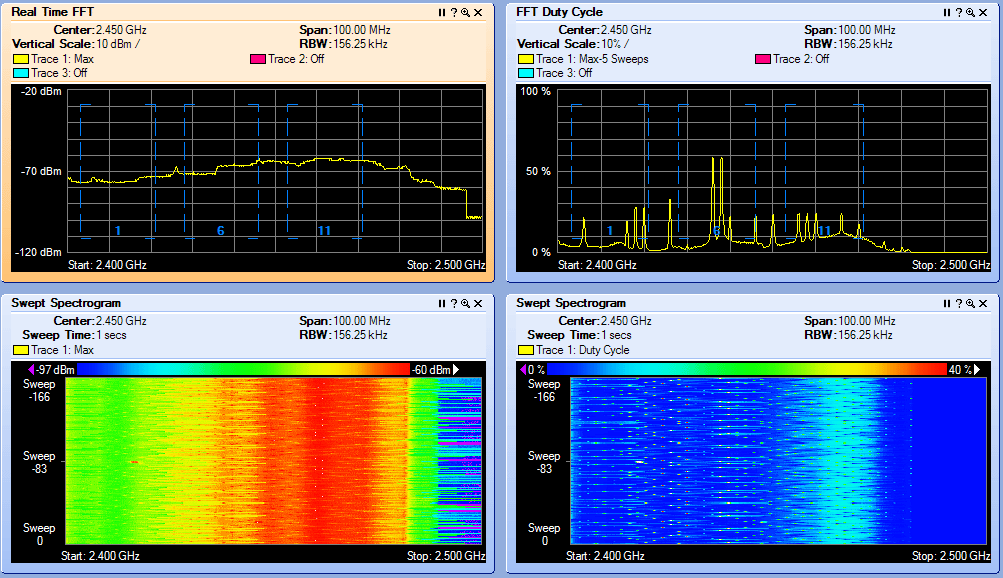
2.4 GHz Channel Overlap

EXAMPLE 1  

EXAMPLE 2

EXAMPLE 3  

Interference Types

BLUETOOTH
 

Microwave Oven
 

Cordless Phone

JAMMER!
 

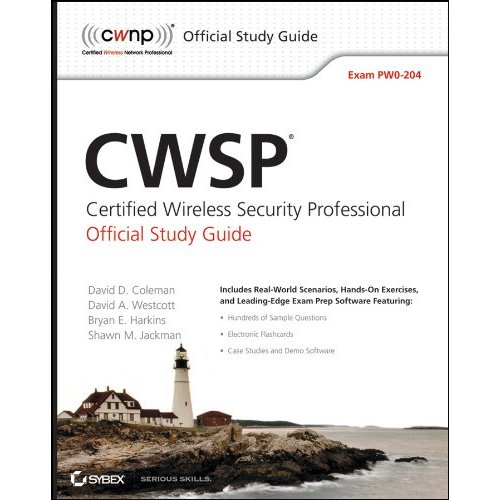
CWSP RELEASE DATE 2/08/2010
  • CWSP Certified Wireless Security Professional Official Study Guide: Exam PW0-204
    CWSP Certified Wireless Security Professional Official Study Guide: Exam PW0-204
    by David D. Coleman, David A. Westcott, Bryan E. Harkins, Shawn M. Jackman

    Shawn Jackman (Jack) CWNE#54 is a personal friend and has been a mentor to me for many years.  I've had the pleasure and opportunity to work with Jack for 4 years. Jack is a great teacher who takes complex 802.11 standards and breaks them down so almost anyone can understand the concept at hand. I'm excited for you brother. Great job and job well done! Put another notch in the belt!

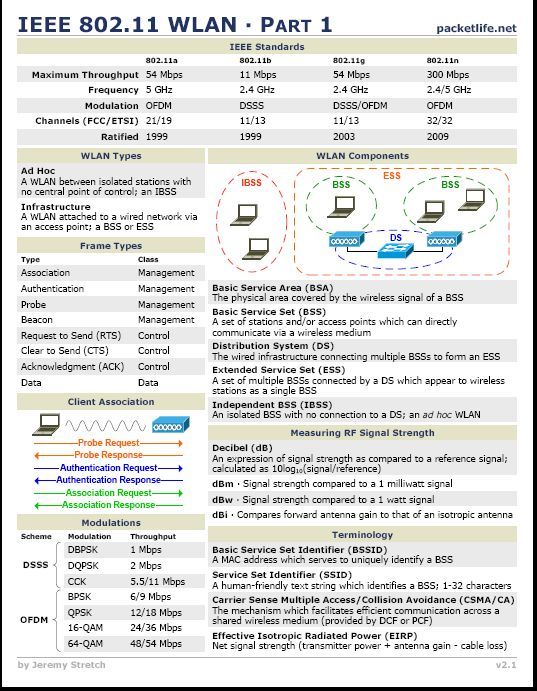
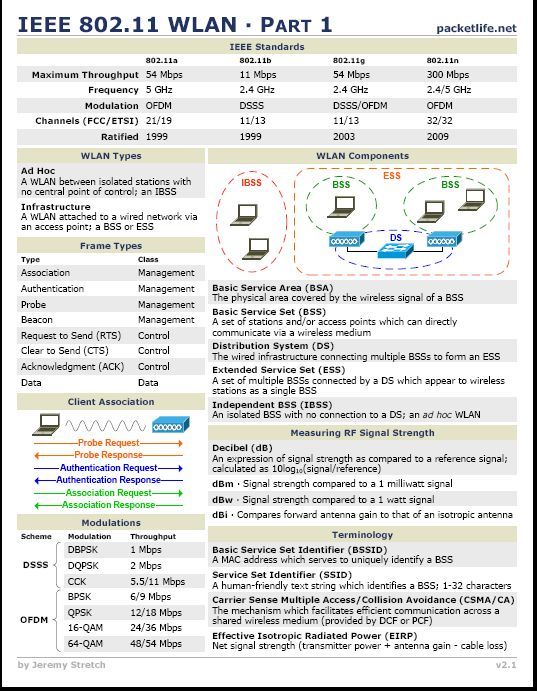
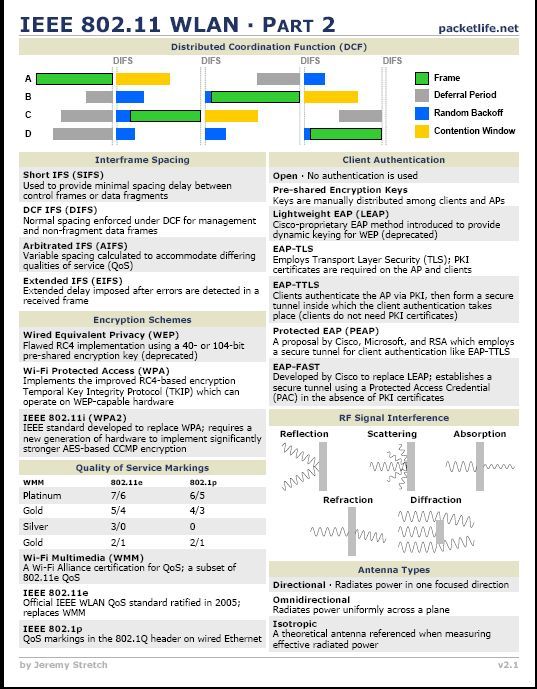
IEEE 802.11a/g/n Reference Sheet


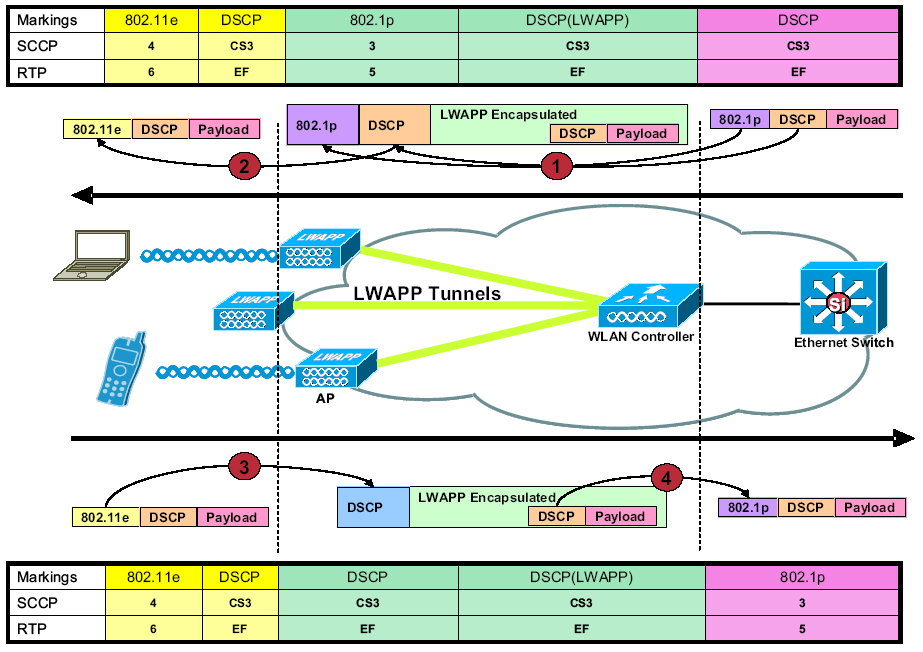
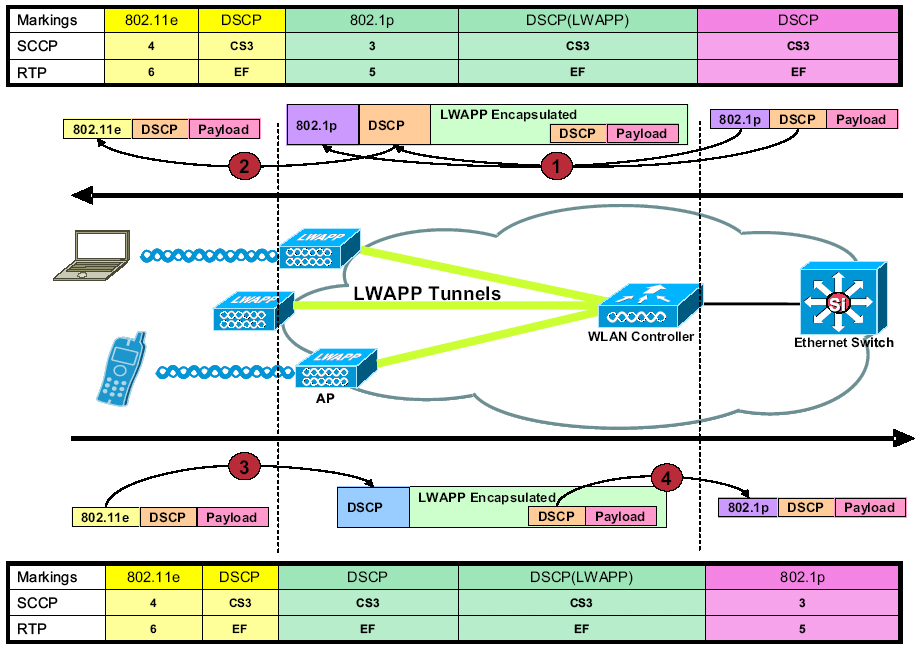
LWAPP QoS Packet Tagging


Friday
Nov202009

WiSM Auto-LAG Feature 

When installing WiSMs in the past I would do it the old fashion way. You know, create my 4 port channels (2 for management) (2 for the controllers), configure the 8 gig interfaces (these come up once the WiSM is installed), and assign these to the port channels.

Software release 12.2(18)SXF5(Sup 720) has a new WiSM feature call "auto-lag". I am always cautions with anything with the word "auto" when it comes to networking. However I was pleasantly surprised with the new feature.  So what is auto-lag --  auto-lag allows you to configure a controller with 3 simple commands rather then doing the multiple steps.

Lets walk through the steps of auto-lag. In this example we will configure a WiSM in MOD 3 controller 1. We will be have native vlan 100 and allow vlans 200,201,202 and 203. These are my wired interfaces which tie to SSIDs.


#> wism module 3 controller 1 native an 100 <--- This creates a native vlan. This is used for your controller management (untagged)

#>wism module 3 controller 1 allowed-vlan native 100, 200, 201,202,203 <--- This allows which vlans are allowed

#>wism module 3 controller 1 qos-trust dscp <--- Good ol' QoS


 This is the output of the show run with auto lag. Note you will not see the gig interfaces and the port channel in the show run output, as you would normally expect to. But don’t worry they are there.


#>show run

wism module 3 controller 1 allowed-vlan 100,200-203

wism module 3 controller 1 native-vlan 100

wism module 3 controller 1 qos-trust dscp


If you want to see the etherchannel you can

#>show etherchannel      

          Channel-group listing:

        -----------------------

 Group: 287

----------

Group state = L2

Ports: 4   Maxports = 8

Port-channels: 1 Max Port-channels = 1

Protocol:    -

Minimum Links: 0

Tuesday
Nov172009

reset the WLC to factory default settings using the CLI

This week I am configuring (2) 6504's with 4 WiSMs for a brand new installation. We are deploying Cisco's new 1142 802.11n access points in a location grade deisgn. As part of the deployment and configuration I needed to restore one of the WiSMs back to factory default. I wanted to share with you the procedure and CLI commands. 

1. First, you need to reset the controller. Enter reset system at the command prompt. 

2. At the prompt that asks whether you need to save changes to the configuration, enter Y or N, doesn’t matter what you select. The controller will then reboot. 

3. When you are prompted for a username, enter recover-config to restore the factory default configuration.

 Press enter and the controller will reset back to factory default.

Saturday
Nov142009

Cisco WLC "linktest" - How well does the AP hear your client? 

A wireless connection is a two way street. All to often Admins will ONLY look at what the Client reports from the AP (how well it hears the AP - client radio receive sensitivity). But have you considered how well the AP hears your client ??

We call this "access point-to-client". For a better understanding, think back when you were a kid and your dad yelled at you for not taking out the trash the night before trash day. Your dad is very loud -- to get his point across and everyone in the house (or neighborhood) can hear him! Perhaps, you answer back to your dad with a low, soft," I’m sorry, I forgot"... Your dad heard your response as a whisper .

In this example your dad is the access point @ 100mW  power (loud) and you are the wireless client @ 5mW power (low). You as the wireless client heard your dad loud and clear, but your dad didn't hear you so well. 


When you check your wireless supplicant and it registers -75dB, this is how loud you hear the AP (or your Dad in my example) - Again this is "access point-to-client".

But you want to see how well the AP (or your Dad in my example) hears you,  "client to-access point". . With a Cisco WLC you can perform a LINKTEST. This can be done in the GUI, WCS or CLI. Here is the command in the CLI. 


(Cisco Controller) >linktest 00:02:10:11:02:68 <-- Wireless NIC MAC Address

The beauty of Cisco CCX is that when enabled on both the client and controller it will report back both access point-to-client and client to-access point readings. 

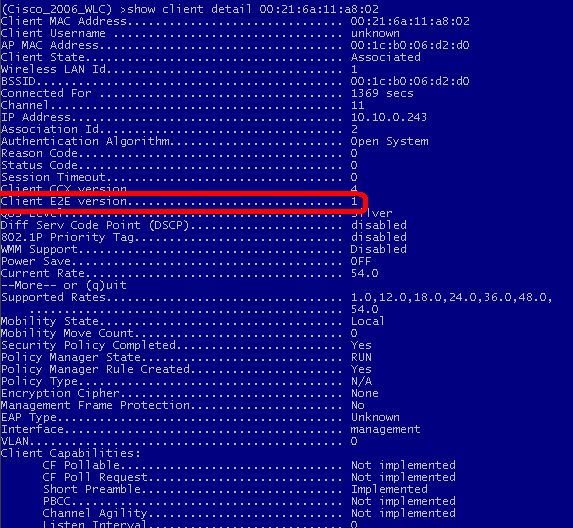
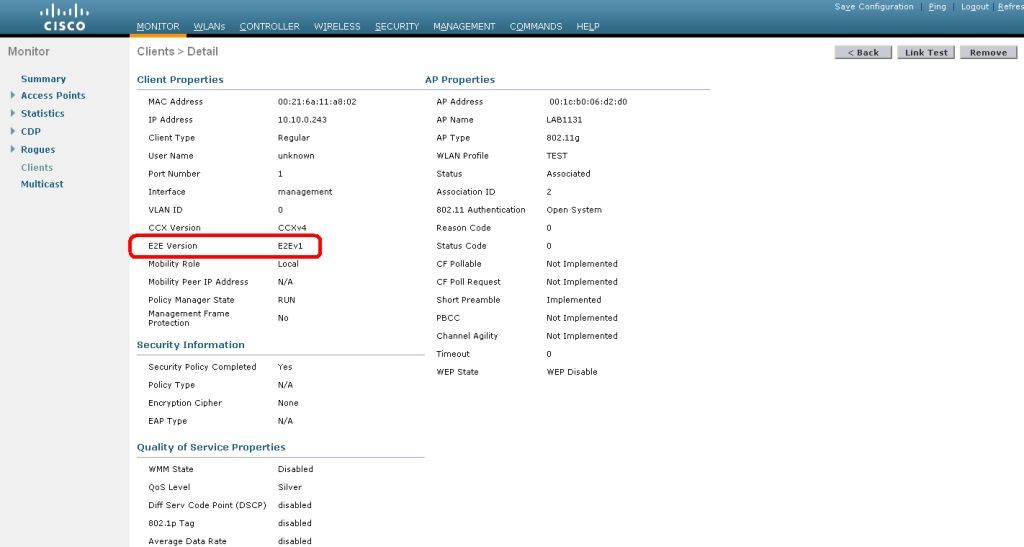
When CCX v4 is enabled on both the controller and the client being tested, information similar to the following appears: 

CCX Link Test to 00:02:10:11:02:68.

     Link Test Packets Sent...................................... 20

     Link Test Packets Received................................. 10

     Link Test Packets Lost (Total/AP to Client/Client to AP).... 10/5/5

     Link Test Packets round trip time (min/max/average)......... 5ms/20ms/15ms

     RSSI at AP (min/max/average)................................ -60dBm/-50dBm/-55dBm

     RSSI at Client (min/max/average)............................ -50dBm/-40dBm/-45dBm

     SNR at AP (min/max/average)................................. 40dB/30dB/35dB

     SNR at Client (min/max/average)............................. 40dB/30dB/35dB

     Transmit Retries at AP (Total/Maximum)...................... 5/3

     Transmit Retries at Client (Total/Maximum).................. 4/2

     Transmit rate:  1M   2M   5.5M   6M   9M  11M 12M 18M   24M   36M  48M  54M  108M

     Packet Count:   0     0     0    0    0    0   0   0     0     2    0   18     0

     Transmit rate:  1M   2M   5.5M   6M   9M  11M 12M 18M   24M   36M  48M  54M  108M

     Packet Count:   0     0     0    0    0    0   0   0     0     2    0    8     0

When CCX v4 is not enabled on either the controller or the client being tested, fewer details appear:

Ping Link Test to 00:02:10:11:02:68.

        Link Test Packets Sent.......................... 20

        Link Test Packets Received...................... 20

        Local Signal Strength........................... -58dBm

        Local Signal to Noise Ratio..................... 29dB


You can also config the default "linktest" settings:


(Cisco Controller) config>linktest ?
frame-size     Configures linktest frame-size for each packet.
number-of-frames Configures number of frames to send for linktest.

Again, another reason WHY a proper wireless site survey is needed and why you need to always consider your lowest common denominator (client) for wireless reliability. If your dad (AP) is always yelling and you (client) always whisper back you are bound to have COMMUNICATION problems. Vocera is one of these such applications.


Thursday
Nov122009

Restore the backup image on your WLC

You just loaded that new code on your WLC and something blew up! Quickly you scramble to start looking through the manual or start downloading and reapplying the previous level of code.

Did you know the controller saves the previous version of code on the controller and all you have to do is change the boot image to active? When you upgrade the WLC with a new image , the WLC automatically writes the new image as the primary image and the previously existing primary image is written over the backup image.

Note: The previously existing backup image will be lost ! 

Below are snips of a backup in progress 

(Cisco Controller) >show boot

Primary Boot Image............................... 4.2.176.0 (active)

Backup Boot Image................................ 4.2.130.0


(Cisco Controller) config>boot ?

primary        Sets the primary image as active.

backup         Sets the backup image as active.


(Cisco Controller) config>boot backup


(Cisco Controller) >reset system

The system has unsaved changes.

Would you like to save them now? (y/N)


(Cisco Controller) >show boot

Primary Boot Image............................... 4.2.176.0

Backup Boot Image................................ 4.2.130.0 (active)

Monday
Nov092009

Enable / Disable LEDs on Cisco LWAPP APs

Working as a consultant for many years you see it and hear it all! I had a situation one time where we deployed a new Cisco WLC solution. I was asked by the management of the hospital if we could turn off the LEDs on the access points in the "crazy ward" as the access points caused a lot of extra attention.

This is real easy to accomplish. In fact you can disable all the AP LEDs or specific ones. If you choose to select specific access points you will need to know the name of the ap. First drop down into the Controller CLI.

'config ap led-state enable/disable <Cisco AP name | all>'


CLI disable specific access point LED named lab1131

(Cisco Controller) config>ap led-state disable lab1131


CLI disable all access points LEDs

(Cisco Controller) config>ap led-state disable all


Sunday
Nov082009

Wireless NIC problem or just poor quality? 

This evening I did benchmark testing on a wireless client which I want to share. I was working on a Samsun NQ unit with an integrated Atheros AR5007EG wireless NIC. I was told by the user the client would lose connectivity and had a slow network connection when connected. So I go through the normal check list, do I have signal for data- check, is the noise floor low -  check, do I have expected PHY data rates - check.  But this test was conducted right under the access point.

As I get distance between the client and the access point (also know as free space path loss) I see the wireless client signal strength nose dive hard.

So I check all the normal things, antenna connection, driver update, NIC config. All these check out OK. So I do side by side benchmark testing with a known good wireless NIC and notice an almost a 20 dBm difference. As you know all wireless NICs will hear (receive sensitivity) differently. But with advancements today, you will see most NICs are all generally in the same ballpark. I say that lightly and tip toeing.

Below is a snap shot of both clients, Samsung has the Atheros AR5007EG and my laptop Intel2915AG. Both clients are side by side at the same distance from the access point. I did further testing by adding another laptop for consistency. I also added a Cisco Linksys WUSB600N to the Samsung.

I don’t have another Samsung to test and it’s not my unit so I wont be taking it apart to investigate further. But the moral of the story, never ever discount the client. Each client will hear differently, and soemtimes a client may have issues or be a poor design.


Saturday
Nov072009

Dropbox.com File Sharing at its best (IPhone app included!)

Recently I was introduced to Dropbox file sharing. I am that shiny object kind of guy and dropped what I was doing to investigate Dropbox (Thanks Brandon, lol). First, I found the ease of uploading and file management so much better than other file share apps. I was also impressed with how easy it is to share public files and how to manage those files or folders. The kicker and deal closer for me, yup the IPhone app just drove this out of the park. You can d/l the Dropbox app and you have full access to ALL your files and better yet, from the Dropbox IPhone app you can share and invite others to share your folders. So if you’re a busy engineer or just a file freak  in general this app is for you. I see myself migrating to this more then my FTP.

Dropbox give you 2 gig free. You can purchase 50 gig @ $10 a month and 100 gig @ $20 a month. Well worth the investment!

www.dropbox.com

Thursday
Oct292009

What you NEED to know about TX Power and 802.11a (5GHz) on a Cisco LWAPP AP

Power, power power.... One of the MOST important design factors is selecting the proper radio TX power when designing any wireless network. You must consider your lowest common denominator and adjust your power equally between your client and AP for optimal design.

But did you know when you select different UNII channels in the 5 GHz band you are also changing the TX power of your AP on a Cisco WLC? When selecting power on a cisco ap in the WLC you are presented with the power levels 1,2,3,4,5 etc. Most folks are aware on the 2.4 GHz side power levels.

1 = 20 dBm / 100mW
2 = 17 dBm / 50mW
3 = 14 dBm / 25 mW
4 = 11 dBm / 12.5 mW

But did you know depending on the UNII band you select the power levels are different on the 802.11a 5GHz radio.

UNII 1                                                 UNII 2 / 3

1 = 11 dBm / 12.5 mW                          1 = 17 dBm / 50mW
2 = 8 dBm / 6.25 mW                            2 = 14 dBm / 25 mW
3 = 5 dBm / 3 mW                                3 = 11 dBm / 12.5 mW
4 = 2 dBm / 1.5 mW                              4 = 8 dBm / 6.25 dBm


(Cisco Controller) >debug ap enable <Name of AP>
(Cisco Controller) >debug ap command "show controller do 1" <Name of AP>

Note:

"show controller do 0" is interface Dot11Radio0
"show comtroller do 1" interface Dot11Radio1

UNII-1 POWER LEVEL - Controller Power Level 1

(Cisco Controller) >
Thu Oct 29 10:37:02 2009: afa0:
Thu Oct 29 10:37:02 2009: afa0: !

Thu Oct 29 10:37:02 2009: afa0: interface Dot11Radio0

Thu Oct 29 10:37:02 2009: afa0: Radio AIR-RM1252A, Base Address 001d.70dd.afa0, BBlock version 0.00, Software versi
on 2.00.22
Thu Oct 29 10:37:02 2009: afa0: Serial number: XXXXXXXXXXXXXXX

Thu Oct 29 10:37:02 2009: afa0: Number of supported simultaneous BSSID on Dot11Radio0: 16

Thu Oct 29 10:37:02 2009: afa0: Carrier Set: Americas (OFDM) (US) (-A)
Thu Oct 29 10:37:02 2009: afa0: Uniform Spreading Required: Yes
Thu Oct 29 10:37:02 2009: afa0: Configured Frequency: 5180 MHz  Channel 36  40Mhz, extended above (Power 1)
Thu Oct 29 10:37:02 2009: afa0: Allowed Frequencies: 5180(36) 5200(40) 5220(44) 5240(48) *5260(52) *5280(56) *5300(
60) *5320(64) *5500(100) *5520(104) *5540(108) *5560(112) *5580(116) *5660(132) *5680(136) *5700(140) 5745(149) 576
5(153) 5785(157) 5805(161) 5825(165)

Thu Oct 29 10:37:02 2009: afa0: * = May only be selected by Dynamic Frequency Selection (DFS)Thu Oct 29 10:37:02 2009: afa0: Listen Frequencies: 5180(36) 5200(40) 5220(44) 5240(48) 5260(52) 5280(56) 5300(60)5320(64) 5500(100) 5520(104) 5540(108) 5560(112) 5580(116) 5660(132) 5680(136) 5700(140) 5745(149) 5765(153) 5785(1
57) 5805(161) 5825(165)

Thu Oct 29 10:37:02 2009: afa0: Beacon Flags: 0; Beacons are enabled; Probes are enabled
Thu Oct 29 10:37:02 2009: afa0: Configured Power: 14 dBm

Thu Oct 29 10:37:02 2009: afa0: Active power levels by rate

Thu Oct 29 10:37:02 2009: afa0:      6.0 to 54.0  , 14  dBm
Thu Oct 29 10:37:02 2009: afa0:      m0. to m15.-4, 11  dBm, changed due to regulatory maximum
Thu Oct 29 10:37:02 2009: afa0:   OffChnl Power: 14, Rate 6.0

Thu Oct 29 10:37:02 2009: afa0: Allowed Power Levels:  -1 2 5 8 11 14
Thu Oct 29 10:37:02 2009: afa0: Allowed Client Power Levels: 2 5 8 11 14
Thu Oct 29 10:37:02 2009: afa0: Receive Antennas : right left middle

Thu Oct 29 10:37:02 2009: afa0: Transmit Antennas : right left, ofdm single
Thu Oct 29 10:37:02 2009: afa0: Antenna: external, Gain: Allowed 11, Reported 11, In Use 11

UNII-2/3 POWER LEVEL - Controller Power Level 1

(Cisco Controller) >
Thu Oct 29 10:34:21 2009: afa0:

Thu Oct 29 10:34:21 2009: afa0: !

Thu Oct 29 10:34:21 2009: afa0: interface Dot11Radio0
Thu Oct 29 10:34:21 2009: afa0: Radio AIR-RM1252A, Base Address 001d.70dd.afa0, BBlock version 0.00, Software versin 2.00.22
Thu Oct 29 10:34:21 2009: afa0: Serial number: XXXXXXXXXXXXXXX
Thu Oct 29 10:34:21 2009: afa0: Number of supported simultaneous BSSID on Dot11Radio0: 16
Thu Oct 29 10:34:21 2009: afa0: Carrier Set: Americas (OFDM) (US) (-A)

Thu Oct 29 10:34:21 2009: afa0: Uniform Spreading Required: YesThu Oct 29 10:34:21 2009: afa0: Configured Frequency: 5745 MHz  Channel 149  40Mhz, extended above (Power 1)
Thu Oct 29 10:34:21 2009: afa0: Allowed Frequencies: 5180(36) 5200(40) 5220(44) 5240(48) *5260(52) *5280(56) *5300(
60) *5320(64) *5500(100) *5520(104) *5540(108) *5560(112) *5580(116) *5660(132) *5680(136) *5700(140) 5745(149) 576
5(153) 5785(157) 5805(161) 5825(165)

Thu Oct 29 10:34:21 2009: afa0: * = May only be selected by Dynamic Frequency Selection (DFS)Thu Oct 29 10:34:21 2009: afa0: Listen Frequencies: 5180(36) 5200(40) 5220(44) 5240(48) 5260(52) 5280(56) 5300(60)5320(64) 5500(100) 5520(104) 5540(108) 5560(112) 5580(116) 5660(132) 5680(136) 5700(140) 5745(149) 5765(153) 5785(157) 5805(161) 5825(165) 

Thu Oct 29 10:34:21 2009: afa0: Beacon Flags: 0; Beacons are enabled; Probes are enabled
Thu Oct 29 10:34:21 2009: afa0: Configured Power: 20 dBm
Thu Oct 29 10:34:21 2009: afa0: Active power levels by rate
Thu Oct 29 10:34:21 2009: afa0:      6.0 to m15.-4,
17  dBm, changed due to regulatory maximum
Thu Oct 29 10:34:21 2009: afa0:   OffChnl Power: 14, Rate 6.0
Thu Oct 29 10:34:21 2009: afa0: Allowed Power Levels:  -1 2 5 8 11 14 17 20
Thu Oct 29 10:34:21 2009: afa0: Allowed Client Power Levels: 2 5 8 11 14 17 20
Thu Oct 29 10:34:21 2009: afa0: Receive Antennas : right left middle
Thu Oct 29 10:34:21 2009: afa0: Transmit Antennas : right left, ofdm single
Thu Oct 29 10:34:21 2009: afa0: Antenna: external, Gain: Allowed 11, Reported 11, In Use 11


Wednesday
Oct282009

CCIEs Worldwide (10/26/09)

Geo - "Cisco updated CCIE counts this week. Man I am taken back by the CCIE Wireless count. To date only 15, yes that’s right 15 people have passed the CCIE lab worldwide! The US lab is booked till March 2010. Do the math, packed labs for the next 5 months and only 15 passes!?!?

The CCIE wireless lab has taken a lot of folks by surprise. Not only I, but others questioned the value of a CCIE Wireless certification. I think Cisco is living up and exceeding expectations in the Wireless lab difficulty. You will earn your badge by passing this lab!

I had the privilege to take part in a small study group this week. The participants weren’t your normal every day engineers, but rather folks that have reached the CCIE peek more than once. In fact, one gentlemen has 5x CCIEs and he is determine to be the second human on earth to have 6x valid IE's, behind Roman. He himself commented, "This lab is up there in difficulty with the voice lab"."

 
Monday
Oct262009

Deploying and Troubleshooting Cisco Wireless LAN Controllers 

Geo "Looking forward to getting my hands on this hardcover. I understand its a late November 2009 release"

The all-in-one guide to deploying, running, and troubleshooting networks using Cisco WLC controllers and LWAPP/CAPWAP 

  • The first ever book on the CCIE Wireless exams
  • Two leading Cisco TAC escalation engineers address the top customer pain points in wireless network deployment and management. 
  • Helps engineers move autonomous wireless network solutions to LWAPP/CAPWAP.
  • Brings together crucial knowledge for installing, configuring and troubleshooting Cisco WLC controllers. 


Deploying and Troubleshooting Cisco Wireless LAN Controllers is a start-to-finish guide to successfully implementing WLC wireless networks in existing wired network environments, troubleshooting design-related issues, and achieving the specific business and technical goals companies have identified for LWAPP or CAPWAP solutions. Cisco technical experts Mark Gress and Javier Contreras Albesa walk step-by-step through designing, configuring, maintaining, and scaling wireless networks using Cisco Unified Wireless solutions. They offer an in-depth look at the Lightweight Access Point Protocol (LWAPP), demonstrating how it can be used to control multiple Wi-Fi wireless access points at once, streamlining network administration and monitoring. You will gain a practical understanding of LWAPP's scalability and how LWAPP/CAPWAP solutions can be integrated into existing networks using Cisco's wireless LAN controllers. Drawing on their own extensive problem-resolution experience, Gress and Albesa also provide expert guidelines for troubleshooting, including an end-to-end problem-solving model available in no other book. This book is part ofthe CCIE Professional Development series, and is the first book to address the training needs for the CCIE Wireless Exam. It is also an excellent preparation title for the new CCNP Wireless exam

Product Details

  • Pub. Date: November 30, 2009
  • Publisher: Cisco Press
  • Format: Hardcover, 600pp
  • Sales Rank: 763,707

Mark Gress, Lee Johnson, Javier Contreras Albesa


Sunday
Oct252009

WiFi Security Paint !?!? Are you kidding me ! LOL

Have you heard about the "WiFi Security Paint Protocol", no no its not a new EAP type or a new type of encryption.  You won’t find this security posture in any of the IOS or LWAPP commands. Researchers at the University of Tokyo have blended paint with aluminum iron oxide. This paint mix has been found to resonate at the same frequencies used by Wi-Fi, thus canceling out any electromagnetic waves in that frequency.  I don’t know how practical the is for the mass, because you wont be panting your windows and floors (not likely anyway). But it would be interesting to lab to see the actual attenuation. I suppose 5 coats are in order for my home office! If anyone knowns were i can purchase it, I will test it !


Monday
Oct122009

my80211.com on iTunes Podcast

I received a number of request about adding the tutorials to iTunes Podcast. So here it is ... Enjoy!  I will be ramping up on the tutorials in coming weeks. We will be deep diving on 802.11 fundamentals.... If you are on iTunes search "my80211".


Sunday
Oct112009

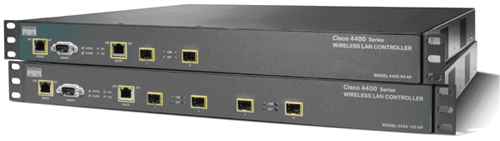
Field Notice: FN - 63258 - WLC 44xx Potential Power Failure

Url: http://www.cisco.com/en/US/partner/ts/fn/632/fn63258.html
Description: Cisco has observed that certain identified serial numbers of WLC 4400 series controllers may fail to boot on a subsequent power cycle. Few 4400 series controllers that are built between November 2008 and March 2009 have experienced lower test during power cycles due to a bad part.
Date: 2009-10-06 10:00:00.0


Sunday
Oct112009

My article about hacking a Cisco WLC / Rogue WCS Attack “All your base are belong to us” published by Author Brandon Carroll on Cisco Unwired - Networkworld.com 

My article about hacking a Cisco WLAN with a Rogue WCS/RRM packet exploit was published by and on Author and CCIE Brandon Carroll’s blog @ Networkword.com.


Read about it here:

http://www.networkworld.com/community/node/45961

Tuesday
Oct062009

Cisco WLC / Rogue WCS Attack “All your base are belong to us”

Geo - “I blogged on my site about the unencrypted RRM packet just a few weeks ago. The RRM packet got little attention, but I seen this as a much bigger issue. I seen this as more than just an IP address in the clear but rather a gold mine of information, but just how could it be exploited. “


In this tutorial I will share with you an attack using the recently identified and less talked about security vulnerability with the Cisco RRM packet in conjunction with SNMP. I would like to emphasize --- this video is to educate network engineers,  system administrators and security professionals of the potential risk of a enterprise wide attack on your Cisco Unified Wireless Network if Cisco best practices are not followed.

The foundation of this attack is to use the less talked about RRM and widely known SNMP vulnerabilities.  There isn’t  anything new that isn’t already known about these vulnerabilities, but what I will share  is the concept of an attack and the real world potential it may have in your enterprise especially if you use default strings or and more importantly if an attacker knows your strings on the WLC. The concept of the attack is simple, sniff the RRM packet, discovery the WLC, and then join the WLC to the rogue WCS server. After which point your wireless network is at the complete mercy of the hacker. The hacker could create a “rogue” ssid for later outside attack over wireless, complete DOS attack of your wireless network enterprise wide, delete admin accounts on the controllers to prevent you from logging into the controllers while an attack is underway.


Sunday
Sep272009

my80211.com OTAP Article picked up at computerweekly.com

Computerweekly.com picked up my article "There is more to the recent Cisco Wireless OTAP issue that isn’t being widely reported." about the controller information being sent in the clear when OTAP is disabled.

Read more about it here:

 http://www.my80211.com/storage/video-cisco-access-points-give-away-network-secrets.htm


Sunday
Sep272009

SouthWest goes WiFi!

Geo "I was on the road for the last 6 years and recently settled into a cube position and NOW SouthWest goes WiFi!. I love their comment about price points. Makes me wonder if they will charge by data use or speed. For all you hackers out there.... Rogue AP works great in Air Ports and even better on plans. On a flight not long ago I exchanged files in Adhoc @ 30,000 feet"

From South West:

As you know, we’ve been testing Wi-Fi on four aircraft since March.  I’m happy to announce we have concluded our testing for inflight Wi-Fi and we are very happy with both the technical performance of the system and the response of Customers who have used it. We are pleased to be continuing with our plans to offer satellite-enabled broadband access through California-based Row 44.

This fall we will be moving to the next step of certifying Southwest’s full fleet with plans to begin fleetwide rollout of the Row 44 satellite service in the first quarter of 2010.  Southwest is ready to have this service up and running as soon as possible and we are excited about these next steps.
 
Over the testing phase Customers have been utilizing the service for anything from e-mail to streaming video.  Those interested in using the service during the test period have had the opportunity to log on to the service via their own personal Wi-Fi enabled device (laptops, iPhones, Wi-Fi enabled smart phones, etc).  Additionally, Southwest has been testing a variety of price points for the service and will continue testing price points through the end of 2009.

The technology works, the product is great, and we look forward to offering more Customers Wi-Fi service in 2010.

Leeched from SW.com

Wednesday
Sep232009

Disable your Wireless NIC when plugged into a wired connection!?!?

I am often asked, "Is there away to disable a wireless NIC when I connect my laptop into a wired connection?". The answer is, YES!  In fact it is advisable to only have one NIC on at a time. When both NICs are enabled *Wired and Wireless" PCs can become confused. In fact there is a "costing" that is suppose to happen when you have both NICs enabled, but this doesn’t always work well and most of time doesn’t work at all!.

http://www.my80211.com/client-labs/2009/9/23/disable-your-wireless-nic-when-plugged-into-a-wired-connecti.html

There is security concerns as well. Suppose you are wired into a corperate network and you have your wireless NIC on. Now suppose someone has a rogue access point and your PC connects to it. Once you are connected to the rogue access point the rogue AP can pass you a DHCP and you will then have a layer 3 adjacency with the attacker. It is possible one could then exploit your laptop and breach over into the corperate network.I have never tested this, but perhaps in the near future I may give it a spin.There are a number of options you have to accomplish this ... I will share with you 4 of them

1) BIOS change

2) Intel Supplicant

3) Juniper Odyssey Supplicant

4) Cisco Cssc Supplicant

1) BIOS - Newer PCs come with BIOS options that allow you to modifiy how your wireless and wired NIC operate when both connections are present. For example if you own a HP laptop and you drop into the BIOS you will see LAN/WLAN switching. When enabled, your wireless NIC will disable itself when plugged into a wired connection.

The downside to the BIOS option, suppose you have to roll out hundreds of PCs. Making BIOS changes isn’t as easy as just making a change to an image.

 2) Intel Supplicant - Intel is everywhere and its likely you have Intel wireless NICs in most of your PCs. Intel calls this functionality  ADAPTER SWITCHING.

Click on your Intel wireless icon in your system tray--> Tools --> Admin Tools --> Application Settings --> Adapter Switching

3) Juniper Odyssey  Supplicant - This supplicant is one that you have to pay for, but I am a big fan of the juniper client, I've used it for years and allows for easier administration of devices. Juniper calls this functionality WIRELESS SUPPRESSION.

Click on your Juniper wireless icon in your system tray--> Tools --> Options --> Wireless Suppression 

4) Cisco CSSC - If you use CSSC you will find the NIC option under Advance Settings.

From client mode--> Advance settings -->Simultaneous Connection portion of the Security Settings pane --> Only allow one connection at a time to restrict the Client to creating only a single connection (prevent multihomed configurations).Note: the preference of the media type is fixed for wired/Ethernet, when both types are available within a network.

Enjoy!

Sunday
Sep202009

Cisco: Wireless data use will double every year


George - I came across this from another blog and found it interesting... I agree, wireless data is expanding leap and bounds.

The worldwide demand for wireless data capacity is enormous and growing at an incredible rate. Between 2008 and 2013, Cisco says wireless data traffic will double every year, reaching more than 2 exabytes per month by 2013.

Mobile data traffic will grow from its current 1 petabyte per month to 1 exabyte per month in half the time it took fixed data traffic to do so, Cisco reported. The internet grew from 1 petabyte per month to 1 exabyte per month in 14 years.

Keeping up with this data traffic is enormously expensive for the network carriers like AT&T, Verizon Wirless and Sprint, which have invested billions of dollars upgrading their systems to 3G standards. The next leap to 4G will be even more expensive.

The reason for this huge surge in demand for data is super fast connections on smartphones like BlackBerry and iPhone, which have turned the consumer cell phone market into a competition for which carrier and device can offer more features.

A BlackBerry generates more data traffic per user than 30 feature cell phones, Cisco said. Imagine if 4 billion mobile phone users all had data demand as high as that and you can see why telecom expense management is a challenging proposition.ADNFCR-2628-ID-19368816-ADNFCR

http://www.visagemobile.com/blog/2009/09/18/cisco-wireless-data-use-will-double-every-year/

Monday
Sep142009

802.3at-2009 Power over Ethernet (PoE) Plus Standard Ratified


Geo – “Another ratified standard indirectly related to wireless this week. Those of us who have used the Cisco 1252 “brick” access points know these puppy’s require the additional power also known at 802.3at, when running both radios.  “

http://www.my80211.com/home/2009/9/14/8023at-2009-power-over-ethernet-poe-plus-standard-ratified.html

The IEEE recently ratified 802.3at, a new Power over Ethernet Plus standard. The IEEE 802.3at-2009 Power over Ethernet (PoE) Plus standard defines the technology for powering a wide range of powered devices at up to 25W over existing CAT5e and above cables.

Mike McCormack, Chair of the IEEE P802.3at Task Force said, "IEEE 802.3at uses the Link Layer Discover Protocol (LLPD) from IEEE Std 802.1AB, which allows dynamic power allocation and negotiation down to 1/10th of a Watt, and associated technology including Type, Length, Values (TLVs) from IEEE 802.3bc, which was also recently approved. This will allow equipment manufactures to manage their power supply costs and efficiencies at levels not possible with previous standards, and to cut their costs in the process."

Click to read more ...