<?xml version="1.0" encoding="UTF-8"?>
<!--Generated by Squarespace Site Server v5.11.81 (http://www.squarespace.com/) on Thu, 16 Feb 2012 02:42:52 GMT--><feed xmlns="http://www.w3.org/2005/Atom" xmlns:dc="http://purl.org/dc/elements/1.1/"><title>Site Survey</title><subtitle>Site Survey</subtitle><id>http://www.my80211.com/site-survey/</id><link rel="alternate" type="application/xhtml+xml" href="http://www.my80211.com/site-survey/"/><link rel="self" type="application/atom+xml" href="http://www.my80211.com/site-survey/atom.xml"/><updated>2011-05-25T14:05:11Z</updated><generator uri="http://www.squarespace.com/" version="Squarespace Site Server v5.11.81 (http://www.squarespace.com/)">Squarespace</generator><entry><title>Site Survey: Intravenous WiFi (Survey Pole)</title><id>http://www.my80211.com/site-survey/2011/5/25/site-survey-intravenous-wifi-survey-pole.html</id><link rel="alternate" type="text/html" href="http://www.my80211.com/site-survey/2011/5/25/site-survey-intravenous-wifi-survey-pole.html"/><author><name>George</name></author><published>2011-05-25T13:57:28Z</published><updated>2011-05-25T13:57:28Z</updated><content type="html" xml:lang="en-US"><![CDATA[<h3>Recently, I repurposed an old IV pole as a site survey rig.</h3>
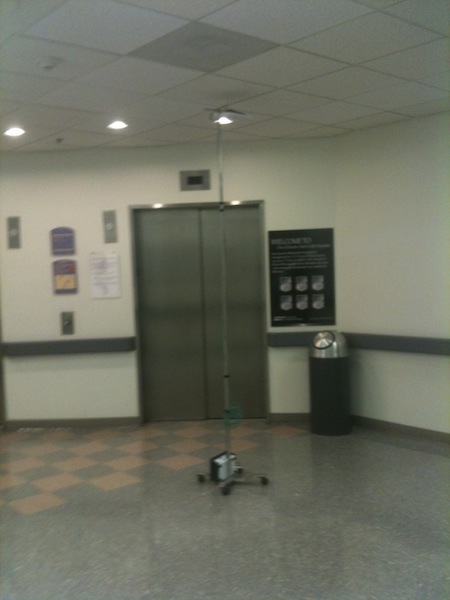
<p>Some see a collection of old carts and IV poles waiting to be exposed of as trash. As for me, I see parts for a <span class="full-image-float-right ssNonEditable"><span><img style="width: 350px;" src="http://www.my80211.com/storage/photo.jpg?__SQUARESPACE_CACHEVERSION=1306331762887" alt="" /></span></span>survey rig ! This isn&rsquo;t anything special and I didn&rsquo;t say it was pretty. I am repurposing a few of these for local survey rigs. I plan to keep 1 at each hospital.</p>
<p>I mention the word &ldquo;local&rdquo; rig because this isn&rsquo;t something that you can pack up and fly with. But if you work in healthcare it could be ideal to have one of these at each site. Or if you travel locally these travel comfortably in an suv.</p>
<p>IV poles come in all different shapes and sizes. I was lucky to find one that extends 12 feet in height and is very stable when fully extended with an access point attached. The casters are low profile and the battery (Terrawave) is placed at the base held into place with a band of velcro. I have a cat5 cable running the length of the pole held into place with velcro. The access point is secured into place with a band clamp and a piece of velcro on top to stabilize the ap.</p>
<p>This is still a work in progress.</p>
<p>On the end of the day it meets my need. It is very mobile and it was FREE!</p>
<p>&nbsp;</p>
<p>&nbsp;</p>
<p>&nbsp;</p>
<p><span class="full-image-float-left ssNonEditable"><span><a href="javascript:showFullImage('/display/ShowImage?imageUrl=%2Fstorage%2Fphoto1.jpg%3F__SQUARESPACE_CACHEVERSION%3D1306331557191',600,450);"><img src="http://www.my80211.com/storage/thumbnails/3116837-5050210-thumbnail.jpg?__SQUARESPACE_CACHEVERSION=1306331779761" alt="" /></a></span></span><a href="javascript:showFullImage('/display/ShowImage?imageUrl=%2Fstorage%2Fphoto1.jpg%3F__SQUARESPACE_CACHEVERSION%3D1306331557191',600,450);"></a><a href="javascript:showFullImage('/display/ShowImage?imageUrl=%2Fstorage%2Fphoto2.jpg%3F__SQUARESPACE_CACHEVERSION%3D1306331651411',600,450);"><img src="http://www.my80211.com/storage/thumbnails/3116837-5050206-thumbnail.jpg?__SQUARESPACE_CACHEVERSION=1306331694068" alt="" /></a><span class="thumbnail-image-block ssNonEditable"><span class="thumbnail-caption" style="width: 150px;">ivpole.batter</span></span></p>
<p>﻿</p>]]></content></entry><entry><title>Site Survey Hint: Attach your WiFi Phone to your Survey PC (VoIP Assessment)</title><id>http://www.my80211.com/site-survey/2010/2/13/site-survey-hint-attach-your-wifi-phone-to-your-survey-pc-vo.html</id><link rel="alternate" type="text/html" href="http://www.my80211.com/site-survey/2010/2/13/site-survey-hint-attach-your-wifi-phone-to-your-survey-pc-vo.html"/><author><name>George</name></author><published>2010-02-13T23:01:49Z</published><updated>2010-02-13T23:01:49Z</updated><content type="html" xml:lang="en-US"><![CDATA[<p><span class="full-image-block ssNonEditable">&nbsp;</span></p>
<p><a href="http://twitter.com/wirelesssguru" target="_blank"><img src="http://www.my80211.com/storage/twitter30-1.png?__SQUARESPACE_CACHEVERSION=1262749802343" alt="" width="100" height="43" /></a><span style="color: #181818;">&nbsp;<span class="full-image-inline ssNonEditable"><a href="http://feeds.feedburner.com/my80211/feeds" target="_blank"><img style="width: 40px;" src="http://www.my80211.com/storage/rss_icon_glass48.jpg?__SQUARESPACE_CACHEVERSION=1262753456609" alt="" /></a></span> </span></p>
<div id="_mcePaste"></div>
<h3>Having conducted more surveys then a belt will allow notches you start to find ways to improve your survey skill set with accuracy and speed. One of these ways came to me completely by accident one day many years ago at lunch.</h3>
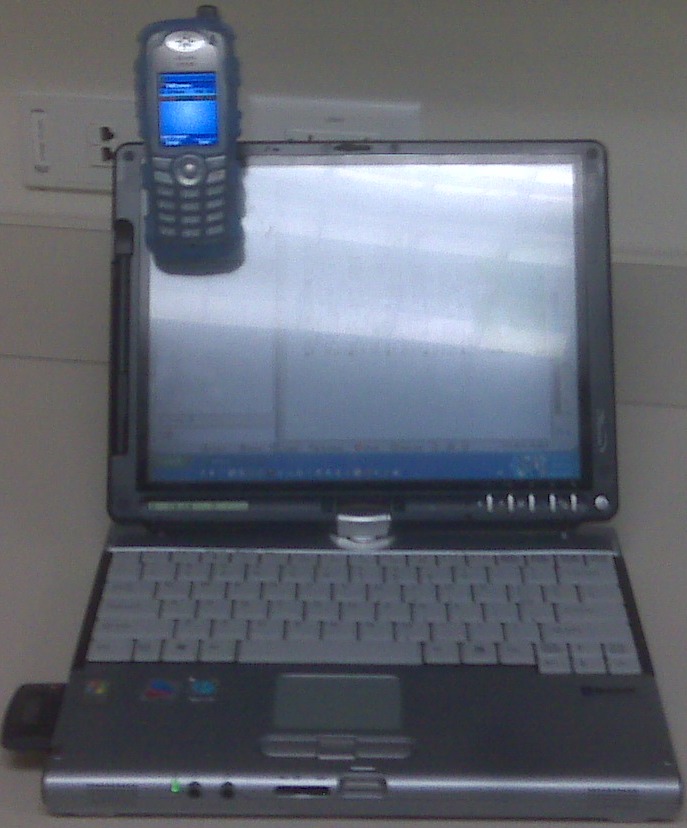
<p>If you are new to surveys or perhaps you have a few hundred already under your belt. The common theme to a good active survey is to understand your lowest powered clients and sensitive applications and their limitations. It is also important to understand the environment in which these devices will<span class="full-image-float-right ssNonEditable"><span><img style="width: 350px;" src="http://www.my80211.com/storage/surveywciscophone1.jpg?__SQUARESPACE_CACHEVERSION=1266101914316" alt="" /></span></span>&nbsp;operate. Then calibrate your survey cards to these lower devices, which can be tricky for someone with limited experience.</p>
<p>There are many decent tools in which you can conduct active site surveys. One of these tools in which I am very familiar with is AirMagnet Surveyor. But never ever assume ANY old wifi card is OK to conduct a survey. In fact, when conducting active surveys you want to use the identical card or one very close to which will be used by your customer.</p>
<p>Example -- If you are surveying for Vocera B2000, Cisco 7921,7925, Ascom i75 deployment you don&rsquo;t want to roll in with a 200mW card or a crappy chipset and let it run loose!?</p>
<p>When I survey for a Voice assessment I like to use that device during my assessment. Why? Because you know WITHOUT QUESTION how that phone / vocera badge / ascom phone will operate.</p>
<p>When I survey for a Vocera deployment, I will use the badge in survey mode in combination with AirMagnet. I will wear the badge around my neck enter the room, door closed and my back to the door and see what the Vocera badge is telling me. You will be surprised when you see what a pcmcia card reads and what the badge reads! In fact the majority of Vocera deployment failures is due to poor assessments. Thus the reason why Vocera has pulled in the assessment portion for their deployments.</p>
<p>Same holds true for handset deployments with Cisco, Ascom and others. These devices have a site survey mode as well. I will put these devices in site survey mode and use in combination with AirMagnet. Then one day at lunch many years ago I attached my Cisco handset to my laptop! Light bulb went off! What better way to survey and easily see the phones survey readings!</p>
<p>I hope you find this helpful during your surveys as well!</p>]]></content></entry><entry><title>Why you should consider "Monitor" Access Points as part of your Cisco Unified WLAN design and architecture</title><id>http://www.my80211.com/site-survey/2010/1/9/why-you-should-consider-monitor-access-points-as-part-of-you.html</id><link rel="alternate" type="text/html" href="http://www.my80211.com/site-survey/2010/1/9/why-you-should-consider-monitor-access-points-as-part-of-you.html"/><author><name>George</name></author><published>2010-01-09T18:11:16Z</published><updated>2010-01-09T18:11:16Z</updated><content type="html" xml:lang="en-US"><![CDATA[<p><span class="full-image-block ssNonEditable">&nbsp;</span></p>
<p><span><a href="http://twitter.com/wirelesssguru" target="_blank"><img src="http://www.my80211.com/storage/twitter30-1.png?__SQUARESPACE_CACHEVERSION=1262749802343" alt="" width="100" height="43" /></a></span><span style="color: #181818;">&nbsp;<span class="full-image-inline ssNonEditable"><span><a href="http://feeds.feedburner.com/my80211/feeds" target="_blank"><img style="width: 40px;" src="http://www.my80211.com/storage/rss_icon_glass48.jpg?__SQUARESPACE_CACHEVERSION=1262753456609" alt="" /></a></span></span> </span></p>
<h3>You are probably asking yourself, why!? Or perhaps, you did not know you could add access points in &ldquo;Monitor&rdquo; mode only. So, let&rsquo;s deep dive this design consideration and why you as a Wireless Admin may want to consider deploying monitor access points in your WLAN.</h3>
<p>We all seen the access point and client rogue alerts, signature attacks, (IDS, IPS) and other environment events on the WLC and WCS dashboard. Do you know how these alerts are gathered? This function is<span class="full-image-float-right ssNonEditable"><span><img src="http://www.my80211.com/storage/1142.jpg?__SQUARESPACE_CACHEVERSION=1263061063458" alt="" /></span></span>&nbsp;part of RRM (Radio Resource Monitoring/Management) Lets look how&hellip;</p>
<p>Cisco Unified (Lightweight) access points go off-line and conduct scans in the environment. Much like if you had a sniffer, in the area of the access point conducting the scan on your laptop.&nbsp; During these scans the information gathered is sent to the WLC where this information is processed and displayed.&nbsp; But here is the problem. &nbsp;&nbsp;</p>
<p>Cisco Unified (Lightweight) access points only spends 0.2% off-channel scanning. Further more, the access point will only spend 60ms during EACH scan (10ms to switch channels and 50ms to scan the actual channel). &nbsp;This activity is distributed across your WLAN so that adjacent access points are not scanning at the same time.</p>
<p><span class="SC152553"><strong>Note:</strong> </span><span class="SC152609"><em>In the presence of voice traffic (in the last 100 ms), the access points defer off-channel measurements.</em></span></p>
<p><span class="SC152609">I&rsquo;ve completed specific testing with no monitor access points deployed in large enterprise environments, only using existing access points with default RRM monitoring enabled. </span></p>
<p><span class="SC152609">I conducted testing where I deployed a (1/6) access point ratio. By this I mean for every 6 production access points I would add (1) access point in monitor mode and found an increase of 25% increase on average of environment information. The reason for this increase is simple. Access points that are only on a channel for short intervals can not see every packet, while access points that are on channel can see far greater more packets.&nbsp;</span></p>
<p><span class="SC152609">Additionally, Cisco unified access point modes include more then just monitor. It includes rouge detector and sniffer modes. Allowing you to leverage your monitor access points in more ways then one.&nbsp;</span></p>
<p><span class="SC152609">In closing, you may want to consider deploying monitor access points in your design.</span></p>]]></content></entry></feed>