<?xml version="1.0" encoding="UTF-8"?>
<!--Generated by Squarespace Site Server v5.11.81 (http://www.squarespace.com/) on Thu, 16 Feb 2012 02:43:08 GMT--><rss xmlns:content="http://purl.org/rss/1.0/modules/content/" xmlns:wfw="http://wellformedweb.org/CommentAPI/" xmlns:itunes="http://www.itunes.com/dtds/podcast-1.0.dtd" xmlns:dc="http://purl.org/dc/elements/1.1/" version="2.0"><channel><title>Security Labs</title><link>http://www.my80211.com/security-labs/</link><description></description><lastBuildDate>Sun, 17 Oct 2010 16:29:49 +0000</lastBuildDate><copyright></copyright><language>en-US</language><generator>Squarespace Site Server v5.11.81 (http://www.squarespace.com/)</generator><item><title>Joshua Wright talks to NPR about “Free Public WiFi” vulnerability</title><dc:creator>George</dc:creator><pubDate>Sun, 17 Oct 2010 16:29:38 +0000</pubDate><link>http://www.my80211.com/security-labs/2010/10/17/joshua-wright-talks-to-npr-about-free-public-wifi-vulnerabil.html</link><guid isPermaLink="false">302415:3121981:9207418</guid><description><![CDATA[<h3><strong><span style="color: #333333;">Joshua Wright talks briefly about the &ldquo;Free Public WiFi&rdquo;, adhoc network. This tactic has been around for a longtime. In fact, frequent travelers should be on the look out for hotel chain SSIDs in adhoc mode as well. </span></strong></h3>
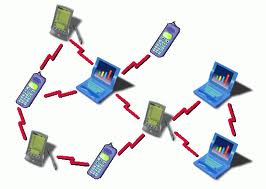
<p><span style="color: #333333;">Depending on your configuration your wireless supplicant may connect automatically to these adhoc<span class="full-image-float-right ssNonEditable"><img src="http://www.my80211.com/storage/adhoc.jpg?__SQUARESPACE_CACHEVERSION=1287332537804" alt="" /></span>&nbsp;networks without you really knowing. Other times, the users sees a pop up &ldquo;Free Public WiFi&rdquo; and willingly connects to the network in hopes of free internet access. To the untrained eye these are wireless networks promising a free WiFi connection. However, you have no idea who is on the other end. The mobile user suspects it a real access point. </span></p>
<p><span style="color: #333333;">This NPR article stops by saying &ldquo;it&rsquo;s a bad thing and you should never connect&rdquo;. But lets cover the why and the how. Suppose&nbsp; I configure an adhoc wireless network &nbsp;broadcasting the SSID &ldquo;Free Public WiFi&rdquo; from my laptop in a busy area where mobile users frequent. This could be at the mall, airport and conference center for example. The adhoc configuration is simple, so simple in fact it can be done in under a minute. You may recall a number of months ago the Russian spy&rsquo;s were using adhoc wireless to communicate amongst themselves. &nbsp;&nbsp;</span></p>
<p><span style="color: #333333;">After I configure my adhoc wireless network. A non suspecting mobile user connects to me thinking they are getting FREE PUBLIC WiFi. But what they don&rsquo;t realize they are connecting to my laptop. At which point I now have a layer 2 adjacency with this user. From here I could run a DHCP server on a VM local to my laptop. Whereby bridging layer 3 connectivity between me and the unsuspecting mobile user.</span></p>
<p><span style="color: #333333;">Once this is complete it&rsquo;s a simple launch of Backtrack, whereby I could act as a man in the middle or deploy a library of attacks.</span>&nbsp;</p>
<p><a style="font-size: 130%;" href="http://www.npr.org/templates/story/story.php?storyId=130451369"><span style="font-size: 130%;">http://www.npr.org/templates/story/story.php?storyId=130451369</span></a><span style="font-size: 130%;">&nbsp;</span></p>
<p>Wikipedia - <a href="http://en.wikipedia.org/wiki/Wireless_security">http://en.wikipedia.org/wiki/Wireless_security</a><br /> Security Tube - <a href="http://www.securitytube.net/Attacks-on-WiFi-(ADHOC-Networks)-video.aspx">http://www.securitytube.net/Attacks-on-WiFi-(ADHOC-Networks)-video.aspx</a> <br /> Hot Spots Attacks - <a href="http://www.ethicalhacker.net/content/view/66/24/">http://www.ethicalhacker.net/content/view/66/24/</a></p>]]></description><wfw:commentRss>http://www.my80211.com/security-labs/rss-comments-entry-9207418.xml</wfw:commentRss></item><item><title>Cisco WiSM Config Practice Opens SVI Vulnerability</title><dc:creator>George</dc:creator><pubDate>Fri, 08 Oct 2010 02:12:54 +0000</pubDate><link>http://www.my80211.com/security-labs/2010/10/7/cisco-wism-config-practice-opens-svi-vulnerability.html</link><guid isPermaLink="false">302415:3121981:9130931</guid><description><![CDATA[<h3>Cisco&rsquo;s recommend WiSM configuration practice will make you vulnerable &ndash; by George Stefanick</h3>
<blockquote>
<p>I was asked, &ldquo;The WiSM Config Practice has been out for years, how did you find this ?&rdquo; The devil is in the details....&nbsp;</p>
</blockquote>
<h3><span><span style="color: black;">WiSM Configuration Practice</span></span></h3>
<p><span style="color: black;">The initial steps in configuring a Cisco WiSM is what I like to call a &ldquo;configure-and-forget&rdquo; step. This is because once the WiSM is configured and married to the backplane of the Sup720 via the &ldquo;service port&rdquo; its rare one would need to revisit this procedure again. </span></p>
<p><span style="color: black;">There are a number of Cisco WiSM Configuration guides available at cisco.com explaining this process. We will get into these in a bit&hellip;</span><span style="color: #000000;">&nbsp;</span></p>
<h3><span style="color: black;">What is the WiSM &ldquo;service port&rdquo;?</span></h3>
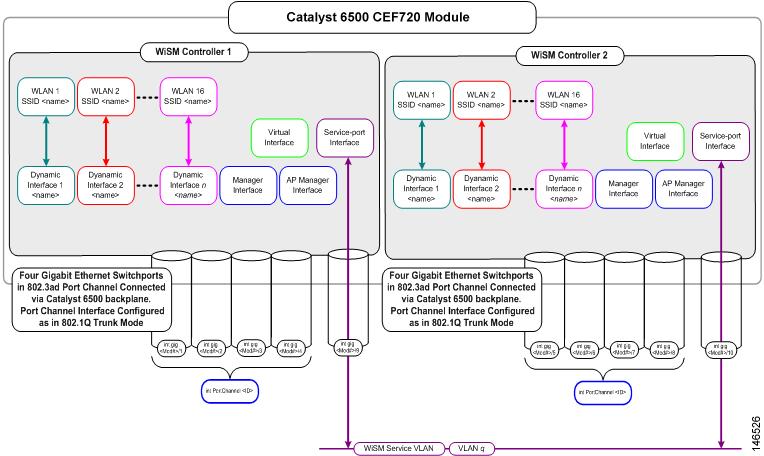
<p><span style="color: black;">First lets understand what the service port interface is and the purpose of the service port. The WiSM service port is one of many ports on a Cisco WiSM. They include the management, ap manager, virtual, service and the operator dynamic interfaces. </span></p>
<ul>
<li><span style="color: black;">&nbsp;Management interface (pre-defined and mandatory)</span></li>
<li><span style="color: black;">&nbsp;AP-Manager interface (pre-defined and mandatory)</span></li>
<li><span style="color: black;">&nbsp;Virtual interface (pre-defined and mandatory)</span></li>
<li><span style="color: black;">&nbsp;Service-port interface (pre-defined and mandatory)</span></li>
<li><span style="color: black;">&nbsp;</span><span style="color: black;">Operator-defined interface (user-defined)</span></li>
</ul>
<p><span style="color: #000000;">Cisco&rsquo;s 4400 and 5500 model controller&rsquo;s service port is used for out-of-bandwidth management. The service port is a physical port supported on these models, whereby allowing you physical access with a console / null modem cable.</span></p>
<p><span style="color: black;">Contrary to the service port on the 4400 and&nbsp; 5500&rsquo;s models. The WiSM service port is NOT used for out-of-bandwidth management. Rather it is used to <span>synchronize the supervisor engine (720) and the WiSM.&nbsp;</span></span></p>
<p><span style="color: black;"><span><span class="full-image-block ssNonEditable"><span><img style="width: 500px;" src="http://www.my80211.com/storage/wismservice.jpg?__SQUARESPACE_CACHEVERSION=1286503472736" alt="" /></span></span><br /></span></span></p>
<h3><span style="color: black;">How does the &ldquo;service port&rdquo; on the Cisco WiSM connect to the Sup720?</span></h3>
<p><span style="color: black;">Once the WiSM is installed, you enter the Sup720 and create a local vlan for the purpose of communications between both the WiSM and the Sup720.&nbsp; Cisco references vlan 192 in their WiSM config documents, but of course any vlan number can be used.&nbsp; </span></p>
<p><span style="color: black;">Cisco&rsquo;s WiSM Configuration documentation goes a step further and states to create an SVI interface. An SVI interface is a gateway to bridge traffic. (Here in lies the problem. I will cover in more detail in the next section.)</span></p>
<p><span style="color: black;">(See below reference and links to Cisco WiSM configuration Guides, note the SVI interface&nbsp;</span><span style="color: #000000;">recommendations and the lack of an ACL)&nbsp;</span></p>
<p><span style="color: black;"><br /></span></p>
<h3><span style="color: black;">The Vulnerability</span></h3>
<p><span style="color: black;">The Cisco WiSM Configuration Guides detail the creation of an SVI interface for the purpose of the service port interface. For example;</span></p>
<p><span style="color: black;">Sup720(config)# <strong>interface Vlan 192<br /></strong></span><span style="color: #000000;">Sup720(config-if)# <strong>ip address 192.168.10.1 255.255.255.0<br /></strong></span><span style="color: #000000;">Sup720(config-if)# <strong>no shutdown<br /></strong></span><span style="color: #000000;">Sup720(config-if)# <strong>exit</strong></span></p>
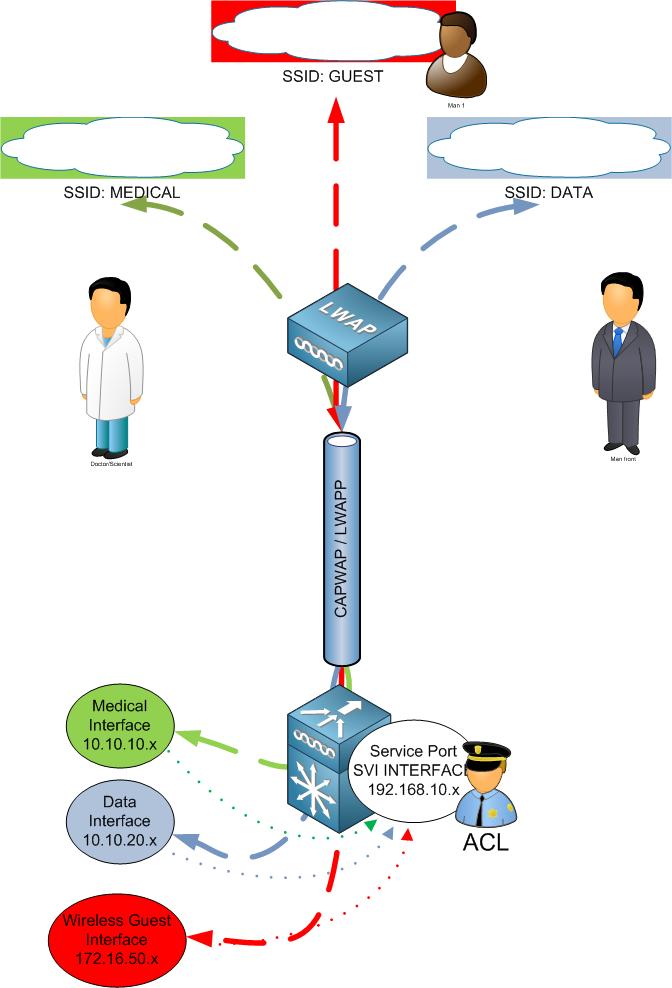
<p><span style="color: #000000;">The Cisco WiSM Guides makes no reference to an ACL which would restrict traffic access to the service port SVI interface. By creating the SVI interface you have a &ldquo;connected route&rdquo; from users who terminate to the 6500 to reach the SVI interface. This would include wired and wireless users. Essentially, inside users have access to the WiSM service port. This would also include wireless guest!</span></p>
<p><span style="color: black;">Lets follow the packet:</span></p>
<p><span style="color: black;">1)&nbsp;&nbsp;&nbsp;&nbsp; </span><span style="color: black;">Wireless client pings 192.168.10.1 </span></p>
<p><span style="color: black;">2)&nbsp;&nbsp;&nbsp;&nbsp; </span><span style="color: black;">The packet egresses the wireless client and 802.11 headers are applied</span></p>
<p><span style="color: black;">3)&nbsp;&nbsp;&nbsp;&nbsp; </span><span style="color: black;">The packet travels via RF </span></p>
<p><span style="color: black;">4)&nbsp;&nbsp;&nbsp;&nbsp; </span><span style="color: black;">Packet reaches Access Point </span></p>
<p><span style="color: black;">5)&nbsp;&nbsp;&nbsp;&nbsp; </span><span style="color: black;">Access points encapsulates the packet in a LWAPP/CAPWAP headers</span></p>
<p><span style="color: black;">6)&nbsp;&nbsp;&nbsp;&nbsp; </span><span style="color: black;">The packet is then sent to the Cisco WiSM / Controller</span></p>
<p><span style="color: black;">7)&nbsp;&nbsp;&nbsp;&nbsp; </span><span style="color: black;">The WiSM removes the LWAPP/CAPWAP encapsulation and adds 802.3 headers</span></p>
<p><span style="color: black;">8)&nbsp;&nbsp;&nbsp;&nbsp; </span><span style="color: black;">The WiSM places the packet on the wired</span></p>
<p><span style="color: black;">9)&nbsp;&nbsp;&nbsp;&nbsp; </span><span style="color: black;">The packet transverses the router to the connected 192.168.10.1 SVI interface</span></p>
<p><span style="color: black;">&nbsp;</span><span style="color: #000000;">&nbsp;</span></p>
<p><span style="color: black;">I&rsquo;m positive this is an oversight by Cisco. Recent conversations with Cisco SE&rsquo;s, Cisco TAC and other peers agree this is an issue on many levels. </span></p>
<p><span style="color: black;">Engineers and Admins who configure the WiSM for the first time or perhaps engineers who have little knowledge would follow the Cisco WiSM Configuration Guide step by step. Not understanding that an ACL needs to be applied to the SVI interface for the WiSM service port.&nbsp;</span></p>
<h3><span style="color: black;">Real World Examples:</span></h3>
<p><span style="color: black;">Lets cover why this is an issue with some real world examples:</span></p>
<p><strong>Example#1 &ndash;</strong></p>
<p><span style="color: black;">Your inside networks are 10.x.x.x and 172.x.x.x. Your service port on the WiSM is configured for 192.168.10.x network. Users who terminated to the cat / Sup 720 that houses the WiSM has access to the SVI interface 192.168.10.x. Why, because it is a connected route. The traffic will bridge over from 10 / 172 &nbsp;to the 192 network. </span></p>
<p><span style="color: black;">&nbsp;</span></p>
<p><span style="color: #000000;"><strong>Example#2 &ndash;</strong></span></p>
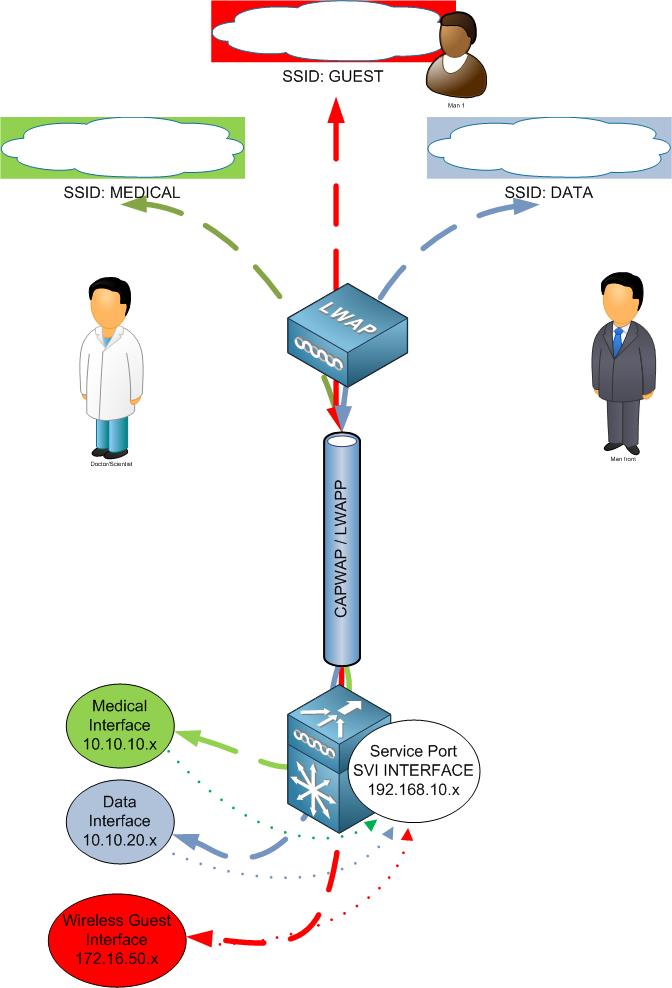
<p><span style="color: black;">Suppose you don&rsquo;t have a Cisco WLC to anchor guest traffic. Your wireless guest traffic terminates to the &nbsp;cat / Sup720 that houses the WiSM. Let suppose you ACL your "GUEST" SVI interface denying your known inside networks. You think you are done and call it a day. </span></p>
<p><span style="color: black;">DENY 10.0.0.0 (inside network)</span></p>
<p><span style="color: #000000;">But did you remember to deny 192.168.10.x? If you didn&rsquo;t your wireless guest now have access to your service port</span></p>
<p><span style="color: black;"><span class="full-image-inline ssNonEditable"><span><img style="width: 400px;" src="http://www.my80211.com/storage/wism%20service%20port%20issue%20guest.jpg?__SQUARESPACE_CACHEVERSION=1286502824625" alt="" /></span></span><br /></span></p>
<h3><span style="color: black;">How to Fix it:</span></h3>
<p><span style="color: black;">If you configured an SVI interface. Simply ACL the SVI not to allow ANY network access to this SVI interface. &nbsp;</span></p>
<p><span style="color: black;"><span class="full-image-block ssNonEditable"><span><img style="width: 450px;" src="http://www.my80211.com/storage/wism%20service%20port%20issue%20gues%20with%20aclt.jpg?__SQUARESPACE_CACHEVERSION=1286503215378" alt="" /></span></span><br /></span></p>
<h3><span style="color: black;">Conclusion:</span></h3>
<p><span style="color: black;">I admit this isn&rsquo;t a five-alarm hole. You don&rsquo;t have to drop everything you are doing.&nbsp; But it is one that needs to be addressed if you followed Cisco WiSM Configuration Guides.</span></p>
<p>&nbsp;</p>
<h3><span style="color: black;">Cisco links to WiSM Config</span></h3>
<p><a href="http://www.cisco.com/en/US/docs/wireless/technology/wism/technical/reference/appnote.html">http://www.cisco.com/en/US/docs/wireless/technology/wism/technical/reference/appnote.html</a></p>
<p><span style="color: black;">! - Create a vlan in the Supervisor 720, this vlan is local to the chassis and is used for </span></p>
<p><span style="color: black;">communication between Cisco WiSM and Catalyst Supervisor 720 over a Gigabit interface on </span></p>
<p><span style="color: black;">the Supervisor and service-port in the Cisco WiSM.</span><span style="color: #000000;">&nbsp;</span></p>
<p><span style="color: black;">Sup720(config)# <strong>vlan 192</strong></span><span style="color: #000000;">&nbsp;</span></p>
<p><span style="color: black;">! -- Assign an appropriate IP address and subnet mask for VLAN 192</span><span style="color: #000000;">&nbsp;</span></p>
<p><span style="color: black;">Sup720(config)# <strong>interface Vlan 192</strong></span></p>
<p><span style="color: black;">Sup720(config-if)# <strong>ip address 192.168.10.1 255.255.255.0</strong></span></p>
<p><span style="color: black;">Sup720(config-if)# <strong>no shutdown</strong></span></p>
<p><span style="color: black;">Sup720(config-if)# <strong>exit</strong></span></p>
<p><strong><span style="color: black;">&nbsp;</span></strong></p>
<p><a href="http://www.cisco.com/en/US/products/hw/modules/ps2706/products_tech_note09186a00808330a9.shtml">http://www.cisco.com/en/US/products/hw/modules/ps2706/products_tech_note09186a00808330a9.shtml</a></p>
<p><span style="color: black;"> Create the WiSM Service Port Gateway and assign the IP address.</span></p>
<p><span style="color: black;">Create a VLAN in the Supervisor 720. This VLAN is local to the chassis and is used for communication between Cisco WiSM and Catalyst Supervisor 720 over a Gigabit Interface on the Supervisor and a service port in the Cisco WiSM.</span></p>
<pre><strong><span style="color: black;">interface </span></strong><em><span style="color: black;">Vlan192</span></em>&nbsp;</pre>
<pre><span style="color: black;">Description WiSM Service Port Gateway or Management Interface on CAT6K</span></pre>
<pre><strong><span style="color: black;">ip address </span></strong><em><span style="color: black;">192.168.10.1 255.255.255.0</span></em><strong>&nbsp;</strong></pre>
<p><span style="color: black;">&nbsp;</span></p>
<p><span style="color: black;">&nbsp;</span></p>]]></description><wfw:commentRss>http://www.my80211.com/security-labs/rss-comments-entry-9130931.xml</wfw:commentRss></item><item><title>TKIP Countermeasure caught in the wild!</title><category>cwsp</category><category>tkip</category><category>tkip countermeasure</category><category>wifi hacking</category><category>wifi security</category><dc:creator>George</dc:creator><pubDate>Sat, 15 May 2010 14:27:28 +0000</pubDate><link>http://www.my80211.com/security-labs/2010/5/15/tkip-countermeasure-caught-in-the-wild.html</link><guid isPermaLink="false">302415:3121981:7679233</guid><description><![CDATA[<p><span class="full-image-block ssNonEditable">&nbsp;<a href="http://twitter.com/wirelesssguru" target="_blank"><img src="http://www.my80211.com/storage/twitter30-1.png?__SQUARESPACE_CACHEVERSION=1262749802343" alt="" width="100" height="43" /></a><span style="color: #181818;">&nbsp;<span class="full-image-inline ssNonEditable"><a href="http://feeds.feedburner.com/my80211/feeds" target="_blank"><img style="width: 40px;" src="http://www.my80211.com/storage/rss_icon_glass48.jpg?__SQUARESPACE_CACHEVERSION=1262753456609" alt="" /></a></span></span></span></p>
<div id="_mcePaste"></div>
<h3><strong>I want to share an event you may not see very often in the wild, TKIP countermeasure.&nbsp;</strong></h3>
<div id="_mcePaste"></div>
<div id="_mcePaste">What is a TKIP countermeasure and why is it important?</div>
<div>&nbsp;</div>
<div></div>
<div></div>
<div>By deafult, Cisco WLCs and autonomous access points will suspend all TKIP traffic on a radio / ssid if a client sends 2 bad MICs in a 60 second period for a <span style="text-decoration: underline;">duration of &nbsp;60 second</span>. This is a measure that prevents the spoofing of frames by hackers.</div>
<div>&nbsp;</div>
<div></div>
<div>Fully authorized wireless clients can occasionally send a bad MIC(s). In fact, a colleague of mine once had a bad wireless NIC that was notorious for throwing bad MICs. His machine was a walking "DoS" attack of sorts. LOL</div>
<div>&nbsp;</div>
<div></div>
<div></div>
<div></div>
<h3>The TKIP countermeasure is a configurable variable by SSID and can be disabled. I blogged about this in December of last year. The commands for both the WLC and Autonomous are below:</h3>
<div></div>
<div><strong><br /></strong></div>
<div id="_mcePaste"><span style="font-size: 150%;">WLC</span> -<a href="http://www.my80211.com/voip-labs/2009/12/29/configure-tkip-countermeasure-holdoff-timer-on-wlc.html"> http://www.my80211.com/voip-labs/2009/12/29/configure-tkip-countermeasure-holdoff-timer-on-wlc.html</a></div>
<div></div>
<div></div>
<div></div>
<div></div>
<div></div>
<div></div>
<div></div>
<div></div>
<div></div>
<div></div>
<div id="_mcePaste"><span style="font-size: 150%;">Autonomous</span> - <a href="http://www.my80211.com/cisco-auton-cli-commands/2009/12/29/configure-tkip-countermeasure-holdoff-timer-on-autonomous.html">http://www.my80211.com/cisco-auton-cli-commands/2009/12/29/configure-tkip-countermeasure-holdoff-timer-on-autonomous.html<br /><br /></a></div>
<div></div>
<div></div>
<div></div>
<div></div>
<div></div>
<div></div>
<div id="_mcePaste"></div>
<div></div>
<div></div>
<div id="_mcePaste"></div>
<h3>So what happen?</h3>
<div></div>
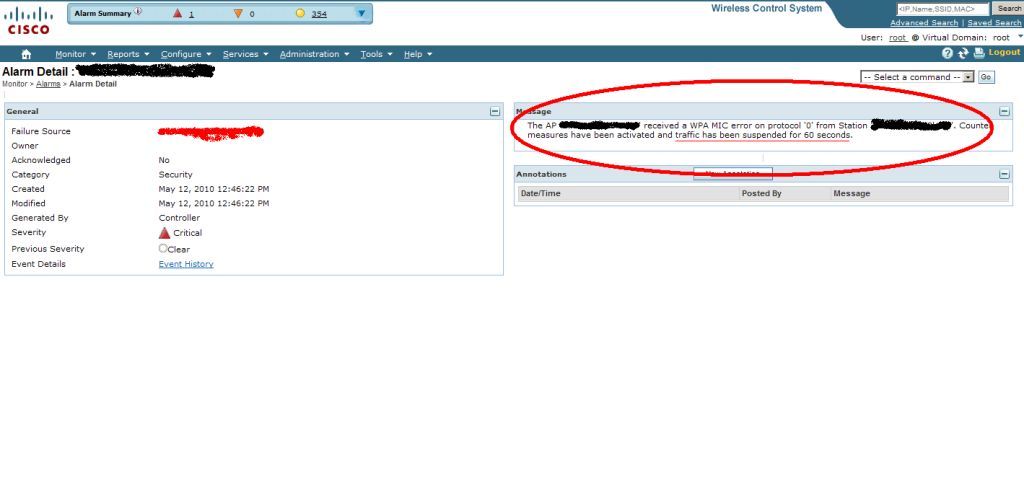
<div>I was simply reviewing logs in WCS when an alert popped up. Once I seen 'MIC' in the header I thought right away, is this a TKIP countermeasure event and sure enough. I've since monitored the device to insure it wasnt a problem child.</div>
<div></div>
<div>NOTE: Cisco recommends to disabled TKIP Countermeasure on all Voice SSIDs.</div>
<div>&nbsp;</div>
<div></div>
<div><span class="full-image-block ssNonEditable"><span><img style="width: 900px;" src="http://www.my80211.com/storage/mic.jpg?__SQUARESPACE_CACHEVERSION=1273809862236" alt="" /></span></span></div>]]></description><wfw:commentRss>http://www.my80211.com/security-labs/rss-comments-entry-7679233.xml</wfw:commentRss></item><item><title>Cisco WLC / Rogue WCS Attack “All your base are belong to us”</title><dc:creator>George</dc:creator><pubDate>Wed, 07 Oct 2009 02:47:06 +0000</pubDate><link>http://www.my80211.com/security-labs/2009/10/6/cisco-wlc-rogue-wcs-attack-all-your-base-are-belong-to-us.html</link><guid isPermaLink="false">302415:3121981:5418846</guid><description><![CDATA[<p><a title="Subscribe to my feed" rel="alternate" type="application/rss+xml" href="http://feeds.feedburner.com/my80211/feeds"><img style="border: 0;" src="http://www.feedburner.com/fb/images/pub/feed-icon32x32.png" alt="" /></a></p>
<blockquote>
<h2>Geo - &ldquo;I blogged on my site about the unencrypted RRM packet just a few weeks ago. The RRM packet got little attention, but I seen this as a much bigger issue. I seen this as more than just an IP address in the clear but rather a gold mine of information, but just how could it be exploited. &ldquo;</h2>
</blockquote>
<p>In this tutorial I will share with you an attack using the recently identified and less talked about security vulnerability with the Cisco RRM packet in conjunction with SNMP. I would like to emphasize --- this video is to educate network engineers,&nbsp; system administrators and security professionals of the potential risk of a enterprise wide attack on your Cisco Unified Wireless Network if Cisco best practices are not followed.</p>
<p>The foundation of this attack is to use the less talked about RRM and widely known SNMP vulnerabilities. &nbsp;There isn&rsquo;t &nbsp;anything new that isn&rsquo;t already known about these vulnerabilities, but what I will share &nbsp;is the concept of an attack and the real world potential it may have in your enterprise especially if you use default strings or and more importantly if an attacker knows your strings on the WLC. The concept of the attack is simple, sniff the RRM packet, discovery the WLC, and then join the WLC to the rogue WCS server. After which point your wireless network is at the complete mercy of the hacker. The hacker could create a &ldquo;rogue&rdquo; ssid for later outside attack over wireless, complete DOS attack of your wireless network enterprise wide, delete admin accounts on the controllers to prevent you from logging into the controllers while an attack is underway.</p>
<p><embed src="http://blip.tv/play/hLkugaW2SgA%2Em4v" type="application/x-shockwave-flash" width="200" height="200" allowscriptaccess="always" allowfullscreen="true"></embed></p>
&nbsp;]]></description><wfw:commentRss>http://www.my80211.com/security-labs/rss-comments-entry-5418846.xml</wfw:commentRss></item><item><title>There is more to the recent Cisco Wireless OTAP issue that isn’t being widely reported.</title><dc:creator>George</dc:creator><pubDate>Sat, 05 Sep 2009 07:11:58 +0000</pubDate><link>http://www.my80211.com/security-labs/2009/9/5/there-is-more-to-the-recent-cisco-wireless-otap-issue-that-i.html</link><guid isPermaLink="false">302415:3121981:5090754</guid><description><![CDATA[<p><a title="Subscribe to my feed" rel="alternate" type="application/rss+xml" href="http://feeds.feedburner.com/my80211/feeds"><img style="border:0" src="http://www.feedburner.com/fb/images/pub/feed-icon32x32.png" alt="" /></a></p> <p>In the last week you heard about the OTAP issue. OTAP stands for Over The Air Provisioning. It is a means whereby a Cisco access point can find a Cisco controller to initiate a join process.</p>
<p>OTAP when enable, by design , sends the controller mac and ip information in the clear every 60 seconds in the multicast RRM packet. This aids access points to join the network.</p>
<p>Cisco recommends you disable OTAP during normal production. OTAP should only be deployed during the deployment phase of a wireless network.</p>
<p>What isn&rsquo;t being reported, when disabled the RRM packets still includes the controller mac and ip address!</p>
<p>&nbsp;Enjoy the video&nbsp;</p>
<p><embed src="http://blip.tv/play/AYGdsUoA" type="application/x-shockwave-flash" width="200" height="200" allowscriptaccess="always" allowfullscreen="true"></embed></p>
&nbsp;]]></description><wfw:commentRss>http://www.my80211.com/security-labs/rss-comments-entry-5090754.xml</wfw:commentRss></item><item><title>Do you use Windows Zero Config as your WLAN Client Management tool of choice? Perhaps you shouldn't!</title><dc:creator>George</dc:creator><pubDate>Sat, 10 Jan 2009 01:11:00 +0000</pubDate><link>http://www.my80211.com/security-labs/2009/1/9/do-you-use-windows-zero-config-as-your-wlan-client-managemen.html</link><guid isPermaLink="false">302415:3121981:2785643</guid><description><![CDATA[<p><a title="Subscribe to my feed" rel="alternate" type="application/rss+xml" href="http://feeds.feedburner.com/my80211/feeds"><img style="border:0" src="http://www.feedburner.com/fb/images/pub/feed-icon32x32.png" alt="" /></a></p><p><strong>If you're an Enterprise user or any user that uses Windows Zero Config with WEP or PSKs. Or if you're a user who forgot or lost your WEP or PSK, this video is for you!</strong></p>
<p><strong></strong><strong><span><strong><embed src="http://blip.tv/play/AeX+IgA" type="application/x-shockwave-flash" width="200" height="200" allowscriptaccess="always" allowfullscreen="true"></embed></strong></span></strong></p>
<p><strong>The WZCOOK application can be delivered via a USB stick and launched on a workstation and within seconds revealing your networks WEP or PSK keys.</strong></p>
<p><strong>In the case of an attacker exploiting a system with WZCOOK, specific to WPA or WPA2 networks using a pre-shared key authentication, are also vulnerable since there is no regular key rotation </strong><strong></strong><strong>mechanism. WPA or WPA2 networks using IEEE 802.1X authentication and an EAP type are also vulnerable to attacks when the PMK has been revealed, but it is limited to a single workstation and only for the duration of the current authentication session.</strong><strong></strong></p>
<p><strong><span class="thumbnail-image-block ssNonEditable"><span><a href="javascript:showFullImage('/display/ShowImage?imageUrl=%2Fstorage%2FUntitled-1.gif%3F__SQUARESPACE_CACHEVERSION%3D1230873316435',107,500);"><img style="width: 150px;" src="http://www.my80211.com/storage/thumbnails/3116837-2316714-thumbnail.jpg?__SQUARESPACE_CACHEVERSION=1230873329570" alt="" /></a></span><span class="thumbnail-caption" style="width: 150px;">Fig 1</span></span></strong><strong></strong></p>
<p><strong><span><strong>My Video Link: (click full screen for better viewing)</strong></span></strong></p>
<p><strong><span><strong><br /></strong></span></strong></p>
<p><strong>&nbsp;</strong></p>
<p><span><br /></span></p>]]></description><wfw:commentRss>http://www.my80211.com/security-labs/rss-comments-entry-2785643.xml</wfw:commentRss></item></channel></rss>