<?xml version="1.0" encoding="UTF-8"?>
<!--Generated by Squarespace Site Server v5.11.81 (http://www.squarespace.com/) on Thu, 16 Feb 2012 02:43:48 GMT--><rdf:RDF xmlns:rdf="http://www.w3.org/1999/02/22-rdf-syntax-ns#" xmlns:rss="http://purl.org/rss/1.0/" xmlns:dc="http://purl.org/dc/elements/1.1/" xmlns:sy="http://purl.org/rss/1.0/modules/syndication/" xmlns:admin="http://webns.net/mvcb/" xmlns:content="http://purl.org/rss/1.0/modules/content/" xmlns:cc="http://web.resource.org/cc/"><rss:channel rdf:about="http://www.my80211.com/product-reviews/"><rss:title>Product Reviews</rss:title><rss:link>http://www.my80211.com/product-reviews/</rss:link><rss:description></rss:description><dc:language>en-US</dc:language><dc:date>2012-02-16T02:43:48Z</dc:date><admin:generatorAgent rdf:resource="http://www.squarespace.com/">Squarespace Site Server v5.11.81 (http://www.squarespace.com/)</admin:generatorAgent><rss:items><rdf:Seq><rdf:li rdf:resource="http://www.my80211.com/product-reviews/2011/7/23/tac-tip-tac-engineers-reveal-their-favorite-apps.html"/><rdf:li rdf:resource="http://www.my80211.com/product-reviews/2011/1/19/cisco-releases-iphone-app-v10-for-csc-cisco-support-communit.html"/><rdf:li rdf:resource="http://www.my80211.com/product-reviews/2010/10/23/poe-power-switches-midspans-inexpensive-power-management-alt.html"/><rdf:li rdf:resource="http://www.my80211.com/product-reviews/2010/10/19/ipad-otterbox-review-1.html"/><rdf:li rdf:resource="http://www.my80211.com/product-reviews/2010/10/19/ipad-otterbox-review.html"/><rdf:li rdf:resource="http://www.my80211.com/product-reviews/2010/8/30/ipad-whiteboard-hd-review.html"/><rdf:li rdf:resource="http://www.my80211.com/product-reviews/2010/7/2/safari-online-ccnp-wireless-iauws-quick-reference-available.html"/><rdf:li rdf:resource="http://www.my80211.com/product-reviews/2010/6/30/safari-online-ccnp-wireless-iuwms-quick-reference-available.html"/><rdf:li rdf:resource="http://www.my80211.com/product-reviews/2010/5/12/review-ccie-cisco-certified-internetwork-expert-wireless-cer.html"/><rdf:li rdf:resource="http://www.my80211.com/product-reviews/2010/4/4/pineapple-v2-jasager-the-yes-man-wifi-man-in-the-middle-atta.html"/></rdf:Seq></rss:items></rss:channel><rss:item rdf:about="http://www.my80211.com/product-reviews/2011/7/23/tac-tip-tac-engineers-reveal-their-favorite-apps.html"><rss:title>TAC Tip: TAC Engineers Reveal Their Favorite Apps</rss:title><rss:link>http://www.my80211.com/product-reviews/2011/7/23/tac-tip-tac-engineers-reveal-their-favorite-apps.html</rss:link><dc:creator>George</dc:creator><dc:date>2011-07-23T16:36:46Z</dc:date><dc:subject></dc:subject><content:encoded><![CDATA[<div class="jive-rendered-content">
<h3>Leeched from:<span style="font-size: 60%;"> <a href="https://supportforums.cisco.com/docs/DOC-15474?referring_site=facebook&amp;channel=CiscoSupportCommunity">https://supportforums.cisco.com/docs/DOC-15474?referring_site=facebook&amp;channel=CiscoSupportCommunity</a></span></h3>
<p>Smartphones have become almost  ubiquitous lately. The TS Newsletter team asked the Cisco TAC what  Smartphone apps they recommend to make life easier for hard working  network engineers. Some apps are from Cisco, some are incredibly useful  when working with Cisco gear, and others are just plain fun.</p>
<p>1.&nbsp; <strong>Cisco Webex</strong> -&nbsp; Available on iPhone, iPad, and Android, this client lets you attend  meetings while on the go. Currently, the app does not work with Webex  Training Center sessions due to the extra features, it is for meetings  only. It&rsquo;s especially nice on a large screen like the iPad.</p>
<p>2.&nbsp; <strong>Cisco Anyconnect VPN client</strong> - Available for iPhone, and works on the iPad. It does not work on  Android plans yet but stay tuned, as Cisco has announced an Android  tablet for enterprises.</p>
<p>3.&nbsp; <strong>Cisco Technical Support</strong> - This app helps Cisco customers, partners, and employees stay plugged into the Cisco Support Community (<a class="jive-link-external-small" href="http://supportforums.cisco.com/">http://supportforums.cisco.com</a>)  when on the go. Stuck in a boring meeting? Waiting for a train? Use  this handy app to surf the discussions within the communities, answer  technical questions, and increase your online community reputation score  by helping Cisco customers and partners, and adding to the community  knowledge base.</p>
<p>In  addition to forum discussions, you can also access RSS feeds, videos,  and the community's leaderboards. Collaborate with other community  members anytime, anywhere, by downloading this app at <a class="jive-link-external-small" href="http://itunes.apple.com/us/app/cisco-technical-support/id398104252?mt=8">http://itunes.apple.com/us/app/cisco-technical-support/id398104252?mt=8</a>. Available for iPhone today, for iPad very soon, and for Android next.</p>
<p>4. <strong>An SSH client</strong> - For you CLI diehards, an indispensable tool for remote administration  on the go. Paid app iSSH is a top seller and well worth the money. It  includes a fully featured VNC client and X11 display server, and both of  these can work over SSH. There are also free SSH apps available</p>
<p>5. <strong>datacase </strong>-  Use your phone as a ftp/tftp/http server - handy for transferring  files. Connect the iPhone to a wireless network you can access from your  Mac and launch DataCase. You should see your iPhone appear in the list  of shared computers in the finder toolbar. Once connected, click on the  volume you wish to browse, accept the connection, and use as a normal  hard drive.</p>
<p><a class="jive-link-external-small" href="http://www.veiosoft.com/">http://www.veiosoft.com/</a></p>
<p>6. <strong>missingcalc</strong> - The Calculator of Mac OS X has 3 modes: Basic, Scientific and  Programmer. But the Calculator of iPhone/iPod touch does not have  Programmer mode. The Missing Calculator app provides the Programmer's  calculator. It operates on and displays 64 bits of data. Do you want to  know what it exactly does? Launch the Calculator of Mac OS X in  programmer's calculator mode and check it out.</p>
<p><a class="jive-link-external-small" href="http://aingoppa.egloos.com/1788948">http://aingoppa.egloos.com/1788948</a></p>
<p>7. <strong>Cisco App</strong> - A portal to mobile-optimized Cisco.com content, including news, new  product introductions, support, videos, security alerts, partner  locator, podcasts, events, and a tool to set up text messaging (SMS)  alerts.</p>
<p>8. <strong>Cisco SIO to go</strong>- Security blog messages and customizable real time security alerts around threat outbreaks and mitigation strategies,</p>
<p>9. <strong>Cisco GIS Global Internet Speed test</strong> - Test Mobile Network or Wifi speed and report your results. See what  kinds of speeds people geographically nearby are reporting.</p>
<p>10. <strong>Cisco Mobile 8.1</strong> - Turn your iPhone into a Skinny Client talking to your Cisco Mobile-enabled Cisco Unified Communications Manager.</p>
<p>11. <strong>Wolfram Alpha </strong>-  Instead of presenting a list of URLs (next hops) related to a subject,  Wolfram Alpha presents an organized list of knowledge (answers). Do a  Google search of Cisco.com and get links to our home page, certification  page, tech support page, and about 515 million other links (in 0.13  seconds). Search Cisco.com on Wolfram and you will get our web hosting  info, web stats, web page info, and HTML hierarchy (graphic or tabular)  in an easy to read format with the ability to drill down into any topic.  Originally targeted at the hard sciences and finance, it has recently  started to organize knowledge in sports, music, culture and media, and  weather. It&rsquo;s full of crucial information (like what your name looks  like as a Code 128 barcode).</p>
<p>12. <strong>A PDF reader </strong>that  allows you to read even tiny-lettered PDFs, so you can sit back and  relax while reading those project details. iRead PDF is pretty good and  iBooks integrates well with iTunes but it doesn't behave very well when  you want to read PDFs in partial page view or in side-by-side. ForScore  is awesome in its PDF reading and annotation features but it's really  meant for sheet music.</p>
<p>13. <strong>Dropbox</strong> - lets you wirelessly sync files onto your iDevice (like PDF files that  you open in your reader). Keep in mind that the data is transmitted to a  third party and they can read it if they want to, so don't put  confidential files on it.</p>
<p>14. <strong>Get Console</strong> - Terminal emulator with accompanying console cable. Expensive, but looks cool.</p>
<p><a class="jive-link-external-small" href="http://www.mobilecrunch.com/2011/03/01/iphone-ethernet-cable-cisco-router-console/?utm_source=twitterfeed&amp;utm_medium=twitter">http://www.mobilecrunch.com/2011/03/01/iphone-ethernet-cable-cisco-router-console/?utm_source=twitterfeed&amp;utm_medium=twitter</a></p>
<p>15. <strong>IP6Config</strong> - Displays your assigned IPv6 address on the WiFi LAN interface (and  cellular data interface if your carrier provides IPv6) and identifies  local Router Advertisements. Requires iOS 4.x and later for IPv6  support.16.</p>
<p>Just for fun:</p>
<ul>
<li><strong><a class="jive-link-external-small" href="http://forums.cisco.com/CertCom/game/binary_game_page.htm">Cisco Binary Learning Game</a></strong> - Brush up on your binary skills so you can subnet circles around your nerdy friends.</li>
<li><strong>iBeer and iCookies.</strong> (Props to customers with us long enough to remember the Wednesday night Beer and Cookies during Cisco training classes.) </li>
<li><strong>Angry Birds</strong> can help you make it through those long maintenance windows.</li>
</ul>
</div>]]></content:encoded></rss:item><rss:item rdf:about="http://www.my80211.com/product-reviews/2011/1/19/cisco-releases-iphone-app-v10-for-csc-cisco-support-communit.html"><rss:title>Cisco Releases iPhone APP v1.0 for CSC (Cisco Support Community)</rss:title><rss:link>http://www.my80211.com/product-reviews/2011/1/19/cisco-releases-iphone-app-v10-for-csc-cisco-support-communit.html</rss:link><dc:creator>George</dc:creator><dc:date>2011-01-20T04:40:32Z</dc:date><dc:subject></dc:subject><content:encoded><![CDATA[<h3><strong>If you follow CSC and have an iPhone you are in luck my friend!</strong></h3>
<p>Cisco Support Community is a great forum and I always point folks to CSC when they have issues or<span class="full-image-float-right ssNonEditable"><span><img style="width: 200px;" src="http://www.my80211.com/storage/csciphone1.jpg?__SQUARESPACE_CACHEVERSION=1295498333345" alt="" /></span></span> if they are new to Cisco networking and want to learn.</p>
<p>Cisco released an iPhone app called &ldquo;Cisco Technical Support&rdquo;, which can be found in iTunes. I&rsquo;ve used it for the first time today and I like it a lot. It keeps you connected to the forums easily.</p>
<p>Kudos to Dan and the other Cisco guys for making this happen!</p>
<p>https://supportforums.cisco.com/docs/DOC-13891</p>
<p>&nbsp;</p>
<p><span class="thumbnail-image-block ssNonEditable"><span>&nbsp;</span></span><span class="thumbnail-image-float-left ssNonEditable"><span><a href="javascript:showFullImage('/display/ShowImage?imageUrl=%2Fstorage%2Fcsciphone3.jpg%3F__SQUARESPACE_CACHEVERSION%3D1295498179256',586,330);"><img src="http://www.my80211.com/storage/thumbnails/3116837-10317963-thumbnail.jpg?__SQUARESPACE_CACHEVERSION=1295498179257" alt="" /></a></span></span><span class="thumbnail-image-float-left ssNonEditable"><span><a href="javascript:showFullImage('/display/ShowImage?imageUrl=%2Fstorage%2Fcsciphone2.jpg%3F__SQUARESPACE_CACHEVERSION%3D1295498240740',576,320);"><img src="http://www.my80211.com/storage/thumbnails/3116837-10317946-thumbnail.jpg?__SQUARESPACE_CACHEVERSION=1295498240741" alt="" /></a></span></span><span class="thumbnail-image-block ssNonEditable"><span><a href="javascript:showFullImage('/display/ShowImage?imageUrl=%2Fstorage%2Fcsciphone4.jpg%3F__SQUARESPACE_CACHEVERSION%3D1295498275984',586,330);"><img src="http://www.my80211.com/storage/thumbnails/3116837-10317986-thumbnail.jpg?__SQUARESPACE_CACHEVERSION=1295498275985" alt="" /></a></span></span></p>]]></content:encoded></rss:item><rss:item rdf:about="http://www.my80211.com/product-reviews/2010/10/23/poe-power-switches-midspans-inexpensive-power-management-alt.html"><rss:title>PoE Power Switches (Midspans) – Inexpensive Power Management Alternative</rss:title><rss:link>http://www.my80211.com/product-reviews/2010/10/23/poe-power-switches-midspans-inexpensive-power-management-alt.html</rss:link><dc:creator>George</dc:creator><dc:date>2010-10-24T03:03:35Z</dc:date><dc:subject></dc:subject><content:encoded><![CDATA[<h3><strong>As a consultant, customer budgets are almost always KING. Sometimes PoE switches aren&rsquo;t in the budget for the WLAN deployment. So what options do you have?&nbsp;</strong></h3>
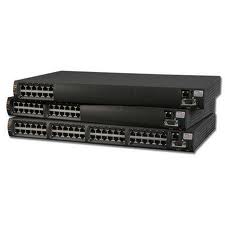
<p>Managed power switches, also called &ldquo;midspans&rdquo; have been around for a longtime. In fact they are the<span class="full-image-float-right ssNonEditable"><span><img src="http://www.my80211.com/storage/powerdsine.jpg?__SQUARESPACE_CACHEVERSION=1287889244265" alt="" /></span></span>cost alternative to PoE switches. A Cisco PoE switch will set you back some heavy green, especially if it&rsquo;s enhanced power, 802.3at. Also, customers don&rsquo;t like the mess of power injectors and the lack of management. You can&rsquo;t easily power cycle an access point that is hooked to an injector, which means a certain visit to the IDF closet. &nbsp;</p>
<p>Over the years, I&rsquo;ve worked with and deployed projects with PoE Power Switches / midspans. These are simple data pass through devices, similar to PoE injectors. The difference is these come in small 6 to 48 ports, 1u switches. Also, certain models are managed, which means you log into the Power Switch and simply power cycle the port.</p>
<p>There are a number of vendors and options when selecting a power switch. Personally, I've used and deployed Microsemi PowerDsine in a number of accounts. I also use a 9000G in my home lab.</p>
<p>PowerDsine has a real nice product line with a number of models and options. &nbsp;They start off with the simple 1 port PoE injector to a PoE extender that pushes power and data to 200 meters! PowerDsine models provide 802.3at and 802.3af power. They also provide a Cisco &ldquo;Splitter&rdquo; for devices that are only Cisco PoE compatible.</p>
<p>These also come in handy when you need to stage a large deployment and prime your access points.</p>
<p><a href="http://www.microsemi.com/powerdsine/Products/Midspan/">http://www.microsemi.com/powerdsine/Products/Midspan/</a></p>]]></content:encoded></rss:item><rss:item rdf:about="http://www.my80211.com/product-reviews/2010/10/19/ipad-otterbox-review-1.html"><rss:title>IPAD OTTERBOX REVIEW</rss:title><rss:link>http://www.my80211.com/product-reviews/2010/10/19/ipad-otterbox-review-1.html</rss:link><dc:creator>George</dc:creator><dc:date>2010-10-20T01:55:39Z</dc:date><dc:subject></dc:subject><content:encoded><![CDATA[<h3><strong>After trial and error with countless &nbsp;iPAD cases. The OtterBox Defender is a winner for me!</strong></h3>
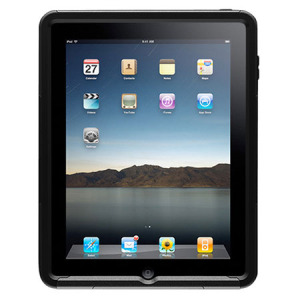
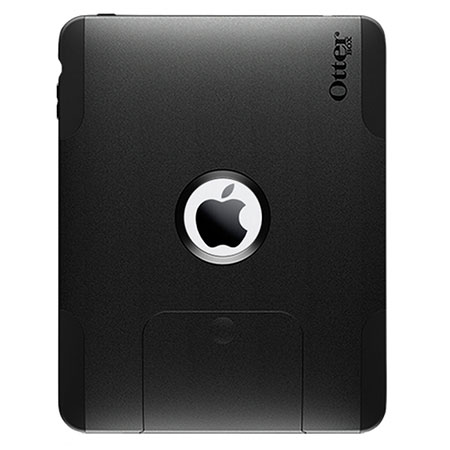
<p>Since the purchase of my iPad a number of months ago. I&rsquo;ve been testing a number of cases. I found<span class="full-image-float-right ssNonEditable"><span><img src="http://www.my80211.com/storage/apl4-ipad1-20.jpg?__SQUARESPACE_CACHEVERSION=1287539266876" alt="" /></span></span>&nbsp;that most cases offer little or no drop protection and the fit for most cases were OK, but not perfect.</p>
<p>&nbsp;As an active engineer, who is one day in the office and the next day on a construction site. &nbsp;I needed a case that was rugged, but yet usable and practical. Since I was already a satisfied OtterBox customer with my eariler purchase of the iPhone OtterBox. I eagerly awaited the release of the iPad cases.</p>
<p>OtterBox has two iPAD case offerings. They&rsquo;re called the Defender and the Commuter.&nbsp; After a close inspection of both cases, the Defender was my choice because of its rugged protection.&nbsp;</p>
<p>After a few weeks of using the Defender I have to say, I am very satisfied with the OtterBox Defender case and I would recommend it.</p>
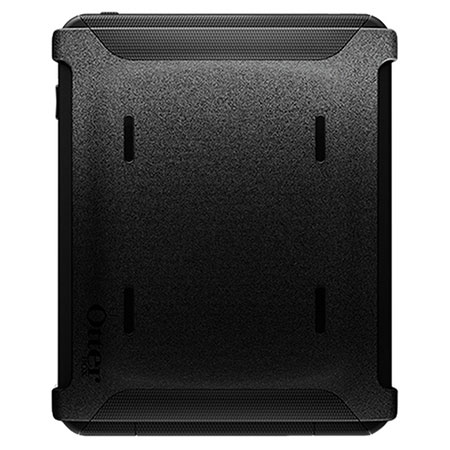
<p>The case is made of durable plastic with a rubber overlay that fits over the back and sides of the iPAD in typical OtterBox fashion. The iPAD power adapter section of the case slides off which allows access to the plug section. I really like this because it protects elements from getting in the adapter connection while in the field.</p>
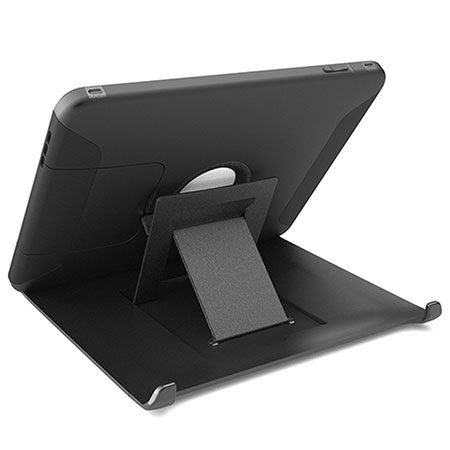
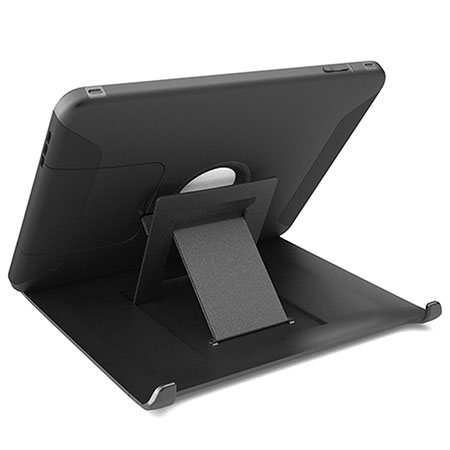
<p><span class="full-image-block ssNonEditable"><span><img style="width: 1px;" src="http://www.my80211.com/storage/apl2-ipad1-20-2.jpg?__SQUARESPACE_CACHEVERSION=1287539337894" alt="" /></span></span>The side volume buttons are a perfect fit and work well. The other &ldquo;ports&rdquo; like the headset jack and screen lock are well protected. Another great feature is the plastic cover which also converts into an iPad <span class="full-image-float-left ssNonEditable"><span><img style="width: 250px;" src="http://www.my80211.com/storage/apl2-ipad1-20-2.jpg?__SQUARESPACE_CACHEVERSION=1287539429629" alt="" /></span></span>desk stand. The cover fits nice over the case which protects the screen from direct hits when not in use. Also, the case adds a little weight to the iPad and its noticeable. Which I like actually.</p>
<p>As for drop testing. My iPad and the ground have been introduced a few times by accident. The OtterBox clearly protected my investment. The only draw back, is the cost. These cases aren&rsquo;t cheap at $90.00, but it&rsquo;s worth every penny!</p>
<p>Defender:</p>
<p><span><span style="color: #868686;">Drop-proof your magical, new must-have gadget with the OtterBox Defender Series for Apple&reg; iPad&trade;! This cutting-edge case incorporates three layers of hardcore protection plus some advanced features. Stowing your iPad away for the night or for your commute? Simply remove the back polycarbonate cover and snap it over the face for ultimate touch screen protection. The built-in stand will come in handy while trying to watch a movie or video, and creates a comfortable browsing experience. When using your iPad on a flat surface, the silicone grip pads on the bottom will hold your device securely in place. We also designed this case to accommodate the optional iPad dock accessory! Take your iPad everywhere you go knowing that it is safe from the occasional drop, bump and/or scratch.</span></span></p>
<p>Commuter:</p>
<p><span><span style="color: #868686;">The slim and attractive OtterBox Commuter Series for Apple&reg; iPad&trade; is sure to protect your new toy from everyday mishaps. Enjoy full access to all buttons, ports and features, along with snap-off access for your optional iPad dock. Also included with the case is a self-adhering protective film for your touch screen to safeguard against unsightly scratches and dings. This innovative OtterBox case will increase your peace of mind while keeping your iPad as fabulous as the day you bought it! About our Commuter Series: Three slender, yet sturdy layers offer tough protection in a sleek package. With a slim form factor and smooth outer layer, this case slides easily in and out of a pocket, purse or bag.</span></span></p>
<p><span><span style="color: #868686;"><span class="full-image-float-left ssNonEditable"><span><img style="width: 250px;" src="http://www.my80211.com/storage/apl2-ipad1-20-3.jpg?__SQUARESPACE_CACHEVERSION=1287539477115" alt="" /></span></span><span class="full-image-block ssNonEditable"><span><img style="width: 250px;" src="http://www.my80211.com/storage/apl4-ipad1-20-1.jpg?__SQUARESPACE_CACHEVERSION=1287539582589" alt="" /></span></span><br /></span></span></p>]]></content:encoded></rss:item><rss:item rdf:about="http://www.my80211.com/product-reviews/2010/10/19/ipad-otterbox-review.html"><rss:title>IPAD OTTERBOX REVIEW</rss:title><rss:link>http://www.my80211.com/product-reviews/2010/10/19/ipad-otterbox-review.html</rss:link><dc:creator>George</dc:creator><dc:date>2010-10-20T01:55:19Z</dc:date><dc:subject></dc:subject><content:encoded><![CDATA[<h3><strong>After trial and error with countless &nbsp;iPAD cases. The OtterBox Defender is a winner for me!</strong></h3>
<p>Since the purchase of my iPad a number of months ago. I&rsquo;ve been testing a number of cases. I found<span class="full-image-float-right ssNonEditable"><span><img src="http://www.my80211.com/storage/apl4-ipad1-20.jpg?__SQUARESPACE_CACHEVERSION=1287539266876" alt="" /></span></span>&nbsp;that most cases offer little or no drop protection and the fit for most cases were OK, but no perfect.</p>
<p>&nbsp;As an active engineer, who is one day in the office and the next day on a construction site. &nbsp;I needed a case that was rugged, but yet usable and practical. Since I was already a satisfied OtterBox customer with my eariler purchase of the iPhone OtterBox. I eagerly awaited the release of the iPad cases.</p>
<p>OtterBox has two iPAD case offerings. They&rsquo;re called the Defender and the Commuter.&nbsp; After a close inspection of both cases, the Defender was my choice because of its rugged protection.&nbsp;</p>
<p>After a few weeks of using the Defender I have to say, I am very satisfied with the OtterBox Defender case and I would recommend it.</p>
<p>The case is made of durable plastic with a rubber overlay that fits over the back and sides of the iPAD in typical OtterBox fashion. The iPAD power adapter section of the case slides off which allows access to the plug section. I really like this because it protects elements from getting in the adapter connection while in the field.</p>
<p><span class="full-image-block ssNonEditable"><span><img style="width: 1px;" src="http://www.my80211.com/storage/apl2-ipad1-20-2.jpg?__SQUARESPACE_CACHEVERSION=1287539337894" alt="" /></span></span>The side volume buttons are a perfect fit and work well. The other &ldquo;ports&rdquo; like the headset jack and screen lock are well protected. Another great feature is the plastic cover which also converts into an iPad <span class="full-image-float-left ssNonEditable"><span><img style="width: 250px;" src="http://www.my80211.com/storage/apl2-ipad1-20-2.jpg?__SQUARESPACE_CACHEVERSION=1287539429629" alt="" /></span></span>desk stand. The cover fits nice over the case which protects the screen from direct hits when not in use. Also, the case adds a little weight to the iPad and its noticeable. Which I like actually.</p>
<p>As for drop testing. My iPad and the ground have been introduced a few times by accident. The OtterBox clearly protected my investment. The only draw back, is the cost. These cases aren&rsquo;t cheap at $90.00, but it&rsquo;s worth every penny!</p>
<p>Defender:</p>
<p><span><span style="color: #868686;">Drop-proof your magical, new must-have gadget with the OtterBox Defender Series for Apple&reg; iPad&trade;! This cutting-edge case incorporates three layers of hardcore protection plus some advanced features. Stowing your iPad away for the night or for your commute? Simply remove the back polycarbonate cover and snap it over the face for ultimate touch screen protection. The built-in stand will come in handy while trying to watch a movie or video, and creates a comfortable browsing experience. When using your iPad on a flat surface, the silicone grip pads on the bottom will hold your device securely in place. We also designed this case to accommodate the optional iPad dock accessory! Take your iPad everywhere you go knowing that it is safe from the occasional drop, bump and/or scratch.</span></span></p>
<p>Commuter:</p>
<p><span><span style="color: #868686;">The slim and attractive OtterBox Commuter Series for Apple&reg; iPad&trade; is sure to protect your new toy from everyday mishaps. Enjoy full access to all buttons, ports and features, along with snap-off access for your optional iPad dock. Also included with the case is a self-adhering protective film for your touch screen to safeguard against unsightly scratches and dings. This innovative OtterBox case will increase your peace of mind while keeping your iPad as fabulous as the day you bought it! About our Commuter Series: Three slender, yet sturdy layers offer tough protection in a sleek package. With a slim form factor and smooth outer layer, this case slides easily in and out of a pocket, purse or bag.</span></span></p>
<p><span><span style="color: #868686;"><span class="full-image-float-left ssNonEditable"><span><img style="width: 250px;" src="http://www.my80211.com/storage/apl2-ipad1-20-3.jpg?__SQUARESPACE_CACHEVERSION=1287539477115" alt="" /></span></span><span class="full-image-block ssNonEditable"><span><img style="width: 250px;" src="http://www.my80211.com/storage/apl4-ipad1-20-1.jpg?__SQUARESPACE_CACHEVERSION=1287539582589" alt="" /></span></span><br /></span></span></p>]]></content:encoded></rss:item><rss:item rdf:about="http://www.my80211.com/product-reviews/2010/8/30/ipad-whiteboard-hd-review.html"><rss:title>iPAD Whiteboard HD Review</rss:title><rss:link>http://www.my80211.com/product-reviews/2010/8/30/ipad-whiteboard-hd-review.html</rss:link><dc:creator>George</dc:creator><dc:date>2010-08-31T02:43:42Z</dc:date><dc:subject></dc:subject><content:encoded><![CDATA[<p><span class="full-image-block ssNonEditable">&nbsp;<a href="http://twitter.com/wirelesssguru" target="_blank"><img src="http://www.my80211.com/storage/twitter30-1.png?__SQUARESPACE_CACHEVERSION=1262749802343" alt="" width="100" height="43" /></a><span style="color: #181818;">&nbsp;<span class="full-image-inline ssNonEditable"><a href="http://feeds.feedburner.com/my80211/feeds" target="_blank"><img style="width: 40px;" src="http://www.my80211.com/storage/rss_icon_glass48.jpg?__SQUARESPACE_CACHEVERSION=1262753456609" alt="" /></a></span></span></span></p>
<h3><strong>I'm an iPAD junky and these apps can nickel and dime you to death! LOL&nbsp;</strong></h3>
<p>I use my iPad mainly for reading , some tunes and the cool apps. Recently, I<span class="thumbnail-image-float-right ssNonEditable"><span><a href="javascript:showFullImage('/display/ShowImage?imageUrl=%2Fstorage%2Fwhiteboard2.PNG%3F__SQUARESPACE_CACHEVERSION%3D1283220086725',768,1024);"><img src="http://www.my80211.com/storage/thumbnails/3116837-8351405-thumbnail.jpg?__SQUARESPACE_CACHEVERSION=1283220180062" alt="" /></a></span><span class="thumbnail-caption" style="width: 152px;">&lt;&lt;&lt;&lt; CLICK ME &gt;&gt;&gt;&gt;</span></span>&nbsp;wanted&nbsp;to&nbsp;find&nbsp;a<span class="full-image-float-right ssNonEditable"><br /></span>&nbsp;good&nbsp;whiteboard app. So I surfed and found most were just &ldquo;finger drawing&rdquo;. I also had a need for a VGA output and one that can be easy to use and looked semi professional&nbsp; (for a whiteboard drawing). In my search I came across Whiteboard HD.&nbsp;</p>
<p>Whiteboard HD allows you VGA output, ease of e-mailing and is great for collaboration. &nbsp;As a network engineer we like to draw with network ICONS. Well they don&rsquo;t have &ldquo;network&rdquo; ICONS, YET. But you can use other shapes and label for identification. &nbsp;I did email support and they said network ICONs are on the way.</p>
<p><span class="thumbnail-image-float-left ssNonEditable"><span><a href="javascript:showFullImage('/display/ShowImage?imageUrl=%2Fstorage%2Fwhiteboard1.PNG%3F__SQUARESPACE_CACHEVERSION%3D1283220284612',768,1024);"><img src="http://www.my80211.com/storage/thumbnails/3116837-8351397-thumbnail.jpg?__SQUARESPACE_CACHEVERSION=1283220294886" alt="" /></a></span><span class="thumbnail-caption" style="width: 150px;">&lt;&lt;&lt;&lt; CLICK ME &gt;&gt;&gt;&gt;</span></span>The app took a little while to get use to. But after a week I am breezing through the screens. &nbsp;With any new technology you need to embrace and have an open mind.&nbsp; Whiteboard HD isn&rsquo;t that bad and the best I&rsquo;ve found so far for my needs. Its like under $8</p>
<p>Here are a few examples &hellip;&nbsp;</p>
<p>If you used a better Whiteboard app please do share !&nbsp;</p>]]></content:encoded></rss:item><rss:item rdf:about="http://www.my80211.com/product-reviews/2010/7/2/safari-online-ccnp-wireless-iauws-quick-reference-available.html"><rss:title>Safari Online: CCNP Wireless IAUWS Quick Reference Available</rss:title><rss:link>http://www.my80211.com/product-reviews/2010/7/2/safari-online-ccnp-wireless-iauws-quick-reference-available.html</rss:link><dc:creator>George</dc:creator><dc:date>2010-07-03T04:22:59Z</dc:date><dc:subject></dc:subject><content:encoded><![CDATA[<p><span class="full-image-block ssNonEditable">&nbsp;<a href="http://twitter.com/wirelesssguru" target="_blank"><img src="http://www.my80211.com/storage/twitter30-1.png?__SQUARESPACE_CACHEVERSION=1262749802343" alt="" width="100" height="43" /></a><span style="color: #181818;">&nbsp;<span class="full-image-inline ssNonEditable"><a href="http://feeds.feedburner.com/my80211/feeds" target="_blank"><img style="width: 40px;" src="http://www.my80211.com/storage/rss_icon_glass48.jpg?__SQUARESPACE_CACHEVERSION=1262753456609" alt="" /></a></span></span></span></p>
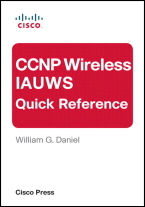
<h3><strong>CCNP IAUWS by William G. Daniel&nbsp;is available on Safari Online!</strong></h3>
<p>You can own the entire book for only 3 tokens! Great cost savings... This is a great reference book and I highly recommend it if you are going for certifications&nbsp;or if you are deploying a WLC.</p>
<h3><strong>Chapter 1.&nbsp;Describing Regulatory Compliance</strong></h3>
<p>Identifying Wireless Vulnerabilities</p>
<p>Industry Standards and Associations<span class="full-image-float-right ssNonEditable"><span><img src="http://www.my80211.com/storage/iauws.jpg?__SQUARESPACE_CACHEVERSION=1278130793699" alt="" /></span></span></p>
<p>Regulatory Compliance</p>
<p>Segmenting Traffic</p>
<p>Configuring Administrative Security</p>
<p>Configuring the Cisco Secure ACS for RADIUS</p>
<p>Authenticating Management Users on TACACS+</p>
<p>Configuring the Cisco Secure ACS for TACACS+</p>
<p>Management via Wireless</p>
<p>Configuring Credentials for APs</p>
<p>Managing WLAN Controller and Cisco WCS Alarms</p>
<p>Configuring WCS Logging and Message Notification</p>
<p>Identifying Security Audit Tools</p>
<p>Cisco Spectrum Expert</p>
<p>WCS Security Reports</p>
<p>PCI DSS Compliance Report</p>
<p>Cisco Security MARS</p>
<h3>Chapter 2.&nbsp;Secure Client Devices</h3>
<p>Configuring EAP Authentication</p>
<p>Understanding the Impact of Security on Application and Client Roaming</p>
<p>Configuring Cisco Secure Services Client (SSC)</p>
<p>Troubleshooting Wireless Connectivity</p>
<h3>Chapter 3.&nbsp;Design and Implement Guest Access Services</h3>
<p>Understanding Guest Access Architecture</p>
<p>Firewall Rules and DHCP</p>
<p>Configuring Foreign and Anchor Controllers</p>
<p>Configuring Guest Access Accounts</p>
<p>Troubleshooting Guest Access</p>
<h3>Chapter 4.&nbsp;Design and Integrate a Wireless Network with Cisco NAC Appliance Server</h3>
<p>Introducing the Cisco NAC Appliance Server</p>
<p>Configuring the Controller for Cisco NAC Out-of-Band Operations</p>
<h3>Chapter 5.&nbsp;Implement Secure Wireless Connectivity Services</h3>
<p>Configuring Authentication for the WLAN Infrastructure</p>
<p>Configuring Management Frame Protection</p>
<p>Configuring Certificate Services</p>
<p>Implementing Access Control Lists</p>
<p>Implementing Identity-Based Networking</p>
<p>Troubleshooting Secure Wireless Connectivity</p>
<p>Troubleshooting Issues Using External Tools</p>
<h3>Chapter 6.&nbsp;Internal and Integrated External Security Mitigations</h3>
<p>Mitigating Wireless Vulnerabilities</p>
<p>Understanding the Cisco End-to-End Security Solutions</p>
<p>Integrating Cisco WCS with Wireless IPS</p>
<p>&nbsp;</p>
<div class="level1"></div>]]></content:encoded></rss:item><rss:item rdf:about="http://www.my80211.com/product-reviews/2010/6/30/safari-online-ccnp-wireless-iuwms-quick-reference-available.html"><rss:title>Safari Online: CCNP Wireless IUWMS Quick Reference available</rss:title><rss:link>http://www.my80211.com/product-reviews/2010/6/30/safari-online-ccnp-wireless-iuwms-quick-reference-available.html</rss:link><dc:creator>George</dc:creator><dc:date>2010-07-01T04:46:35Z</dc:date><dc:subject></dc:subject><content:encoded><![CDATA[<p><span class="full-image-block ssNonEditable">&nbsp;<a href="http://twitter.com/wirelesssguru" target="_blank"><img src="http://www.my80211.com/storage/twitter30-1.png?__SQUARESPACE_CACHEVERSION=1262749802343" alt="" width="100" height="43" /></a><span style="color: #181818;">&nbsp;<span class="full-image-inline ssNonEditable"><a href="http://feeds.feedburner.com/my80211/feeds" target="_blank"><img style="width: 40px;" src="http://www.my80211.com/storage/rss_icon_glass48.jpg?__SQUARESPACE_CACHEVERSION=1262753456609" alt="" /></a></span></span></span></p>
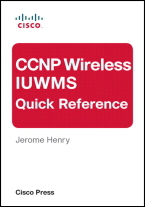
<h3><strong>Jerome Henry's CCNP IUWMS is available on Safari Online!</strong></h3>
<p>You can own the entire book for only 3 tokens! Great cost savings... This is a great reference book and I highly recommend it if you are going for certifications&nbsp;or if you are deploying a WLC.</p>
<h3>Chapter 1.&nbsp;Implement Location-Based Services</h3>
<div class="level1"><a title="View Sample" href="http://my.safaribooksonline.com/9781587142116/ch01lev1sec1"></a>
<p class="p">Understanding Location-Tracking Techniques</p>
</div>
<div class="level1"><a title="View Sample" href="http://my.safaribooksonline.com/9781587142116/ch01lev1sec2"></a>
<p class="p">Understanding the AP/Antenna Deployment Model for Location<span class="full-image-float-right ssNonEditable"><span><img src="http://www.my80211.com/storage/ccnp.iuwms.jpg?__SQUARESPACE_CACHEVERSION=1277959303913" alt="" /></span></span></p>
</div>
<div class="level1"><a title="View Sample" href="http://my.safaribooksonline.com/9781587142116/ch01lev1sec3"></a>
<p class="p">Tracking RFID Tags</p>
</div>
<div class="level1"><a title="View Sample" href="http://my.safaribooksonline.com/9781587142116/ch01lev1sec4"></a>
<p class="p"><a title="Tracking Wireless Clients" href="http://my.safaribooksonline.com/9781587142116/ch01lev1sec4"></a></p>
</div>
<div class="level1">
<p class="p">Tracking Wireless Clients</p>
</div>
<div class="level1"><a title="View Sample" href="http://my.safaribooksonline.com/9781587142116/ch01lev1sec5"></a>
<p class="p">Tracking Rogues</p>
</div>
<div><a title="View Sample" href="http://my.safaribooksonline.com/9781587142116/ch02"></a>
<h3>Chapter 2.&nbsp;Implement Location Architecture</h3>
</div>
<div class="level1"><a title="View Sample" href="http://my.safaribooksonline.com/9781587142116/ch02lev1sec1"></a>
<p class="p">Understanding Mobility Service Engine and Location Appliance Architectures</p>
</div>
<div class="level1">
<p class="p"><a title="Understanding Mobility Service Engine and Location Appliance Architectures" href="http://my.safaribooksonline.com/9781587142116/ch02lev1sec1"></a></p>
</div>
<div class="level1"><a title="View Sample" href="http://my.safaribooksonline.com/9781587142116/ch02lev1sec2"></a>
<p class="p">Integrating the MSE or the Location Appliance to WCS</p>
</div>
<div class="level1"><a title="View Sample" href="http://my.safaribooksonline.com/9781587142116/ch02lev1sec3"></a>
<p class="p">Configuring and Tuning the MSE or the Location Appliance</p>
</div>
<div class="level1"><a title="View Sample" href="http://my.safaribooksonline.com/9781587142116/ch02lev1sec4"></a>
<p class="p">Integrating Third-Party Applications</p>
</div>
<div><a title="View Sample" href="http://my.safaribooksonline.com/9781587142116/ch03"></a>
<h3>Chapter 3.&nbsp;Implement Advanced Services and Manage with WCS and Navigator</h3>
</div>
<div class="level1"><a title="View Sample" href="http://my.safaribooksonline.com/9781587142116/ch03lev1sec1"></a>
<p class="p">Configuring Controller and AP Templates</p>
</div>
<div class="level1"><a title="View Sample" href="http://my.safaribooksonline.com/9781587142116/ch03lev1sec2"></a>
<p class="p">Using Config Groups</p>
</div>
<div class="level1"><a title="View Sample" href="http://my.safaribooksonline.com/9781587142116/ch03lev1sec3"></a>
<p class="p">Autoprovisioning</p>
</div>
<div class="level1"><a title="View Sample" href="http://my.safaribooksonline.com/9781587142116/ch03lev1sec4"></a>
<p class="p">Supporting Autonomous APs</p>
</div>
<div class="level1"><a title="View Sample" href="http://my.safaribooksonline.com/9781587142116/ch03lev1sec5"></a>
<p class="p">Scheduling Wireless Access</p>
</div>
<div class="level1"><a title="View Sample" href="http://my.safaribooksonline.com/9781587142116/ch03lev1sec6"></a>
<p class="p">Configuring Administrative Tasks</p>
</div>
<div class="level1"><a title="View Sample" href="http://my.safaribooksonline.com/9781587142116/ch03lev1sec7"></a>
<p class="p">Configuring Administrative Access</p>
</div>
<div class="level1"><a title="View Sample" href="http://my.safaribooksonline.com/9781587142116/ch03lev1sec8"></a>
<p class="p">Configuring Reports</p>
</div>
<div class="level1"><a title="View Sample" href="http://my.safaribooksonline.com/9781587142116/ch03lev1sec9"></a>
<p class="p">Using WCS Navigator</p>
</div>
<div><a title="View Sample" href="http://my.safaribooksonline.com/9781587142116/ch04"></a>
<h3>Chapter 4.&nbsp;Design WLAN Infrastructure for Mobility</h3>
</div>
<div class="level1"><a title="View Sample" href="http://my.safaribooksonline.com/9781587142116/ch04lev1sec1"></a>
<p class="p">Designing the Network for High Availability</p>
</div>
<div class="level1"><a title="View Sample" href="http://my.safaribooksonline.com/9781587142116/ch04lev1sec2"></a>
<p class="p">Understanding and Using Best Practices</p>
</div>
<div class="level1"><a title="View Sample" href="http://my.safaribooksonline.com/9781587142116/ch04lev1sec3"></a>
<p class="p">Understanding the Implications of Layer 2 and Layer 3 Roaming</p>
</div>
<div class="level1"><a title="View Sample" href="http://my.safaribooksonline.com/9781587142116/ch04lev1sec4"></a>
<p class="p">Understand Single SSID Designs with Mobility</p>
</div>
<div><a title="View Sample" href="http://my.safaribooksonline.com/9781587142116/ch05"></a>
<h3>Chapter 5.&nbsp;Implement and Manage the Enterprise Mesh (Indoors)</h3>
</div>
<div class="level1"><a title="View Sample" href="http://my.safaribooksonline.com/9781587142116/ch05lev1sec1"></a>
<p class="p">Understanding Mesh and Its Benefits</p>
</div>
<div class="level1"><a title="View Sample" href="http://my.safaribooksonline.com/9781587142116/ch05lev1sec2"></a>
<p class="p">Understanding Mesh Formation</p>
</div>
<div class="level1"><a title="View Sample" href="http://my.safaribooksonline.com/9781587142116/ch05lev1sec3"></a>
<p class="p">Implementing Mesh</p>
</div>
<div class="level1"><a title="View Sample" href="http://my.safaribooksonline.com/9781587142116/ch05lev1sec4"></a>
<p class="p">Configuring WCS: Mesh Focus</p>
</div>
<div><a title="View Sample" href="http://my.safaribooksonline.com/9781587142116/ch06"></a>
<h3>Chapter 6.&nbsp;Using Advanced Troubleshooting Tools</h3>
</div>
<div class="level1"><a title="View Sample" href="http://my.safaribooksonline.com/9781587142116/ch06lev1sec1"></a>
<p class="p">Troubleshooting AP Joining</p>
</div>
<div class="level1"><a title="View Sample" href="http://my.safaribooksonline.com/9781587142116/ch06lev1sec2"></a>
<p class="p">Troubleshooting Clients</p>
</div>
<div class="level1"><a title="View Sample" href="http://my.safaribooksonline.com/9781587142116/ch06lev1sec3"></a>
<p class="p">Location Troubleshooting</p>
</div>]]></content:encoded></rss:item><rss:item rdf:about="http://www.my80211.com/product-reviews/2010/5/12/review-ccie-cisco-certified-internetwork-expert-wireless-cer.html"><rss:title>Review: CCIE Cisco Certified Internetwork Expert Wireless Certification Exam Preparation Course in a Book for Passing the CCIE Exam</rss:title><rss:link>http://www.my80211.com/product-reviews/2010/5/12/review-ccie-cisco-certified-internetwork-expert-wireless-cer.html</rss:link><dc:creator>George</dc:creator><dc:date>2010-05-13T04:48:06Z</dc:date><dc:subject></dc:subject><content:encoded><![CDATA[<p><span class="full-image-block ssNonEditable">&nbsp;<a href="http://twitter.com/wirelesssguru" target="_blank"><img src="http://www.my80211.com/storage/twitter30-1.png?__SQUARESPACE_CACHEVERSION=1262749802343" alt="" width="100" height="43" /></a><span style="color: #181818;">&nbsp;<span class="full-image-inline ssNonEditable"><a href="http://feeds.feedburner.com/my80211/feeds" target="_blank"><img style="width: 40px;" src="http://www.my80211.com/storage/rss_icon_glass48.jpg?__SQUARESPACE_CACHEVERSION=1262753456609" alt="" /></a></span></span></span></p>
<div id="_mcePaste"></div>
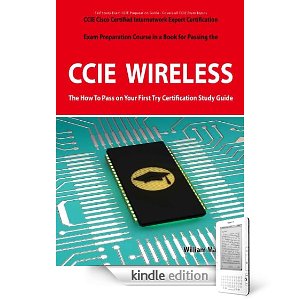
<h3><strong>I completed my read of the "CCIE Cisco Certified Internetwork Expert Wireless Certification Exam Preparation Course in a Book for Passing the CCIE Exam" by William Manning</strong></h3>
<p>I'm surfing Amazon looking for a good read for my iPad. I stumble across this book. So, I shot a few<span class="full-image-float-right ssNonEditable"><span><img src="http://www.my80211.com/storage/cciewirelessbook1.jpg?__SQUARESPACE_CACHEVERSION=1273725737810" alt="" /></span></span>&nbsp;emails to some&nbsp;colleagues&nbsp;of mine if anyone read this or knew about it before I purchased it. There weren't any reviews on Amazon for this title either. So what the heck for $16.00 let me give it a spin!</p>
<p>At first impression you aren't sure if this is a study guide for the lab or written or both. It turns the book&nbsp;is geared towards the Cisco CCIE Wireless written exam. The content itself is a mile high and a inch thick. By this I mean it covers broad topics and doesn't go into great great &nbsp;detail. That's not a bad thing. Just know what to expect.&nbsp;</p>
<p>If you are preparing for your Cisco CCIE Wireless written <span style="text-decoration: underline;">you may</span> find this of interest as <strong>refresher material</strong>. Keep in mind this is NOT your 'offical' everything you need to pass guide. But rather a quick review of objectives you will find on the exam.&nbsp;</p>
<p>Is it worth the $16.00... yea, but I wouldn't spend a penny more!</p>
<p>&nbsp;</p>]]></content:encoded></rss:item><rss:item rdf:about="http://www.my80211.com/product-reviews/2010/4/4/pineapple-v2-jasager-the-yes-man-wifi-man-in-the-middle-atta.html"><rss:title>Pineapple v2 - Jasager -- “The Yes Man” (WiFi man in the middle attack)</rss:title><rss:link>http://www.my80211.com/product-reviews/2010/4/4/pineapple-v2-jasager-the-yes-man-wifi-man-in-the-middle-atta.html</rss:link><dc:creator>George</dc:creator><dc:date>2010-04-04T18:36:23Z</dc:date><dc:subject></dc:subject><content:encoded><![CDATA[<p><span class="full-image-block ssNonEditable">&nbsp;</span></p>
<p><span><a href="http://twitter.com/wirelesssguru" target="_blank"><img src="http://www.my80211.com/storage/twitter30-1.png?__SQUARESPACE_CACHEVERSION=1262749802343" alt="" width="100" height="43" /></a></span><span style="color: #181818;">&nbsp;<span class="full-image-inline ssNonEditable"><span><a href="http://feeds.feedburner.com/my80211/feeds" target="_blank"><img style="width: 40px;" src="http://www.my80211.com/storage/rss_icon_glass48.jpg?__SQUARESPACE_CACHEVERSION=1262753456609" alt="" /></a></span></span> </span></p>
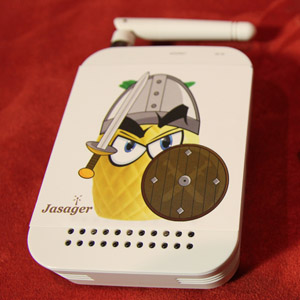
<h3><strong>Robin Wood (DigiNinja) and Darren Kitchen (Hak5) collaborate&nbsp;on the newest Pineapple&nbsp;release called the WiFi Pineapple Version 2. It is running Jasger --In German it means "The Yes Man".</strong></h3>
<p>So what is a Pineapple you ask?</p>
<p>Think of a wireless router that detects probe request from clients and this wireless router responds to<span class="full-image-float-right ssNonEditable"><span><img src="http://www.my80211.com/storage/jasagerv2.jpg?__SQUARESPACE_CACHEVERSION=1270406120942" alt="" /></span></span>&nbsp;these probe request with a probe response allowing ALMOST anyone to attach. I see the wheels turning, right ... cool stuff but there is more!</p>
<p>Robin wood the author of Jasger which is installed on the Pineapple includes the linux program called "Karma". Karma is a web front end that allows you to direct traffic and allows you control of the web content.</p>
<p>So in short, think of man in the middle attack where people attach to you and you can filter and control their traffic and SO MUCH MORE.&nbsp;</p>
<p>You can purchase one already pre-built for $109.&nbsp;</p>
<p><a href="http://www.hak5.org/store/wifi-pineapple-version-2">http://www.hak5.org/store/wifi-pineapple-version-2</a></p>
<p>&nbsp;</p>
<p>Leeched: <a href="http://www.digininja.org/jasager/">http://www.digininja.org/jasager/</a>&nbsp;</p>
<blockquote>
<h1>Jasager</h1>
<p class="intro">Welcome to Jasager - Karma on the Fon.</p>
<p>Jasager is an implementation of Karma designed to run on OpenWrt on the Fon. It will probably run on most APs with Atheros wifi cards but it was designed with the Fon in mind as it is a nice small AP which gives it a lot of scope for use in penetration tests and other related fun.</p>
<p>A quick highlight of features:</p>
<ul>
<li>Web interface showing currently connected clients with their MAC address, IP address (if assigned) and the SSID they associated with</li>
<li>The web interface allows control of all Karma features and can either run fully featured through AJAX enabled browsers or just as well through lynx</li>
<li>Auto-run scripts on both association and IP assignment</li>
<li>Full logging for later review</li>
<li>Pluggable module system for easy extensibility</li>
<li>Basic command line interface so you don't have to remember the different iwpriv commands</li>
</ul>
<p>Please give your feedback, bug reports, comments, praise, etc either through<a href="mailto:jasager@digininja.org">jasager@digininja.org</a>&nbsp;or on the&nbsp;<a rel="nofollow" href="http://hak5.org/forums/index.php?showforum=49">Hak5 forums</a>.</p>
<p>To pre-empt the question of "Will this work on a laptop instead?", with some slight tweeking it should do but I haven't tested this for two reasons. First, from a security point of view, the web server needs to have some way to execute the iw and if commands. On the Fon everything runs as root by default so this doesn't really create any extra problems on top of what is already there but on a laptop it could be an issue. The second reason is because I have plans for a laptop version which will build on this and run in a much better way due to the extra processor/storage space.</p>
<p>I've recently worked with Orange from the&nbsp;<a rel="nofollow" href="http://piranha.klashed.net/">Piranha project</a>&nbsp;to integrate Jasager into his firmware. Together, but mostly Orange, we worked out how to make a Jasager Makefile so it could be built directly into the firmware and as a proper OpenWrt package rather than my original script which built the package with tar and gzip.</p>
<h2>Uses</h2>
<p>As with any tools, this tool can be used for good or bad. Here are some of the good uses:</p>
<ul>
<li>In your office - Set it up to capture laptops before the bad guys do. Use a website to remind them of the rules.</li>
<li>On penetration tests - Lure in target clients to find a back door into networks</li>
<li>At home - Have fun with neighbours who try to steal your wifi bandwidth&nbsp;</li>
</ul>
</blockquote>
<p><object width="640" height="385"><param name="movie" value="http://www.youtube.com/v/yr5upPHqhlA&color1=0xb1b1b1&color2=0xcfcfcf&hl=en_US&feature=player_embedded&fs=1"></param><param name="allowFullScreen" value="true"></param><param name="allowScriptAccess" value="always"></param><embed src="http://www.youtube.com/v/yr5upPHqhlA&color1=0xb1b1b1&color2=0xcfcfcf&hl=en_US&feature=player_embedded&fs=1" type="application/x-shockwave-flash" allowfullscreen="true" allowScriptAccess="always" width="640" height="385"></embed></object></p>
<div></div>
<div></div>
<div></div>
<div></div>
<div></div>
<div></div>]]></content:encoded></rss:item></rdf:RDF>