<?xml version="1.0" encoding="UTF-8"?>
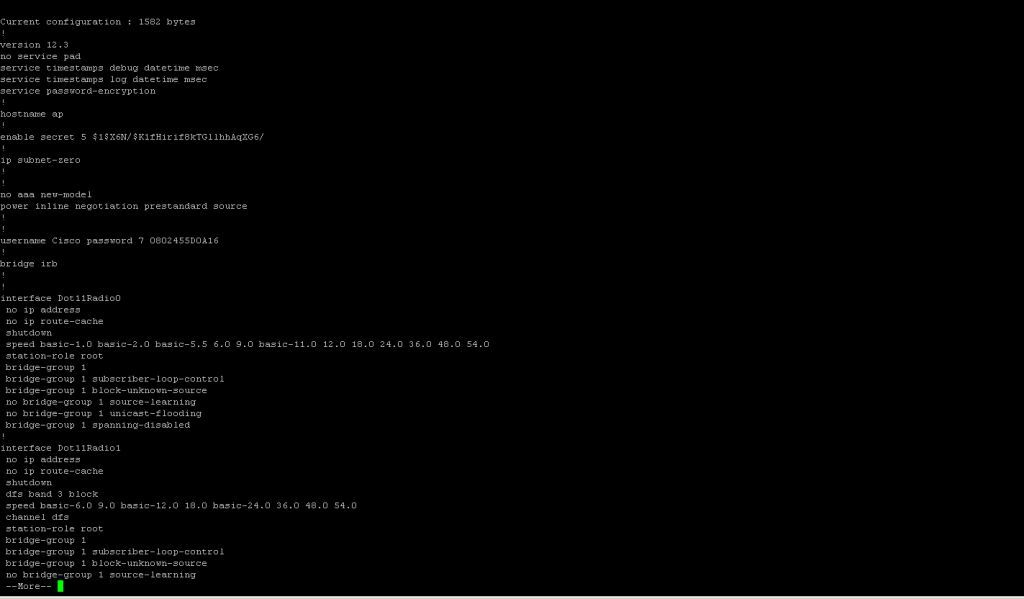
<!--Generated by Squarespace Site Server v5.11.81 (http://www.squarespace.com/) on Thu, 16 Feb 2012 02:45:17 GMT--><feed xmlns="http://www.w3.org/2005/Atom" xmlns:dc="http://purl.org/dc/elements/1.1/"><title>Cisco Autonomous CLI Commands</title><subtitle>Cisco Autonomous CLI Commands</subtitle><id>http://www.my80211.com/cisco-auton-cli-commands/</id><link rel="alternate" type="application/xhtml+xml" href="http://www.my80211.com/cisco-auton-cli-commands/"/><link rel="self" type="application/atom+xml" href="http://www.my80211.com/cisco-auton-cli-commands/atom.xml"/><updated>2011-12-16T01:54:38Z</updated><generator uri="http://www.squarespace.com/" version="Squarespace Site Server v5.11.81 (http://www.squarespace.com/)">Squarespace</generator><entry><title>Basic Cisco AP Debugging - Autonomous IOS</title><id>http://www.my80211.com/cisco-auton-cli-commands/2011/12/15/basic-cisco-ap-debugging-autonomous-ios.html</id><link rel="alternate" type="text/html" href="http://www.my80211.com/cisco-auton-cli-commands/2011/12/15/basic-cisco-ap-debugging-autonomous-ios.html"/><author><name>George</name></author><published>2011-12-16T01:54:19Z</published><updated>2011-12-16T01:54:19Z</updated><content type="html" xml:lang="en-US"><![CDATA[<div class="jive-rendered-content">
<h2>A great post from Aaron Leonard (Cisco TAC)</h2>
<p>These are debugs that you can collect while logged into the IOS CLI.</p>
<h4 style="min-height: 8pt; height: 8pt; padding: 0px;">Basic setup</h4>
<p>If you see a prompt that ends in a right angle bracket, like this:</p>
<p><span style="font-family: andale mono,times;">ap&gt;</span></p>
<p>it means that you are in unprivileged mode, so get privileged (which shows a # prompt):</p>
<p><span style="font-family: andale mono,times;">ap&gt;enable</span></p>
<p><span style="font-family: andale mono,times;"> Password:</span></p>
<p><span style="font-family: andale mono,times;"> ap#</span></p>
<p>(default username/password on APs is "Cisco".)</p>
<h4 style="min-height: 8pt; height: 8pt; padding: 0px;">Configure NTP, timestamps, line timeout</h4>
<p><span style="font-family: andale mono,times;">ap#configure terminal</span></p>
<p><span style="font-family: andale mono,times;"> ap(config)#sntp server 1.2.3.4</span></p>
<p><span style="font-family: andale mono,times;"> ap(config)#service timestamp debug datetime msec</span></p>
<p><span style="font-family: andale mono,times;"> ap(config)#service timestamp log datetime msec</span></p>
<p><span style="font-family: andale mono,times;"> ap(config)#logging rate-limit 500</span></p>
<p><span style="font-family: andale mono,times;"> ap(config)#no logging console </span></p>
<p><a class="jive-link-anchor-small">[1]</a></p>
<p><span style="font-family: andale mono,times;">ap(config)#line con 0</span></p>
<p><span style="font-family: andale mono,times;"> ap(config-line)#no exec-timeout</span></p>
<p><span style="font-family: andale mono,times;"> ap(config-line)#line vty 0 4</span></p>
<p><span style="font-family: andale mono,times;"> ap(config-line)#no exec-timeout</span></p>
<p><span style="font-family: andale mono,times;"> ap(config)#exit</span></p>
<p><span style="font-family: andale mono,times;"> ap#write</span>&nbsp;&nbsp; (if you wan to to save the configuration changes to NVRAM)</p>
<p>#</p>
<p><a class="jive-link-anchor-small" name="Note1"></a>[1]  if you're going to generate debug messages at an extremely high rate,  should be sure to turn off console logging, otherwise the AP will hang.&nbsp;  (If your access is via the console, then of course you would need some  other way to see the debugs then - e.g.</p>
<p><a class="jive-link-external-small" href="http://www.cisco.com/en/US/docs/ios/12_0/debug/command/reference/dintro.html">write them to a logging buffer, or to an external syslog server</a></p>
<p>.&nbsp; Or</p>
<p><a class="jive-link-external-small" href="http://www.cisco.com/en/US/products/hw/routers/ps259/products_tech_note09186a008009433b.shtml#speed">increase the console port speed to 115200</a></p>
<p>.)</p>
<p style="min-height: 8pt; height: 8pt; padding: 0px;">&nbsp;</p>
<h4>Collecting debugs from telnet or ssh session</h4>
<p>Telnet/ssh into the AP, then enter the command "terminal monitor".&nbsp; The  debug messages will be written to your terminal window.&nbsp; To save the  messages, configure your terminal emulator accordingly.</p>
<p style="min-height: 8pt; height: 8pt; padding: 0px;">&nbsp;</p>
<h4>Collecting debugs from a console session</h4>
<p>Some development special debug output will be written only to the  console.&nbsp; So in such a case, you must connect a serial cable to the AP's  console port and access this cable via a terminal emulator program  (e.g. Windows Hyperterminal talking to a PC COM port.)&nbsp; The default  console port speed is 9600 bps which is too slow to collect a large  volume of debugs - so increase the speed to 115200 bps, its maximum:</p>
<p style="min-height: 8pt; height: 8pt; padding: 0px;">ap#configure terminal</p>
<p style="min-height: 8pt; height: 8pt; padding: 0px;">ap(config)#logging console<br />ap(config)#line con 0</p>
<div class="jive-rendered-content"><br />ap(config-line)#no exec-timeout<br />ap(config-file)#speed 115200</div>
<p>&nbsp;</p>
<p>at this point, the terminal emulator program on the serial line will no  longer be able to communicate with the console port, till you reset its  speed to 115200 bps to match.</p>
<h4 style="min-height: 8pt; height: 8pt; padding: 0px;">Radio names</h4>
<p>The radios are usually called Dot11Radio0 (2.4GHz) and Dot11Radio1 (5GHz.)</p>
<p style="min-height: 8pt; height: 8pt; padding: 0px;">&nbsp;</p>
<pre>ajax#show ip int brief<br />Interface&nbsp;&nbsp;&nbsp;&nbsp;&nbsp;&nbsp;&nbsp;&nbsp;&nbsp;&nbsp;&nbsp;&nbsp;&nbsp;&nbsp;&nbsp;&nbsp;&nbsp; IP-Address&nbsp;&nbsp;&nbsp;&nbsp;&nbsp; OK? Method Status&nbsp;&nbsp;&nbsp;&nbsp;&nbsp;&nbsp;&nbsp;&nbsp;&nbsp;&nbsp;&nbsp;&nbsp;&nbsp;&nbsp;&nbsp; Protocol<br />BVI1&nbsp;&nbsp;&nbsp;&nbsp;&nbsp;&nbsp;&nbsp;&nbsp;&nbsp;&nbsp;&nbsp;&nbsp;&nbsp;&nbsp;&nbsp;&nbsp;&nbsp;&nbsp;&nbsp;&nbsp;&nbsp;&nbsp; 10.0.47.21&nbsp;&nbsp;&nbsp;&nbsp;&nbsp; YES DHCP&nbsp;&nbsp; up&nbsp;&nbsp;&nbsp;&nbsp;&nbsp;&nbsp;&nbsp;&nbsp;&nbsp;&nbsp;&nbsp;&nbsp;&nbsp;&nbsp;&nbsp;&nbsp;&nbsp;&nbsp;&nbsp; up&nbsp; <br />Dot11Radio0&nbsp;&nbsp;&nbsp;&nbsp;&nbsp;&nbsp;&nbsp;&nbsp;&nbsp;&nbsp;&nbsp;&nbsp;&nbsp;&nbsp;&nbsp; unassigned&nbsp;&nbsp;&nbsp;&nbsp;&nbsp; YES unset&nbsp; up&nbsp;&nbsp;&nbsp;&nbsp;&nbsp;&nbsp;&nbsp;&nbsp;&nbsp;&nbsp;&nbsp;&nbsp;&nbsp;&nbsp;&nbsp;&nbsp;&nbsp;&nbsp;&nbsp; up&nbsp; <br />Dot11Radio1&nbsp;&nbsp;&nbsp;&nbsp;&nbsp;&nbsp;&nbsp;&nbsp;&nbsp;&nbsp;&nbsp;&nbsp;&nbsp;&nbsp;&nbsp; unassigned&nbsp;&nbsp;&nbsp;&nbsp;&nbsp; YES unset&nbsp; administratively down down<br />FastEthernet0&nbsp;&nbsp;&nbsp;&nbsp;&nbsp;&nbsp;&nbsp;&nbsp;&nbsp;&nbsp;&nbsp;&nbsp;&nbsp; unassigned&nbsp;&nbsp;&nbsp;&nbsp;&nbsp; YES other&nbsp; up&nbsp;&nbsp;&nbsp;&nbsp;&nbsp;&nbsp;&nbsp;&nbsp;&nbsp;&nbsp;&nbsp;&nbsp;&nbsp;&nbsp;&nbsp;&nbsp;&nbsp;&nbsp;&nbsp; up <br /><br />You can abbreviate them to do0 and do1:<br /><br />ajax#show controller do0<br />[...]<br />Radio AIR-AP1131G, Base Address 0012.44b3.e000, BBlock version 0.00, Software version 6.20.6<br />[...]<br />Configured Frequency: 2442 MHz&nbsp; Channel 7<br /></pre>
<p style="min-height: 8pt; height: 8pt; padding: 0px;">&nbsp;</p>
<h4>Basic show commands</h4>
<p style="min-height: 8pt; height: 8pt; padding: 0px;">&nbsp;</p>
<h5>radio information</h5>
<p style="min-height: 8pt; height: 8pt; padding: 0px;">&nbsp;</p>
<pre>ajax#show interface dot11radio0<br />ajax#show controller dot11radio0<br /></pre>
<p style="min-height: 8pt; height: 8pt; padding: 0px;">&nbsp;</p>
<h5>client information</h5>
<p style="min-height: 8pt; height: 8pt; padding: 0px;">&nbsp;</p>
<pre>ajax#show dot11 associations<br />ajax#show dot11 associations all<br /></pre>
<p style="min-height: 8pt; height: 8pt; padding: 0px;">&nbsp;</p>
<h5>AP information</h5>
<p style="min-height: 8pt; height: 8pt; padding: 0px;">&nbsp;</p>
<pre>ajax#show config&nbsp;&nbsp;&nbsp;&nbsp;&nbsp;&lt;= configuration (from NVRAM)<br />ajax#show run&nbsp;&nbsp;&nbsp;&nbsp;&nbsp;&nbsp;&nbsp;&nbsp;&nbsp;&nbsp;&lt;= configuration (in memory)<br />ajax#show version&nbsp;&nbsp;&nbsp;&nbsp;&nbsp;&lt;= model, version info<br />ajax#show tech&nbsp;&nbsp;&nbsp;&nbsp;&nbsp;&nbsp;&nbsp;&nbsp;&nbsp;&nbsp;&lt;= everything - do "term length 0" first<br /></pre>
<p style="min-height: 8pt; height: 8pt; padding: 0px;">&nbsp;</p>
<h5>Other basic commands</h5>
<p style="min-height: 8pt; height: 8pt; padding: 0px;">&nbsp;</p>
<pre>ajax#clear dot11 client 0011.2233.4455&nbsp; &lt;= deauthenticate a client<br />ajax#clear int dot11radio0&nbsp;&nbsp;&nbsp;&nbsp;&nbsp;&nbsp;&nbsp;&nbsp;&nbsp;&nbsp;&nbsp;&nbsp;&nbsp; &lt;= reset a radio<br />ajax#reload&nbsp;&nbsp;&nbsp;&nbsp;&nbsp;&nbsp;&nbsp;&nbsp;&nbsp;&nbsp;&nbsp;&nbsp;&nbsp;&nbsp;&nbsp;&nbsp;&nbsp;&nbsp;&nbsp;&nbsp;&lt;= reboot the AP<br /></pre>
<p style="min-height: 8pt; height: 8pt; padding: 0px;">&nbsp;</p>
<h4>Basic debug commands</h4>
<p style="min-height: 8pt; height: 8pt; padding: 0px;">&nbsp;</p>
<h4>radio debugs</h4>
<p style="min-height: 8pt; height: 8pt; padding: 0px;">ajax#no debug dot11 dot11radio0 print printf&nbsp; &lt;= sometimes necessary to get radio debugs to log correctly</p>
<pre>ajax#debug dot11 dot11radio0 trace print ?&nbsp;&nbsp;&nbsp; &lt;= show list of flags<br />-- example:<br />-- debug dot11 dot11radio0 trace print mgmt keys&nbsp; &lt;= mgmt frames &amp; keying<br /></pre>
<p style="min-height: 8pt; height: 8pt; padding: 0px;">&nbsp;</p>
<h4>dot1x/RADIUS debugs</h4>
<p style="min-height: 8pt; height: 8pt; padding: 0px;">&nbsp;</p>
<pre>ajax#debug dot11 aaa authenticator state-machine<br />ajax#debug dot11 aaa authenticator txdata<br />ajax#debug dot11 aaa authenticator rxdata<br />ajax#debug radius<br /></pre>
<p style="min-height: 8pt; height: 8pt; padding: 0px;">&nbsp;</p>
<h5>Example debug output</h5>
<p>This example uses all of the above listed debugs.&nbsp; This shows a client  being deauthed, then successfully associating in LEAP with WPA2/AES.&nbsp;  Note that the messages aren't all logged in order, i.e. the 802.11  association response sent by the AP is logged after the EAP ID-Request  message is logged.</p>
<p style="min-height: 8pt; height: 8pt; padding: 0px;">&nbsp;</p>
<pre>ajax#clear dot11 client 0040.96b4.7e8f<br />ajax#<br />Dec&nbsp; 5 23:14:58.537: %DOT11-6-DISASSOC: Interface Dot11Radio0, Deauthenticating Station 0040.96b4.7e8f Reason: Previous authentication no longer valid<br />Dec&nbsp; 5 23:14:58.619: 2149F234 t 1&nbsp;&nbsp;&nbsp;&nbsp; 0&nbsp; - C040 13A B47E8F B3E000 B3E000 8250 deauth l 2<br />&nbsp;&nbsp;&nbsp;&nbsp;&nbsp;&nbsp;&nbsp; reason 2<br />Dec&nbsp; 5 23:14:58.623: 214A02B6-0 0040.96b4.7e8f- delete session key<br />Dec&nbsp; 5 23:15:02.184: 218059FB r 1&nbsp;&nbsp;&nbsp;&nbsp;&nbsp; 75/ 13- B000 130 B3E000 B47E8F B3E000 0290 auth l 6<br />&nbsp;&nbsp;&nbsp;&nbsp;&nbsp;&nbsp;&nbsp; algorithm 128<br />&nbsp;&nbsp;&nbsp;&nbsp;&nbsp;&nbsp;&nbsp; sequence 1<br />&nbsp;&nbsp;&nbsp;&nbsp;&nbsp;&nbsp;&nbsp; status 0<br />Dec&nbsp; 5 23:15:02.185: 21805E40 t 1&nbsp;&nbsp;&nbsp;&nbsp; 0&nbsp; - B000 13A B47E8F B3E000 B3E000 84B0 auth l 6<br />&nbsp;&nbsp;&nbsp;&nbsp;&nbsp;&nbsp;&nbsp; algorithm 128<br />&nbsp;&nbsp;&nbsp;&nbsp;&nbsp;&nbsp;&nbsp; sequence 2<br />&nbsp;&nbsp;&nbsp;&nbsp;&nbsp;&nbsp;&nbsp; status 0<br />Dec&nbsp; 5 23:15:02.186: 218064A6 r 1&nbsp;&nbsp;&nbsp;&nbsp;&nbsp; 76/ 12- 0000 130 B3E000 B47E8F B3E000 02A0 assreq l 141<br />&nbsp;&nbsp;&nbsp;&nbsp;&nbsp;&nbsp;&nbsp; cap 431 infra privacy shorthdr<br />&nbsp;&nbsp;&nbsp;&nbsp;&nbsp;&nbsp;&nbsp; listen interval 10<br />&nbsp;&nbsp;&nbsp;&nbsp;&nbsp;&nbsp;&nbsp; ssid LEaP<br />&nbsp;&nbsp;&nbsp;&nbsp;&nbsp;&nbsp;&nbsp; rates 2 4 B C 12 16 18 24<br />&nbsp;&nbsp;&nbsp;&nbsp;&nbsp;&nbsp;&nbsp; extrates 30 48 60 6C<br />&nbsp;&nbsp;&nbsp;&nbsp;&nbsp;&nbsp;&nbsp; rsn1 mcst aes ucst aes keymgmt wpa2 cap 2800<br />&nbsp;&nbsp;&nbsp;&nbsp;&nbsp;&nbsp;&nbsp; 221 - 0 50 F2 2 0 1 0<br />&nbsp;&nbsp;&nbsp;&nbsp;&nbsp;&nbsp;&nbsp; aironet AARON-GW-XP load 0 clients 0 hops 0 device 87-0<br />&nbsp;&nbsp;&nbsp;&nbsp;&nbsp;&nbsp;&nbsp;&nbsp;&nbsp;&nbsp;&nbsp;&nbsp;&nbsp;&nbsp;&nbsp; refresh 10 CW 0-0 flags 18 distance 0<br />&nbsp;&nbsp;&nbsp;&nbsp;&nbsp;&nbsp;&nbsp; IP 10.0.47.206 0<br />&nbsp;&nbsp;&nbsp;&nbsp;&nbsp;&nbsp;&nbsp; 221 - 0 40 96 1 1 0<br />&nbsp;&nbsp;&nbsp;&nbsp;&nbsp;&nbsp;&nbsp; ccxver 5<br />&nbsp;&nbsp;&nbsp;&nbsp;&nbsp;&nbsp;&nbsp; 221 - 0 40 96 14 7<br />Dec&nbsp; 5 23:15:02.188: dot11_auth_dot1x_send_id_req_to_client: Sending identity request to 0040.96b4.7e8f<br />Dec&nbsp; 5 23:15:02.189: EAPOL pak dump tx<br />Dec&nbsp; 5 23:15:02.189: EAPOL Version: 0x1&nbsp; type: 0x0&nbsp; length: 0x0028<br />Dec&nbsp; 5 23:15:02.189: EAP code: 0x1&nbsp; id: 0x1&nbsp; length: 0x0028 type: 0x1<br />01806BC0:&nbsp;&nbsp;&nbsp;&nbsp;&nbsp;&nbsp;&nbsp;&nbsp;&nbsp;&nbsp;&nbsp;&nbsp;&nbsp;&nbsp;&nbsp;&nbsp;&nbsp;&nbsp; 01000028 01010028&nbsp;&nbsp;&nbsp;&nbsp;&nbsp;&nbsp;&nbsp;&nbsp;&nbsp; ...(...(<br />01806BD0: 01006E65 74776F72 6B69643D 4C456150&nbsp; ..networkid=LEaP<br />01806BE0: 2C6E6173 69643D61 6A61782C 706F7274&nbsp; ,nasid=ajax,port<br />01806BF0: 69643D30&nbsp;&nbsp;&nbsp;&nbsp;&nbsp;&nbsp;&nbsp;&nbsp;&nbsp;&nbsp;&nbsp;&nbsp;&nbsp;&nbsp;&nbsp;&nbsp;&nbsp;&nbsp;&nbsp;&nbsp;&nbsp;&nbsp;&nbsp;&nbsp;&nbsp;&nbsp;&nbsp;&nbsp; id=0<br />Dec&nbsp; 5 23:15:02.190: dot11_auth_dot1x_send_id_req_to_client: Client 0040.96b4.7e8f timer started for 30 seconds<br />Dec&nbsp; 5 23:15:02.190: 21806A65-0 0040.96b4.7e8f- session key type 200 len 16, idx: 1, E2164DEDE9F1AA1D<br />Dec&nbsp; 5 23:15:02.191: 21807239 t 1&nbsp;&nbsp;&nbsp;&nbsp; 0&nbsp; - 1000 13A B47E8F B3E000 B3E000 84C0 assrsp l 113<br />&nbsp;&nbsp;&nbsp;&nbsp;&nbsp;&nbsp;&nbsp; cap 431 infra privacy shorthdr<br />&nbsp;&nbsp;&nbsp;&nbsp;&nbsp;&nbsp;&nbsp; status 0<br />&nbsp;&nbsp;&nbsp;&nbsp;&nbsp;&nbsp;&nbsp; aid C001<br />&nbsp;&nbsp;&nbsp;&nbsp;&nbsp;&nbsp;&nbsp; rates 82 84 8B C 12 96 18 24<br />&nbsp;&nbsp;&nbsp;&nbsp;&nbsp;&nbsp;&nbsp; extrates 30 48 60 6C<br />&nbsp;&nbsp;&nbsp;&nbsp;&nbsp;&nbsp;&nbsp; aironet ajax load 0 clients 0 hops 0 device 89-2700<br />&nbsp;&nbsp;&nbsp;&nbsp;&nbsp;&nbsp;&nbsp;&nbsp;&nbsp;&nbsp;&nbsp;&nbsp;&nbsp;&nbsp;&nbsp; refresh 10 CW 15-1023 flags 1 distance 0<br />&nbsp;&nbsp;&nbsp;&nbsp;&nbsp;&nbsp;&nbsp; IP 10.0.47.21 1<br />&nbsp;&nbsp;&nbsp;&nbsp;&nbsp;&nbsp;&nbsp; ccxver 5<br />&nbsp;&nbsp;&nbsp;&nbsp;&nbsp;&nbsp;&nbsp; 221 - 0 40 96 B 9<br />&nbsp;&nbsp;&nbsp;&nbsp;&nbsp;&nbsp;&nbsp; 221 - 0 40 96 14 1<br />&nbsp;&nbsp;&nbsp;&nbsp;&nbsp;&nbsp;&nbsp; 221 - 0 50 F2 2 1 1 8C 0 3 A4 0 0 27 A4 0 0 42 43 BC 0 62 32 66 0<br />Dec&nbsp; 5 23:15:02.192: 218076D6 t 1&nbsp;&nbsp;&nbsp;&nbsp; 0&nbsp; - 8802 13A B47E8F B3E000 B3E000 C730 q7 l54<br />&nbsp; EAP id 1 req ident 0 "networkid=LEaP,nasid=ajax,portid=0"<br />Dec&nbsp; 5 23:15:02.205: 2180ACD3 r 1&nbsp;&nbsp;&nbsp;&nbsp;&nbsp; 75/ 13- 0801 130 B3E000 B47E8F B3E000 02B0 l21<br />&nbsp;&nbsp; 0100 0009 0201 0009 016C 6561 7000 0000 0000 0000 00<br />Dec&nbsp; 5 23:15:02.205: EAPOL pak dump rx<br />Dec&nbsp; 5 23:15:02.205: EAPOL Version: 0x1&nbsp; type: 0x0&nbsp; length: 0x0009<br />Dec&nbsp; 5 23:15:02.205: EAP code: 0x2&nbsp; id: 0x1&nbsp; length: 0x0009 type: 0x1<br />01803280: 01000009 02010009 016C6561 70&nbsp;&nbsp;&nbsp;&nbsp;&nbsp;&nbsp;&nbsp; .........leap<br />Dec&nbsp; 5 23:15:02.206: dot11_auth_dot1x_run_rfsm: Executing Action(CLIENT_WAIT,CLIENT_REPLY) for 0040.96b4.7e8f<br />Dec&nbsp; 5 23:15:02.206: dot11_auth_dot1x_send_response_to_server: Sending client 0040.96b4.7e8f data to server<br />Dec&nbsp; 5 23:15:02.206: dot11_auth_dot1x_send_response_to_server: Started timer server_timeout 60 seconds<br />Dec&nbsp; 5 23:15:02.207: RADIUS/ENCODE(00000B86):Orig. component type = DOT11<br />Dec&nbsp; 5 23:15:02.207: RADIUS:&nbsp; AAA Unsupported Attr: ssid&nbsp;&nbsp;&nbsp;&nbsp;&nbsp;&nbsp;&nbsp;&nbsp;&nbsp;&nbsp;&nbsp;&nbsp;&nbsp; [265] 4<br />Dec&nbsp; 5 23:15:02.207: RADIUS:&nbsp;&nbsp; 4C 45&nbsp;&nbsp;&nbsp;&nbsp;&nbsp;&nbsp;&nbsp;&nbsp;&nbsp;&nbsp;&nbsp;&nbsp;&nbsp;&nbsp;&nbsp;&nbsp;&nbsp;&nbsp;&nbsp;&nbsp;&nbsp;&nbsp;&nbsp;&nbsp;&nbsp;&nbsp;&nbsp;&nbsp;&nbsp;&nbsp;&nbsp;&nbsp;&nbsp;&nbsp;&nbsp;&nbsp;&nbsp;&nbsp;&nbsp;&nbsp;&nbsp;&nbsp;&nbsp; [LE]<br />Dec&nbsp; 5 23:15:02.207: RADIUS:&nbsp; AAA Unsupported Attr: interface&nbsp;&nbsp;&nbsp;&nbsp;&nbsp;&nbsp;&nbsp;&nbsp; [157] 4<br />Dec&nbsp; 5 23:15:02.208: RADIUS:&nbsp;&nbsp; 33 31&nbsp;&nbsp;&nbsp;&nbsp;&nbsp;&nbsp;&nbsp;&nbsp;&nbsp;&nbsp;&nbsp;&nbsp;&nbsp;&nbsp;&nbsp;&nbsp;&nbsp;&nbsp;&nbsp;&nbsp;&nbsp;&nbsp;&nbsp;&nbsp;&nbsp;&nbsp;&nbsp;&nbsp;&nbsp;&nbsp;&nbsp;&nbsp;&nbsp;&nbsp;&nbsp;&nbsp;&nbsp;&nbsp;&nbsp;&nbsp;&nbsp;&nbsp;&nbsp; [31]<br />Dec&nbsp; 5 23:15:02.208: RADIUS(00000B86): Config NAS IP: 0.0.0.0<br />Dec&nbsp; 5 23:15:02.208: RADIUS/ENCODE(00000B86): acct_session_id: 2948<br />Dec&nbsp; 5 23:15:02.208: RADIUS(00000B86): sending<br />Dec&nbsp; 5 23:15:02.208: RADIUS/ENCODE: Best Local IP-Address 10.0.47.21 for Radius-Server 10.0.47.20<br />Dec&nbsp; 5 23:15:02.208: RADIUS(00000B86): Send Access-Request to 10.0.47.20:1812 id 1645/10, len 123<br />Dec&nbsp; 5 23:15:02.209: RADIUS:&nbsp; authenticator 4B A2 CB 82 2F BD 4A DA - E8 78 72 BA 6B A3 04 16<br />Dec&nbsp; 5 23:15:02.209: RADIUS:&nbsp; User-Name&nbsp;&nbsp;&nbsp;&nbsp;&nbsp;&nbsp;&nbsp;&nbsp;&nbsp;&nbsp; [1]&nbsp;&nbsp; 6&nbsp;&nbsp; "leap"<br />Dec&nbsp; 5 23:15:02.209: RADIUS:&nbsp; Framed-MTU&nbsp;&nbsp;&nbsp;&nbsp;&nbsp;&nbsp;&nbsp;&nbsp;&nbsp; [12]&nbsp; 6&nbsp;&nbsp; 1400<br />Dec&nbsp; 5 23:15:02.209: RADIUS:&nbsp; Called-Station-Id&nbsp;&nbsp; [30]&nbsp; 16&nbsp; "0012.44b3.e000"<br />Dec&nbsp; 5 23:15:02.209: RADIUS:&nbsp; Calling-Station-Id&nbsp; [31]&nbsp; 16&nbsp; "0040.96b4.7e8f"<br />Dec&nbsp; 5 23:15:02.209: RADIUS:&nbsp; Service-Type&nbsp;&nbsp;&nbsp;&nbsp;&nbsp;&nbsp;&nbsp; [6]&nbsp;&nbsp; 6&nbsp;&nbsp; Login&nbsp;&nbsp;&nbsp;&nbsp;&nbsp;&nbsp;&nbsp;&nbsp;&nbsp;&nbsp;&nbsp;&nbsp;&nbsp;&nbsp;&nbsp;&nbsp;&nbsp;&nbsp;&nbsp;&nbsp; [1]<br />Dec&nbsp; 5 23:15:02.209: RADIUS:&nbsp; Message-Authenticato[80]&nbsp; 18<br />Dec&nbsp; 5 23:15:02.209: RADIUS:&nbsp;&nbsp; C2 F3 BA 46 5D CC A7 56 6F 75 CD D5 CF 71 A1 F2&nbsp; [???F]??Vou???q??]<br />Dec&nbsp; 5 23:15:02.210: RADIUS:&nbsp; EAP-Message&nbsp;&nbsp;&nbsp;&nbsp;&nbsp;&nbsp;&nbsp;&nbsp; [79]&nbsp; 11<br />Dec&nbsp; 5 23:15:02.210: RADIUS:&nbsp;&nbsp; 02 01 00 09 01 6C 65 61 70&nbsp;&nbsp;&nbsp;&nbsp;&nbsp;&nbsp;&nbsp;&nbsp;&nbsp;&nbsp;&nbsp;&nbsp;&nbsp;&nbsp;&nbsp;&nbsp;&nbsp;&nbsp;&nbsp;&nbsp;&nbsp;&nbsp; [?????leap]<br />Dec&nbsp; 5 23:15:02.210: RADIUS:&nbsp; NAS-Port-Type&nbsp;&nbsp;&nbsp;&nbsp;&nbsp;&nbsp; [61]&nbsp; 6&nbsp;&nbsp; 802.11 wireless&nbsp;&nbsp;&nbsp;&nbsp;&nbsp;&nbsp;&nbsp;&nbsp;&nbsp;&nbsp; [19]<br />Dec&nbsp; 5 23:15:02.210: RADIUS:&nbsp; NAS-Port&nbsp;&nbsp;&nbsp;&nbsp;&nbsp;&nbsp;&nbsp;&nbsp;&nbsp;&nbsp;&nbsp; [5]&nbsp;&nbsp; 6&nbsp;&nbsp; 3196<br />Dec&nbsp; 5 23:15:02.210: RADIUS:&nbsp; NAS-Port-Id&nbsp;&nbsp;&nbsp;&nbsp;&nbsp;&nbsp;&nbsp;&nbsp; [87]&nbsp; 6&nbsp;&nbsp; "3196"<br />Dec&nbsp; 5 23:15:02.210: RADIUS:&nbsp; NAS-IP-Address&nbsp;&nbsp;&nbsp;&nbsp;&nbsp; [4]&nbsp;&nbsp; 6&nbsp;&nbsp; 10.0.47.21<br />Dec&nbsp; 5 23:15:02.215: RADIUS: Received from id 1645/10 10.0.47.20:1812, Access-Challenge, len 116<br />Dec&nbsp; 5 23:15:02.216: RADIUS:&nbsp; authenticator 89 E3 9A 73 09 D3 BC C7 - F5 3B 33 C4 1F 0D 71 25<br />Dec&nbsp; 5 23:15:02.216: RADIUS:&nbsp; EAP-Message&nbsp;&nbsp;&nbsp;&nbsp;&nbsp;&nbsp;&nbsp;&nbsp; [79]&nbsp; 22<br />Dec&nbsp; 5 23:15:02.216: RADIUS:&nbsp;&nbsp; 01 02 00 14 11 01 00 08 C2 F9 E3 AE 90 E0 5E 4D&nbsp; [??????????????^M]<br />Dec&nbsp; 5 23:15:02.216: RADIUS:&nbsp;&nbsp; 6C 65 61 70&nbsp;&nbsp;&nbsp;&nbsp;&nbsp;&nbsp;&nbsp;&nbsp;&nbsp;&nbsp;&nbsp;&nbsp;&nbsp;&nbsp;&nbsp;&nbsp;&nbsp;&nbsp;&nbsp;&nbsp;&nbsp;&nbsp;&nbsp;&nbsp;&nbsp;&nbsp;&nbsp;&nbsp;&nbsp;&nbsp;&nbsp;&nbsp;&nbsp;&nbsp;&nbsp;&nbsp;&nbsp; [leap]<br />Dec&nbsp; 5 23:15:02.216: RADIUS:&nbsp; Session-Timeout&nbsp;&nbsp;&nbsp;&nbsp; [27]&nbsp; 6&nbsp;&nbsp; 10<br />Dec&nbsp; 5 23:15:02.216: RADIUS:&nbsp; State&nbsp;&nbsp;&nbsp;&nbsp;&nbsp;&nbsp;&nbsp;&nbsp;&nbsp;&nbsp;&nbsp;&nbsp;&nbsp;&nbsp; [24]&nbsp; 50<br />Dec&nbsp; 5 23:15:02.217: RADIUS:&nbsp;&nbsp; C2 F9 E3 AE 90 E0 5E 4D 00 00 00 00 00 00 00 00&nbsp; [??????^M????????]<br />Dec&nbsp; 5 23:15:02.217: RADIUS:&nbsp;&nbsp; 00 00 00 00 00 00 00 00 00 00 00 00 00 00 00 00&nbsp; [????????????????]<br />Dec&nbsp; 5 23:15:02.217: RADIUS:&nbsp;&nbsp; 24 B7 93 97 FE D4 04 23 78 5C 05 87 75 00 17 6C&nbsp; [$??????#x\??u??l]<br />Dec&nbsp; 5 23:15:02.217: RADIUS:&nbsp; Message-Authenticato[80]&nbsp; 18<br />Dec&nbsp; 5 23:15:02.217: RADIUS:&nbsp;&nbsp; B6 9B A4 4B A5 A0 81 5B CC 75 58 42 A9 3F C1 C3&nbsp; [???K???[?uXB????]<br />Dec&nbsp; 5 23:15:02.218: RADIUS(00000B86): Received from id 1645/10<br />Dec&nbsp; 5 23:15:02.218: RADIUS/DECODE: EAP-Message fragments, 20, total 20 bytes<br />Dec&nbsp; 5 23:15:02.219: dot11_auth_dot1x_run_rfsm: Executing Action(SERVER_WAIT,SERVER_REPLY) for 0040.96b4.7e8f<br />Dec&nbsp; 5 23:15:02.219: dot11_auth_dot1x_send_response_to_client: Forwarding server message to client 0040.96b4.7e8f<br />Dec&nbsp; 5 23:15:02.219: EAPOL pak dump tx<br />Dec&nbsp; 5 23:15:02.219: EAPOL Version: 0x1&nbsp; type: 0x0&nbsp; length: 0x0014<br />Dec&nbsp; 5 23:15:02.219: EAP code: 0x1&nbsp; id: 0x2&nbsp; length: 0x0014 type: 0x11<br />01800CB0:&nbsp;&nbsp;&nbsp;&nbsp;&nbsp;&nbsp;&nbsp;&nbsp;&nbsp;&nbsp;&nbsp;&nbsp;&nbsp;&nbsp;&nbsp;&nbsp;&nbsp;&nbsp; 01000014 01020014&nbsp;&nbsp;&nbsp;&nbsp;&nbsp;&nbsp;&nbsp;&nbsp;&nbsp; ........<br />01800CC0: 11010008 C2F9E3AE 90E05E4D 6C656170&nbsp; ....Byc..`^Mleap<br />01800CD0:<br />Dec&nbsp; 5 23:15:02.220: dot11_auth_dot1x_send_response_to_client: Started timer client_timeout 10 seconds<br />Dec&nbsp; 5 23:15:02.221: 2180EC54 t 1&nbsp;&nbsp;&nbsp;&nbsp; 0&nbsp; - 8802 13A B47E8F B3E000 B3E000 C740 q7 l54<br />&nbsp; EAP id 2 req leap 0100 08C2 F9E3 AE90 E05E 4D6C 6561 70<br />Dec&nbsp; 5 23:15:02.224: EAPOL pak dump rx<br />Dec&nbsp; 5 23:15:02.224: EAPOL Version: 0x1&nbsp; type: 0x0&nbsp; length: 0x0024<br />Dec&nbsp; 5 23:15:02.224: EAP code: 0x2&nbsp; id: 0x2&nbsp; length: 0x0024 type: 0x11<br />01807E10: 01000024 02020024 11010018 75682898&nbsp; ...$...$....uh(.<br />01807E20: 897FB670 FA732F1A 09B92150 B21EF0F2&nbsp; ..6pzs/..9!P2.pr<br />01807E30: 044CDEE4 6C656170&nbsp;&nbsp;&nbsp;&nbsp;&nbsp;&nbsp;&nbsp;&nbsp;&nbsp;&nbsp;&nbsp;&nbsp;&nbsp;&nbsp;&nbsp;&nbsp;&nbsp;&nbsp;&nbsp; .L^dleap<br />Dec&nbsp; 5 23:15:02.225: dot11_auth_dot1x_run_rfsm: Executing Action(CLIENT_WAIT,CLIENT_REPLY) for 0040.96b4.7e8f<br />Dec&nbsp; 5 23:15:02.225: dot11_auth_dot1x_send_response_to_server: Sending client 0040.96b4.7e8f data to server<br />Dec&nbsp; 5 23:15:02.225: dot11_auth_dot1x_send_response_to_server: Started timer server_timeout 60 seconds<br />Dec&nbsp; 5 23:15:02.226: RADIUS/ENCODE(00000B86):Orig. component type = DOT11<br />Dec&nbsp; 5 23:15:02.226: RADIUS:&nbsp; AAA Unsupported Attr: ssid&nbsp;&nbsp;&nbsp;&nbsp;&nbsp;&nbsp;&nbsp;&nbsp;&nbsp;&nbsp;&nbsp;&nbsp;&nbsp; [265] 4<br />Dec&nbsp; 5 23:15:02.226: RADIUS:&nbsp;&nbsp; 4C 45&nbsp;&nbsp;&nbsp;&nbsp;&nbsp;&nbsp;&nbsp;&nbsp;&nbsp;&nbsp;&nbsp;&nbsp;&nbsp;&nbsp;&nbsp;&nbsp;&nbsp;&nbsp;&nbsp;&nbsp;&nbsp;&nbsp;&nbsp;&nbsp;&nbsp;&nbsp;&nbsp;&nbsp;&nbsp;&nbsp;&nbsp;&nbsp;&nbsp;&nbsp;&nbsp;&nbsp;&nbsp;&nbsp;&nbsp;&nbsp;&nbsp;&nbsp;&nbsp; [LE]<br />Dec&nbsp; 5 23:15:02.226: RADIUS:&nbsp; AAA Unsupported Attr: interface&nbsp;&nbsp;&nbsp;&nbsp;&nbsp;&nbsp;&nbsp;&nbsp; [157] 4<br />Dec&nbsp; 5 23:15:02.226: RADIUS:&nbsp;&nbsp; 33 31&nbsp;&nbsp;&nbsp;&nbsp;&nbsp;&nbsp;&nbsp;&nbsp;&nbsp;&nbsp;&nbsp;&nbsp;&nbsp;&nbsp;&nbsp;&nbsp;&nbsp;&nbsp;&nbsp;&nbsp;&nbsp;&nbsp;&nbsp;&nbsp;&nbsp;&nbsp;&nbsp;&nbsp;&nbsp;&nbsp;&nbsp;&nbsp;&nbsp;&nbsp;&nbsp;&nbsp;&nbsp;&nbsp;&nbsp;&nbsp;&nbsp;&nbsp;&nbsp; [31]<br />Dec&nbsp; 5 23:15:02.226: RADIUS(00000B86): Config NAS IP: 0.0.0.0<br />Dec&nbsp; 5 23:15:02.227: RADIUS/ENCODE(00000B86): acct_session_id: 2948<br />Dec&nbsp; 5 23:15:02.227: RADIUS(00000B86): sending<br />Dec&nbsp; 5 23:15:02.227: RADIUS/ENCODE: Best Local IP-Address 10.0.47.21 for Radius-Server 10.0.47.20<br />Dec&nbsp; 5 23:15:02.227: RADIUS(00000B86): Send Access-Request to 10.0.47.20:1812 id 1645/11, len 200<br />Dec&nbsp; 5 23:15:02.227: RADIUS:&nbsp; authenticator A7 50 BD F4 AA 2D 8A F3 - 92 EF 86 B2 2F 31 89 B4<br />Dec&nbsp; 5 23:15:02.228: RADIUS:&nbsp; User-Name&nbsp;&nbsp;&nbsp;&nbsp;&nbsp;&nbsp;&nbsp;&nbsp;&nbsp;&nbsp; [1]&nbsp;&nbsp; 6&nbsp;&nbsp; "leap"<br />Dec&nbsp; 5 23:15:02.228: RADIUS:&nbsp; Framed-MTU&nbsp;&nbsp;&nbsp;&nbsp;&nbsp;&nbsp;&nbsp;&nbsp;&nbsp; [12]&nbsp; 6&nbsp;&nbsp; 1400<br />Dec&nbsp; 5 23:15:02.228: RADIUS:&nbsp; Called-Station-Id&nbsp;&nbsp; [30]&nbsp; 16&nbsp; "0012.44b3.e000"<br />Dec&nbsp; 5 23:15:02.228: RADIUS:&nbsp; Calling-Station-Id&nbsp; [31]&nbsp; 16&nbsp; "0040.96b4.7e8f"<br />Dec&nbsp; 5 23:15:02.228: RADIUS:&nbsp; Service-Type&nbsp;&nbsp;&nbsp;&nbsp;&nbsp;&nbsp;&nbsp; [6]&nbsp;&nbsp; 6&nbsp;&nbsp; Login&nbsp;&nbsp;&nbsp;&nbsp;&nbsp;&nbsp;&nbsp;&nbsp;&nbsp;&nbsp;&nbsp;&nbsp;&nbsp;&nbsp;&nbsp;&nbsp;&nbsp;&nbsp;&nbsp;&nbsp; [1]<br />Dec&nbsp; 5 23:15:02.228: RADIUS:&nbsp; Message-Authenticato[80]&nbsp; 18<br />Dec&nbsp; 5 23:15:02.228: RADIUS:&nbsp;&nbsp; BA FE 70 17 A6 67 2B B3 A5 78 35 EB 6D AE 5B 36&nbsp; [??p??g+??x5?m?[6]<br />Dec&nbsp; 5 23:15:02.228: RADIUS:&nbsp; EAP-Message&nbsp;&nbsp;&nbsp;&nbsp;&nbsp;&nbsp;&nbsp;&nbsp; [79]&nbsp; 38<br />Dec&nbsp; 5 23:15:02.229: RADIUS:&nbsp;&nbsp; 02 02 00 24 11 01 00 18 75 68 28 98 89 7F B6 70&nbsp; [???$????uh(????p]<br />Dec&nbsp; 5 23:15:02.229: RADIUS:&nbsp;&nbsp; FA 73 2F 1A 09 B9 21 50 B2 1E F0 F2 04 4C DE E4&nbsp; [?s/???!P?????L??]<br />Dec&nbsp; 5 23:15:02.229: RADIUS:&nbsp;&nbsp; 6C 65 61 70&nbsp;&nbsp;&nbsp;&nbsp;&nbsp;&nbsp;&nbsp;&nbsp;&nbsp;&nbsp;&nbsp;&nbsp;&nbsp;&nbsp;&nbsp;&nbsp;&nbsp;&nbsp;&nbsp;&nbsp;&nbsp;&nbsp;&nbsp;&nbsp;&nbsp;&nbsp;&nbsp;&nbsp;&nbsp;&nbsp;&nbsp;&nbsp;&nbsp;&nbsp;&nbsp;&nbsp;&nbsp; [leap]<br />Dec&nbsp; 5 23:15:02.229: RADIUS:&nbsp; NAS-Port-Type&nbsp;&nbsp;&nbsp;&nbsp;&nbsp;&nbsp; [61]&nbsp; 6&nbsp;&nbsp; 802.11 wireless&nbsp;&nbsp;&nbsp;&nbsp;&nbsp;&nbsp;&nbsp;&nbsp;&nbsp;&nbsp; [19]<br />Dec&nbsp; 5 23:15:02.229: RADIUS:&nbsp; NAS-Port&nbsp;&nbsp;&nbsp;&nbsp;&nbsp;&nbsp;&nbsp;&nbsp;&nbsp;&nbsp;&nbsp; [5]&nbsp;&nbsp; 6&nbsp;&nbsp; 3196<br />Dec&nbsp; 5 23:15:02.230: RADIUS:&nbsp; NAS-Port-Id&nbsp;&nbsp;&nbsp;&nbsp;&nbsp;&nbsp;&nbsp;&nbsp; [87]&nbsp; 6&nbsp;&nbsp; "3196"<br />Dec&nbsp; 5 23:15:02.230: RADIUS:&nbsp; State&nbsp;&nbsp;&nbsp;&nbsp;&nbsp;&nbsp;&nbsp;&nbsp;&nbsp;&nbsp;&nbsp;&nbsp;&nbsp;&nbsp; [24]&nbsp; 50<br />Dec&nbsp; 5 23:15:02.230: RADIUS:&nbsp;&nbsp; C2 F9 E3 AE 90 E0 5E 4D 00 00 00 00 00 00 00 00&nbsp; [??????^M????????]<br />Dec&nbsp; 5 23:15:02.230: RADIUS:&nbsp;&nbsp; 00 00 00 00 00 00 00 00 00 00 00 00 00 00 00 00&nbsp; [????????????????]<br />Dec&nbsp; 5 23:15:02.230: RADIUS:&nbsp;&nbsp; 24 B7 93 97 FE D4 04 23 78 5C 05 87 75 00 17 6C&nbsp; [$??????#x\??u??l]<br />Dec&nbsp; 5 23:15:02.230: RADIUS:&nbsp; NAS-IP-Address&nbsp;&nbsp;&nbsp;&nbsp;&nbsp; [4]&nbsp;&nbsp; 6&nbsp;&nbsp; 10.0.47.21<br />Dec&nbsp; 5 23:15:02.231: 2180F622 r 1&nbsp;&nbsp;&nbsp;&nbsp;&nbsp; 76/ 13- 0801 130 B3E000 B47E8F B3E000 02C0 l48<br />&nbsp;&nbsp; 0100 0024 0202 0024 1101 0018 7568 2898 897F B670 FA73 2F1A 09B9 2150<br />&nbsp; B21E F0F2 044C DEE4 6C65 6170 0000 0000 0000 0000<br />Dec&nbsp; 5 23:15:02.245: RADIUS: Received from id 1645/11 10.0.47.20:1812, Access-Challenge, len 94<br />Dec&nbsp; 5 23:15:02.245: RADIUS:&nbsp; authenticator FE 64 BD 35 49 E1 0C C4 - 71 F5 9E B1 DE CB 45 9D<br />Dec&nbsp; 5 23:15:02.246: RADIUS:&nbsp; EAP-Message&nbsp;&nbsp;&nbsp;&nbsp;&nbsp;&nbsp;&nbsp;&nbsp; [79]&nbsp; 6<br />Dec&nbsp; 5 23:15:02.246: RADIUS:&nbsp;&nbsp; 03 02 00 04&nbsp;&nbsp;&nbsp;&nbsp;&nbsp;&nbsp;&nbsp;&nbsp;&nbsp;&nbsp;&nbsp;&nbsp;&nbsp;&nbsp;&nbsp;&nbsp;&nbsp;&nbsp;&nbsp;&nbsp;&nbsp;&nbsp;&nbsp;&nbsp;&nbsp;&nbsp;&nbsp;&nbsp;&nbsp;&nbsp;&nbsp;&nbsp;&nbsp;&nbsp;&nbsp;&nbsp;&nbsp; [????]<br />Dec&nbsp; 5 23:15:02.246: RADIUS:&nbsp; State&nbsp;&nbsp;&nbsp;&nbsp;&nbsp;&nbsp;&nbsp;&nbsp;&nbsp;&nbsp;&nbsp;&nbsp;&nbsp;&nbsp; [24]&nbsp; 50<br />Dec&nbsp; 5 23:15:02.246: RADIUS:&nbsp;&nbsp; C2 F9 E3 AE 90 E0 5E 4D 75 68 28 98 89 7F B6 70&nbsp; [??????^Muh(????p]<br />Dec&nbsp; 5 23:15:02.246: RADIUS:&nbsp;&nbsp; FA 73 2F 1A 09 B9 21 50 B2 1E F0 F2 04 4C DE E4&nbsp; [?s/???!P?????L??]<br />Dec&nbsp; 5 23:15:02.247: RADIUS:&nbsp;&nbsp; D4 2C 1C 1C 49 4D 60 80 BC BC AF FC 91 78 37 92&nbsp; [?,??IM`??????x7?]<br />Dec&nbsp; 5 23:15:02.247: RADIUS:&nbsp; Message-Authenticato[80]&nbsp; 18<br />Dec&nbsp; 5 23:15:02.247: RADIUS:&nbsp;&nbsp; 6E 86 16 34 26 7B 27 89 53 32 0A 49 DE 4E 65 FC&nbsp; [n??4&amp;{'?S2?I?Ne?]<br />Dec&nbsp; 5 23:15:02.247: RADIUS(00000B86): Received from id 1645/11<br />Dec&nbsp; 5 23:15:02.248: RADIUS/DECODE: EAP-Message fragments, 4, total 4 bytes<br />Dec&nbsp; 5 23:15:02.248: dot11_auth_dot1x_run_rfsm: Executing Action(SERVER_WAIT,SERVER_REPLY) for 0040.96b4.7e8f<br />Dec&nbsp; 5 23:15:02.248: dot11_auth_dot1x_send_response_to_client: Forwarding server message to client 0040.96b4.7e8f<br />Dec&nbsp; 5 23:15:02.248: EAPOL pak dump tx<br />Dec&nbsp; 5 23:15:02.248: EAPOL Version: 0x1&nbsp; type: 0x0&nbsp; length: 0x0004<br />Dec&nbsp; 5 23:15:02.248: EAP code: 0x3&nbsp; id: 0x2&nbsp; length: 0x0004<br />01808F20: 01000004 03020004&nbsp;&nbsp;&nbsp;&nbsp;&nbsp;&nbsp;&nbsp;&nbsp;&nbsp;&nbsp;&nbsp;&nbsp;&nbsp;&nbsp;&nbsp;&nbsp;&nbsp;&nbsp;&nbsp; ........<br />Dec&nbsp; 5 23:15:02.249: dot11_auth_dot1x_send_response_to_client: Started timer client_timeout 30 seconds<br />Dec&nbsp; 5 23:15:02.250: 21815D4C t 1&nbsp;&nbsp;&nbsp;&nbsp; 0&nbsp; - 8802 13A B47E8F B3E000 B3E000 C750 q7 l54<br />&nbsp; EAP id 2 success<br />Dec&nbsp; 5 23:15:02.255: EAPOL pak dump rx<br />Dec&nbsp; 5 23:15:02.255: EAPOL Version: 0x1&nbsp; type: 0x0&nbsp; length: 0x0014<br />Dec&nbsp; 5 23:15:02.255: EAP code: 0x1&nbsp; id: 0x2&nbsp; length: 0x0014 type: 0x11<br />01804390: 01000014 01020014 11010008 496A7925&nbsp; ............Ijy%<br />018043A0: 08614014 6C656170&nbsp;&nbsp;&nbsp;&nbsp;&nbsp;&nbsp;&nbsp;&nbsp;&nbsp;&nbsp;&nbsp;&nbsp;&nbsp;&nbsp;&nbsp;&nbsp;&nbsp;&nbsp;&nbsp; .a@.leap<br />Dec&nbsp; 5 23:15:02.256: dot11_auth_dot1x_run_rfsm: Executing Action(CLIENT_WAIT,CLIENT_REPLY) for 0040.96b4.7e8f<br />Dec&nbsp; 5 23:15:02.256: dot11_auth_dot1x_send_response_to_server: Sending client 0040.96b4.7e8f data to server<br />Dec&nbsp; 5 23:15:02.256: dot11_auth_dot1x_send_response_to_server: Started timer server_timeout 60 seconds<br />Dec&nbsp; 5 23:15:02.257: RADIUS/ENCODE(00000B86):Orig. component type = DOT11<br />Dec&nbsp; 5 23:15:02.257: RADIUS:&nbsp; AAA Unsupported Attr: ssid&nbsp;&nbsp;&nbsp;&nbsp;&nbsp;&nbsp;&nbsp;&nbsp;&nbsp;&nbsp;&nbsp;&nbsp;&nbsp; [265] 4<br />Dec&nbsp; 5 23:15:02.257: RADIUS:&nbsp;&nbsp; 4C 45&nbsp;&nbsp;&nbsp;&nbsp;&nbsp;&nbsp;&nbsp;&nbsp;&nbsp;&nbsp;&nbsp;&nbsp;&nbsp;&nbsp;&nbsp;&nbsp;&nbsp;&nbsp;&nbsp;&nbsp;&nbsp;&nbsp;&nbsp;&nbsp;&nbsp;&nbsp;&nbsp;&nbsp;&nbsp;&nbsp;&nbsp;&nbsp;&nbsp;&nbsp;&nbsp;&nbsp;&nbsp;&nbsp;&nbsp;&nbsp;&nbsp;&nbsp;&nbsp; [LE]<br />Dec&nbsp; 5 23:15:02.257: RADIUS:&nbsp; AAA Unsupported Attr: interface&nbsp;&nbsp;&nbsp;&nbsp;&nbsp;&nbsp;&nbsp;&nbsp; [157] 4<br />Dec&nbsp; 5 23:15:02.257: RADIUS:&nbsp;&nbsp; 33 31&nbsp;&nbsp;&nbsp;&nbsp;&nbsp;&nbsp;&nbsp;&nbsp;&nbsp;&nbsp;&nbsp;&nbsp;&nbsp;&nbsp;&nbsp;&nbsp;&nbsp;&nbsp;&nbsp;&nbsp;&nbsp;&nbsp;&nbsp;&nbsp;&nbsp;&nbsp;&nbsp;&nbsp;&nbsp;&nbsp;&nbsp;&nbsp;&nbsp;&nbsp;&nbsp;&nbsp;&nbsp;&nbsp;&nbsp;&nbsp;&nbsp;&nbsp;&nbsp; [31]<br />Dec&nbsp; 5 23:15:02.258: RADIUS(00000B86): Config NAS IP: 0.0.0.0<br />Dec&nbsp; 5 23:15:02.258: RADIUS/ENCODE(00000B86): acct_session_id: 2948<br />Dec&nbsp; 5 23:15:02.258: RADIUS(00000B86): sending<br />Dec&nbsp; 5 23:15:02.258: RADIUS/ENCODE: Best Local IP-Address 10.0.47.21 for Radius-Server 10.0.47.20<br />Dec&nbsp; 5 23:15:02.258: RADIUS(00000B86): Send Access-Request to 10.0.47.20:1812 id 1645/12, len 184<br />Dec&nbsp; 5 23:15:02.258: RADIUS:&nbsp; authenticator 31 78 B8 F6 26 E4 36 F1 - 88 DB 25 40 53 56 A4 B5<br />Dec&nbsp; 5 23:15:02.259: RADIUS:&nbsp; User-Name&nbsp;&nbsp;&nbsp;&nbsp;&nbsp;&nbsp;&nbsp;&nbsp;&nbsp;&nbsp; [1]&nbsp;&nbsp; 6&nbsp;&nbsp; "leap"<br />Dec&nbsp; 5 23:15:02.259: RADIUS:&nbsp; Framed-MTU&nbsp;&nbsp;&nbsp;&nbsp;&nbsp;&nbsp;&nbsp;&nbsp;&nbsp; [12]&nbsp; 6&nbsp;&nbsp; 1400<br />Dec&nbsp; 5 23:15:02.259: RADIUS:&nbsp; Called-Station-Id&nbsp;&nbsp; [30]&nbsp; 16&nbsp; "0012.44b3.e000"<br />Dec&nbsp; 5 23:15:02.259: RADIUS:&nbsp; Calling-Station-Id&nbsp; [31]&nbsp; 16&nbsp; "0040.96b4.7e8f"<br />Dec&nbsp; 5 23:15:02.259: RADIUS:&nbsp; Service-Type&nbsp;&nbsp;&nbsp;&nbsp;&nbsp;&nbsp;&nbsp; [6]&nbsp;&nbsp; 6&nbsp;&nbsp; Login&nbsp;&nbsp;&nbsp;&nbsp;&nbsp;&nbsp;&nbsp;&nbsp;&nbsp;&nbsp;&nbsp;&nbsp;&nbsp;&nbsp;&nbsp;&nbsp;&nbsp;&nbsp;&nbsp;&nbsp; [1]<br />Dec&nbsp; 5 23:15:02.259: RADIUS:&nbsp; Message-Authenticato[80]&nbsp; 18<br />Dec&nbsp; 5 23:15:02.259: RADIUS:&nbsp;&nbsp; 31 01 9A B3 64 AA 5B DB 6C 76 31 AA A2 CD 3B F6&nbsp; [1???d?[?lv1???;?]<br />Dec&nbsp; 5 23:15:02.259: RADIUS:&nbsp; EAP-Message&nbsp;&nbsp;&nbsp;&nbsp;&nbsp;&nbsp;&nbsp;&nbsp; [79]&nbsp; 22<br />Dec&nbsp; 5 23:15:02.260: RADIUS:&nbsp;&nbsp; 01 02 00 14 11 01 00 08 49 6A 79 25 08 61 40 14&nbsp; [????????Ijy??a@?]<br />Dec&nbsp; 5 23:15:02.260: RADIUS:&nbsp;&nbsp; 6C 65 61 70&nbsp;&nbsp;&nbsp;&nbsp;&nbsp;&nbsp;&nbsp;&nbsp;&nbsp;&nbsp;&nbsp;&nbsp;&nbsp;&nbsp;&nbsp;&nbsp;&nbsp;&nbsp;&nbsp;&nbsp;&nbsp;&nbsp;&nbsp;&nbsp;&nbsp;&nbsp;&nbsp;&nbsp;&nbsp;&nbsp;&nbsp;&nbsp;&nbsp;&nbsp;&nbsp;&nbsp;&nbsp; [leap]<br />Dec&nbsp; 5 23:15:02.260: RADIUS:&nbsp; NAS-Port-Type&nbsp;&nbsp;&nbsp;&nbsp;&nbsp;&nbsp; [61]&nbsp; 6&nbsp;&nbsp; 802.11 wireless&nbsp;&nbsp;&nbsp;&nbsp;&nbsp;&nbsp;&nbsp;&nbsp;&nbsp;&nbsp; [19]<br />Dec&nbsp; 5 23:15:02.260: RADIUS:&nbsp; NAS-Port&nbsp;&nbsp;&nbsp;&nbsp;&nbsp;&nbsp;&nbsp;&nbsp;&nbsp;&nbsp;&nbsp; [5]&nbsp;&nbsp; 6&nbsp;&nbsp; 3196<br />Dec&nbsp; 5 23:15:02.260: RADIUS:&nbsp; NAS-Port-Id&nbsp;&nbsp;&nbsp;&nbsp;&nbsp;&nbsp;&nbsp;&nbsp; [87]&nbsp; 6&nbsp;&nbsp; "3196"<br />Dec&nbsp; 5 23:15:02.260: RADIUS:&nbsp; State&nbsp;&nbsp;&nbsp;&nbsp;&nbsp;&nbsp;&nbsp;&nbsp;&nbsp;&nbsp;&nbsp;&nbsp;&nbsp;&nbsp; [24]&nbsp; 50<br />Dec&nbsp; 5 23:15:02.261: RADIUS:&nbsp;&nbsp; C2 F9 E3 AE 90 E0 5E 4D 75 68 28 98 89 7F B6 70&nbsp; [??????^Muh(????p]<br />Dec&nbsp; 5 23:15:02.261: RADIUS:&nbsp;&nbsp; FA 73 2F 1A 09 B9 21 50 B2 1E F0 F2 04 4C DE E4&nbsp; [?s/???!P?????L??]<br />Dec&nbsp; 5 23:15:02.261: RADIUS:&nbsp;&nbsp; D4 2C 1C 1C 49 4D 60 80 BC BC AF FC 91 78 37 92&nbsp; [?,??IM`??????x7?]<br />Dec&nbsp; 5 23:15:02.261: RADIUS:&nbsp; NAS-IP-Address&nbsp;&nbsp;&nbsp;&nbsp;&nbsp; [4]&nbsp;&nbsp; 6&nbsp;&nbsp; 10.0.47.21<br />Dec&nbsp; 5 23:15:02.262: 21816FB9 r 1&nbsp;&nbsp;&nbsp;&nbsp;&nbsp; /75 12- 0801 130 B3E000 B47E8F B3E000 02D0 l32<br />&nbsp;&nbsp; 0100 0014 0102 0014 1101 0008 496A 7925 0861 4014 6C65 6170 0000 0000<br />&nbsp; 0000 0000<br />Dec&nbsp; 5 23:15:02.278: RADIUS: Received from id 1645/12 10.0.47.20:1812, Access-Accept, len 216<br />Dec&nbsp; 5 23:15:02.278: RADIUS:&nbsp; authenticator 52 FD 9C 2F 96 3A B9 B1 - F5 C1 59 17 A7 A5 DD FD<br />Dec&nbsp; 5 23:15:02.278: RADIUS:&nbsp; EAP-Message&nbsp;&nbsp;&nbsp;&nbsp;&nbsp;&nbsp;&nbsp;&nbsp; [79]&nbsp; 38<br />Dec&nbsp; 5 23:15:02.278: RADIUS:&nbsp;&nbsp; 02 02 00 24 11 01 00 18 AC BD 25 1F 89 7B CB 6F&nbsp; [???$?????????{?o]<br />Dec&nbsp; 5 23:15:02.279: RADIUS:&nbsp;&nbsp; 42 08 3B 37 62 8D 0D C7 78 9F 11 E3 5C D9 5B F1&nbsp; [B?;7b???x???\?[?]<br />Dec&nbsp; 5 23:15:02.279: RADIUS:&nbsp;&nbsp; 6C 65 61 70&nbsp;&nbsp;&nbsp;&nbsp;&nbsp;&nbsp;&nbsp;&nbsp;&nbsp;&nbsp;&nbsp;&nbsp;&nbsp;&nbsp;&nbsp;&nbsp;&nbsp;&nbsp;&nbsp;&nbsp;&nbsp;&nbsp;&nbsp;&nbsp;&nbsp;&nbsp;&nbsp;&nbsp;&nbsp;&nbsp;&nbsp;&nbsp;&nbsp;&nbsp;&nbsp;&nbsp;&nbsp; [leap]<br />Dec&nbsp; 5 23:15:02.279: RADIUS:&nbsp; Vendor, Cisco&nbsp;&nbsp;&nbsp;&nbsp;&nbsp;&nbsp; [26]&nbsp; 59<br />Dec&nbsp; 5 23:15:02.279: RADIUS:&nbsp;&nbsp; Cisco AVpair&nbsp;&nbsp;&nbsp;&nbsp;&nbsp;&nbsp; [1]&nbsp;&nbsp; 53&nbsp; "leap:session-key=?<br />p&lt;k2}l;q`o)2AHP2K%GXD&gt;G:"<br />Dec&nbsp; 5 23:15:02.279: RADIUS:&nbsp; Vendor, Cisco&nbsp;&nbsp;&nbsp;&nbsp;&nbsp;&nbsp; [26]&nbsp; 31<br />Dec&nbsp; 5 23:15:02.279: RADIUS:&nbsp;&nbsp; Cisco AVpair&nbsp;&nbsp;&nbsp;&nbsp;&nbsp;&nbsp; [1]&nbsp;&nbsp; 25&nbsp; "auth-algo-type=eap-leap"<br />Dec&nbsp; 5 23:15:02.279: RADIUS:&nbsp; State&nbsp;&nbsp;&nbsp;&nbsp;&nbsp;&nbsp;&nbsp;&nbsp;&nbsp;&nbsp;&nbsp;&nbsp;&nbsp;&nbsp; [24]&nbsp; 50<br />Dec&nbsp; 5 23:15:02.280: RADIUS:&nbsp;&nbsp; C2 F9 E3 AE 90 E0 5E 4D 75 68 28 98 89 7F B6 70&nbsp; [??????^Muh(????p]<br />Dec&nbsp; 5 23:15:02.280: RADIUS:&nbsp;&nbsp; FA 73 2F 1A 09 B9 21 50 B2 1E F0 F2 04 4C DE E4&nbsp; [?s/???!P?????L??]<br />Dec&nbsp; 5 23:15:02.280: RADIUS:&nbsp;&nbsp; D4 2C 1C 1C 49 4D 60 80 BC BC AF FC 91 78 37 92&nbsp; [?,??IM`??????x7?]<br />Dec&nbsp; 5 23:15:02.280: RADIUS:&nbsp; Message-Authenticato[80]&nbsp; 18<br />Dec&nbsp; 5 23:15:02.280: RADIUS:&nbsp;&nbsp; A4 B6 3E 73 9D C0 5E 01 EB 1F 6A 57 D7 44 4C DF&nbsp; [??&gt;s??^???jW?DL?]<br />Dec&nbsp; 5 23:15:02.281: RADIUS(00000B86): Received from id 1645/12<br />Dec&nbsp; 5 23:15:02.281: RADIUS/DECODE: EAP-Message fragments, 36, total 36 bytes<br />Dec&nbsp; 5 23:15:02.281: found leap session key<br />Dec&nbsp; 5 23:15:02.282: dot11_auth_dot1x_run_rfsm: Executing Action(SERVER_WAIT,SERVER_PASS) for 0040.96b4.7e8f<br />Dec&nbsp; 5 23:15:02.282: dot11_auth_dot1x_send_response_to_client: Forwarding server message to client 0040.96b4.7e8f<br />Dec&nbsp; 5 23:15:02.282: EAPOL pak dump tx<br />Dec&nbsp; 5 23:15:02.282: EAPOL Version: 0x1&nbsp; type: 0x0&nbsp; length: 0x0024<br />Dec&nbsp; 5 23:15:02.282: EAP code: 0x2&nbsp; id: 0x2&nbsp; length: 0x0024 type: 0x11<br />01804AE0: 01000024 02020024 11010018 ACBD251F&nbsp; ...$...$....,=%.<br />01804AF0: 897BCB6F 42083B37 628D0DC7 789F11E3&nbsp; .{KoB.;7b..Gx..c<br />01804B00: 5CD95BF1 6C656170&nbsp;&nbsp;&nbsp;&nbsp;&nbsp;&nbsp;&nbsp;&nbsp;&nbsp;&nbsp;&nbsp;&nbsp;&nbsp;&nbsp;&nbsp;&nbsp;&nbsp;&nbsp;&nbsp; \Y[qleap<br />Dec&nbsp; 5 23:15:02.283: dot11_auth_dot1x_send_response_to_client: Started timer client_timeout 30 seconds<br />Dec&nbsp; 5 23:15:02.284: 2181E306 t 1&nbsp;&nbsp;&nbsp;&nbsp; 0&nbsp; - 8802 13A B47E8F B3E000 B3E000 C760 q7 l54<br />&nbsp; EAP id 2 resp leap 0100 18AC BD25 1F89 7BCB 6F42 083B 3762 8D0D C778 9F11<br />&nbsp; E35C D95B F16C 6561 70<br />Dec&nbsp; 5 23:15:02.286: 2181EA22 t 1&nbsp;&nbsp;&nbsp;&nbsp; 0&nbsp; - 8802 13A B47E8F B3E000 B3E000 C770 q7 l129<br />&nbsp; EAPOL2 EAPOL key desc 02&nbsp; 008A 0010 0000 0000 0000 0001 5AD9 47C1 D022<br />&nbsp; 5AE4 6C06 F77E AFD2 B48A D7CD 4D05 1510 DF8C F732 7D69 E62D A592 0000 0000<br />Dec&nbsp; 5 23:15:02.298: 21821818 r 1&nbsp;&nbsp;&nbsp;&nbsp;&nbsp; /76 14- 0801 130 B3E000 B47E8F B3E000 02E0 l161<br />&nbsp;&nbsp; 0103 0095 0201 0A00 0000 0000 0000 0000 01B1 3B6A A511 28C1 8CD6 A90B<br />&nbsp; 8797 8C2F F115 1D9A 95C1 9BE1 C07E E9A8 9AA7 86C2 B500 0000 0000 0000 0000<br />Dec&nbsp; 5 23:15:02.302: 218227E8 t 1&nbsp;&nbsp;&nbsp;&nbsp; 0&nbsp; - 8802 13A B47E8F B3E000 B3E000 C780 q7 l179<br />&nbsp; EAPOL2 EAPOL key desc 02&nbsp; 13CA 0010 0000 0000 0000 0002 5AD9 47C1 D022<br />&nbsp; 5AE4 6C06 F77E AFD2 B48A D7CD 4D05 1510 DF8C F732 7D69 E62D A592 0000 0000<br />Dec&nbsp; 5 23:15:02.312: 21824F9A r 1&nbsp;&nbsp;&nbsp;&nbsp;&nbsp; /76 15- 0801 130 B3E000 B47E8F B3E000 02F0 l107<br />&nbsp;&nbsp; 0103 005F 0203 0A00 0000 0000 0000 0000 0200 0000 0000 0000 0000 0000<br />&nbsp; 0000 0000 0000 0000 0000 0000 0000 0000 0000 0000 0000 0000 0000 0000 0000<br />Dec&nbsp; 5 23:15:02.313: %DOT11-6-ASSOC: Interface Dot11Radio0, Station AARON-GW-XP 0040.96b4.7e8f Associated KEY_MGMT[WPAv2]<br />Dec&nbsp; 5 23:15:02.314: 218252AE-0 0040.96b4.7e8f- session key type 200 len 16, idx: 0, B0DC14798C4898C6<br /><br /></pre>
<p style="min-height: 8pt; height: 8pt; padding: 0px;">&nbsp;</p>
<h4>More info</h4>
<p style="min-height: 8pt; height: 8pt; padding: 0px;">&nbsp;</p>
<p><a class="jive-link-external-small" href="http://www.cisco.com/en/US/docs/wireless/access_point/1240/quick/guide/ap1240qs.html">Quick Start Guide Cisco Aironet 1240AG Series Access Point</a></p>
<p style="min-height: 8pt; height: 8pt; padding: 0px;">&nbsp;</p>
<p><a class="jive-link-external-small" href="http://www.cisco.com/en/US/docs/wireless/access_point/12.4_10b_JA/configuration/guide/scg12410b.html">Configuration Guide</a></p>
<p style="min-height: 8pt; height: 8pt; padding: 0px;">&nbsp;</p>
<p><a class="jive-link-external-small" href="http://www.cisco.com/en/US/docs/wireless/access_point/12.4_10b_JA/command/reference/cr2410b.html">AP Command Reference</a></p>
</div>]]></content></entry><entry><title>Autonomous: Carrier Busy Test</title><id>http://www.my80211.com/cisco-auton-cli-commands/2010/6/20/autonomous-carrier-busy-test.html</id><link rel="alternate" type="text/html" href="http://www.my80211.com/cisco-auton-cli-commands/2010/6/20/autonomous-carrier-busy-test.html"/><author><name>George</name></author><published>2010-06-20T17:09:01Z</published><updated>2010-06-20T17:09:01Z</updated><content type="html" xml:lang="en-US"><![CDATA[<p><span class="full-image-block ssNonEditable">&nbsp;<a href="http://twitter.com/wirelesssguru" target="_blank"><img src="http://www.my80211.com/storage/twitter30-1.png?__SQUARESPACE_CACHEVERSION=1262749802343" alt="" width="100" height="43" /></a><span style="color: #181818;">&nbsp;<span class="full-image-inline ssNonEditable"><a href="http://feeds.feedburner.com/my80211/feeds" target="_blank"><img style="width: 40px;" src="http://www.my80211.com/storage/rss_icon_glass48.jpg?__SQUARESPACE_CACHEVERSION=1262753456609" alt="" /></a></span></span></span></p>
<div id="_mcePaste"></div>
<h3><strong>Back in the day when I couldn&rsquo;t afford a spectrum or packet analyzer I would often use the next best free thing available. Its called the "carrier busy" test and it&rsquo;s built into the Cisco Autonomous Access Point.</strong></h3>
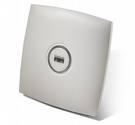
<p>The carrier busy test will allow you to see what is going on in an environment from 50,000 feet, but<span class="full-image-float-right ssNonEditable"><span><img src="http://www.my80211.com/storage/cisco1131.jpg?__SQUARESPACE_CACHEVERSION=1277052936406" alt="" /></span></span>&nbsp;that&rsquo;s about where it ends. It doesn&rsquo;t have details like a professional analyzer will provide. You could incorporate other commands like frame retries etc to help better interpret &ldquo;carrier busy&rdquo;.</p>
<p>Needless to say, it&rsquo;s a fun command and if you don&rsquo;t have the proper tools could help you in a pinch. If you do outdoor bridges, you may already use this command to assist on channel assignment.</p>
<h3><strong>What is "Carrier Busy"</strong></h3>
<p>On a Cisco autonomous access point you can run a command called 'carrier busy'. The AP will shutdown the respected radio interface and will scan all respected channels and report back with a percentage of channel activity. The channel activity collected includes activity from both 802.11 traffic and interference also sometimes called RFI (Radio Frequency Interference).</p>
<p>What this means, if there is 802.11 traffic and suppose there is interference it will compute a&nbsp; (percentage) to this value. Things to note when you run the carrier busy test the radio will do a shut and all associated clients will lose connectivity between 5 - 8 seconds during the test. After the test the radio will no shut itself and return to production allowing clients to associate again.</p>
<p>I have not found any detailed documentation stating exactly how the access point computes these values. If you have any info please do share!</p>
<h3><strong>Command for "Carrier Busy"</strong></h3>
<p>If your access point has both 802.11g &lt;dot11Radio 0&gt; and 802.11a &lt;dot11Radio 1&gt; radios you can run busy test on either the 2.4 GHz or the 5 GHz spectrums.</p>
<p><em>ap#dot11 <strong>&lt;Radio Interface&gt;</strong> carrier busy</em></p>
<p>ap#show dot11 carrier busy</p>
<p>802.11g = dot11Radio 0<br />802.11a = dot11Radio 1</p>
<p><span style="font-size: 140%;">ap#dot11 dot11Radio 0 carrier busy</span></p>
<p>&nbsp;</p>
<h3><strong>Example # 1 - Carrier Busy (Normal) </strong></h3>
<p>This example is a neighboring access point on channel 11 only sending management frames</p>
<p>ap#dot11 dot11Radio 0 carrier busy</p>
<p>*Mar&nbsp; 2 09:07:33.173: %LINK-5-CHANGED: Interface Dot11Radio0, changed state to reset<br />*Mar&nbsp; 2 09:07:34.173: %LINEPROTO-5-UPDOWN: Line protocol on Interface Dot11Radio0, changed state to down</p>
<p>Frequency&nbsp; Carrier Busy %<br />---------&nbsp; --------------<br />2412 &nbsp; &nbsp; &nbsp; &nbsp; &nbsp;0<br />2417&nbsp;&nbsp;&nbsp;&nbsp;&nbsp;&nbsp;&nbsp;&nbsp;&nbsp; 3<br />2422&nbsp;&nbsp;&nbsp;&nbsp;&nbsp;&nbsp;&nbsp;&nbsp;&nbsp; 0<br />2427&nbsp;&nbsp;&nbsp;&nbsp;&nbsp;&nbsp;&nbsp;&nbsp;&nbsp; 0<br />2432&nbsp;&nbsp;&nbsp;&nbsp;&nbsp;&nbsp;&nbsp;&nbsp;&nbsp; 0<br />2437&nbsp;&nbsp;&nbsp;&nbsp;&nbsp;&nbsp;&nbsp;&nbsp;&nbsp; 0<br />2442&nbsp;&nbsp;&nbsp;&nbsp;&nbsp;&nbsp;&nbsp;&nbsp;&nbsp; 0<br />2447&nbsp;&nbsp;&nbsp;&nbsp;&nbsp;&nbsp;&nbsp;&nbsp;&nbsp; 4<br />2452 &nbsp; &nbsp; &nbsp; &nbsp; &nbsp;5<br />2457&nbsp;&nbsp;&nbsp;&nbsp;&nbsp;&nbsp;&nbsp;&nbsp;&nbsp; 2<br />2462&nbsp;&nbsp;&nbsp;&nbsp;&nbsp;&nbsp;&nbsp;&nbsp;&nbsp; 5</p>
<p>*Mar&nbsp; 2 09:07:38.695: %LINK-3-UPDOWN: Interface Dot11Radio0, changed state to up<br />*Mar&nbsp; 2 09:07:39.695: %LINEPROTO-5-UPDOWN: Line protocol on Interface Dot11Radio0, changed state to up</p>
<p>&nbsp;</p>
<h3><strong>Example # 2 - Carrier Busy (Microwave)</strong></h3>
<p>&nbsp;I introduced a microwave oven into the mix. You can see there is a significant increase in channel activity from 2447 - 2462.&nbsp;</p>
<p>ap#dot11 dot11Radio 0 carrier busy</p>
<p>*Mar&nbsp; 2 09:05:52.664: %LINK-5-CHANGED: Interface Dot11Radio0, changed state to reset<br />*Mar&nbsp; 2 09:05:53.664: %LINEPROTO-5-UPDOWN: Line protocol on Interface Dot11Radio0, changed state to down</p>
<p>Frequency&nbsp; Carrier Busy %<br />---------&nbsp; --------------<br />2412 &nbsp; &nbsp; &nbsp; &nbsp; &nbsp;1<br />2417 &nbsp; &nbsp; &nbsp; &nbsp; &nbsp;7<br />2422 &nbsp; &nbsp; &nbsp; &nbsp; &nbsp;5<br />2427 &nbsp; &nbsp; &nbsp; &nbsp; &nbsp;1<br />2432 &nbsp; &nbsp; &nbsp; &nbsp; &nbsp;11<br />2437 &nbsp; &nbsp; &nbsp; &nbsp; &nbsp;13<br />2442 &nbsp; &nbsp; &nbsp; &nbsp; &nbsp;10<br />2447 &nbsp; &nbsp; &nbsp; &nbsp; &nbsp;31<br />2452 &nbsp; &nbsp; &nbsp; &nbsp; &nbsp;36<br />2457 &nbsp; &nbsp; &nbsp; &nbsp; &nbsp;42<br />2462 &nbsp; &nbsp; &nbsp; &nbsp; &nbsp;45</p>
<p>*Mar&nbsp; 2 09:05:58.186: %LINK-3-UPDOWN: Interface Dot11Radio0, changed state to up<br />*Mar&nbsp; 2 09:05:59.186: %LINEPROTO-5-UPDOWN: Line protocol on Interface Dot11Radio0, changed state to up</p>
<p>ap#</p>
<p>&nbsp;</p>
<h3><strong>Example # 3 - Carrier Busy (ISO Download)</strong></h3>
<p>In this example I introduced 2 laptops and conducted an ISO download for the purpose of creating 802.11 traffic.</p>
<p>ap#dot11 dot11Radio 0 carrier busy</p>
<p>*Mar&nbsp; 2 09:07:33.173: %LINK-5-CHANGED: Interface Dot11Radio0, changed state to reset<br />*Mar&nbsp; 2 09:07:34.173: %LINEPROTO-5-UPDOWN: Line protocol on Interface Dot11Radio0, changed state to down</p>
<p>Frequency&nbsp; Carrier Busy %<br />---------&nbsp; --------------<br />2412 &nbsp; &nbsp; &nbsp; &nbsp; &nbsp;0<br />2417 &nbsp; &nbsp; &nbsp; &nbsp; &nbsp;3<br />2422 &nbsp; &nbsp; &nbsp; &nbsp; &nbsp;0<br />2427 &nbsp; &nbsp; &nbsp; &nbsp; &nbsp;0<br />2432 &nbsp; &nbsp; &nbsp; &nbsp; &nbsp;0<br />2437 &nbsp; &nbsp; &nbsp; &nbsp; &nbsp;0<br />2442 &nbsp; &nbsp; &nbsp; &nbsp; &nbsp;3<br />2447 &nbsp; &nbsp; &nbsp; &nbsp; &nbsp;9<br />2452 &nbsp; &nbsp; &nbsp; &nbsp; &nbsp;19<br />2457 &nbsp; &nbsp; &nbsp; &nbsp; &nbsp;21<br />2462 &nbsp; &nbsp; &nbsp; &nbsp; &nbsp;23</p>
<p>*Mar&nbsp; 2 09:07:38.695: %LINK-3-UPDOWN: Interface Dot11Radio0, changed state to up<br />*Mar&nbsp; 2 09:07:39.695: %LINEPROTO-5-UPDOWN: Line protocol on Interface Dot11Radio0, changed state to up</p>
<h3>Conclusion</h3>
<p>If you don&rsquo;t have tools and you are in a pinch the carrier busy test may be a tool you might find helpful. Keep in mind, you will need to incorporate other commands to interpret the carrier busy results.</p>
<p>&nbsp;</p>]]></content></entry><entry><title>Autonomous: Enable / Disable Web Browser Interface</title><id>http://www.my80211.com/cisco-auton-cli-commands/2010/4/9/autonomous-enable-disable-web-browser-interface.html</id><link rel="alternate" type="text/html" href="http://www.my80211.com/cisco-auton-cli-commands/2010/4/9/autonomous-enable-disable-web-browser-interface.html"/><author><name>George</name></author><published>2010-04-09T09:06:39Z</published><updated>2010-04-09T09:06:39Z</updated><content type="html" xml:lang="en-US"><![CDATA[<p><span class="full-image-block ssNonEditable">&nbsp;</span></p>
<p><a href="http://twitter.com/wirelesssguru" target="_blank"><img src="http://www.my80211.com/storage/twitter30-1.png?__SQUARESPACE_CACHEVERSION=1262749802343" alt="" width="100" height="43" /></a><span style="color: #181818;">&nbsp;<span class="full-image-inline ssNonEditable"><a href="http://feeds.feedburner.com/my80211/feeds" target="_blank"><img style="width: 40px;" src="http://www.my80211.com/storage/rss_icon_glass48.jpg?__SQUARESPACE_CACHEVERSION=1262753456609" alt="" /></a></span> </span></p>
<div id="_mcePaste"></div>
<h3>How to enable or disable the web interface on a Cisco access point (autonomous)&nbsp;</h3>
<p>&nbsp;</p>
<p>The web browser command in the CLI is</p>
<p>"ip http server" for port 80 HTTP</p>
<p>"ip http secure-server" for port 443 HTTPS<span class="full-image-float-right ssNonEditable"><span><img src="http://www.my80211.com/storage/1142.jpg?__SQUARESPACE_CACHEVERSION=1267858250796" alt="" /></span></span></p>
<p><strong style="font-size: 150%;">ENABLE</strong></p>
<p>ap(config)#ip http server&nbsp;</p>
<p>ap(config)#ip http secure-server</p>
&nbsp;&nbsp;&nbsp;
<p><strong style="font-size: 150%;">DISABLE - <span style="font-size: 70%;">You negate the command with "NO"</span></strong></p>
<p>ap(config)#NO ip http server</p>
<p>ap(config)#NO ip http secure-server</p>
&nbsp;
<p>&nbsp;</p>
<p>&nbsp;</p>]]></content></entry><entry><title>Autonomous: Understanding Cisco AP ARP Caching [Disabled] [Enabled] and [Optional]</title><category term="arp"/><category term="cisco access point"/><category term="cisco arp"/><category term="wireless arp"/><id>http://www.my80211.com/cisco-auton-cli-commands/2010/3/12/autonomous-understanding-cisco-ap-arp-caching-disabled-enabl.html</id><link rel="alternate" type="text/html" href="http://www.my80211.com/cisco-auton-cli-commands/2010/3/12/autonomous-understanding-cisco-ap-arp-caching-disabled-enabl.html"/><author><name>George</name></author><published>2010-03-12T06:29:55Z</published><updated>2010-03-12T06:29:55Z</updated><content type="html" xml:lang="en-US"><![CDATA[<p><span class="full-image-block ssNonEditable">&nbsp;</span></p>
<p><a href="http://twitter.com/wirelesssguru" target="_blank"><img src="http://www.my80211.com/storage/twitter30-1.png?__SQUARESPACE_CACHEVERSION=1262749802343" alt="" width="100" height="43" /></a><span style="color: #181818;">&nbsp;<span class="full-image-inline ssNonEditable"><a href="http://feeds.feedburner.com/my80211/feeds" target="_blank"><img style="width: 40px;" src="http://www.my80211.com/storage/rss_icon_glass48.jpg?__SQUARESPACE_CACHEVERSION=1262753456609" alt="" /></a></span> </span></p>
<div id="_mcePaste"></div>
<h3>ARP Caching at the access point isn't something normally deployed in the field in my experience, but I wanted to cover it here. &nbsp;I've done limited testing with this "nerd knob" function in the field. If you have this in production I would like to hear your feedback!&nbsp;</h3>
<p>ARP caching on an access point reduces the traffic on your wireless LAN by stopping ARP requests for client devices at the access point. The good is that you lessen the ARP traffic and lessen the use of the wireless medium. There is also a security benny. If you are familiar with aireplay-ng it works by capturing the ARP packet and replaying it back to the AP to generate traffic. By blocking the ARP at the AP you lessen the upstream ARPs to the wireless clients to be sniffed, but you still have down stream ARPs (wireless clients to LAN).&nbsp;</p>
<p><strong style="font-size: 150%;">ARP CACHE DISABLED:</strong></p>
<p><span style="font-size: 150%;">ap(config)#no dot11 arp-cache</span> <strong>&lt;-- Negate dot11 arp-cache with "NO"</strong></p>
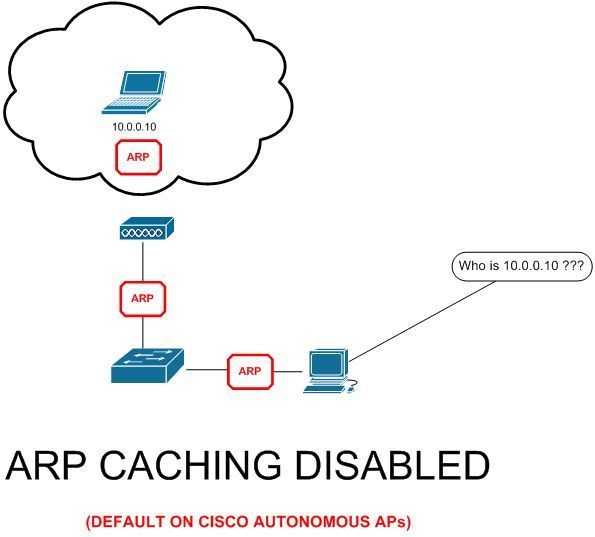
<div>When ARP caching is disabled (its is by default), the access point forwards all ARP requests through the radio port to&nbsp;associated clients, and the client to which the ARP request is directed responds.</div>
<div>See FIG 1.</div>
<div><span class="full-image-block ssNonEditable"><img src="http://www.my80211.com/storage/arp-caching-disabled.jpg?__SQUARESPACE_CACHEVERSION=1267931686794" alt="" /></span></div>
<div></div>
<div>
<p style="color: #181818; margin-top: 0px; margin-right: 0px; margin-bottom: 1em; margin-left: 0px;">&nbsp;</p>
<p style="color: #181818; margin-top: 0px; margin-right: 0px; margin-bottom: 1em; margin-left: 0px;"><strong style="font-size: 150%;">ARP CACHE ENABLED:</strong></p>
<p style="color: #181818; margin-top: 0px; margin-right: 0px; margin-bottom: 1em; margin-left: 0px;"><span style="font-size: 150%;">ap(config)#dot11 arp-cache</span>&nbsp;<strong>&lt;-- dot11 arp-cache ENABLED</strong></p>
</div>
<div></div>
<div></div>
<div></div>
<div></div>
<div></div>
<div></div>
<div></div>
<div></div>
<div></div>
<div></div>
<div></div>
<div></div>
<div></div>
<div></div>
<div></div>
<div></div>
<div></div>
<div></div>
<div></div>
<div></div>
<div></div>
<div></div>
<div></div>
<div></div>
<div></div>
<div></div>
<div></div>
<div></div>
<div></div>
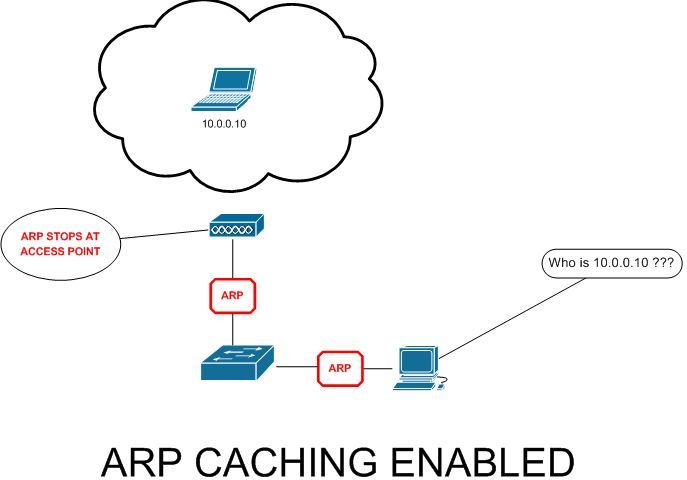
<div>When ARP caching is enabled, the access point responds to ARP requests for associated clients and <strong><span style="text-decoration: underline;">does not forward requests to clients</span></strong>. When the access point receives an ARP request for an IP address not in the cache, the access point<strong><span style="text-decoration: underline;">&nbsp;<span style="font-size: 110%;">drops the request and does not forward it</span></span></strong>. Did your ears just perk up!? See Fig 2</div>
<div><span class="full-image-block ssNonEditable"><img src="http://www.my80211.com/storage/arp-caching-enabled.jpg?__SQUARESPACE_CACHEVERSION=1267933405739" alt="" /></span></div>
<div></div>
<div></div>
<p>&nbsp;</p>
<p>&nbsp;</p>
<p>&nbsp;</p>
<p style="color: #181818; margin-top: 0px; margin-right: 0px; margin-bottom: 1em; margin-left: 0px;"><strong style="font-size: 150%;">ARP CACHE OPTIONAL:&nbsp;</strong></p>
<p style="color: #181818; margin-top: 0px; margin-right: 0px; margin-bottom: 1em; margin-left: 0px;"><span style="font-size: 150%;">ap(config)#ap(config)#dot11 arp-cache optional</span>&nbsp;<strong>&lt;-- dot11 arp-cache OPTIONAL</strong></p>
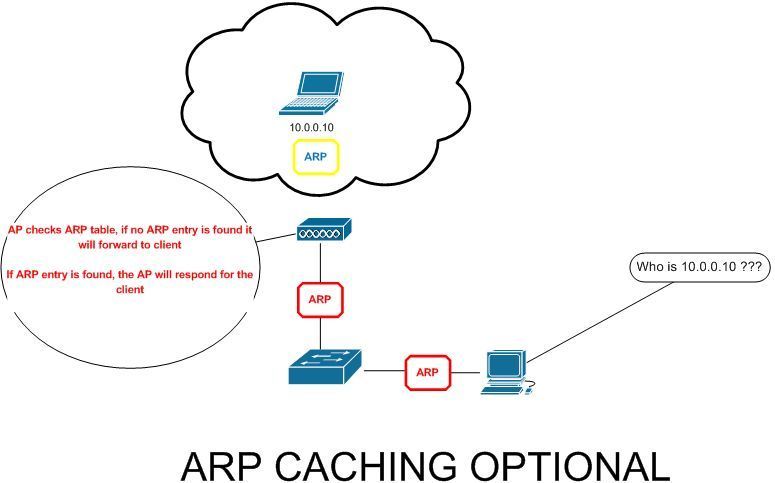
<p style="color: #181818; margin-top: 0px; margin-right: 0px; margin-bottom: 1em; margin-left: 0px;">When legacy and non-Cisco client devices are associated to an access point and not passing data, the access point might not know the client&rsquo;s IP address. If this situation occurs frequently on your wireless LAN, you can enable optional ARP caching. When ARP caching is optional, the access point responds on <strong><span style="text-decoration: underline;">behalf of clients with IP addresses known to the access point</span></strong> <span style="text-decoration: underline;"><strong>but forwards out its radio port any ARP requests addressed to unknown clients.</strong></span> When the access point learns the IP addresses for all associated clients, <strong><span style="text-decoration: underline;">it drops ARP requests not directed to its associated clients</span></strong>.</p>
<p style="color: #181818; margin-top: 0px; margin-right: 0px; margin-bottom: 1em; margin-left: 0px;">&nbsp;<span class="full-image-block ssNonEditable"><img src="http://www.my80211.com/storage/arp-caching-optional.jpg?__SQUARESPACE_CACHEVERSION=1267935988190" alt="" /></span></p>
<p style="color: #181818; margin-top: 0px; margin-right: 0px; margin-bottom: 1em; margin-left: 0px;">&nbsp;</p>
<p>&nbsp;</p>]]></content></entry><entry><title>Autonomous: Command History Buffer</title><category term="ap history"/><category term="cisco ap"/><category term="cli history"/><category term="history buffer"/><id>http://www.my80211.com/cisco-auton-cli-commands/2010/3/9/autonomous-command-history-buffer.html</id><link rel="alternate" type="text/html" href="http://www.my80211.com/cisco-auton-cli-commands/2010/3/9/autonomous-command-history-buffer.html"/><author><name>George</name></author><published>2010-03-09T14:49:27Z</published><updated>2010-03-09T14:49:27Z</updated><content type="html" xml:lang="en-US"><![CDATA[<p><span class="full-image-block ssNonEditable">&nbsp;</span></p>
<p><a href="http://twitter.com/wirelesssguru" target="_blank"><img src="http://www.my80211.com/storage/twitter30-1.png?__SQUARESPACE_CACHEVERSION=1262749802343" alt="" width="100" height="43" /></a><span style="color: #181818;">&nbsp;<span class="full-image-inline ssNonEditable"><a href="http://feeds.feedburner.com/my80211/feeds" target="_blank"><img style="width: 40px;" src="http://www.my80211.com/storage/rss_icon_glass48.jpg?__SQUARESPACE_CACHEVERSION=1262753456609" alt="" /></a></span> </span></p>
<div id="_mcePaste"></div>
<h3>By default, the Cisco autonomous AP records ten command lines in its history buffer.&nbsp;</h3>
<div></div>
<div></div>
<div style="font-size: 150%;">Beginning in privileged EXEC mode, enter this command to change the number of command lines that the wireless device records <strong><span style="text-decoration: underline;">during the current terminal session</span></strong>:<span class="full-image-float-right ssNonEditable"><span><img style="width: 300px;" src="http://www.my80211.com/storage/clioutput.jpg?__SQUARESPACE_CACHEVERSION=1267861032592" alt="" /></span></span></div>
<div>&nbsp;</div>
<div>
<div></div>
<div>ap#terminal history size ?</div>
<div>&nbsp;&nbsp;&lt;0-256&gt; &nbsp;Size of history buffer</div>
<div></div>
<div></div>
<div>Negate&nbsp;</div>
<div>
<div>ap#no terminal history&nbsp;</div>
<div></div>
</div>
<div></div>
<div>&nbsp;</div>
</div>
<div></div>
<div></div>
<p><span style="font-size: 150%;">Beginning in line configuration mode, enter this command to configure the number of command lines the access point records for </span><strong><span style="font-size: 150%;">all sessions on a particular line</span></strong><span style="font-size: 150%;">:</span></p>
<p>ap#config t<br />ap(config)#line vty 0 4<br />ap(config-line)#history size ?<br />&nbsp;&lt;0-256&gt; &nbsp;Size of history buffer</p>
<p>&nbsp;</p>
<p>Negate&nbsp;</p>
<p><br />ap#config t<br />ap(config)#line vty 0 4<br />ap(config-line)#no history</p>
<p><span style="text-decoration: underline;"><strong>** NOTE ** If you select 100 for example, it will record 100 lines.</strong></span></p>
<p><span style="text-decoration: underline;"><strong><br /></strong></span></p>
<p><span style="font-size: 150%;">Below is the show history output:</span></p>
<div id="_mcePaste">ap#show history</div>
<div id="_mcePaste">&nbsp;&nbsp;en</div>
<div id="_mcePaste">&nbsp;&nbsp;show terminal</div>
<div id="_mcePaste">&nbsp;&nbsp;show history</div>
<div id="_mcePaste">&nbsp;&nbsp;terminal history</div>
<div id="_mcePaste">&nbsp;&nbsp;terminal history 200</div>
<div id="_mcePaste">&nbsp;&nbsp;configure terminal</div>
<div id="_mcePaste">&nbsp;&nbsp;terminal history size 200</div>
<div id="_mcePaste">&nbsp;&nbsp;configure t</div>
<div id="_mcePaste">&nbsp;&nbsp;config t</div>
<div id="_mcePaste">&nbsp;&nbsp;terminal history size</div>
<div id="_mcePaste">&nbsp;&nbsp;show history</div>
<p>&nbsp;</p>]]></content></entry><entry><title>Autonomous: Configure a Cisco AP to provide DHCP Services</title><category term="autonomous ap dhcp"/><category term="cisco dhcp"/><category term="cisco dhcp server"/><category term="dhcp"/><id>http://www.my80211.com/cisco-auton-cli-commands/2010/3/8/autonomous-configure-a-cisco-ap-to-provide-dhcp-services.html</id><link rel="alternate" type="text/html" href="http://www.my80211.com/cisco-auton-cli-commands/2010/3/8/autonomous-configure-a-cisco-ap-to-provide-dhcp-services.html"/><author><name>George</name></author><published>2010-03-09T01:50:17Z</published><updated>2010-03-09T01:50:17Z</updated><content type="html" xml:lang="en-US"><![CDATA[<p><span class="full-image-block ssNonEditable">&nbsp;</span></p>
<p><a href="http://twitter.com/wirelesssguru" target="_blank"><img src="http://www.my80211.com/storage/twitter30-1.png?__SQUARESPACE_CACHEVERSION=1262749802343" alt="" width="100" height="43" /></a><span style="color: #181818;">&nbsp;<span class="full-image-inline ssNonEditable"><a href="http://feeds.feedburner.com/my80211/feeds" target="_blank"><img style="width: 40px;" src="http://www.my80211.com/storage/rss_icon_glass48.jpg?__SQUARESPACE_CACHEVERSION=1262753456609" alt="" /></a></span> </span></p>
<div id="_mcePaste"></div>
<h3>In real world deployments you wouldn't likely use a Cisco AP as the DHCP server. But, during deployments I've used it for temporary setups. Lets step through the setup process</h3>
<p>In this senerio we will set up a class C 192.168.1.0 DHCP Scope with IP exclusions and add additional info like the gateway and DNS server information.</p>
<p><strong style="font-size: 150%;"><span style="font-size: 200%;">1.</span></strong> Lets start with the client exclusion. We will exclude the following ranges, so that the AP doesn't<span class="full-image-float-right ssNonEditable"><span><img style="width: 200px;" src="http://www.my80211.com/storage/881.jpg?__SQUARESPACE_CACHEVERSION=1267920005999" alt="" /></span></span>&nbsp;assign these specific addresses out:&nbsp;</p>
<p>192.168.1.1 - 192.168.1.10<br />192.168.1.200 - 192.168.1.254&nbsp;</p>
<div id="_mcePaste"></div>
<div id="_mcePaste" style="font-size: 120%;"><span style="font-size: 120%;">ap#config t</span></div>
<div style="font-size: 120%;"><span style="font-size: 120%;">ap(config)#ip dhcp excluded-address 192.168.1.1 192.168.1.10</span></div>
<div id="_mcePaste" style="font-size: 120%;"><span style="font-size: 120%;">ap(config)#ip dhcp excluded-address 192.168.1.200 192.168.1.254</span></div>
<div id="_mcePaste"></div>
<p>&nbsp;</p>
<p><strong style="font-size: 150%;"><span style="font-size: 200%;">2.</span></strong> Next, we will name the DHCP Scope (pool) and set the network:</p>
<p><span style="font-size: 120%;"><strong>ap(config)#ip dhcp pool WIRELESS<br />ap(dhcp-config)#network 192.168.1.0</strong></span></p>
<p><strong style="font-size: 150%;"><span style="font-size: 150%;">3</span></strong><span style="font-size: 150%;">.</span> Next, we will set the LEASE time for the addresses (3 days,4 hours, 20 min) , setup the gateway and DNS:</p>
<p><span style="font-size: 120%;"><strong>ap(dhcp-config)#lease 3 4 20<br />ap(dhcp-config)#default-router 192.168.1.1<br />ap(dhcp-config)#dns-server 192.168.1.250</strong></span></p>
<p><strong style="font-size: 200%;">4.</strong>&nbsp;Next, we connect a wired laptop to the switch on the VLAN and see the results:&nbsp;<br />(Note this will also hand out Wireless DHCP as well)</p>
<p>Ethernet adapter Local Area Connection:<br />Connection-specific DNS Suffix &nbsp;. :</p>
<p>&nbsp;&nbsp; &nbsp; &nbsp; &nbsp;Description . . . . . . . . . . . : Intel(R) 82567LM Gigabit Network Connection<br />&nbsp;&nbsp; &nbsp; &nbsp; &nbsp;Physical Address. . . . . . . . . : 00-2A-A1-13-C2-33<br />&nbsp;&nbsp; &nbsp; &nbsp; &nbsp;Dhcp Enabled. . . . . . . . . . . : Yes<br />&nbsp;&nbsp; &nbsp; &nbsp; &nbsp;Autoconfiguration Enabled . : Yes<br />&nbsp;&nbsp; &nbsp; &nbsp; &nbsp;IP Address. . . . . . . . . . . . . . : 192.168.1.11 &nbsp;<strong>&lt;-- This is the first IP in our Scope</strong><br />&nbsp;&nbsp; &nbsp; &nbsp; &nbsp;Subnet Mask . . . . . . . . . . . : 255.255.255.0 <strong>&lt;-- Our class C&nbsp;</strong><br />&nbsp;&nbsp; &nbsp; &nbsp; &nbsp;Default Gateway . . . . . . . . . : 192.168.1.1 &nbsp; <strong>&lt;-- This is the GW we set up</strong><br />&nbsp;&nbsp; &nbsp; &nbsp; &nbsp;DHCP Server . . . . . . . . . . . : 192.168.1.2 &nbsp; &nbsp; &nbsp;<strong>&lt;-- This is the IP of our AP</strong><br />&nbsp;&nbsp; &nbsp; &nbsp; &nbsp;DNS Servers . . . . . . . . . . . : 192.168.1.250 &nbsp;<strong>&lt;-- This is the DNS we set up&nbsp;</strong><br />&nbsp;&nbsp; &nbsp; &nbsp; &nbsp;Lease Obtained. . . . . . . . . . : Saturday, March 06, 2010 5:48:12 PM <strong>&lt;--- This is our lease time we set up</strong><br />&nbsp;&nbsp; &nbsp; &nbsp; &nbsp;Lease Expires . . . . . . . . . . : Tuesday, March 09, 2010 10:08:12 PM</p>
<div></div>
<p>&nbsp;</p>
<p>&nbsp;</p>
<p>&nbsp;</p>]]></content></entry><entry><title>Cisco Output Interpreter - New this month Wireless LAN Controller - show &amp; debug commands</title><id>http://www.my80211.com/cisco-auton-cli-commands/2010/3/6/cisco-output-interpreter-new-this-month-wireless-lan-control.html</id><link rel="alternate" type="text/html" href="http://www.my80211.com/cisco-auton-cli-commands/2010/3/6/cisco-output-interpreter-new-this-month-wireless-lan-control.html"/><author><name>George</name></author><published>2010-03-07T03:00:04Z</published><updated>2010-03-07T03:00:04Z</updated><content type="html" xml:lang="en-US"><![CDATA[<p><span class="full-image-block ssNonEditable">&nbsp;</span></p>
<p><a href="http://twitter.com/wirelesssguru" target="_blank"><img src="http://www.my80211.com/storage/twitter30-1.png?__SQUARESPACE_CACHEVERSION=1262749802343" alt="" width="100" height="43" /></a><span style="color: #181818;">&nbsp;<span class="full-image-inline ssNonEditable"><a href="http://feeds.feedburner.com/my80211/feeds" target="_blank"><img style="width: 40px;" src="http://www.my80211.com/storage/rss_icon_glass48.jpg?__SQUARESPACE_CACHEVERSION=1262753456609" alt="" /></a></span> </span></p>
<div id="_mcePaste"></div>
<h3>I wanted to share this in case you may have a use for it. I've used it in the past, its a little hit or miss on what is supported and how the code is sometimes read. It was recently updated to support the Cisco WLCs show &amp; debug commands</h3>
<p><span class="contentbold">Output Interpreter</span><span class="content">&nbsp;is a troubleshooting tool that reports potential problems by analyzing supported "show" command output. Output Interpreter supports various "show" command output from your router,&nbsp;switch, PIX/ASA firewall, IOS&reg; wireless access point, or Meeting Place Platform.<span class="full-image-float-right ssNonEditable"><img src="http://www.my80211.com/storage/wism.jpg?__SQUARESPACE_CACHEVERSION=1267857259125" alt="" /></span><br /><br />The Output Interpreter continues to support new features to better serve you. This month's list of new features includes support for GOLD diagnostics and other outputs, including:</span><span class="content"> </span></p>
<ul>
<li>Cisco 12000 IOS XR Firmware, Hardware and Software Readiness Assessment (Up to version 3.8)</li>
<li><strong style="font-size: 110%;">Wireless LAN Controller - show &amp; debug commands</strong></li>
<li>GOLD diagnostics - show diagnostic result</li>
<li>ASA Commands - show tech-support, show running-config</li>
</ul>
<p>&nbsp;</p>
<p><a href="https://www.cisco.com/cgi-bin/Support/OutputInterpreter/home.pl" target="_blank">https://www.cisco.com/cgi-bin/Support/OutputInterpreter/home.pl</a>&nbsp;</p>]]></content></entry><entry><title>Autonomous: Disable Cisco AP MODE Button</title><id>http://www.my80211.com/cisco-auton-cli-commands/2010/3/6/autonomous-disable-cisco-ap-mode-button.html</id><link rel="alternate" type="text/html" href="http://www.my80211.com/cisco-auton-cli-commands/2010/3/6/autonomous-disable-cisco-ap-mode-button.html"/><author><name>George</name></author><published>2010-03-06T16:00:00Z</published><updated>2010-03-06T16:00:00Z</updated><content type="html" xml:lang="en-US"><![CDATA[<p><span class="full-image-block ssNonEditable">&nbsp;</span></p>
<p><a href="http://twitter.com/wirelesssguru" target="_blank"><img src="http://www.my80211.com/storage/twitter30-1.png?__SQUARESPACE_CACHEVERSION=1262749802343" alt="" width="100" height="43" /></a><span style="color: #181818;">&nbsp;<span class="full-image-inline ssNonEditable"><a href="http://feeds.feedburner.com/my80211/feeds" target="_blank"><img style="width: 40px;" src="http://www.my80211.com/storage/rss_icon_glass48.jpg?__SQUARESPACE_CACHEVERSION=1262753456609" alt="" /></a></span> </span></p>
<div id="_mcePaste"></div>
<div>
<h3>You can disable the MODE button on a Cisco AP. Why do you ask?&nbsp;This command prevents unauthorized users from gaining access to the access point CLI and creating a "inside rogue".</h3>
<div></div>
<div>I consulted at a government agency and part of their requirements was to disable all means except<span class="full-image-float-right ssNonEditable"><span><img src="http://www.my80211.com/storage/macaddressfilter.jpg?__SQUARESPACE_CACHEVERSION=1267866385345" alt="" /></span></span>&nbsp;console access which also included disabling the MODE button. They feared someone could reset the AP and reconfigure it as a "inside rogue".&nbsp;</div>
<div></div>
<div>
<div>By default the MODE button is enabled.</div>
<div>&nbsp;</div>
<div></div>
<div>ap#config t</div>
<div>ap(config)#boot mode-button&nbsp;</div>
<div>&nbsp;</div>
<div></div>
<div>Negate</div>
<div></div>
<div>ap(config)#no boot mode-button</div>
<div>&nbsp;</div>
</div>
<div></div>
<div>SHOW BOOT</div>
<div>&nbsp;</div>
<div></div>
<div></div>
<div></div>
<div>ap#show boot</div>
<div id="_mcePaste">BOOT path-list:</div>
<div id="_mcePaste">Config file: &nbsp; &nbsp; &nbsp; &nbsp; flash:/config.txt</div>
<div id="_mcePaste">Private Config file: flash:/private-config</div>
<div id="_mcePaste">Enable Break: &nbsp; &nbsp; &nbsp; &nbsp;no</div>
<div id="_mcePaste">Manual Boot: &nbsp; &nbsp; &nbsp; &nbsp; no</div>
<div id="_mcePaste">Enable IOS Break: &nbsp; &nbsp;no</div>
<div id="_mcePaste">HELPER path-list:</div>
<div id="_mcePaste">NVRAM/Config file</div>
<div id="_mcePaste">&nbsp;&nbsp; &nbsp; &nbsp;buffer size: &nbsp; 32768</div>
<div id="_mcePaste">&nbsp;&nbsp; &nbsp; &nbsp;<strong>Mode Button: &nbsp; &nbsp;on<br /></strong></div>
<div><strong>&nbsp;</strong></div>
<div></div>
<div><strong>NOTE:</strong></div>
<div><strong>If you lose the privileged EXEC mode password for the access point after entering this command, you will need to contact the Cisco Technical Assistance Center (TAC) to regain access to the access point CLI.</strong></div>
<div id="_mcePaste"></div>
</div>]]></content></entry><entry><title>Autonomous: Reset Cisco Access Point to Factory Defaults Using the MODE Button</title><id>http://www.my80211.com/cisco-auton-cli-commands/2010/3/5/autonomous-reset-cisco-access-point-to-factory-defaults-usin.html</id><link rel="alternate" type="text/html" href="http://www.my80211.com/cisco-auton-cli-commands/2010/3/5/autonomous-reset-cisco-access-point-to-factory-defaults-usin.html"/><author><name>George</name></author><published>2010-03-06T03:20:18Z</published><updated>2010-03-06T03:20:18Z</updated><content type="html" xml:lang="en-US"><![CDATA[<p><span class="full-image-block ssNonEditable">&nbsp;</span></p>
<p><a href="http://twitter.com/wirelesssguru" target="_blank"><img src="http://www.my80211.com/storage/twitter30-1.png?__SQUARESPACE_CACHEVERSION=1262749802343" alt="" width="100" height="43" /></a><span style="color: #181818;">&nbsp;<span class="full-image-inline ssNonEditable"><a href="http://feeds.feedburner.com/my80211/feeds" target="_blank"><img style="width: 40px;" src="http://www.my80211.com/storage/rss_icon_glass48.jpg?__SQUARESPACE_CACHEVERSION=1262753456609" alt="" /></a></span> </span></p>
<div id="_mcePaste"></div>
<h3>How to reset a Cisco AP using the MODE button.</h3>
<p>I have a small project coming up and getting refreshed with the Cisco Autonomous Access Points...<span class="full-image-float-right ssNonEditable"><span><img src="http://www.my80211.com/storage/cisco1131.jpg?__SQUARESPACE_CACHEVERSION=1267846094753" alt="" /></span></span></p>
<p>Using the MODE Button</p>
<p><a name="wp42221"></a></p>
<p class="pB1_Body1">Follow these steps to delete the current configuration and return all access point settings to the factory defaults by using the MODE button:</p>
<p><a name="wp42222"></a></p>
<p class="pNF_NumFirst"><strong>1. </strong><img src="http://www.cisco.com/en/US/i/templates/blank.gif" border="0" alt="" width="10" height="2" />Disconnect power from the access point (the power jack for external power or the Ethernet cable for in-line power).</p>
<p><a name="wp42223"></a></p>
<p class="pNN_NumNext"><strong>2. </strong><img src="http://www.cisco.com/en/US/i/templates/blank.gif" border="0" alt="" width="10" height="2" />Press and hold the MODE button while you reconnect power to the access point.</p>
<p><a name="wp42224"></a></p>
<p class="pNN_NumNext"><strong>3. </strong><img src="http://www.cisco.com/en/US/i/templates/blank.gif" border="0" alt="" width="10" height="2" />Continue pressing the MODE button until the Ethernet LED turns amber. (approximately 2 to 3 seconds). Then release the button.</p>
<p><a name="wp42225"></a></p>
<p class="pNN_NumNext"><strong>4. </strong><img src="http://www.cisco.com/en/US/i/templates/blank.gif" border="0" alt="" width="10" height="2" />After the access point reboots, you must reconfigure it using the web browser interface, the Telnet interface, or the access point console port.</p>]]></content></entry><entry><title>Configure TKIP Countermeasure Holdoff Timer on Autonomous</title><id>http://www.my80211.com/cisco-auton-cli-commands/2009/12/29/configure-tkip-countermeasure-holdoff-timer-on-autonomous.html</id><link rel="alternate" type="text/html" href="http://www.my80211.com/cisco-auton-cli-commands/2009/12/29/configure-tkip-countermeasure-holdoff-timer-on-autonomous.html"/><author><name>George</name></author><published>2009-12-30T00:37:13Z</published><updated>2009-12-30T00:37:13Z</updated><content type="html" xml:lang="en-US"><![CDATA[<p><a title="Subscribe to my feed" rel="alternate" type="application/rss+xml" href="http://feeds.feedburner.com/my80211/feeds"><img style="border: 0;" src="http://www.feedburner.com/fb/images/pub/feed-icon32x32.png" alt="" /></a></p>
<h3>After having worked on countless Cisco WLAN VoIP deployments a general rule of thumb from Cisco TAC is to disable&nbsp;TKIP countermeasure on ALL voice WLANs and lessen the timer for DATA WLANs. Again this is all subject to your&nbsp;comfort level and performance requirements. Personally, I can't say I have ever seen this to be an issue or had an issue that was&nbsp;directly related to the countermeasure. But something to chew on!</h3>
<div></div>
<div id="_mcePaste"></div>
<div id="_mcePaste">TKIP countermeasure mode can occur if the Access Point receives <strong style="font-size: 150%;">2</strong> message integrity check (MIC) errors <span class="full-image-float-right ssNonEditable"><span><img style="width: 150px;" src="http://www.my80211.com/storage/tkip.jpg?__SQUARESPACE_CACHEVERSION=1262132574190" alt="" /></span></span>within a <strong style="font-size: 150%;">60&nbsp;second period</strong>. When this occurs, the Access Point will de-authenticate <strong>ALL TKIP clients associated to that 802.11 radio</strong> and&nbsp;holdoff any clients for the countermeasure holdoff time (<strong>default = 60 seconds</strong>).</div>
<div></div>
<p>&nbsp;</p>
<p>ap#config t</p>
<p>ap(config)#interface dot11Radio 0</p>
<p><em>Note: This is radio specific on autonomous access points</em></p>
<p><em><br /></em></p>
<p>ap(config-if)#countermeasure tkip 0</p>
<p><em>Note:&nbsp;&nbsp;Configures TKIP MIC countermeasures hold-down timer (0-<span style="font-style: normal;">65535</span>&nbsp;seconds), unlike the WLC which is (0-60 seconds)</em></p>]]></content></entry></feed>